Static Ads Spotlight #1
One of the ads that I researched & designed for a Digital Products brand recently that did very well.
How much would you rate this ad on a scale of 10?
@nkecom I'm going through that card decline period very badly at the moment.
Took a series of incorrect decisions & now I'm in the worst financial shape of my life.
Do you want to test this dynamic view counter on your product page?
The count would be different for every time a new visitor arrives or hits refresh.
For some brands, it performs very well especially if you're marketing stock scarcity.
You don't need to pay for an app to implement this, I am sharing the code snipped with you.
> On Shopify, go to Online Store
> Click Customize
> Navigate to the landing page
> Click 'Add Block'
> Select 'Custom Liquid'
> Paste this code & hit save.
<style>
.wrapper h6{
color: #FF3130;
}
</style>
<div class="wrapper" id="wrapper-id"></div>
<script>
document.getElementById("wrapper-id").innerHTML = `👁️ You & ${Math.floor(Math.random() * (1050 - 40 + 1) + 20)} others are watching this right now!` ;
</script>
In case you need any help with implementing this, feel free to drop me a DM..
If you are still directing traffic to Shopify's native landing page, you're missing out on plenty of potential conversion.
I 100% recommend utilizing page builders.
If you're new to ecomm, don't get into the setup of advertorials or any other strategy just yet.
Keep your focus on building a professional looking landing page. Get good at it. Damn good.
Once you're comfortable with using a page builder, then you can utilize other page formats & strategies too.
If you ask me, I feel @gempages provide great value for money.
Definitely give it a try.. 😊
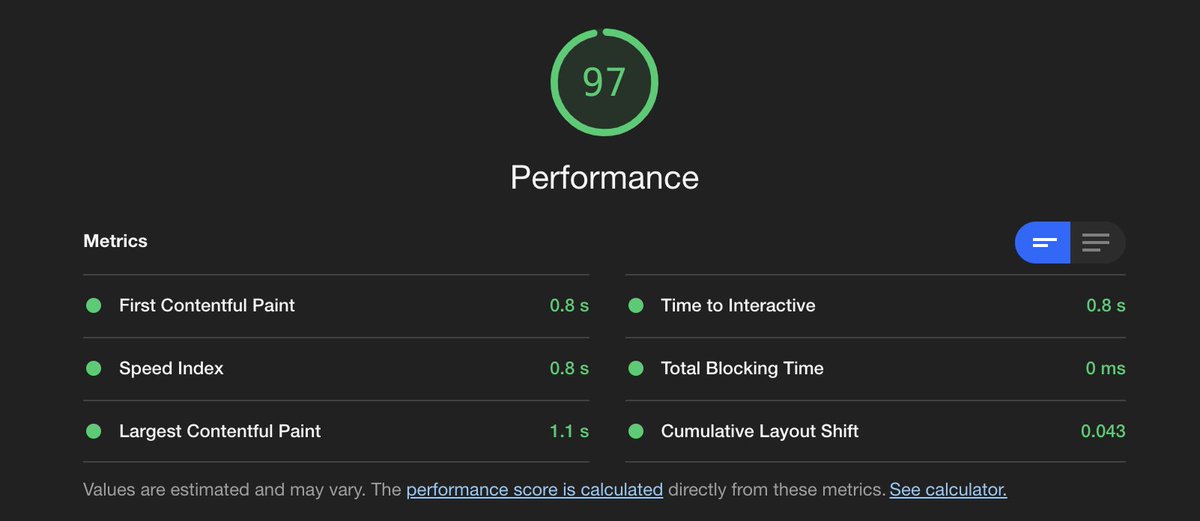
If you're in ecomm, I'd highly recommend paying attention to your store's loading speed.
It can have a great deal of impact on your store's CR as not everyone has access to the same speed of internet as you might have.
To check your store's speed (for FREE), utilize Google Chrome's Lighthouse tool.
On your landing page,
> Right click
> Click Inspect
> On top navigation bar, you'll see options like Elements, Console, Recorder, etc.
> Towards the very end, click on 'Lighthouse'.
> For device, choose 'Mobile' (if that's where majority of your traffic comes from. But, its a good idea to check speed for both desktop & mobile).
> Under categories, you can check/uncheck the boxes as per your intended performance metric. But make sure to leave 'Performance' metric checked.
> Click 'Analyze Page Load'.
Now, based on how well you've optimized your store, Lighthouse will give a performance metric.
You should always strive for a score of 90+ to make sure your store is well optimized.
--
If you found this post useful, follow me @akhilbuilds for more such valuable tips.
Thank you 😊
Does anyone have a plug for reinstating restricted Meta Ad account?
One of my client got their ad account restricted on Dec 17th & are still trying to get it recovered.
Any help would be much appreciated 🙏
Helping a friend get into ecomm space. This is how his first 10 days into business looks like -
> Niche: Health & Wellness
> Target Audience: US
> Model: Dropshipping
> Marketing Channel: Meta
> Ads Format: Static Ads
> Bid Strategy: Cost Caps
Results so far:
- Reduced CPMs from $118 on Day 1 to $28 on Day 10.
- Reduced CPC from $2.34 to $0.87 on Day 10.
- Average CTR = 5.48%
- Profit Percentage = 60% (because of very low adspend due to CC (< $10/d) and high AOV & low COGS)
Next Plan of Action:
- Loosen up CC to increase ad spend while maintaining aMER.
- Price split testing
- Identify areas to improve AOV (Bundling, PPU, Email/SMS Upsell)
- Iterate on winning static ads to build more static ads.
- Invest in video ads to convert ToF.
The friend I am helping is already super happy & is excited to pump budgets immediately 😅 The hardest part for me is to keep him calm and focus on what's working & identify areas of improvement.
I strongly believe this product/market fit is great, with minimal competition and excellent demand.
If you folks are interested, let me know & I'll keep you posted on the progress..
Have been learning a lot from @nkecom recently in area of manual bidding for running Meta ads.
Made points out of countless number of his tweets, his replies to the comments on his posts & distilled that info into actionable steps.
Achievements so far:
> Improvement in efficiency
> Less meddling in ad account
Things to refine further:
> Adjusting CC to get higher volume.
Things to test & learn further:
> Does running a lowest cost campaign alongside a cost controlled campaign impact its performance?
> Would adding new creatives to a performant cost controlled adset impact its performance or if its best to test new creatives in a new cost controlled ad set and then importing the winner(s) into the performant ad set.
Would keep testing & refine this further.
Thank you @nkecom for all the valuable info you share with the community.
I wish to connect with you over a call someday ✨
Meta outage for most part of the day today.
3/4 Ad Accounts I am managing had this error for 4 straight hours.
As my ad accounts are in EST timezone, and its evening, Meta is trying to force spend to make up for those hours.
Might as well turn these campaigns off for rest of the day than having Meta sending low quality traffic.
How was your experience with Meta today? Or have you already ditched it for AppLovin?