its probably the easiest time in history to post 1000s of tiktoks just from your Claude and target USA audience
you can use it to promote anything: an app, a game, an e-com brand
yes, we have an MCP and you can create as many social media accounts to scale up distribution and we only operate 1 account per phone to give you the maximum chance of consistently going viral
just comment "tiktok" if you're interested
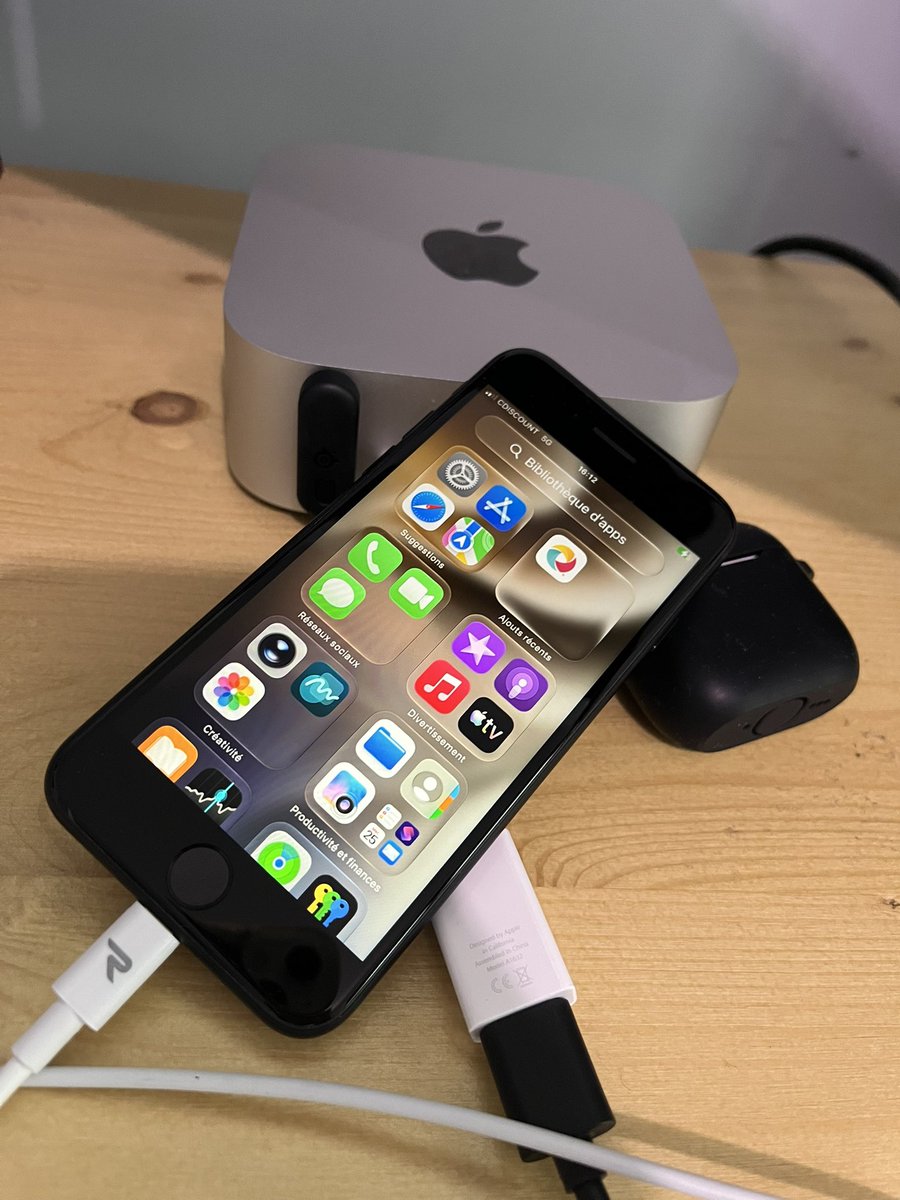
Il y a des mecs qui font énormément d'argent avec des fermes de téléphones. Je vous donne la data, et comment j'en monte une à la maison.
Un mec fait tourner 9 iPhone sur un Mac mini : 3,78 M de vues en 21 jours, sans main humaine. Une app d'étude IA pousse avec 30 comptes sans visage : 70 M de vues, 59 000 $ par mois. Une boite financée par a16z avait environ 1 100 téléphones sur des étagères.
C'est une méta de malade en organique. Et ça sert à pousser n'importe quoi : une app, un jeu, une marque e-com, des vêtements, n'importe quel business. Ou juste faire de la création de contenu.
Moi je la reproduis en tout petit. Le setup :
- Des iPhone d'occasion, environ 120 € pièce. Pas besoin du dernier modèle.
- Une SIM par téléphone, pour toujours. Jamais de Wi-Fi : tout passe par la 4G, sinon tous tes comptes sortent par la même IP.
- Une identité par téléphone : un Gmail et un compte Apple neufs, créés sur le téléphone avec le numéro de sa SIM. Langue, région et fuseau en France.
- iCloud Photos, Bluetooth, suivi des apps coupés. Verrouillage auto sur Jamais.
La partie dev :
- Le téléphone est branché en USB sur un Mac mini qui tourne 24 h/24. Mode développeur activé sur l'iPhone.
- Dans Xcode, tu connectes le compte Apple du téléphone. Le compte gratuit suffit, mais la signature expire tous les 7 jours : il faut re-signer chaque semaine.
- Xcode compile et installe WebDriverAgent sur l'iPhone. C'est open source, c'est le moteur qu'Appium utilise pour tester les apps iOS. Il tourne sur le téléphone et ouvre un petit serveur HTTP.
- Le Mac parle à ce serveur par le tunnel USB d'Apple. Il prend des captures d'écran, lit ce qu'il y a à l'écran, et envoie des taps, des swipes et du texte comme un vrai doigt.
- Par-dessus, un script maison : des gestes humains, jamais deux fois pareils. Durées, pauses, swipes pas droits, tout tiré au hasard.
Pas de jailbreak, pas d'app modifiée. L'iPhone croit juste qu'un développeur teste son écran.
Résultat : le Mac pilote déjà le premier téléphone. Prochaine étape : le faire scroller comme un humain, puis publier.
Deuxième téléphone samedi. Je vous partage tout au fur et à mesure.
https://t.co/3aXtDGM1K0
you can automate distribution for your apps, by just connecting your AI agent to my setup which lets it spin up as many accounts it likes on separate US phones so no risk of shadowbans or vpn limitations because the algorithms treat the phones as a native user
comment "phone" if you're interested, you can even start with just 1 account
Now imagine running this strategy simultaneously on multiple accounts all running on separate US phones, which your AI agents can easily rent and post at scale across TikTok, Instagram, Facebook, and YT Shorts
ask your AI agent to warm each account up for your specific niche
Schedule an entire month of videos in advance
You can even start with just 1 account, no shadow ban risk, fresh IP and you can start posting within minutes
Comment "tiktok" if you're interested
this format works for almost any consumer app (music, fitness, dating, creator tools) because the product becomes the turning point of a story instead of an interruption
PROMPT:
"<inputs>
Ask me two questions: (1) what my app does in one sentence, and (2) the exact subculture my core user belongs to. Then don't stop until the full ad is rendered.
I'll attach: the app screenshots, the logo, any real artwork, and 3 reference ads. If something is missing, ask once, then proceed with a placeholder and mark it.
</inputs>
<format>
This is a drama ad, not a demo. The product must not appear in the first third.
Open on the user's ordinary world. Show the want, the work, and the price they can't pay. The product enters at the lowest point, handed over by a friend, never by a narrator. The back third is the after-state seen through other people. End on the version of the user they used to be.
One ad, three jobs:
> make them care about a person before the product exists
> make the product a favor, not a pitch
> show the result through reaction, not a screen recording
</format>
<research>
If I give a reference ad, pull its shot count, cut rhythm, palette, camera height, audio and on-screen text. Write style.md. Match the craft, not the story.
If I don't, pick 3 ads in my category that are doing numbers and do the same read.
Pick one saturated accent - normally the product UI colour and decide the exact second it first appears.
</research>
<world>
Build empty location plates first: no people, no text, no logos.
Reuse plates across shots. Bookend the first and last shot on the same framing, relit.
Rebuild the product UI exactly from my screenshots. Never re-letter or redraw it. Make one hero prop still: the phone with the result screen.
</world>
<keyframes>
One keyframe per shot, composed from master + sheet + plate + prop.
Approve every still before any video. Show me a contact sheet of all the reference frames.
Fix faces, hands, text and screen direction on the still. A bad keyframe is a wasted generation.
</keyframes>
<video>
One block per shot. A new block is a cut. Never split a continuous move.
Use this in every prompt, in this order:
[REFERENCE MATERIALS] [VOICES] [GOAL] [CONTINUITY] [SHOTS] [VISUAL STYLE] [CAMERA AND PERFORMANCE] [AUDIO] [EXCLUSIONS] [MAINTAIN CONSISTENCY]
Bind references by name, not slot number. State the shot count and repeat it in exclusions.
30s is a hard ceiling per generation. Split the film into 2-3 segments and stitch.
Voices: age, accent, timbre, pace, reused verbatim. Never name a real actor.
No music bed. Diegetic sound only. One sound per cut.
Motion: anticipation, snap, settle, overlap, moving holds. Never even timing.
</video>
<assemble>
Cut on the action. Hard cuts only.
ffmpeg: concat, mix dialogue and SFX, end card with the cover and "made with [APP]".
Output 1080x1920, H.264, -14 LUFS.
</assemble>
<gotchas>
No extra cuts. No on-screen text except the product UI and the end card. No watermark.
The lead's face, outfit and chain never change.
The product screen is identical every time. Never mirror it.
Production CG, not photoreal. Matte skin, shallow DOF, no film grain.
The friend and lead never swap heights or screen sides.
If a generation drifts, fix the reference binding, not the prose.
Show me the contact sheet before rendering. Then render.
If a model isn't available, output the exact prompts and shot list for me to paste.
</gotchas>
<deliver>
final.mp4, the contact sheet, the exact shot list, the exact video prompts, cost per model, and one command to make the next film.
</deliver>
<start>
Ask the one question, then write the script, then the stills, then the keyframes, then the video, then cut it. Don't stop for approval except at the contact sheet.
</start>"
AI pixar ads are cracked rn
i made this 40-second pixar-style drama ad for a client's app
all with nano banana pro + seedance 2.5
here's the exact workflow:
- write the ad as shots before you generate anything
- lock one character master per character (same cap, chain, braids, fit in every shot)
- generate empty location plates
- generate one keyframe per shot using the master + plate
- feed each keyframe into seedance 2.5 with a shot-level prompt
- generate 5-6s clips for each scene
- keep the product on screen as a prop, never as a logo
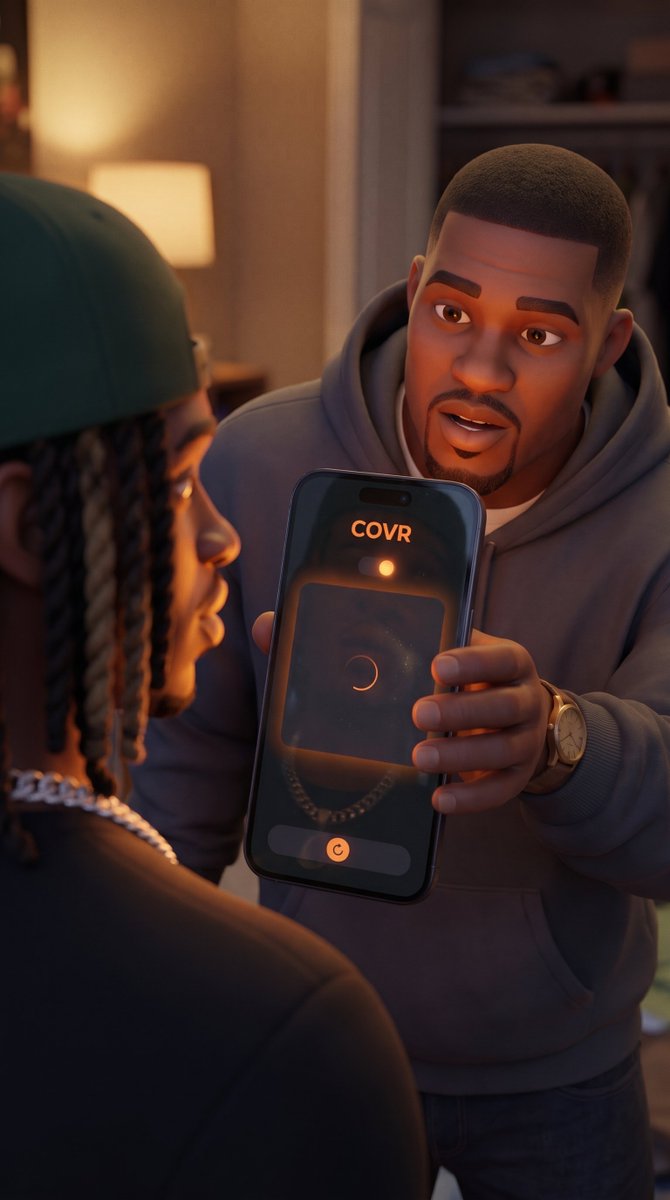
the shot that sells the app is shot 5:
the friend hands him the phone, the cover loads, his reaction changes.
that's the whole ad. everything else is setup and payoff.
I turned the exact shot by shot workflow and prompt system for this ad into a reusable doc
comment "PIXAR" and i'll send it
if you're a founder struggling to grow your app, steal this format:
- pick one hyper-specific subculture your buyers identify with, not a broad demographic
- spend the first 40% of the video on pure story and ego/status tension with zero product mentions
- write the #1 reason users stall out straight into the script as a casual line of dialogue
- introduce your app as a friend's shortcut, never a narrator pitch
- close on an emotional status payoff, not a loud "download now" CTA
i turned the exact shot-by-shot workflow and prompt system to create ai pixar ads
comment "PIXAR" and i'll send it over
AI pixar ads are cracked rn
i made this 40-second pixar-style drama ad for a client's app
all with nano banana pro + seedance 2.5
here's the exact workflow:
- write the ad as shots before you generate anything
- lock one character master per character (same cap, chain, braids, fit in every shot)
- generate empty location plates
- generate one keyframe per shot using the master + plate
- feed each keyframe into seedance 2.5 with a shot-level prompt
- generate 5-6s clips for each scene
- keep the product on screen as a prop, never as a logo
the shot that sells the app is shot 5:
the friend hands him the phone, the cover loads, his reaction changes.
that's the whole ad. everything else is setup and payoff.
I turned the exact shot by shot workflow and prompt system for this ad into a reusable doc
comment "PIXAR" and i'll send it
we are officially past the point where you can tell what's real. this entire scene was generated in Kling 4
I put together a quick breakdown of how I kept the characters consistent and killed the AI look
comment "Kling" below and I'll DM you the full prompt sheet
AI video is basically free now
MAGI-2 is the cheapest model to create AI videos right now
you can create realistic AI UGC hooks and yapping AI influencers for $0.08/sec
1. character sheet:
“Character turnaround sheet of the person from the reference photo, three views: full body front, super close-up front, back. Strictly keep 100% of face, hair, body, clothing and all details from the reference.
Clean gray background, consistent and natural lighting.”
2. video + references:
“Replace the person in {video1} with the person in {image2}.
Keep the same movements, camera quality, voice tone, background sounds, facial expressions, and hand gestures.
Make the interaction realistic, with natural hand placement, grip, and movements.
Remove ALL on-screen text. NO subtitles, NO captions, NO text overlays at any point”
this is the cheapest model to create AI videos right now ($0.04/sec at 1080p)
MAGI-2
it’s 20x cheaper than seedance 2.5.
you can create realistic AI ugc hooks and yapping AI influencers for almost nothing
if you're not using the newly launched MAGI 2 video model to create realistic AI UGC hooks for your mobile apps I don't know wtf are u doing
it's insanely cheap and open source
Video editing will go through the same transition as coding.
What we're seeing in video today looks a lot like coding one or two years ago.
In coding, we went from:
- An assistant in the sidebar (Cursor, Windsurf)
- Headless agents (Claude Code, Codex)
- Agents at scale in cloud environments (Conductor, Capy)
My bet is video follows the same sequence. This year was about AI assistance. Next year, making cuts by hand on a timeline will start to feel dated, even for pros.
Just like in coding, specialized video agents will coexist with general-purpose agents like Claude or ChatGPT. If you edit every day, you'll want something build for agentic editing. If you edit once in a while, you'll ask Claude.