Zostało tylko 6 dni! ⏳Call for Papers na #SCS25 kończy się za moment! Masz ciekawy case, historię z pola walki cyber – ostatni moment, na zgłoszenie! 💥 Dla inspiracji 📸parę zdjęć z zeszłorocznej edycji
👉 Czekamy na Ciebie! https://t.co/qmzrjSUu1L
#CFP#cybersecurity
New Ivanti Connect Secure 0day — I'm sure we'll see Mandiant and MSTIC write-ups on whatever campaign/actor was using CVE-2025-0282 shortly. https://t.co/RDqYjjnF88
SSO (Single Sign-On) explained.
SSO can be thought of as a master key to open all different locks. It allows a user to log in to different systems using a single set of credentials.
In a time where we are accessing more applications than ever before, this is a big help to mitigate password fatigue and streamlines user experience.
To fully understand the SSO process, 𝗹𝗲𝘁’𝘀 𝘁𝗮𝗸𝗲 𝗮 𝗹𝗼𝗼𝗸 𝗮𝘁 𝗵𝗼𝘄 𝗮 𝘂𝘀𝗲𝗿 𝘄𝗼𝘂𝗹𝗱 𝗹𝗼𝗴 𝗶𝗻𝘁𝗼 𝗟𝗶𝗻𝗸𝗲𝗱𝗜𝗻 𝘂𝘀𝗶𝗻𝗴 𝗚𝗼𝗼𝗴𝗹𝗲 𝗮𝘀 𝘁𝗵𝗲 𝗶𝗱𝗲𝗻𝘁𝗶𝘁𝘆 𝗽𝗿𝗼𝘃𝗶𝗱𝗲𝗿:
𝟭) 𝗨𝘀𝗲𝗿 𝗿𝗲𝗾𝘂𝗲𝘀𝘁𝘀 𝗮𝗰𝗰𝗲𝘀𝘀
First, the user would attempt to access the Service Provider (LinkedIn). At this point, a user would be presented with login options, and in this example, they would select "Sign in with Google".
𝟮) 𝗔𝘂𝘁𝗵𝗲𝗻𝘁𝗶𝗰𝗮𝘁𝗶𝗼𝗻 𝗿𝗲𝗾𝘂𝗲𝘀𝘁
From here, the Service Provider (LinkedIn) will redirect the user to the Identity Provider (Google) with an authentication request.
𝟯) 𝗜𝗱𝗣 𝗰𝗵𝗲𝗰𝗸𝘀 𝗳𝗼𝗿 𝗮𝗰𝘁𝗶𝘃𝗲 𝘀𝗲𝘀𝘀𝗶𝗼𝗻
Once the Identity Provider (Google) has received the request, it will check for an active session. If it doesn't find one, authentication will be requested.
𝟰) 𝗨𝘀𝗲𝗿 𝘀𝘂𝗯𝗺𝗶𝘁𝘀 𝗰𝗿𝗲𝗱𝗲𝗻𝘁𝗶𝗮𝗹𝘀
At this stage, the user will submit their login credentials (username and password) to the Identity Provider (IdP).
𝟱) 𝗜𝗱𝗣 𝘃𝗲𝗿𝗶𝗳𝗶𝗲𝘀 𝗰𝗿𝗲𝗱𝗲𝗻𝘁𝗶𝗮𝗹𝘀
The Identity Provider will then verify the submitted credentials against its User Directory (database). If the credentials are correct, the IdP will create an authentication token or assertion.
𝟲) 𝗜𝗱𝗣 𝘀𝗲𝗻𝗱𝘀 𝘁𝗼𝗸𝗲𝗻 𝘁𝗼 𝗦𝗲𝗿𝘃𝗶𝗰𝗲 𝗣𝗿𝗼𝘃𝗶𝗱𝗲𝗿
Once the token or assertion has been created, the IdP sends it back to the Service Provider confirming the user's identity. The user is now authenticated and can access the Service Provier (LinkedIn).
𝟳) 𝗔𝗰𝗰𝗲𝘀𝘀 𝗴𝗿𝗮𝗻𝘁𝗲𝗱 𝘂𝘀𝗶𝗻𝗴 𝗲𝘅𝗶𝘀𝘁𝗶𝗻𝗴 𝘀𝗲𝘀𝘀𝗶𝗼𝗻
Since the Identity Provider has established a session, when the user goes to access a different Service Provider (eg; GitHub), they won't need to re-enter their credentials. Future service providers will request authentication from the Identity Provider, recognize the existing session, and grant access to the user based on the previously authenticated session.
SSO workflows like the above operate on SSO protocols, which are a set of rules that govern how the IdP and SP communicate and trust each other. Common protocols include Security Assertion Markup Language (SAML), OpenID Connect, and OAuth.
~~~
A big thank you to our partner Postman who keeps our content free to the community.
Last year Postman released long-awaited features that make API authentication much easier. Check it out: https://t.co/MEXkiNtxQI
𝗧𝗼𝗽 𝟮𝟬 𝗦𝗤𝗟 𝗾𝘂𝗲𝗿𝘆 𝗼𝗽𝘁𝗶𝗺𝗶𝘇𝗮𝘁𝗶𝗼𝗻 𝘁𝗲𝗰𝗵𝗻𝗶𝗾𝘂𝗲𝘀
Here is the list of the top 20 SQL query optimization techniques I found noteworthy:
1. Create an index on huge tables (>1.000.000) rows
2. Use EXIST() instead of COUNT() to find an element in the table
3. SELECT fields instead of using SELECT *
4. Avoid Subqueries in WHERE Clause
5. Avoid SELECT DISTINCT where possible
6. Use WHERE Clause instead of HAVING
7. Create joins with INNER JOIN (not WHERE)
8. Use LIMIT to sample query results
9. Use UNION ALL instead of UNION wherever possible
10. Use UNION where instead of WHERE ... or ... query.
11. Run your query during off-peak hours
12. Avoid using OR in join queries
14. Choose GROUP BY over window functions
15. Use derived and temporary tables
16. Drop the index before loading bulk data
16. Use materialized views instead of views
17. Avoid != or <> (not equal) operator
18. Minimize the number of subqueries
19. Use INNER join as little as possible when you can get the same output using LEFT/RIGHT join.
20. For retrieving the same dataset, frequently try to use temporary sources.
Do you know what is 𝗤𝘂𝗲𝗿𝘆 𝗢𝗽𝘁𝗶𝗺𝗶𝘇𝗲𝗿? Its primary function is to determine 𝘁𝗵𝗲 𝗺𝗼𝘀𝘁 𝗲𝗳𝗳𝗶𝗰𝗶𝗲𝗻𝘁 𝘄𝗮𝘆 to execute a given SQL query by finding the best execution plan. The query optimizer works by taking the SQL query as input and analyzing it to determine how best to execute it. The first step is to parse the SQL query and create a syntax tree. The optimizer then analyzes the syntax tree to determine how to run the query.
Next, the optimizer generates 𝗮𝗹𝘁𝗲𝗿𝗻𝗮𝘁𝗶𝘃𝗲 𝗲𝘅𝗲𝗰𝘂𝘁𝗶𝗼𝗻 𝗽𝗹𝗮𝗻𝘀, which are different ways of executing the same query. Each execution plan specifies the order in which the tables should be accessed, the join methods, and any filtering or sorting operations. The optimizer then assigns a 𝗰𝗼𝘀𝘁 to each execution plan based on the number of disk reads and the CPU time required to execute the query.
Finally, the optimizer 𝗰𝗵𝗼𝗼𝘀𝗲𝘀 𝘁𝗵𝗲 𝗲𝘅𝗲𝗰𝘂𝘁𝗶𝗼𝗻 𝗽𝗹𝗮𝗻 with the lowest cost as the optimal execution plan for the query. This plan is then used to execute the query.
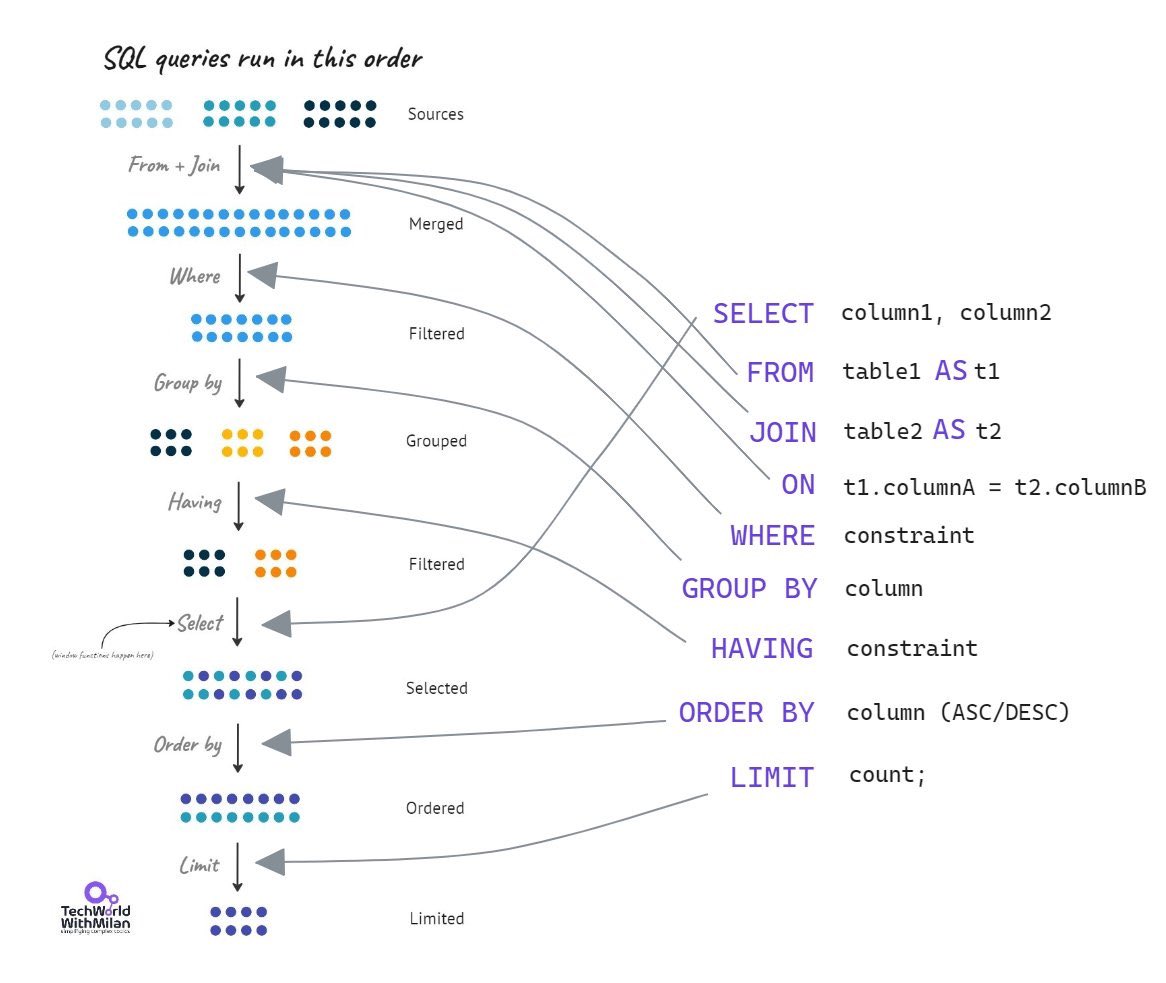
Check in the image the 𝗼𝗿𝗱𝗲𝗿 𝗶𝗻 𝘄𝗵𝗶𝗰𝗵 𝗦𝗤𝗟 𝗾𝘂𝗲𝗿𝗶𝗲𝘀 𝗿𝘂𝗻.
#technology #softwareengineering #programming #techworldwithmilan #sql
https://t.co/hd5rhcXJ3H
Well, i am back with a brand new Git repo with Ansible content, yes, right now is just one simple playbook but you might learn a couple of useful bits like connecting your Ansible content to your OpenShift cluster.
Enjoy and expect more to come
Gizmo 😎
Explaining 8 Popular Network Protocols in 1 Diagram. The method to download the high-resolution PDF is available at the end.
Network protocols are standard methods of transferring data between two computers in a network.
1. HTTP (HyperText Transfer Protocol)
HTTP is a protocol for fetching resources such as HTML documents. It is the foundation of any data exchange on the Web and it is a client-server protocol.
2. HTTP/3
HTTP/3 is the next major revision of the HTTP. It runs on QUIC, a new transport protocol designed for mobile-heavy internet usage. It relies on UDP instead of TCP, which enables faster web page responsiveness. VR applications demand more bandwidth to render intricate details of a virtual scene and will likely benefit from migrating to HTTP/3 powered by QUIC.
3. HTTPS (HyperText Transfer Protocol Secure)
HTTPS extends HTTP and uses encryption for secure communications.
4. WebSocket
WebSocket is a protocol that provides full-duplex communications over TCP. Clients establish WebSockets to receive real-time updates from the back-end services. Unlike REST, which always “pulls” data, WebSocket enables data to be “pushed”. Applications, like online gaming, stock trading, and messaging apps leverage WebSocket for real-time communication.
5. TCP (Transmission Control Protocol)
TCP is is designed to send packets across the internet and ensure the successful delivery of data and messages over networks. Many application-layer protocols build on top of TCP.
6. UDP (User Datagram Protocol)
UDP sends packets directly to a target computer, without establishing a connection first. UDP is commonly used in time-sensitive communications where occasionally dropping packets is better than waiting. Voice and video traffic are often sent using this protocol.
7. SMTP (Simple Mail Transfer Protocol)
SMTP is a standard protocol to transfer electronic mail from one user to another.
8. FTP (File Transfer Protocol)
FTP is used to transfer computer files between client and server. It has separate connections for the control channel and data channel.
–
Subscribe to our newsletter to download the high-resolution PDF. After signing up, find the download link on the success page: https://t.co/keu1P0hhKI
'Fears of recession, mass tech layoffs, conservative spendings are likely to make dealmakers cautious, but an ever-increasing need to defend against bigger and faster attacks will keep M&A activity steady in 2023' - https://t.co/7B1bIvffMz #cybersecurity#MandA#Deals#Trends