I got home from Örebro Sunday night and sat down with Claude. I had one idea: Can the app open the Cardmarket page for the exact card I just scanned, with the right language and condition already filtered? Well, see for yourself in this video I sent to Ryan the next morning. 😎
You can also export a backup or a CSV of your inventory from Settings and import one on a new phone. I'm pretty sure this system will develop quickly in the future, but it's a good start.
If you lose your phone, do you lose your collection? In Snaptory it used to depend on whether your phone's own backup caught it, and I didn't like that I couldn't know for sure. So the app now keeps its own small backup file for import and export.
The part I'm glad I tested is Android. Its auto backup has a 25 MB cap, and with the database in it, the entire backup was dropped without a word. So we had to limit it to the small file, and an uninstall, reinstall, and restore on an emulator brought everything back.
I'm trying to be cautious of not collecting too much data but this seems like the best way to understand issues where we recognize cards incorrectly, for example. It just doesn't scale for me to be the only one scanning cards and noticing when something goes wrong.
Two small things went in this week that make me feel a bit more like a real app. There's a Send feedback button in the More tab, and the app can now tell me when it crashes. I can actually hear from people without asking them to text me.
Crash reports are anonymous, no account and no location. Settings has a switch for usage data, and crash reports always go through, since a crash I never hear about is one I can't fix. After a scan there's also a Wrong card? link that sends me the report.
A price you can't trust is worse than no price when you're making an offer. So when the app isn't sure, would you rather see a flagged price or a blank?
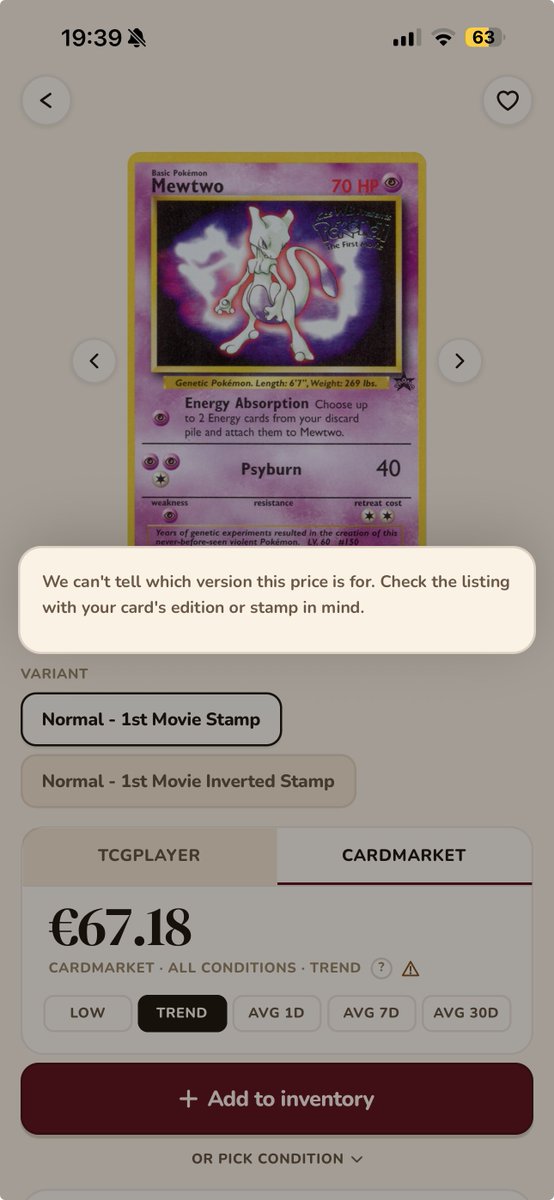
Some prices in Snaptory are a best guess, and I'd rather the app said so. Take Mewtwo from the Black Star Movie promos. The price feed has one number for it, but the card exists in two stamped versions. Nothing says which one the number belongs to.
The same happens with Japanese sets that have both a 1st Edition and an Unlimited print. If the feed has one price and doesn't specify the edition, both get it flagged. When the feed does name the stamp, like Staff or a Worlds placement, that print gets its own price and no flag.
This week I did a clean-up again, and it was the biggest one yet. Over a few days, Claude touched 171 files, added about 1,500 lines, and deleted about 4,000, and the app does the same things it did before but just with less code and less tech debt at launch.
The other half was buttons and sheets. There were a lot of slightly different buttons, grabbers on sheets, and loading screen from building everything quickly. Each one is now a single shared component, which also means the next design change is one edit to change it everywhere.
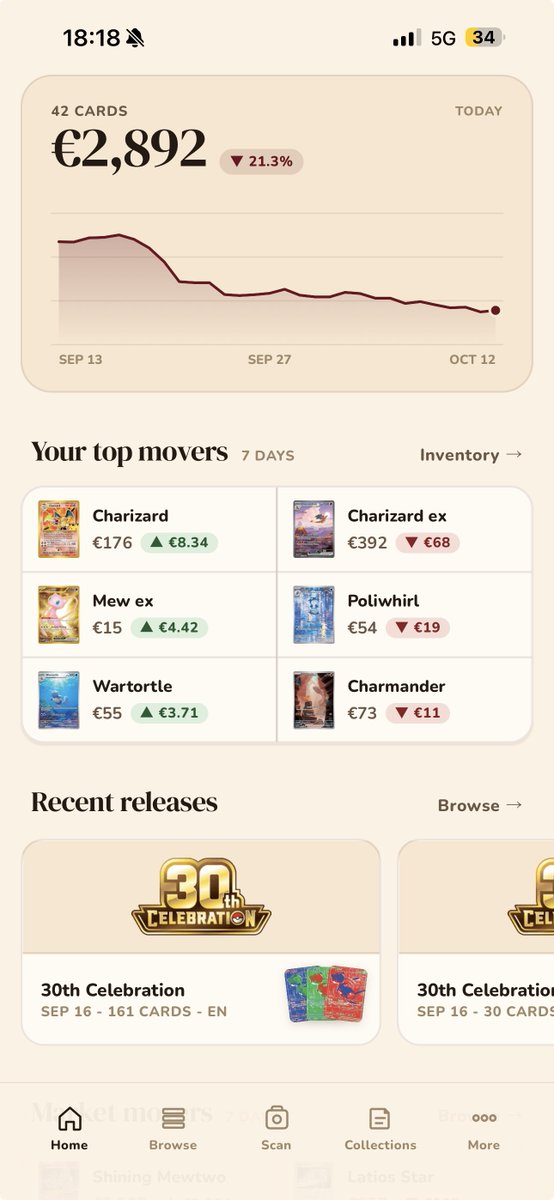
"Cheaper this week" now ranks by money saved times percent drop, so a 55 cent bulk card doesn't lead just because its percentage looks big. Does that match how you'd want to see a deal? What else would you want to see on the Home tab?
Home now has a "Your top movers" section, and for a while, the biggest mover in my test collection was a Kingler V worth 77 cents. Meanwhile, a Magikarp that went up 200% was hidden. That kinda defeated the purpose of the section so I had to figure out what's happening.
What's left refuses only faulty data: a card with an unpriced day in the window, or a move past 3x either way. A promo Dragonite showed -99.5% because its price feed had drifted from 45.74 to 0.02 over two weeks, and nobody wants that on their home screen.