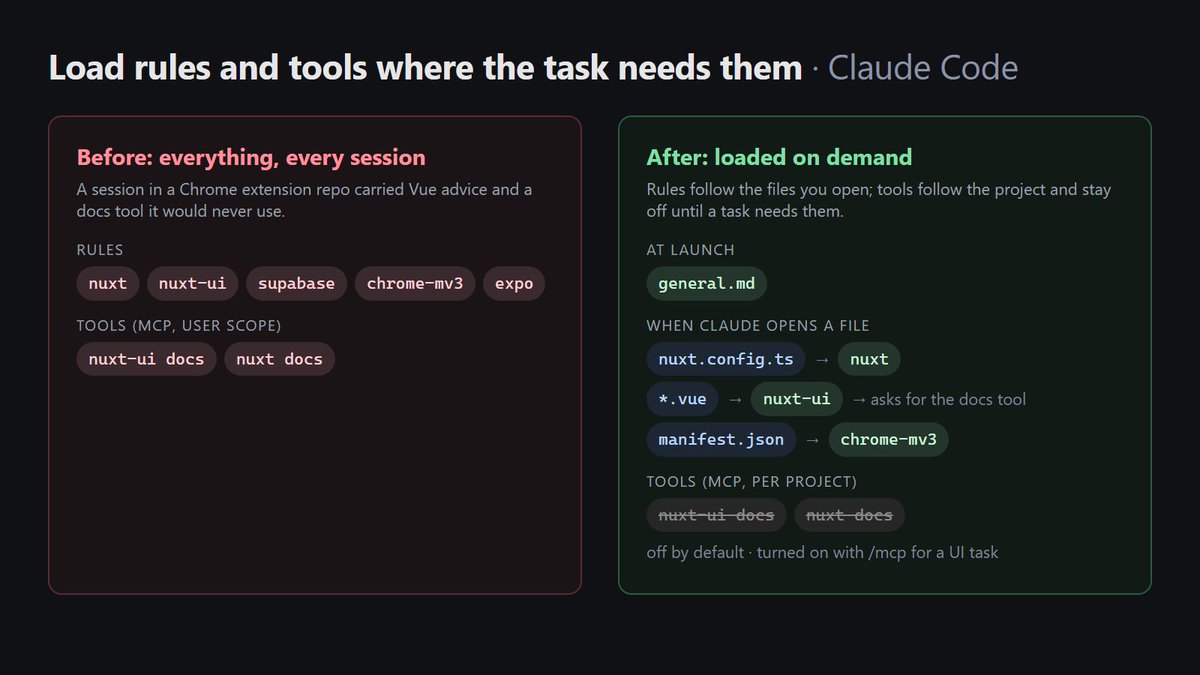
If you use Claude Code across projects on different stacks, check what it loads in every session.
Coding rules for one stack and MCP tools (add-ons Claude can call) can end up everywhere, costing context and giving advice that doesn't fit. 🧵
Tools: add each MCP server only to the projects that use it (claude mcp add --scope local), then switch it off with /mcp and turn it on when a task needs
Markly is live! 🎉
Save the useful part of any page with one right-click.
• Highlight → saved, with source link
• Notes beside the page
• Search, boards, tags
• Reminders and to-dos
No more "where did I read that?"
Free, no account → https://t.co/fmyglChdN8
@mattpocockuk i was exploring this idea before and made an extension and& Claude Artifact that handle X posts and blog posts in my writing style,👇🏻
https://t.co/erUiCW450J
just added a cool feature to the X Growth AI extension 🎉
now you can generate sample tweets right from profile settings, it creates scenarios based on your topics and you write how you'd reply.
way better for learning your style 💪" you still can copy-pasting old tweets"
this is how i think AI tools should work, helping you be more you, not replacing you 😃
@Nehakathare Markly
Save the useful part of any page with one right-click.
• Highlight → saved, with source link
• Notes beside the page
• Search, boards, tags
• Reminders and to-dos
• Export to JSON & Markdown
Free, no account → https://t.co/fmyglChdN8
@Galo2027@DanHartleyuk Markly
Save the useful part of any page with one right-click.
• Highlight → saved, with source link
• Notes beside the page
• Search, boards, tags
• Reminders and to-dos
• Export to JSON & Markdown
Free, no account → https://t.co/fmyglCgFXA
@Zaydenf9 Markly
Save the useful part of any page with one right-click.
• Highlight → saved, with source link
• Notes beside the page
• Search, boards, tags
• Reminders and to-dos
• Export to JSON & Markdown
Free, no account → https://t.co/fmyglChdN8
@imryanarya007 Markly
Save the useful part of any page with one right-click.
• Highlight → saved, with source link
• Notes beside the page
• Search, boards, tags
• Reminders and to-dos
• Export to JSON & Markdown
Free, no account → https://t.co/fmyglCgFXA
Markly is live! 🎉
Save the useful part of any page with one right-click.
• Highlight → saved, with source link
• Notes beside the page
• Search, boards, tags
• Reminders and to-dos
No more "where did I read that?"
Free, no account → https://t.co/fmyglChdN8