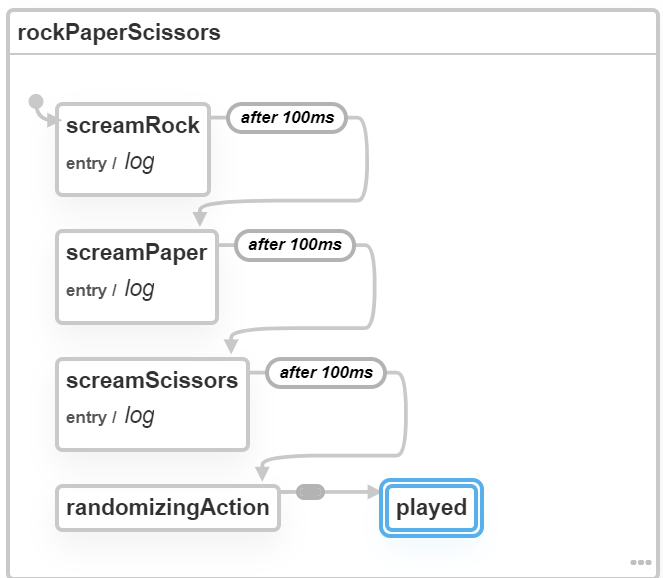
Ever realized that your UIs are basically just a collection of states and transitions between them?
XState is a JS library that lets you model your UIs in an intuitive declarative style.
🚀Stay tuned for the upcoming release of an XState DevTools extension I'm developing!
@CodingDive Benefits:
1) Clear separation of what is needed for rendering and what is simple Actors/FSM logic that can be reasoned with
2) Lets me expose data to whichever dumb component, and render only when that data changes, which has good performance (e.g. with React.memo)
2/2
@CodingDive Actors are an amazing mental model to develop with.
I like the idea of setting up the actor/fsm logic in my topmost <App> component.
For rendering the HTML I make that data available for lower dumb components that tap into it with a React Context connection.
1/2
XState V5 is in progress, and it will be faster, simpler, smaller, and have very few breaking changes (if any) with V4. Most code won't even need any migration!
Please let us know what you would like to see new/improved in the next version here: https://t.co/CjaXs3YXzw
Interested in Web Frontend?
Check out my article to learn how to introduce a responsive visual feedback for touch/click events ✨
https://t.co/PH8DIDjr9m
My 2019 accomplishments:
- taught some developers how important state machines are
My 2020 goals:
- teach a few more developers how important state machines are
(... oh yeah, and release some powerful new tooling, useful libraries, and in-depth tutorials 🛠️)
@keyframers@DavidKPiano Wouldn't have been able to solve it without learning how to invert the FLIP, which @DavidKPiano's hugely innovative talk at CSSconf 2018 showed: https://t.co/zClCYkCkrk
I went on to read the excellent article by @aerotwist: https://t.co/Bwy4WGwGSg
🤘 You guys are awesome! 🤘
Hey @keyframers,
I tried to apply a FLIP animation to an image, but it stretches/shrinks abruptly at the beginning of the animation.
- <img /> has `object-fit: cover;`
- "First" and "Last" have different aspect ratios
🤔 Any idea how to approach this?
https://t.co/v0ZWrhA5du
@keyframers@DavidKPiano Hey, I solved it! 😁
I used these techniques:
- hidden layer: parent div with `position: relative; overflow: hidden;` child image with `position: absolute;`
- FLIP the parent
- FLIP the child image and invert the parent's FLIP frame-by-frame
Was hard!
https://t.co/wFNO2kUGft
@CodingDive Thanks @CodingDive!
Still some ways I'm pursuing to improve the devtools extension:
- removing stopped services (coming soon!)
- improving the Visualizer graphing layout (pathfinding for edges)
- fixing some issues
- improving UX
It's going to be a real treat to work with 👌
I can't believe how well the visualizer and XState devtools are working. @amitnovick has done an amazing job with the chrome extension. Visualizes entry actions, delayed transitions, null events and more. 😍
@mxstbr@reactjs Triggering entry/exit actions that manipulate the DOM (e.g. animations) on a FSM-driven component.
When the markup depends on state, you must wait until after component render before triggering the DOM manipulation (componentDidUpdate / useLayoutEffect)
@MrDignitty @DavidKPiano "complex animations" is vague, but the way I interpreted that sentence is doing animations with elements from remote components
The "complex" part comes from two components becoming coupled due to implicit assumptions (e.g. that a passed ref to a child gets attached to element)
@fold_left Really excited about the improved workflow for XState users!
Many improvements are underway to flesh out some rough edges, and also for keeping up with XState / the Visualizer as moving targets (for example, v4.7.0 has been a big change!).
@tomus_sherman@DavidKPiano@gustavobini@NatalieMarleny XState DevTools is a browser extension that I first released about 2 months ago that lets you open the browser DevTools and see the real-time visualization of all XState state machines running in your app.
https://t.co/pBad5kgrRY
Check out this tweet: https://t.co/Ne1vzyQ3GU
Ever realized that your UIs are basically just a collection of states and transitions between them?
XState is a JS library that lets you model your UIs in an intuitive declarative style.
🚀Stay tuned for the upcoming release of an XState DevTools extension I'm developing!
State Machines made simple with @reactjs Hooks!
We build a mock file uploader and show several ways to leverage hooks & #CSS to animate state transitions.
📼 @YouTube Video: https://t.co/mrEi3SdD0o
💻 @CodePen Demo: https://t.co/xBiIpuxOSt
#javascript#webdev#animation#svg
@keyframers@DavidKPiano Aha! just figured it out.
It was my mistake 😑
I wasn't calculating the circle's new position, and was reusing the square's position calculations.
Here's the vanilla JS implementation fixed:
https://t.co/a8h1CegAMs
Thanks guys! learned a lot about animations with your help
Hey @keyframers!
Love your show, big inspiration for me.
I've just recently learned about the FLIP animation technique, and tried out the snippet @DavidKPiano posted in his article about it.
However w/ a nested element seems to behave strange: https://t.co/8miM7DB95Y
Any idea?
@keyframers@DavidKPiano Tried using Flipping.web.js again, this time animating two elements, and that works! yay small victory 😅
https://t.co/4eHLcZoJlO
Not sure what Flipping does that the vanilla implementation I used isn't doing though