Big Humane Ai Pin milestone: Full preservation of the original experience, entirely on-device.
I've applied Humane's UX work and polish so we can build whatever functionality we want
Video: Ai Mic -> cosmOS -> Gemini -> live search
Powered by PenumbraOS https://t.co/FR1gDfANsr
Big Humane Ai Pin milestone: Full preservation of the original experience, entirely on-device.
I've applied Humane's UX work and polish so we can build whatever functionality we want
Video: Ai Mic -> cosmOS -> Gemini -> live search
Powered by PenumbraOS https://t.co/FR1gDfANsr
OpenAI’s Codex can now control Mac apps with Computer Use.
But at launch, it’s blocked in the EEA, UK, and Switzerland.
So I made a Codex++ tweak that enables it for you.
https://t.co/lP5wcNqObt
At #HPImagine, we shared a vision of work where technology does the heavy lifting in the background—connecting people, spaces, and ideas so teams can focus on what matters
We introduced HP IQ as the intelligence built for that new reality: a workplace AI layer that brings together HP AI PCs, meeting spaces, and edge devices into one coordinated experience.
By running AI closer to where work actually happens, on devices, in rooms, at the edge, HP IQ helps teams move from juggling tools to simply working. It’s part of how HP is rethinking the future of work: not just faster or smarter, but more meaningful for the people behind every screen.
🔗 https://t.co/AeshF6ieLU
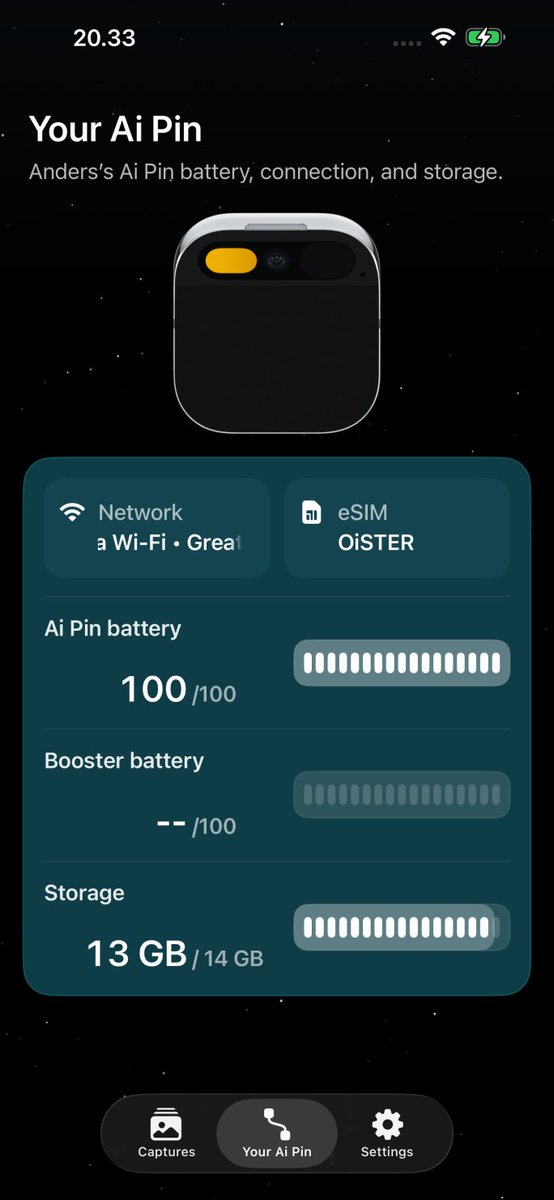
humane ai pin companion app for ios, incoming.
you’ll be able to:
• sync contacts to your pin
• quick overview of battery and storage status
• transfer captures to your iphone
• install esim with a simple qr scan
• configure wi-fi
• configure openclaw
FYI: I'm no designer as you can tell. Any feedback will be very much appreciated! I'm passionate and I want to make the experience as good as possible. This will all be open source as well, once I'm happy with it.
humane ai pin companion app for ios, incoming.
you’ll be able to:
• sync contacts to your pin
• quick overview of battery and storage status
• transfer captures to your iphone
• install esim with a simple qr scan
• configure wi-fi
• configure openclaw