آندری کارپاتی، یکی از همبنیانگذاران OpenAI، تقریباً تمام چیزهایی رو که درباره ساخت هوش مصنوعی میدونه، رایگان روی GitHub منتشر کرده!
از ساخت GPT از صفر تا هوش مصنوعیای که خودش آزمایش میکنه، تحقیق میکنه و از نتایجش یاد میگیره.
۶ پروژه با مجموع بیش از ۳۰۰ هزار ستاره ⭐
۱. Autoresearch | 92.7K ⭐
هوش مصنوعیای که شب تا صبح خودش آزمایش انجام میده، نتایج رو بررسی میکنه و فقط راهکارهایی رو نگه میداره که واقعاً جواب دادهاند.
https://t.co/DELRy7LXDV
۲. nanoGPT | 64.4K ⭐
یاد بگیر چطور یک مدل GPT رو از صفر آموزش بدی؛ پروژهای که برای خیلیها نقطه ورود به دنیای LLM بود.
https://t.co/eS6fGsGNa7
۳. nanochat | 60.2K ⭐
با حدود ۱۰۰ دلار، نسخه شخصی خودت از ChatGPT رو بساز.
https://t.co/WlW6q9FMFA
۴. LLM Wiki | 50K ⭐
ایدهای ساده اما قدرتمند برای ساخت یک دانشنامه شخصی و قابل توسعه برای هوش مصنوعی؛ چیزی شبیه مغز دوم.
https://t.co/Z1KSvcwOCg
۵. llm.c | 31.4K ⭐
آموزش یک مدل زبانی با زبان C؛ بدون پنهان کردن پیچیدگیهای فنی پشت فریمورکهای آماده.
https://t.co/TViNK3jeLu
۶. micrograd | 18.7K ⭐
در چند صد خط کد بفهم شبکههای عصبی چطور یاد میگیرن و گرادیانها چطور کار میکنن.
https://t.co/Nprbsq46tS
پیشنهاد من:
از micrograd شروع کن.
بعد برو سراغ nanoGPT و nanochat.
این مسیر کمک میکنه بهجای اینکه فقط با ابزارهای AI کار کنی، بفهمی پشت پرده واقعاً چه اتفاقی میافته.
تفاوت استفادهکننده از هوش مصنوعی با کسی که میتونه سیستمهای هوشمند بسازه، دقیقاً از همینجا شروع میشه.
این ۶ ریپازیتوری رو ذخیره کن؛ گنجینهای از دانش رایگاناند.
Everyone builds the agents first, then wonders why they step on each other
Draw the work first: steps, handoffs, decisions, stops, then count the agents
5 shapes, the Anthropic vs Cognition fight and a GRAPH.md you can copy ↓ https://t.co/jZut91W71X
CLAUDE CODE DESIGNED ALL OF THIS. NO DESIGNER, NO FIGMA
BOOKMARK THIS POST
the 12 skills behind it, with links:
TASTE
┣ ui-ux-pro-max · styles, palettes and font pairs that match (147K★)
┃ ┗ https://t.co/1VZWcTyov3
┣ awesome-design-md · drop in a brand's DESIGN.md, get its look (126K★)
┃ ┗ https://t.co/5gYc8SKsK7
┗ nothing-design · monochrome, type-first UI in one skill (2.9K★)
┗ https://t.co/wl2S29dtMU
BUILD
┣ frontend-design · official. anthropic's own UI skill (190K★)
┃ ┗ https://t.co/HJ8BIMsn4x
┣ stitch-skills · by Google Labs. screens straight from Stitch (8.7K★)
┃ ┗ https://t.co/PD0Qrq4UFe
┗ oil-ui · 3 different directions before it picks one (3K★)
┗ https://t.co/uqgMALacdH
POLISH
┣ impeccable · /polish /bolder /critique on any page (107K★)
┃ ┗ https://t.co/Kxbn9AJJ23
┣ unslop · turns vibecoded UI into a designed one (12.5K★)
┃ ┗ https://t.co/EZxWg4qEZr
┣ hallmark · design that refuses to look AI-made (51K★)
┃ ┗ https://t.co/AsZnjJLKsO
┗ emil kowalski skills · gestures and motion from the sonner author (55K★)
┗ https://t.co/cJ0WWxomVp
BRAND
┣ logo-design-skill · real logo process, not clipart (6.4K★)
┃ ┗ https://t.co/Q1yq1r9p4O
┗ extract-design-system · steals colors, fonts, spacing from any site
┗ https://t.co/3nmxFIvOCI
start here:
npx skills add pbakaus/impeccable
then type /critique on your ugliest page
Si eres diseñador UI/UX, guárdate esto.
1. https://t.co/BsPEDrxmvU → más de 600 prompts de diseño y 200+ componentes con código completo para webs 3D y con scroll
2. https://t.co/1hM8CzxUpJ → 117 shaders animados en 11 estilos
3. https://t.co/FzDq5KQXiv → footers mejores
4. https://t.co/z9rlJ3109Y → inspiración para CTAs
5. https://t.co/zXbLwxoWZu → estilos de productos reales
¿Qué me he dejado?
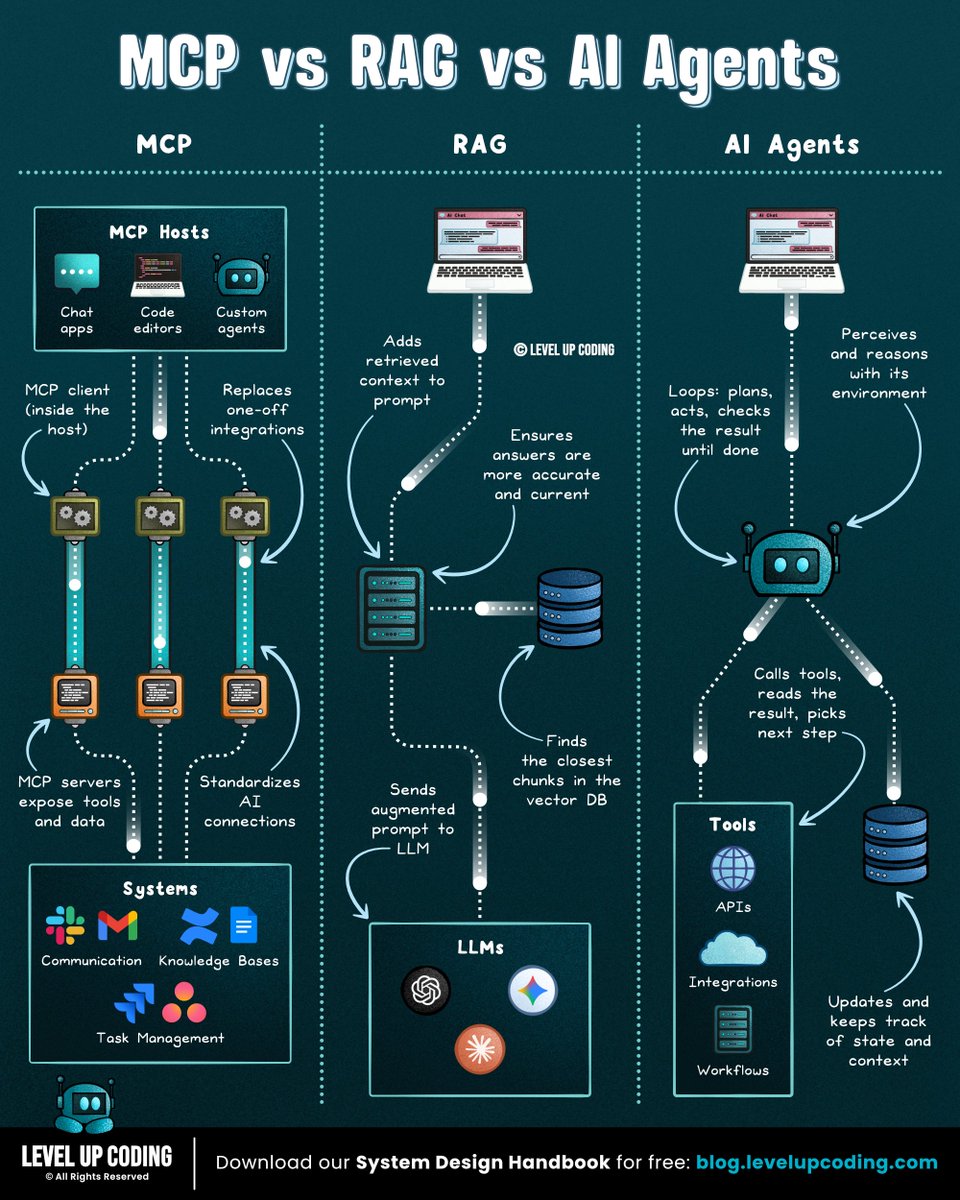
𝗠𝗖𝗣 𝘃𝘀 𝗥𝗔𝗚 𝘃𝘀 𝗔𝗜 𝗔𝗴𝗲𝗻𝘁𝘀.
𝗠𝗖𝗣 𝗶𝘀 𝘁𝗵𝗲 𝗰𝗼𝗻𝗻𝗲𝗰𝘁𝗶𝗼𝗻 𝗹𝗮𝘆𝗲𝗿. It gives AI systems a standard way to connect to external systems and capabilities. MCP servers expose tools for querying databases, calling APIs, or taking actions, without requiring custom integrations for every client. But it handles connectivity, not retrieval.
That's where 𝗥𝗔𝗚 comes in. It searches your docs at query time, pulling relevant chunks into the prompt so answers can draw from your data. Keeping it current means updating an index, not retraining the model. In a basic RAG pipeline, the flow is straightforward: retrieve, then answer.
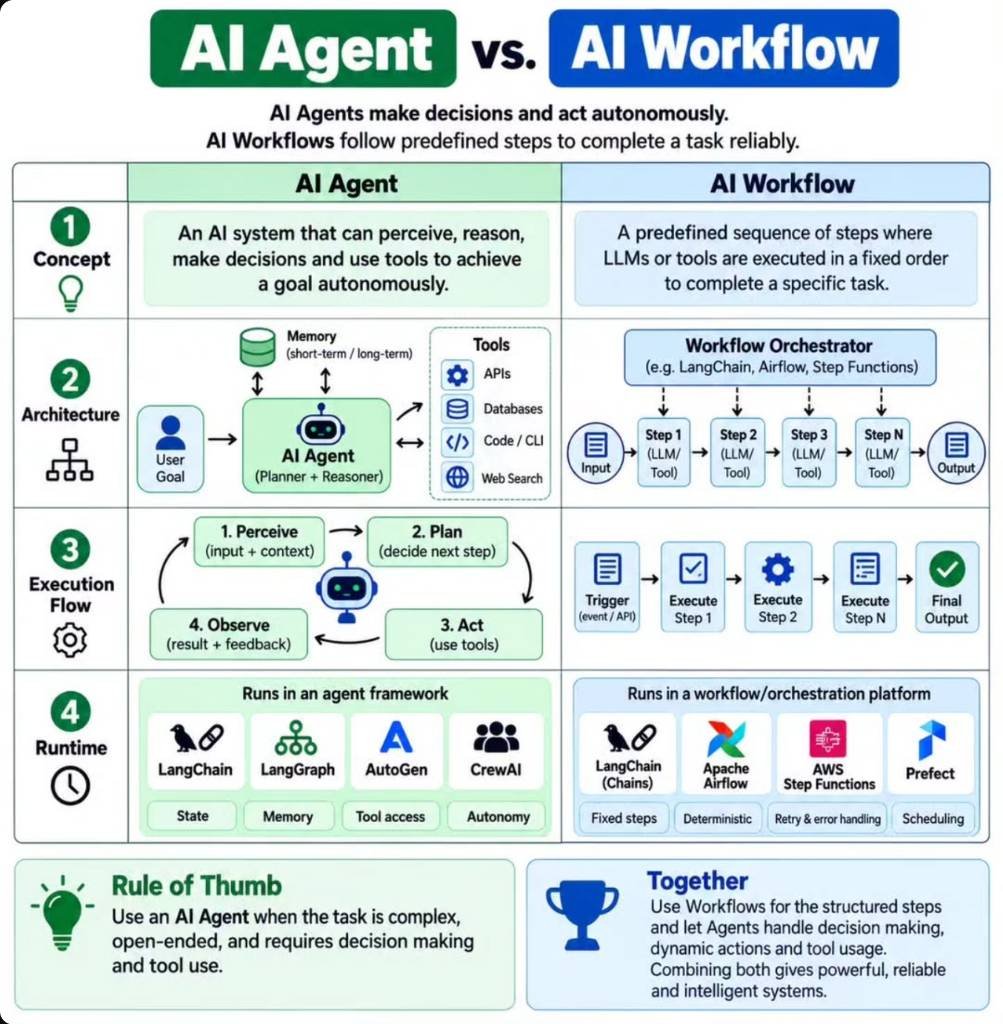
Now with 𝗔𝗜 𝗔𝗴𝗲𝗻𝘁𝘀, the model runs in a loop: plan a step, call a tool, read the result, repeat until the goal is met. That handles multi-step tasks, at the cost of more latency, tokens, and failure points.
So the choice comes down to the gap you're closing: access to systems, knowledge from your data, or action over many steps.
But executing a task successfully doesn't necessarily mean it's still the right task.
Priorities shift, budgets change, and teams move between projects. Both humans and AI agents can keep executing work that no longer aligns with the bigger plan.
The problem is that strategy, capacity, spend, and execution data often live in different systems. By the time a quarterly review reveals the gap between plan and reality, time and budget have already been spent.
Catching that drift early means continuously connecting what was planned with the work actually happening, across both human teams and AI agents.
Tempo Loop brings together time, capacity, spend, and execution data in one unified view across human and AI-agent work.
It answers a simple question without chasing status updates: Are we still working on the right things?
When something drifts, Loop identifies the gap, recommends corrective actions with tradeoff context, and orchestrates approved changes back into the systems teams already use, like Jira.
𝗔𝗴𝗲𝗻𝘁𝘀 𝗹𝗼𝗼𝗽 𝗼𝗻 𝘁𝗮𝘀𝗸𝘀. 𝗧𝗵𝗶𝘀 𝗼𝗻𝗲 𝗹𝗼𝗼𝗽𝘀 𝗼𝗻 𝗽𝗿𝗶𝗼𝗿𝗶𝘁𝗶𝗲𝘀.
𝗦𝗲𝗲 𝗵𝗼𝘄 𝗧𝗲𝗺𝗽𝗼 𝗟𝗼𝗼𝗽 𝘄𝗼𝗿𝗸𝘀 → https://t.co/gG53bFKIYa
What else would you add?
——
♻️ Repost to help others learn AI.
🙏 Thanks to @TempoHQ for sponsoring this post.
➕ Follow me ( Nikki Siapno ) to improve at AI and system design.
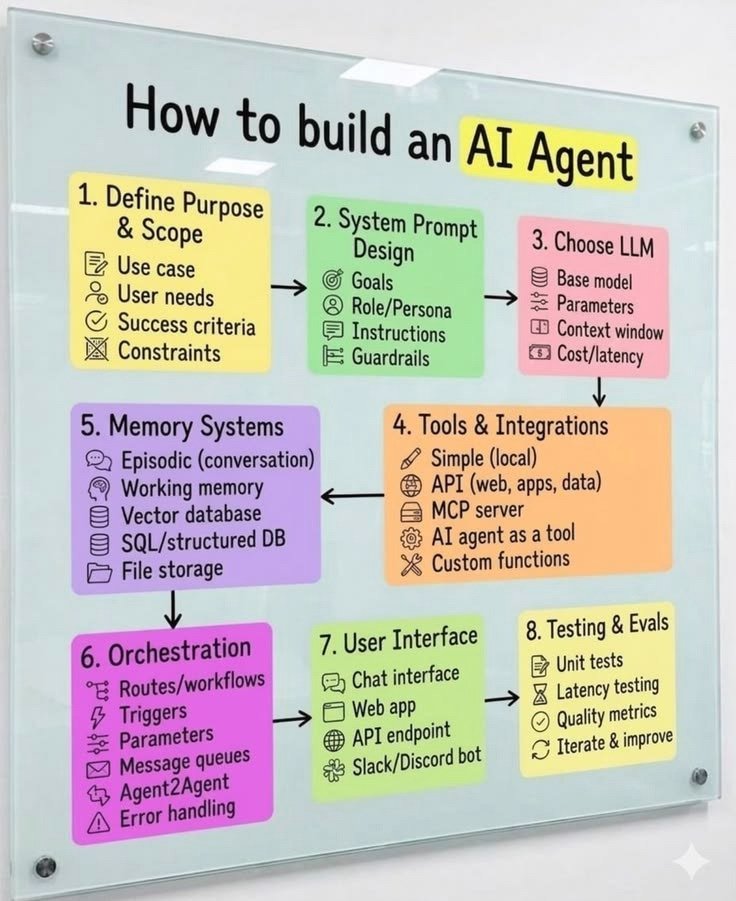
𝗛𝗢𝗪 𝗧𝗢 𝗕𝗨𝗜𝗟𝗗 𝗔𝗡 𝗔𝗜 𝗔𝗚𝗘𝗡𝗧 𝗙𝗥𝗢𝗠 𝗦𝗖𝗥𝗔𝗧𝗖𝗛 🤖
Building an AI agent is more than connecting an LLM to a few tools.
You need the right architecture, memory, integrations, orchestration, and testing to make an agent actually useful.
Here are 8 essential steps to build a reliable AI agent.
1. Define Purpose & Scope — Start With the Goal
Before building anything, identify what your agent needs to accomplish.
- Define the use case.
- Understand user requirements.
- Set success criteria.
- Identify limitations.
A clear goal prevents unnecessary complexity.
2. System Prompt Design — Give Your Agent Direction
The system prompt defines how your agent behaves and operates.
Include:
- Goals and responsibilities.
- Role and personality.
- Instructions and expected outputs.
- Safety rules and guardrails.
3. Choose an LLM — Select the Brain
Your model determines how effectively the agent understands instructions and solves problems.
Consider:
- Model capabilities.
- Context window.
- Response quality.
- Cost and latency.
4. Tools & Integrations — Give It Capabilities
Tools allow an agent to interact with external systems and perform real tasks.
Examples:
- APIs and web applications.
- MCP servers.
- Custom functions.
- Local tools and integrations.
5. Memory Systems — Help It Remember Context
Memory allows agents to retain useful information across interactions.
Important components:
- Episodic memory.
- Working memory.
- Vector databases.
- SQL databases.
- File storage.
6. Orchestration — Connect Everything
Orchestration manages how different components work together.
It handles workflows, triggers, task routing, message queues, error handling, and agent-to-agent communication.
7. User Interface — Make It Accessible
Give users a simple way to interact with your agent.
Possible interfaces include:
- Chat interfaces.
- Web applications.
- API endpoints.
- Slack or Discord bots.
8. Testing & Evaluations — Make It Reliable
A working agent isn't necessarily a good agent.
Test its performance through:
- Unit testing.
- Latency testing.
- Output quality metrics.
- Continuous evaluation and improvement.
𝗪𝗵𝘆 𝗗𝗼𝗲𝘀 𝗧𝗵𝗶𝘀 𝗠𝗮𝘁𝘁𝗲𝗿?
A well-designed AI agent can go beyond answering questions.
It can understand goals, remember context, use tools, execute workflows, and deliver meaningful results.
The real power of AI agents comes from building the right system around the model.
Follow @AamirAnsar94694 for more AI tools & tech updates.
#AI #AIAgents #AgenticAI #ArtificialIntelligence #Automation #LLM #MCP #Tech
la mejor forma de aprender sobre agentes es hacer uno.
un proyecto para arrancar:
crear un agente que busque oportunidades laborales según tu perfil.
podés construirlo de a poco e incorporar un concepto en cada paso. apoyate en Claude para implementarlo y pedile que te explique qué hace cada parte antes de avanzar.
1) primero, una llamada al modelo
> pasale tu CV y una oferta copiada a mano. pedile que compare los requisitos con tu experiencia y explique si encajás. acá estás probando si puede resolver la parte central del problema.
2) separá instrucciones y contexto
> las instrucciones definen cómo trabajar: “no inventes información y señalá los requisitos que no cumplo”. el contexto es lo que necesita saber: tu experiencia y preferencias, como trabajar remoto desde X lugar, etc.
3) creá las tools
> para encontrar ofertas actuales, necesita consultar información externa en la web. creá funciones para buscar ofertas y leer publicaciones. exponelas al modelo como tools, con una descripción de qué hacen y qué parámetros reciben.
4) cerrá el loop
> devolvé el resultado de cada tool al modelo para que decida el siguiente paso: consultar otra página, cambiar la búsqueda o responder.
podés usar el Agents SDK de OpenAI para manejar este ciclo.
5) agregá límites y revisá los resultados
> configurá en código un límite de turnos y restringí las acciones disponibles. buscar ofertas no implica tener permiso para enviar tu CV.
probalo con publicaciones reales y revisá las recomendaciones cumplen los criterios que definiste. guardá los casos donde falla para repetirlos después de cada cambio.
con esto ya practicás modelo, instrucciones, contexto, tools y loop mientras construís algo que podés usar.
más adelante podés sumar evals para medir si los cambios mejoran los resultados, o subagentes que investiguen distintas empresas en paralelo.
son formas de extender el proyecto cuando ya tengas la base funcionando.
Harness, loop and graph could be the missing layers between AI models and agents that actually work.
Same model, same prompt, completely different results.
In this article, I show you how to build all three layers. https://t.co/W99aPfcSub
SYSTEM DESIGN ROADMAP — FROM ZERO TO ADVANCED
Want to learn System Design? Start with these essential concepts 👇
🔹 1. Fundamentals
→ Client-Server Architecture
→ Monolithic vs Microservices
→ Latency vs Throughput
→ Scalability & Availability
🔹 2. Core Components
→ Load Balancers
→ Caching (Redis)
→ CDN
→ DNS
→ API Gateway
🔹 3. Databases
→ SQL vs NoSQL
→ Database Indexing
→ Replication & Sharding
→ Database Partitioning
🔹 4. Distributed Systems
→ CAP Theorem
→ Consistency & Availability
→ Message Queues (Kafka, RabbitMQ)
→ Fault Tolerance
🔹 5. System Design Patterns
→ Rate Limiting
→ Circuit Breaker
→ Event-Driven Architecture
→ Service Discovery
🔹 6. Practice Real-World Designs
→ URL Shortener
→ WhatsApp
→ YouTube
→ Instagram
→ Uber
→ Netflix
Pro Tip: Don't just memorize concepts. Understand WHY a system is designed a certain way and what trade-offs each decision creates.
Save this roadmap and follow it step by step!
Repost to help others learn System Design.
Follow for more AI & Tech content.
@SaurabhDub28465
AI agents are more than chatbots.
They combine LLMs, RAG, Memory, Tools, MCP, and Multi-Agent systems to turn user instructions into autonomous actions.
From understanding goals to getting work done — this is the future of AI.
Follow @mayaislam_ai for more AI insights. 🚀
#AIAgents #ArtificialIntelligence #MCP #AI
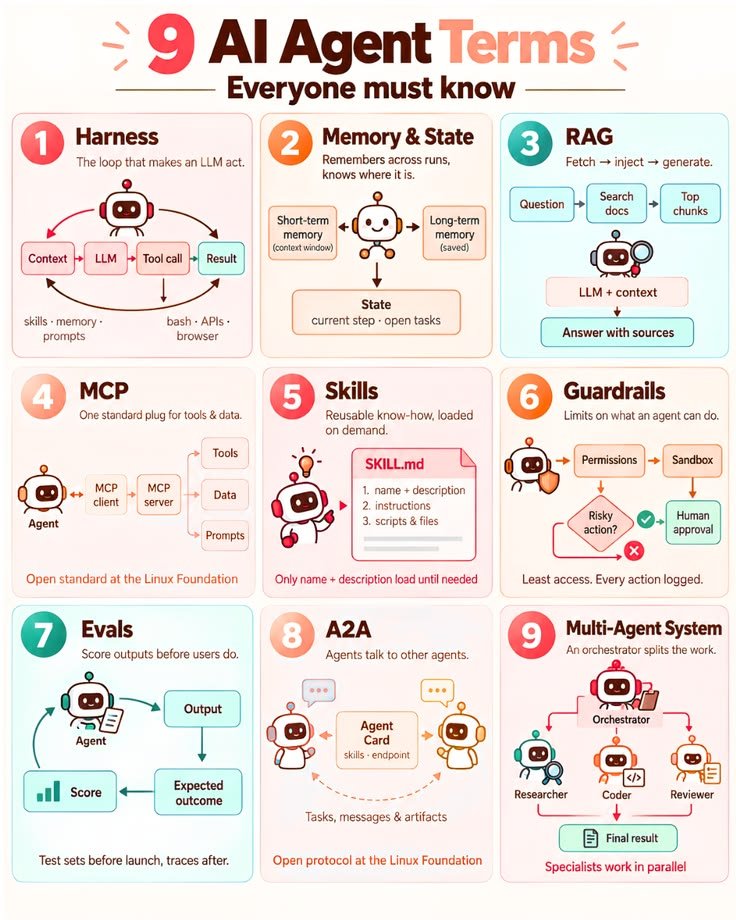
𝗜𝗙 𝗬𝗢𝗨 𝗪𝗔𝗡𝗧 𝗧𝗢 𝗨𝗡𝗗𝗘𝗥𝗦𝗧𝗔𝗡𝗗 𝗔𝗜 𝗔𝗚𝗘𝗡𝗧𝗦, 𝗟𝗘𝗔𝗥𝗡 𝗧𝗛𝗘𝗦𝗘 𝟵 𝗧𝗘𝗥𝗠𝗦
AI agents are becoming more than just chatbots.
They can use tools, remember context, retrieve information, work with other agents, and execute multi-step tasks.
But first, you need to understand the language behind them.
𝗛𝗘𝗥𝗘 𝗔𝗥𝗘 𝟵 𝗜𝗠𝗣𝗢𝗥𝗧𝗔𝗡𝗧 𝗧𝗘𝗥𝗠𝗦:
01 — 𝗛𝗔𝗥𝗡𝗘𝗦𝗦
The loop that turns an LLM into an agent.
Context → LLM → Tool Call → Result → Context
It connects the model with skills, memory, prompts, APIs, browsers and other tools.
02 — 𝗠𝗘𝗠𝗢𝗥𝗬 & 𝗦𝗧𝗔𝗧𝗘
Memory helps an agent remember information across tasks.
→ Short-term memory
→ Long-term memory
→ Current state
→ Open tasks
03 — 𝗥𝗔𝗚
Retrieval-Augmented Generation helps an agent find relevant information before generating an answer.
Question → Search → Relevant Data → LLM → Answer
This helps ground responses in external knowledge.
04 — 𝗠𝗖𝗣
Model Context Protocol provides a standardized way for AI systems to connect with tools and data.
Think of it as a common connection layer between AI and external capabilities.
05 — 𝗦𝗞𝗜𝗟𝗟𝗦
Reusable instructions, knowledge, scripts, and workflows that an agent can load when needed.
This makes agents more capable without putting everything into one massive prompt.
06 — 𝗚𝗨𝗔𝗥𝗗𝗥𝗔𝗜𝗟𝗦
Rules that define what an agent can and cannot do.
→ Permissions
→ Sandboxing
→ Human approval
→ Action logging
The goal is useful autonomy without uncontrolled actions.
07 — 𝗘𝗩𝗔𝗟𝗦
Evaluation systems measure whether an agent actually performs well.
Test before launch → Measure outcomes → Improve → Monitor
Good agents need more than impressive demos.
08 — 𝗔𝟮𝗔
Agent-to-Agent communication allows agents to communicate, exchange tasks, and share results.
Different agents can specialize in different jobs.
09 — 𝗠𝗨𝗟𝗧𝗜-𝗔𝗚𝗘𝗡𝗧 𝗦𝗬𝗦𝗧𝗘𝗠𝗦
One orchestrator can coordinate multiple specialized agents.
For example:
Researcher → Coder → Reviewer → Final Result
𝗧𝗛𝗘 𝗕𝗜𝗚 𝗣𝗜𝗖𝗧𝗨𝗥𝗘:
LLM + Memory + RAG + Tools + Skills + Guardrails + Evals + Agent Communication
That combination is what turns a basic AI model into a more capable agentic system.
Save this cheat sheet if you're learning AI agents.
Follow @mayaislam_ai for more AI, tools, automation and tech insights.
#AI #AIAgents #AgenticAI #ArtificialIntelligence #RAG #MCP #AITools #GenerativeAI #Tech
this PDF is a f*cking cheat code for anyone running coding agents
Diogo Almeida, founder of Jev and co-author of InstructGPT, published a PDF on building a Jev harness
the promise:
> up to 200x faster
> up to 400x cheaper
the speed and the cost both live in the harness around the model
how to use it:
> drop the PDF and the article below into Claude Code or Codex
> let it rebuild its own setup
one evening of work, and your agent runs on a harness few teams have 👇