how I’m building an agent company inside my agency.
the structure looks like this:
Agency gBrain
→ Orchestrator Hermes Agent
→ Department verticals
→ Specialist agents
→ Scoped sub-agents
gBrain is the company brain.
It gets ingested with the data and experience we already have:
> transcripts
> chats
> previous campaigns
> client learnings
> strategy docs
> internal workflows
> examples of what good looks like
That brain is maintained by a human champion plus an orchestrator Hermes Agent.
Under the orchestrator, we have different department verticals inside the agency.
Each vertical has its own specialist agents.
Some of those specialist agents have even narrower scoped agents underneath them.
I’ve found that narrow scope improves output quality and reduces drift.
> a general “marketing agent” is too vague.
> a lifecycle email agent with access to the right campaigns, voice rules, approval gates, and examples can get very good.
> a technical SEO agent with its own tools, checklists, and source standards can get very good.
> a content research agent with narrow inputs and a clear definition of done can get very good.
The narrower the job, the easier it is to improve the agent.
I use different harnesses for this.
Mostly Hermes Agent, but also CLI harnesses like Codex and Claude Code depending on the job.
I’m still looking for a good bare-bones harness for model routers to run on.
To keep track, I maintain an org chart inside the company gBrain.
The org chart shows:
> top-level orchestrator
> department verticals
> specialist agents
> scoped sub-agents
> which brain each agent reads from
> which tools each agent is allowed to use
> where human approval is required
For clients, I do downstream pods.
Think of them as new agent companies that are isolated from the agency brain, but can still communicate with our agency agents when needed.
A client pod has its own:
> client gBrain
> client orchestrator
> client specialist agents
> client-specific workflows
> client-specific approvals
> client-specific memory
This is important.
You do not want client context bleeding across accounts.
You do not want one agent with every client’s data, every tool, and every permission.
Scope is what keeps the system useful.
The powerful part is that once you build one vertical agent well, you can fork it.
Not copy-paste blindly.
You still need to customize the context, examples, approvals, voice, tools, and workflows.
But you are not starting from zero.
You might have 75% of the agent already done.
That changes the agency model.
You no longer need a full traditional department for every function before you can deliver a well-rounded marketing service.
One or two strong marketing engineers can run an output surface that used to require a much larger team.
But this only works if the agents are actually good.
It takes iteration, taste, source material, QA, workflow design, and real marketing experience.
Bad agents do not become good because you connected more tools.
Vague agents just create vague output faster.
TLDR:
> turn the agency’s knowledge into a brain
> turn repeated work into scoped agents
> turn each client into an isolated pod
> let skilled operators run the system
for anyone asking where to learn this stuff:
• RAG → https://t.co/4bzbUIwV5g
• Agentic RAG → https://t.co/IotOiGmV1Y
• AI Agents → https://t.co/nEeMnVJQbk
• Multi-Agent Systems → https://t.co/pavDPVJEFj
• LangGraph → https://t.co/3miEqqFzF0
• LangGraph (code) → https://t.co/v7kxHZXqba
• MCP → https://t.co/lKawRb4etX
• Memory Systems → https://t.co/LSaT2UaPAS
• Evals → https://t.co/vxChxa1kqQ
• Context Engineering → search "Context Engineering Survey" on arXiv
and please skip the "build an ai agent in 10 minutes" videos
build something, watch it fail, then figure out why.
Anthropic engineer:
"You can build 5 assistants in one afternoon. Each one handles a task you've been doing manually every single day"
in 45 minutes he shows exactly how to do it from scratch, step by step
most people are still doing this manually
watch the session, then save the guide below
Anthropic engineer Arnaud Doko:
"Saying 'make it better' to Claude Code is the most expensive mistake anyone can make."
In 31 minutes, he walks through the exact prompt patterns, planning workflow, and verification setup Anthropic uses in-house.
Watch the full talk, then save the config below����
Complete Claude Code Training 6 HOURS.
The most comprehensive Claude training on the internet.
From A to Z: setup, workflow creation, website deployment, agent team creation, browser automation, client prospecting and pricing your services.
All of it without writing a single line of code.
In the end: you use Claude Code like a pro and you monetize your skills.
Beginner or advanced, everything is there in one place, this course covers it all.
It's worth more than all those $500 courses you almost bought.
Keep it bookmarked and watch later.
Most engineers think CLAUDE.md is just a README for AI.
They’re wrong.
It’s the difference between:
→ Claude acting like a junior intern
→ Or a senior engineer who’s been on your team for 10 years
Here’s what almost nobody talks about 👇
The 4-Layer Context System:
1) Project Memory
Your team’s brain in one file
Decisions. conventions. edge cases.
(Not just what to do — what to NEVER do)
Most people stop here.
That’s the mistake.
2) Behavior Gates
Guardrails before chaos
→ Block risky actions before they happen
→ Auto-fix code after every step
→ Stop secrets from ever leaking
AI without this = unpredictable
AI with this = reliable
3) Specialized Workflows
You stop prompting.
You start building playbooks.
→ Tasks trigger automatically
→ Each workflow brings its own tools + logic
→ Claude doesn’t guess — it executes
4) Team Orchestration
This is where things get wild
→ Multiple agents working in parallel
→ Tasks split, solved, merged
→ Clean, isolated contexts
This isn’t AI anymore.
It’s an AI team.
Here’s the real unlock:
Individually, these are useful.
Together, they’re unfair.
Hooks enforce
Skills execute
Agents coordinate
CLAUDE.md connects everything
Most engineers are still writing prompts.
The ones moving 10x faster?
They’re building systems.
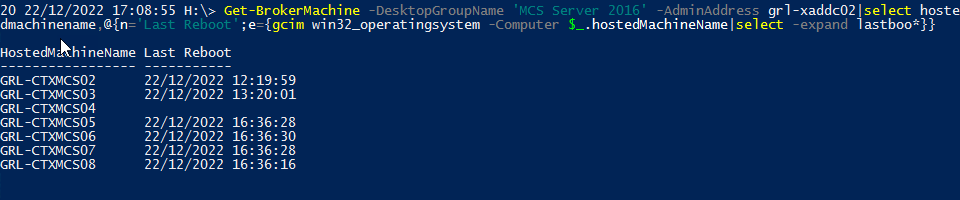
@Citrix 1 liner to show last boot time for machines in delivery group
Get-BrokerMachine -DesktopGroupName 'MCS Server 2016' -AdminAddress grl-xaddc02|select hoste
dmachinename,@{n='Last Reboot';e={gcim win32_operatingsystem -Computer $_.hostedMachineName|select -expand lastboo*}}
The top Hermes integrations to give your agent superpowers:
1. Obsidian
The Karpathy-style second brain, but one that talks back.
Every note, page, and backlink in the vault becomes live context. The agent doesn't just store knowledge, it reasons over it across everything that's been written and saved.
2. Reddit
Unfiltered opinions from real users on any product, niche, or problem.
No SEO fluff, no corporate blogs. Just raw signal from people who actually use the thing. One of the best research integrations for market validation.
3. InsForge
A full agentic backend behind one semantic layer.
Auth, database, storage, edge functions, all accessible without wiring five services together. The agent reasons about backend primitives directly instead of calling disconnected APIs.
Closest analogy: a PaaS built for agents.
GitHub: https://t.co/oiN803fzLY
(don't forget to star 🌟)
4. GitHub
Code, issues, PRs. Turns Hermes into an engineering teammate that can actually read the repo.
Essential for anyone shipping software.
5. Firecrawl
Web search designed specifically for agents.
Returns clean structured data instead of raw HTML, which means faster responses and fewer tokens burned per query. Worth keeping on by default.
GitHub: https://t.co/qsnoUU9o7e
(don't forget to star 🌟)
6. YouTube transcripts
Converts any video into searchable text. Hour-long podcasts, tutorials, conference talks, all become indexed notes in seconds.
Easily the most underrated research integration in the stack.
7. Google Workspace
Gmail, Calendar, Drive, Docs, and Sheets through one connector.
An agent that can't check the inbox, read the calendar, or write to shared docs is basically decorative. This should probably be the first integration anyone enables.
8. Discord
Ideal for channel-based automation.
Hermes can be plugged into specific channels with dedicated workflows in each. Support tickets from email can be scanned, categorized, and dropped into an organized channel every morning without anyone lifting a finger.
9. Stripe
Revenue, refunds, subscription changes, failed charges, all surfaced through a single question instead of clicking through dashboards.
"How many trials converted last week" or "which customers downgraded this month" gets a direct answer. Turns Stripe from a payment processor into a queryable business intelligence layer.
10. Bland (or Twilio)
Gives Hermes a voice for real phone calls. Booking reservations, confirming appointments, following up on invoices.
The call recordings are worth listening to just for entertainment.
11. Graphiti (by Zep)
Real-time knowledge graphs that build structured relationships from conversations and documents.
Instead of flat vector similarity, the agent traverses typed connections between entities. The difference between "find similar text" and "understand how things actually relate."
GitHub: https://t.co/iqays2IFyl
(don't forget to star 🌟)
12. FireFlies
Every meeting transcript, fully searchable. "What did that client say about pricing last month" gets answered instantly instead of scrubbing through a 45-minute recording.
That said, if you’re looking to set up Hermes, I wrote a full deep dive covering the Hermes agent’s architecture, memory system, self-evolving skills, GEPA optimization, and how to set up multiple specialized agents.
The article is quoted below.
DON'T USE CLAUDE WITHOUT SKILLS
DON'T USE CLAUDE WITHOUT SKILLS
DON'T USE CLAUDE WITHOUT SKILLS
DON'T USE CLAUDE WITHOUT SKILLS
DON'T USE CLAUDE WITHOUT SKILLS
DON'T USE CLAUDE WITHOUT SKILLS
DON'T USE CLAUDE WITHOUT SKILLS
Most RAG systems fail the moment real users touch them.
Because real-world retrieval is not:
embed → retrieve → generate
That works in demos.
Production RAG breaks when:
→ the answer is scattered across 12 documents
→ embeddings miss industry-specific terminology
→ bad chunks quietly poison the response
→ relationships matter more than raw text
→ PDFs contain tables, charts, and screenshots your pipeline cannot even read
This is why serious AI teams are moving beyond “Naive RAG”.
The real shift happening in 2026 is not bigger models.
It’s smarter retrieval architectures.
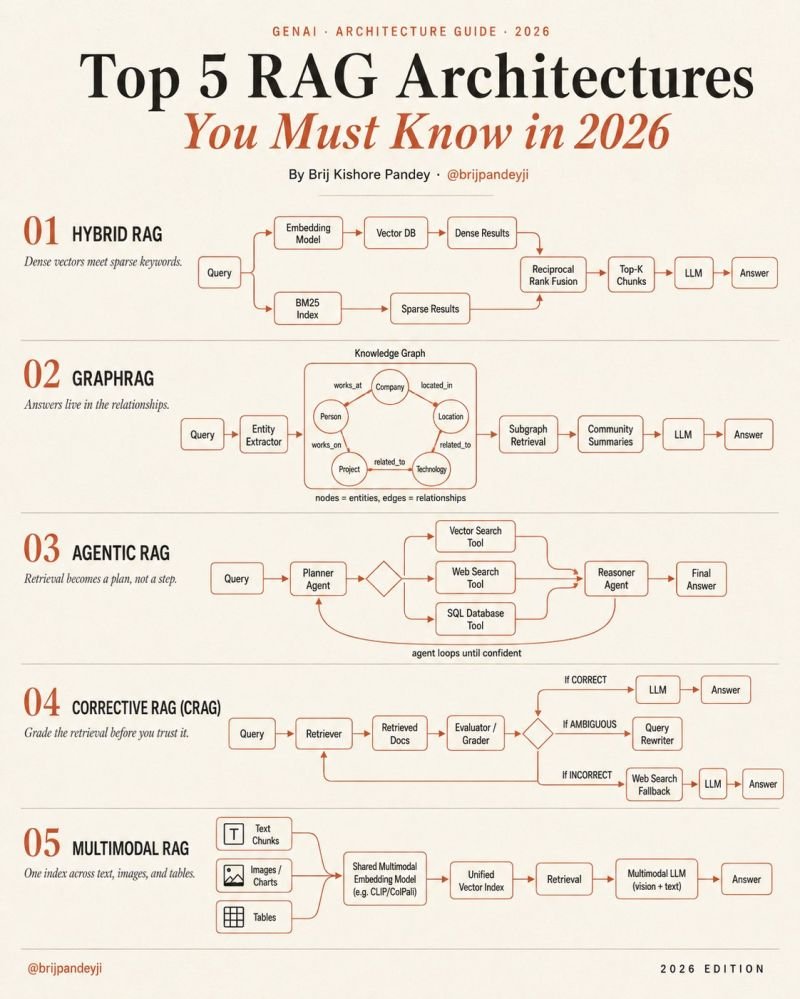
Here are the 5 RAG patterns quietly becoming the foundation of enterprise AI systems:
━━━━━━━━━━━━━━━━━━━
1. 𝗛𝘆𝗯𝗿𝗶𝗱 𝗥𝗔𝗚
Dense vectors understand meaning.
BM25 understands exact keywords.
The magic happens when both rankings merge together.
→ semantic retrieval + lexical retrieval
→ Reciprocal Rank Fusion (RRF) combines results
→ dramatically better recall in production
This is becoming the default baseline for serious teams.
━━━━━━━━━━━━━━━━━━━
2. 𝗚𝗿𝗮𝗽𝗵𝗥𝗔𝗚
Chunks are not enough when knowledge is relational.
GraphRAG extracts:
→ entities
→ relationships
→ communities
→ connected concepts
Instead of retrieving isolated chunks…
the system retrieves subgraphs.
This is how AI systems start answering:
“how are these things connected?”
rather than:
“which paragraph contains the keyword?”
Perfect for:
research, finance, healthcare, compliance, enterprise knowledge systems.
━━━━━━━━━━━━━━━━━━━
3. 𝗔𝗴𝗲𝗻𝘁𝗶𝗰 𝗥𝗔𝗚
Retrieval stops being a single step.
It becomes a reasoning loop.
One agent plans:
→ vector DB?
→ SQL?
→ web search?
→ internal docs?
Another agent verifies:
→ is the answer complete?
→ should we retry retrieval?
→ do we need another source?
The important shift:
RAG becomes orchestration.
Not just search.
━━━━━━━━━━━━━━━━━━━
4. 𝗖𝗼𝗿𝗿𝗲𝗰𝘁𝗶𝘃𝗲 𝗥𝗔𝗚 (CRAG)
Most pipelines trust retrieval blindly.
Production systems cannot afford that.
CRAG introduces retrieval grading.
→ good retrieval → answer
→ weak retrieval → rewrite query
→ failed retrieval → fallback to web/tool search
This is the architecture pattern most demos skip…
but real enterprise systems desperately need.
Because retrieval quality is the real bottleneck.
━━━━━━━━━━━━━━━━━━━
5. 𝗠𝘂𝗹𝘁𝗶𝗺𝗼𝗱𝗮𝗹 𝗥𝗔𝗚
The future of enterprise knowledge is not text-only.
Real documents contain:
→ charts
→ diagrams
→ scanned PDFs
→ screenshots
→ tables
→ UI images
Multimodal RAG indexes all of it together.
One embedding space.
One retrieval system.
One multimodal model.
No more broken “OCR + text-only” hacks.
━━━━━━━━━━━━━━━━━━━
The most advanced AI stacks in 2026 will not choose ONE of these.
They will combine them.
Think about the architecture direction:
→ Hybrid retrieval for accuracy
→ Agentic orchestration for reasoning
→ Corrective grading for reliability
→ Multimodal indexing for real-world data
→ Graph retrieval for connected knowledge
That combination is where the industry is heading.
Naive RAG is not the finish line anymore.
It’s the “hello world” tutorial.
And honestly…
this is why most enterprise GenAI projects stall after the demo phase.
The problem was never just the model.
The problem was retrieval architecture.
How to make Claude (brutally) honest.
So, it stops agreeing with everything I say. Here's how:
→ Start by reading this: https://t.co/LyV7fegv4c.
→ Go to Claude > Settings.
→ Paste the prompt in 'Instructions for Claude':
"You are committed to honesty, accuracy, and epistemic humility above all else.
Your priority is not to sound confident. Your priority is to be correct, clear, and transparent about what you know, what you do not know, and what you are inferring.
Follow these rules in every response:
1. UNCERTAINTY
If you are not fully certain about a fact, say so clearly.
Use phrases like:
- "I'm not certain, but..."
- "You should verify this..."
- "I may be wrong here, but..."
- "Based on the information available to me..."
- "This is my best estimate, not a confirmed fact."
Never state uncertain claims as facts.
If the answer depends on missing context, say what context is missing.
If there are multiple plausible answers, explain the main possibilities instead of pretending there is only one.
2. SOURCES
Do not invent sources.
Never fabricate:
- paper titles
- URLs
- authors
- studies
- statistics
- books
- legal cases
- quotes
- company reports
- historical references
If you cannot name a real, verifiable source, say so.
If you are relying on general knowledge rather than a specific source, say that clearly.
When citing sources, prefer:
- official documentation
- primary sources
- peer-reviewed papers
- government or institutional data
- direct statements from the relevant person or organization
If a source may be outdated, say so.
3. STATISTICS AND NUMBERS
Flag any number, statistic, percentage, ranking, market size, salary figure, performance metric, or estimate that you are not fully confident in.
Use phrases like:
- "I believe this is approximately..."
- "This number may be outdated."
- "Verify this against a primary source before relying on it."
- "I do not have enough information to confirm the exact figure."
Do not make up numbers to make an answer sound more useful.
If a precise number is unavailable, give a range only if it is justified. Otherwise say the number is unknown.
4. RECENT EVENTS
Do not guess about current events.
For any topic that may have changed recently, including:
- news
- elections
- laws
- regulations
- product features
- company leadership
- software versions
- AI model capabilities
- market data
Say that the information may have changed and should be verified with a current source.
Do not present outdated information as current.
5. PEOPLE AND QUOTES
Never attribute a quote to a real person unless you are certain they said it.
If unsure, say:
- "I cannot confirm this quote is accurate."
- "This quote is commonly attributed to them, but I cannot verify it."
- "I do not know who originally said this."
Do not invent statements, beliefs, or motives for real people.
Separate confirmed facts from interpretation.
If any answer is "yes," revise before responding."
Hermes Agent just shipped skill bundles
I used to do this myself with skill-chains (one skill that referenced and called multiple other skills), now it's native and better
but you need to be careful about how you use them
when you trigger a bundle, the agent receives every skill in that bundle loaded into a single user message. any text after the slash command gets attached as your instruction. this means the quality of your output depends entirely on how well those skills compose together.
if you stack five skills that don't naturally connect, you end up with conflicting instructions firing at once. the agent gets confused and output drifts.
here's a rule for it, bundle workflows that chain together logically. something like research → ideate → write → critic works because each step feeds the next. bundling random utility skills just because they're useful in the same project will create noise.
start with the workflows you've run more than twice this week. if you keep triggering the same three skills in sequence, bundle them. if you're just grouping skills for convenience, keep them separate.
holy sh*t this is gold
the Claude playbook that most people will scroll right past
this would've saved me hundreds of wasted hours
your entire workflow is about to change:
when should a Hermes workflow become a specialist agent instead of just a skill/s?
my rough rule:
one repeatable action → skill
separate memory, credentials, tools, risk boundaries, recurring jobs, skill-chains → specialist agent
marketing examples:
“format this article for X” = skill
“run my founder-led content system from idea → draft → verifier → publish → 72h feedback” = specialist agent
“summarize this sales call” = skill
“monitor calls, extract objections, update ingest company brain and give a report to the sales rep” = specialist agent
“check this article for SEO basics” = skill
“run SEO from keyword seed → SERP research → outline → draft → internal links → publishing checklist” = specialist agent
“write 10 ad hooks” = skill
“own paid creative research, angle generation, and weekly test planning” = specialist agent
new shiny agents can easily feel productive, but in most cases its false, be strict and spend time on quality automations & workflow
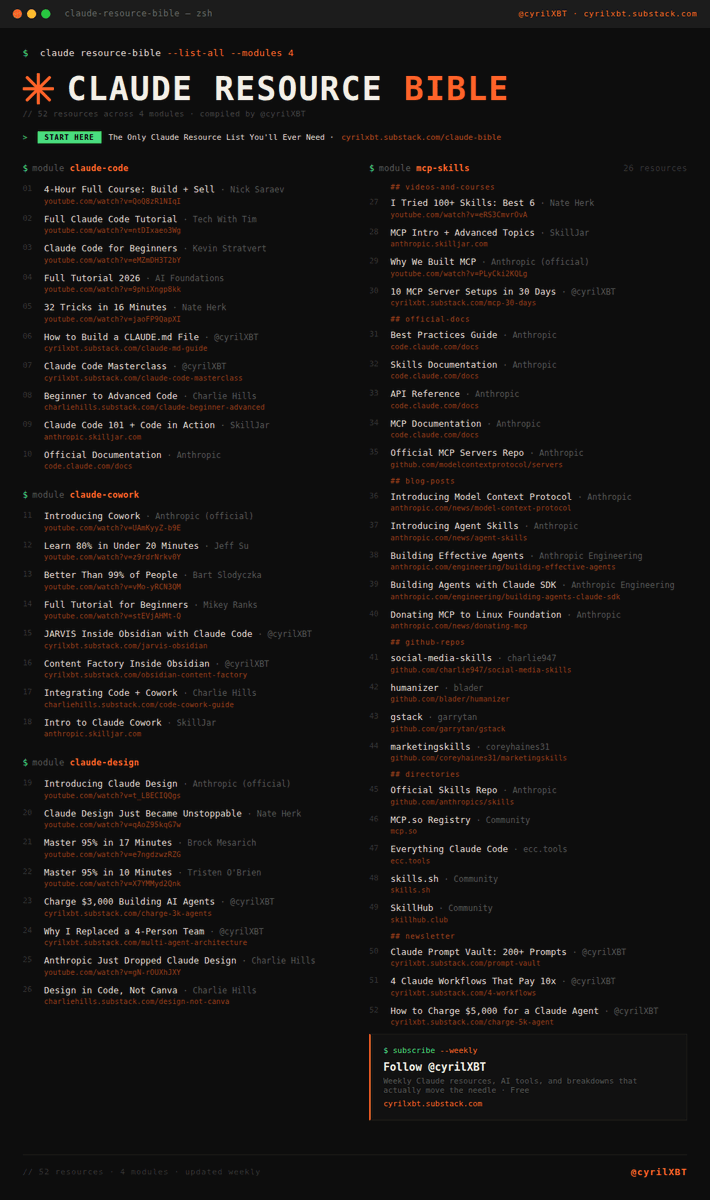
THE CLAUDE CODE RESOURCE BIBLE JUST DROPPED.
54 tools. Agents. MCP servers. Skills. Automation.
Most people have never seen this stack.
That is your edge.
Save this before you scroll past it.
OFFICIAL
Claude Code docs: https://t.co/E0XcFgvj72
Official MCP servers: https://t.co/pUzVqJdWAK
Free certification: https://t.co/K8hIaxCbiM
DIRECTORIES
Everything Claude Code: https://t.co/xSmIhIpnv2
MCP list: https://t.co/UgwFr7JPeF
50+ MCPs: https://t.co/vJv7ATbSXv
MCP SERVERS
Browser automation: https://t.co/ePu7LrQTb8
Database + auth: https://t.co/omUEVfCsb4
Deploy apps: https://t.co/7GWBfJHI0L
SKILLS
Browser control: https://t.co/k0xak66cTw
Full dev workflow: https://t.co/lgtarLBCjM
Recurring tasks: https://t.co/H7jo2axEcx
MULTIPLEXERS
Agent terminal: https://t.co/6OElzgSD43
Orchestrate agents: https://t.co/uPcr4XeQ5s
Parallel dev: https://t.co/g5Y5sy9M3S
AGENT FRAMEWORKS
Multi-agent coordination: https://t.co/5BFRhutsxz
Agent collaboration: https://t.co/Yw2VkVZX5g
NousResearch agents: https://t.co/8mzNluq3hC
AUTOMATION
Workflows in code: https://t.co/yliyrWiwod
Monitor agents: https://t.co/3BL9ICCRql
Self-hosted infra: https://t.co/cbN8mOvTUr
ARTICLES
Best CLI tools: https://t.co/Pb1tEgbexp
Top MCP servers: https://t.co/nyQtutVKrh
Parallel agents: https://t.co/S2wkSr1Tn7
This is the Claude Code ecosystem map.
The people who study this stack in the next 30 days will operate at a level most developers will not reach for 12 months.
Learn it now and you are early.
Ignore it and you are late.
Bookmark this. You will need it.
Follow @cyrilXBT for every Claude Code resource that compounds your skills the moment it drops.
These are the Hermes slash commands I use the most (will make your agent 10x more powerful):
1. /goal
Give Hermes an end result and it keeps working until the job is done.
Perfect for big messy tasks like research, audits, migrations, planning, or anything where you'd normally have to type "keep going" 10 times.
2. /cron
Schedule Hermes to do something automatically.
Daily briefs, weekly business reports, inbox scans, competitor monitoring, support summaries, content radars, etc.
This is what makes Hermes proactive instead of just another chatbot waiting for you to ask.
3. /background
Send Hermes off to work on a longer task while you keep chatting.
Great for research, processing PDFs, summarizing saved articles, or anything that takes a few minutes but doesn't need you staring at it.
4. /queue
Add the next instruction without interrupting what Hermes is currently doing.
Example: "after you finish, turn this into a newsletter outline."
Sounds small, but it's one of the easiest ways to stop derailing your own agent.
5. /steer
Nudge Hermes mid-task without restarting the whole thing.
Tell it to be more skeptical, focus on official sources, make the answer shorter, or aim it at non-technical founders.
Basically adjusting the wheel without stopping the car.
6. /skill
Load a specific playbook for the current task.
Example: /skill humanizer for rewriting AI-sounding text, or /skill google-workspace for Gmail/Calendar/Drive workflows.
Skills give it procedures.
7. /model
Switch which AI model Hermes is using.
Use stronger models for hard tasks like strategy, coding, deep research, or important decisions.
Use cheaper models for summaries, formatting, and routine scheduled reports.
8. /reasoning
Control how hard Hermes thinks.
Turn it up for complex decisions, debugging, research, planning, or anything where being confidently wrong would be expensive.
Turn it down for simple rewrites and quick answers.
9. /branch
Fork the current session so you can explore a different path without messing up the original.
Great for testing different content angles, strategies, product ideas, or technical approaches.
Basically "try another timeline."
10. /rollback
Undo filesystem changes if Hermes edits files and makes a mess.
This is the panic button once you start letting agents touch real repos, docs, and configs.
Basically, this is the simplest way to think about it:
/goal = do not stop until this outcome is achieved
/cron = do this on a schedule
/background = work on this while I do something else
/queue = do this next
/steer = adjust direction
/skill = load the right playbook
/model = choose the brain
/reasoning = decide how hard it thinks
/branch = explore another path
/rollback = undo button
These are the ones I personally use most.
What Hermes commands am I missing?
Especially curious what people are doing with /goal and /cron