6. The Citadel Technical Analysis
"You are a senior quantitative trader at Citadel who combines technical analysis with statistical models to time entries and exits.
I need a full technical analysis breakdown of a stock.
Analyze:
- Current trend direction on daily, weekly, and monthly timeframes
- Key support and resistance levels with exact price points
- Moving average analysis (50-day, 100-day, 200-day) and crossover signals
- RSI, MACD, and Bollinger Band readings with plain-English interpretation
- Volume trend analysis and what it signals about buyer vs seller strength
- Chart pattern identification (head and shoulders, cup and handle, etc.)
- Fibonacci retracement levels for potential bounce zones
- Ideal entry price, stop-loss level, and profit target
- Risk-to-reward ratio for the current setup
- Confidence rating: strong buy, buy, neutral, sell, strong sell
Format as a technical analysis report card with a clear trade plan summary.
The stock to analyze: [ENTER TICKER SYMBOL AND YOUR CURRENT POSITION IF ANY]"
BREAKING: Claude can now analyze stocks like a senior Wall Street analyst for free.
Here are 7 prompts to research, pick, and manage winning stocks like a pro:
🚨 BREAKING: Claude Cowork can now build hedge fund–level trading strategies (100% free).
Here are 12 prompts to backtest strategies, analyze risk–reward, and find high-probability trades:
(save it for later!)
Claude Code can now connect to financial datasets in seconds.
Prompt for financial research, company data, access to 17,000+ stocks, and much more.
Here's how to connect in just 60 seconds:
1. Open Claude Code and paste:
"claude mcp add --transport http financial-datasets https:// mcp. financialdatasets. ai/"
2. Authenticate
Type:
"/mcp" inside Claude Code and complete the OAuth flow in your browser.
You can verify the server is connected at any time:
"claude mcp list"
2. Start prompting
Example prompts:
“What is Apple’s current P/E ratio and market cap?”
“Show me Tesla’s income statement for the last 4 quarters.”
“How has Bitcoin’s price changed over the past year?”
3. Help
If you run into errors, just ask Claude to help you by scanning the official docs here: https://t.co/6yP8VlEa8H
INSTEAD OF WATCHING NETFLIX TONIGHT.
Spend 1 hour with this.
Claude AI FULL COURSE that teaches you how to BUILD and AUTOMATE anything.
The people who watch this tonight will wake up tomorrow with a new skill.
Watch it and Bookmark it now.
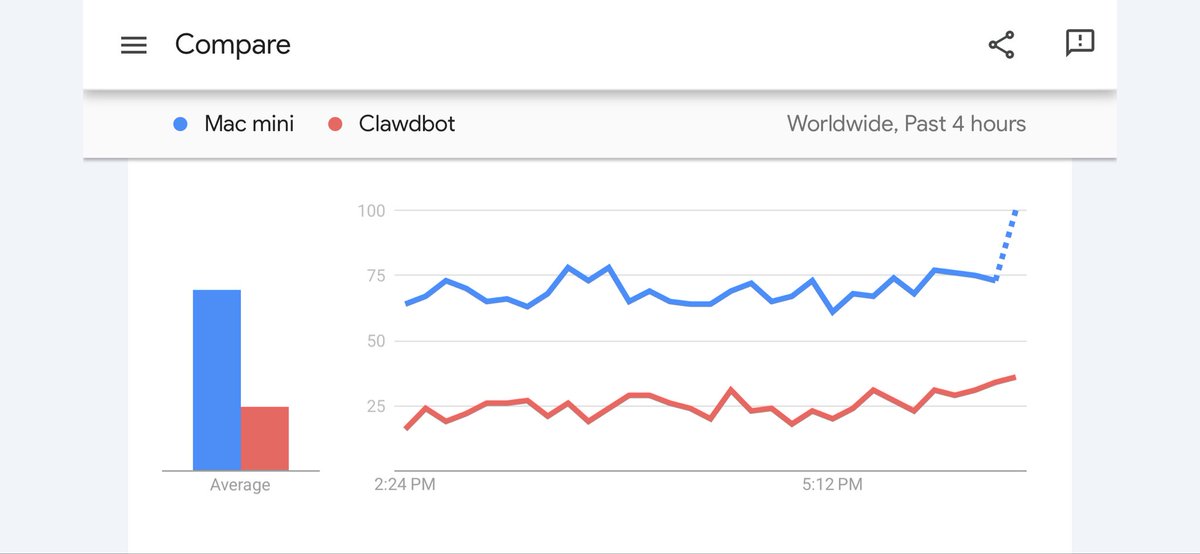
Mac Minis are breaking out on ‘Google Search’ trends
The driver? Clawdbot
People are hoovering up the Apple devices to run their own AI assistants
This article explains the Clawdbot setup seamlessly:
1) Install:
Open your computer's terminal/command prompt and type:
`npm install -g clawdbot@latest`
(You need Node.js version 22 or newer already on your computer – it's like the engine that runs this)
2) Run the easy setup wizard
Type:
`clawdbot onboard --install-daemon`
It will ask you simple questions and automatically:
- Set up the "always-on" background part (called the gateway/daemon)
- Create a folder on your computer called `~/clawd` where all your custom stuff lives
- Add ready-made example instructions (like personality files: https://t.co/gU0H5vN1ZO, https://t.co/Olqx7ZlyYR, https://t.co/IcZXgCdLDi)
- Help you connect chat apps and pick your AI brain (usually Claude models like Opus or Sonnet)
3) Check if everything works
Type:
`clawdbot doctor`
It runs a quick health check: Is the background part running? Folder okay? AI connected? etc.
4) Terms / Actions explained:
- The "gateway" = the always-running part that keeps Clawdbot alive 24/7 (uses a small port like 18789)
- Your `~/clawd` folder = the brain's home – edit files here to change how it talks or acts
- Connect your chats = link WhatsApp, Telegram, iMessage, Slack, Discord, Signal, etc. (you log in/pair once)
- Add skills = give it extra powers (built-in ones, your own code, or download from their hub)
- Safety options = run risky stuff in a locked box (Docker), control your browser if you want, etc.
After the wizard finishes, you basically have your own private, local AI assistant that lives in your chat apps and only runs on your machine
Personal assistance just had their jobs displaced. 2026 is going to be wild
Mainstream media are so far behind
They’re only just talking about Claude Code
How long until they mention Ralph Wiggum, Clawdbot or the Mac Mini shortage?
The gambling brain believes in the “illusion of control”. The idea that staying active, reacting faster, or holding longer will eventually force a win, even when there’s no edge.
The investing brain believes in structure. Understanding what is within your control and what isn’t, and designing decisions so time and probability work in your favor.
Are you a gambler or an investor?
Top 10 Must Read AI Content for this Weekend PT.55
- @MessariCrypto State of AI 2025: https://t.co/Pvofh89yVe
- @krugermacro The Year of Fed's Regime Change: https://t.co/pc2qRNbkrz
- @OnchainLu on Bittensor Halving: https://t.co/CRe6I7mgfh
- @dabit3 Sovereign Agent Stack: https://t.co/IhvUII0UVi
- @adamscochran on Weakening Consumer Data in US: https://t.co/WutG3evTdG
- @Kalshi Tokenized Predictions on Solana + $2M Builder Grants: https://t.co/IWWVoq6z38
- @beausecurity How to Stay Safe from Crypto Kidnappings: https://t.co/sDIQuqHum4
- @0xgmike Inside Talus Network: https://t.co/oeAVI1pNit
- @rawgroundbeef introducing x402 Jobs: https://t.co/PNY5gSRVQA
- @almanak Almanak Games & Pledge Movement: https://t.co/RZ2yg1a6HF