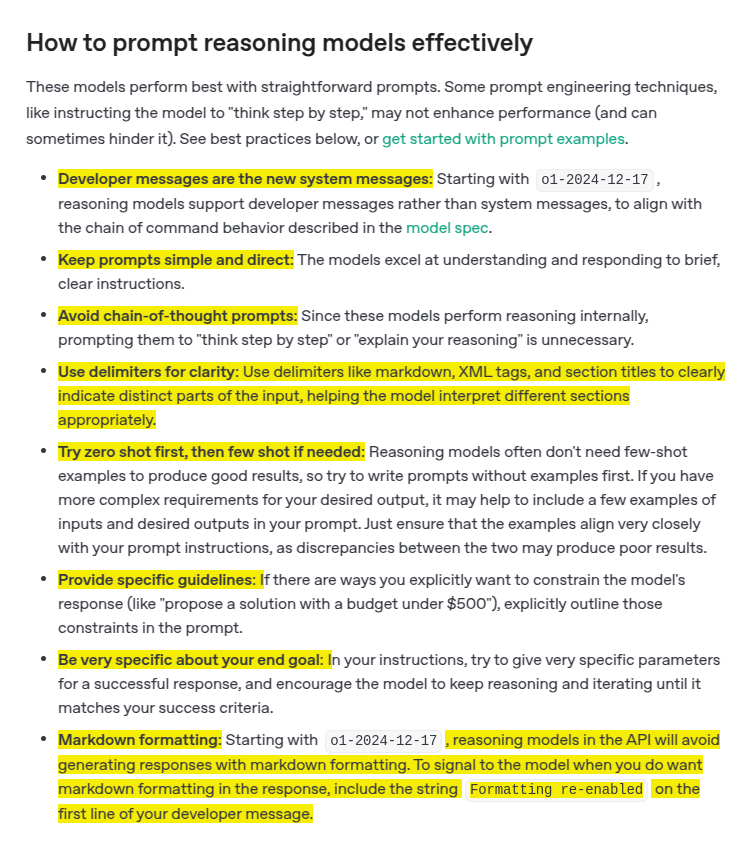
OpenAI just released its Reasoning model best practices
- Use delimiters for clarity: Use delimiters like markdown, XML tags, and section titles to clearly indicate distinct parts of the input, helping the model interpret different sections appropriately.
- The guide differentiates between reasoning models (e.g., o1, o3-mini) and GPT models (e.g., GPT-4o).
Reasoning models are built for complex, multi-step tasks—such as planning, detailed document analysis, and visual interpretation—while GPT models focus on speed and cost efficiency for well-defined tasks.
- In practice, reasoning models excel at clarifying ambiguous prompts, extracting key details from extensive unstructured data, and performing multi-step planning or code review.
- They are best used with clear, concise prompts that include explicit constraints and delimiters;
- elaborate chain-of-thought instructions are unnecessary since these models reason internally.
---
Ultimately, choose GPT models for straightforward tasks and reasoning models when accuracy and handling complexity are critical. Often, combining both offers the best balance of planning and rapid execution.
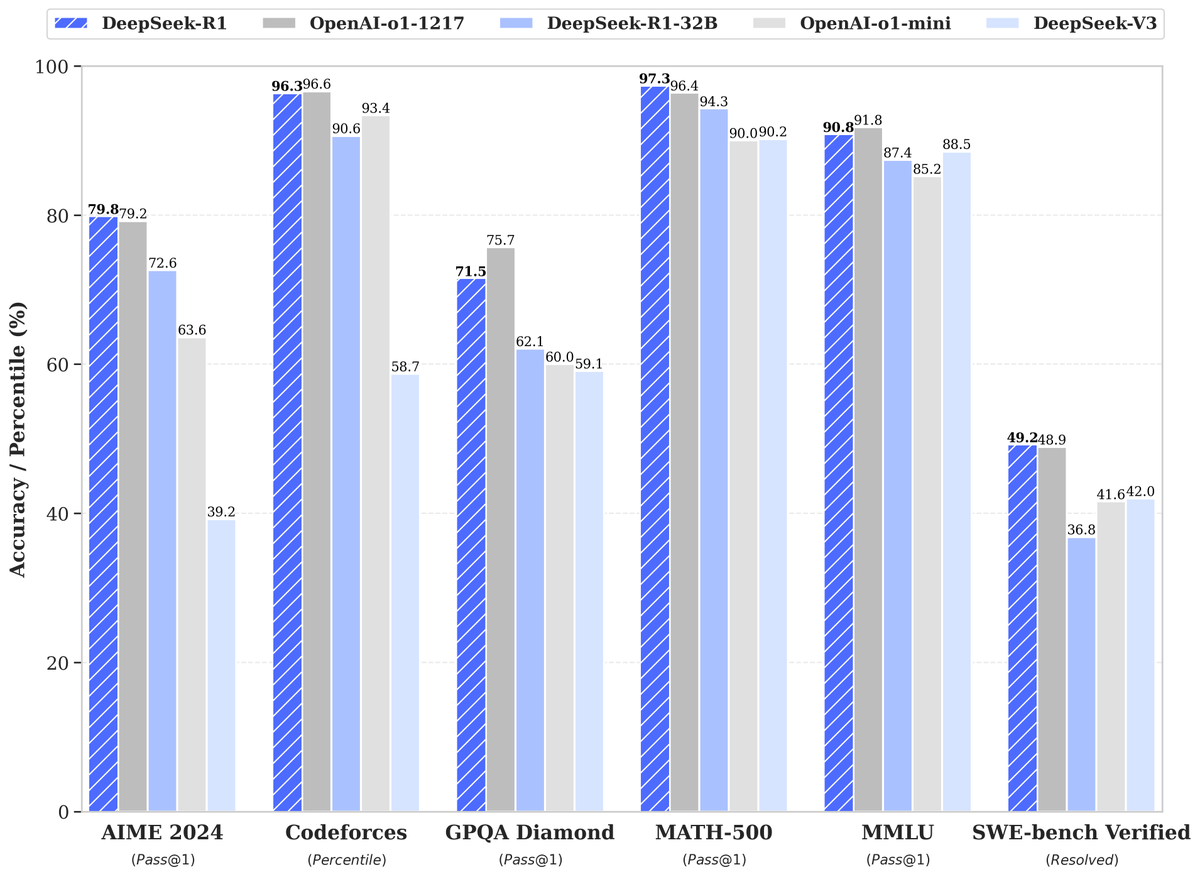
🚀 DeepSeek-R1 is here!
⚡ Performance on par with OpenAI-o1
📖 Fully open-source model & technical report
🏆 MIT licensed: Distill & commercialize freely!
🌐 Website & API are live now! Try DeepThink at https://t.co/v1TFy7LHNy today!
🐋 1/n
My book Building Microfrontends with React 1, covering topics, like the different types of MFEs, misconceptions around MFEs & deploying MFEs to Kubernetes etc, let me know what you think.
US: https://t.co/j9f6bwlbDo
UK: https://t.co/Ehr2xrYeic
BIG NEWS! Publicis Sapient has been awarded the “Google Cloud Partner of the Year” award for the category of “Industry Solution Services Partner of the Year – Sustainability” for 2023! https://t.co/yFuuS51xMO
GIT TIP: git config --global push.autoSetupRemote true It'll set in your global git config file the value true to push.autoSetupRemote.
With that new config, all first-time push on new branches will auto set the default upstream. #GitTip
Say hello to the CSS tint() color function! 🎉
Pick a color and a percentage, and you're good to go. It works by altering the color L value. So excited about this 🤩
Tech Tip: If you are moving from npm to yarn and worried about your lock file. Just run `yarn import`. It generates yarn.lock from an npm package-lock.json file in the same location or an existing npm-installed node_modules folder.
#experienceEngineering#frontend#yarn