You think you've mastered Claude.
Here are 7 daily habits proving you haven't (yet):
Mistake 1. You open a new chat for every task.
Fix: Build Cowork Projects for each part of your tasks. Each gets its own folder & about-me file. Claude now knows your tone, your goals, & your last 10 decisions.
Mistake 2. You write every draft from a blank page.
Fix: Drop writing-style .md and anti-ai-writing-style .md in your Cowork folder. Claude reads them before every draft. Every word sounds like you.
Mistake 3. You check Gmail by hand every morning.
Fix: Plug Connectors into Gmail, Slack, and Granola. Every morning: one summary. What to reply to. What's slipping. Click. Done.
Mistake 4. You open Canva with a blank canvas.
Fix: Draft the brief inside claude .ai/design first. Then hit "Send to Canva." Never guess at a blank screen again.
Mistake 5. You redo the same task twice.
Fix: The second time you run it, turn it into a Skill. One /command, every instruction baked in.
Mistake 6. You lose ideas to your Notes app.
Fix: Speak them with Wispr .ai. The transcript lands in your Cowork folder. Claude turns each one into a hook, a caption, and a brief. Batched.
Mistake 7. You build spreadsheets cell by cell.
Fix: Drop your CSV into Cowork and describe the output. Claude writes the formulas, builds the model, saves the .xlsx in your folder. You open it already done.
To download my (exact) Claude .md files:
1. Go to https://t.co/psB7XxB2Y4.
2. Subscribe for free. Open my welcome email.
3. Hit the automatic reply button inside.
4. Go to the Notion link in the second mail.
5. Copy-paste prompts, too.
Claude for Excel, PowerPoint, and Word are now generally available, and Claude for Outlook is in public beta.
As Claude moves between your Microsoft apps, it carries the full context of your conversation.
Our virtual hackathon is back! Join us for a week of building with Opus 4.7 alongside developers from around the world.
The Claude Code team will be in the room all week, with a prize pool of $100K in API credits.
Introducing Claude Design by Anthropic Labs: make prototypes, slides, and one-pagers by talking to Claude.
Powered by Claude Opus 4.7, our most capable vision model. Available in research preview on the Pro, Max, Team, and Enterprise plans, rolling out throughout the day.
Claude Opus 4.7 is reportedly dropping this week : here's what's coming
- Anthropic is set to release Claude Opus 4.7 as early as this week, according to new reports from The Information and internal codebase leaks.
- Alongside the new flagship, they are launching an AI powered design tool that can build entire websites, landing pages, and presentations just by describing what you want.
- This new tool is aimed at both developers and non-technical users, posing a direct threat to existing tool like Google's Stitch.
- Internal commit messages already leaked codenames like Capybara and Tengu, confirming that the next generation of Opus and Sonnet has been in final prep for a while.
- The recent performance dip in Opus 4.6 the so called "67% thinking drop", now looks like a deliberate move to save compute resources ahead of this major flagship jump .
- Competition is heating up fast, OpenAI has responded by launching GPT-5.4 Cyber, a specialized model for defensive security that directly challenges the high end Claude Mythos.
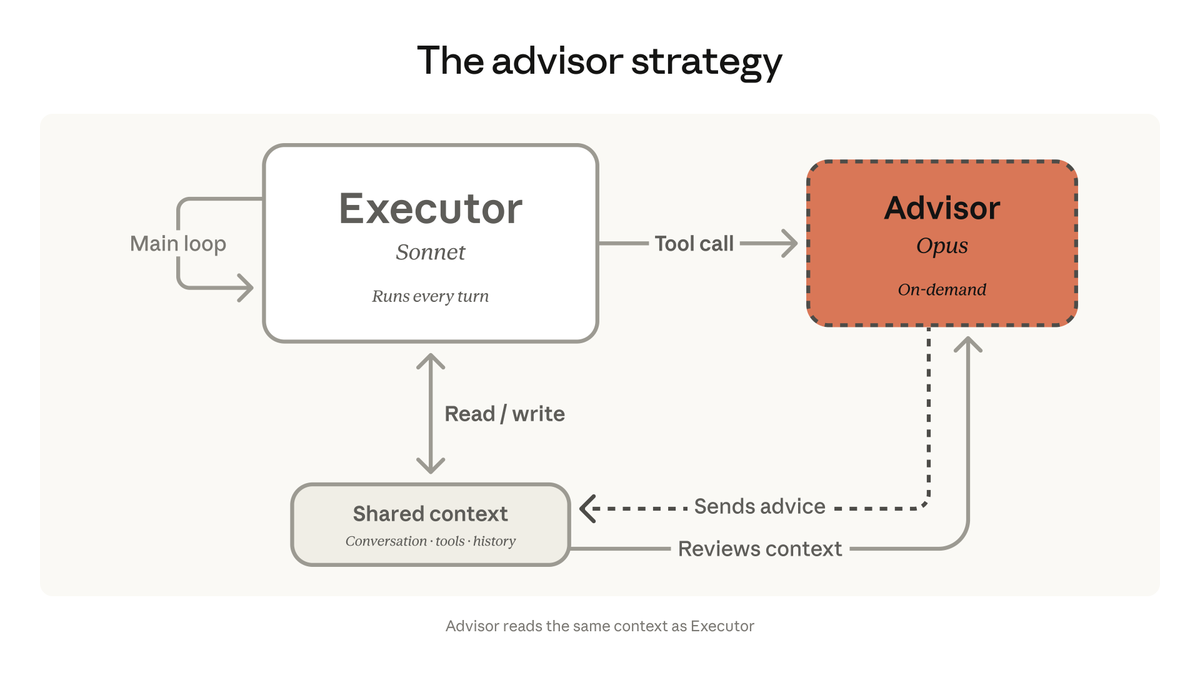
We're bringing the advisor strategy to the Claude Platform.
Pair Opus as an advisor with Sonnet or Haiku as an executor, and get near Opus-level intelligence in your agents at a fraction of the cost.
Most people dump everything into CLAUDE.md or .cursorrules and wonder why their AI agent runs slowly and forgets things.
The problem is context bloat. Every time your agent starts, it loads ALL your instructions: even the ones it doesn't need for the current task. That eats up your context window and burns tokens on stuff that's irrelevant.
SKILL.md solves this with a simple idea: modular, on-demand instructions.
Instead of one massive config file, you create small, focused skill folders.
Each one has a SKILL.MD file with a name, description, and instructions. The agent only reads the name and description upfront (about 30-50 tokens per skill). It loads the full instructions only when the task actually matches.
So if you have 50 skills but only need 2 for the current task, the agent loads just those 2. The rest don't touch your context window.
Here's how a skill folder looks:
.claude/skills/review-pr/
├── SKILL.md (the instructions)
├── scripts/ (automation scripts like https://t.co/rmQfFdSgr3)
├── references/ (docs the agent can pull in)
└── assets/ (templates, etc.)
The SKILL.md file has YAML frontmatter at the top (name + description) and markdown instructions in the body. That's it. No new syntax to learn.
A few things I picked up that aren't obvious:
1. The description field is everything. Your agent reads it to decide whether to activate the skill. Write it like a search query trigger — "Use when the user asks to review a PR or code changes" works. "This skill reviews code" doesn't.
2. Skills are portable across tools. Same SKILL.md format works in Claude Code (.claude/skills/), Cursor (.cursor/skills/), GitHub Copilot (.github/skills/), Gemini CLI (.gemini/skills/), and 10+ other tools. Only the folder path changes.
3. Skills, config files, and MCP servers aren't competing approaches: they solve different problems. Skills handle on-demand workflows and expertise. Config files (.cursorrules, CLAUDE.md) set always-on project rules. MCP servers connect to external APIs and databases. Use all three together.
4. Keep your SKILL.md under 500 lines and 5,000 tokens. If it's bigger, you're probably cramming multiple skills into one. Split them.
5. Put heavy logic in the scripts/ folder, not in the markdown. Your SKILL.md should describe what to do and when. The scripts handle how.
Brij Kishore Pandey put together an excellent cheat sheet covering the full spec, folder structure, frontmatter fields, best practices, tool compatibility, and progressive disclosure flow. Saving it for reference.
If you want to learn Claude Code end-to-end, including skills, MCP servers, and real project workflows, I've got a full free course here:
https://t.co/lG8HZs4uZ8
Happy Learning!
Explore the latest phishing trends, how to prevent attacks, and email security best practices to enhance your email security and reduce cyber risk. Learn more from @TrendMicro: https://t.co/3DD4woemfS
@TrendMicro breaks down the #cyberespionage activities of advanced persistent threat (APT) group #EarthPreta, observed in large-scale attack deployments that began in March. Learn more: https://t.co/djCSrb2NiX
With alert overload for #SOCAnalysts, there is increasing demand for automated workflows.
Tune into Episode 2 of #MondayMinutes with Zaheer Ebrahim to learn how to achieve automation and boost analyst efficiency using #XDR from Trend Micro Vision One. https://t.co/7X9SOzXve7
A newly discovered @MicrosoftTeams Vulnerability allows remote #attackers to escape the sandbox on infected installations of Microsoft Teams. Learn more from @TrendMicro #Pwn2Own https://t.co/gKRioIuQ1R
Overwhelmed by alerts? Use of multi-vendor tools in threat analysis and detection impedes a comprehensive view of the #attacksurface and makes SOC analysts' work painful.
Tune into episode 1 of #MondayMinutes to discover how minimise alert fatigue. https://t.co/cwsBnchUoD
In @TrendMicro's 2022 midyear roundup part 3, they examine the most significant trends and incidents that influenced #attack surface management in the first half of the year. Learn more: https://t.co/mjfdwBPDxF
.@TrendMicro found malicious samples attempting to steal Amazon Elastic Compute Cloud (EC2) Workloads' access keys and tokens via typosquatting and the abuse of legitimate tools. Learn more here: https://t.co/zQb0qYPry2
Read about this week's OpenSSL vulnerability and version 3.0.7 that is supposed to act as a critical security-fix. Learn more from @TrendMicro: https://t.co/ZQEnYX2ILF