AI writes code in seconds now.
So why does going from a Bug ticket to a pull request still feel so slow?
Here's the part nobody talks about: writing code stopped being the bottleneck.
Everything around it is.
You copy the ticket into a chat window.
Then paste in codebase context.
Then explain your team's standards.
Then set up a branch.
Every. Single. Time.
All that context switching quietly eats the time AI was supposed to save.
That's why I got genuinely excited about what Atlassian shipped today: 𝗖𝗹𝗮𝘂𝗱𝗲 𝗔𝗴𝗲𝗻𝘁 𝗳𝗼𝗿 𝗝𝗶𝗿𝗮.
It connects Jira directly to your code. No more copy-pasting context into a separate tool.
Here's how it works in 3 steps:
𝟭. 𝗔𝘀𝘀𝗶𝗴𝗻 𝘁𝗵𝗲 𝘄𝗼𝗿𝗸
Pick Claude in the assignee dropdown, or mention it in a comment.
The agent reads the full work item: acceptance criteria, target repo, and your engineering standards.
𝟮. 𝗖𝗹𝗮𝘂𝗱𝗲 𝗱𝗼𝗲𝘀 𝘁𝗵𝗲 𝘄𝗼𝗿𝗸
Inside a secure sandbox, it clones the repo, studies the codebase, and writes the changes on its own branch.
𝟯. 𝗬𝗼𝘂 𝘀𝘁𝗮𝘆 𝗶𝗻 𝗰𝗼𝗻𝘁𝗿𝗼𝗹
It opens a draft pull request in GitHub and streams live updates back to Jira.
Your team reviews, verifies, and merges.
Nothing ships without you.
The agent always has the full context it needs.
And every move stays visible and traceable inside Jira.
👉 If your team loses hours dragging tickets into pull requests, try Claude Agent for Jira here: https://t.co/Qnth2aBLMh
——
♻️ Repost to help others ship faster from Jira ♻️
➕ Follow me ( Anton Martyniuk ) to improve your .NET and Architecture skills
Thanks to Atlassian for giving me early access to this announcement and for your partnership.
@Atlassian@Jira
#Ad #AtlassianPartner
@AntonMartyniuk I believe there has been no such idea for an actual interview simulation before, particularly for .NET. And the fact that you've been working on it for the past 6 months indicates it is something of high value and worth the investment. Great work Anton.
𝗠𝗼𝘀𝘁 .𝗡𝗘𝗧 𝗱𝗲𝘃𝘀 𝗱𝗼𝗻'𝘁 𝗳𝗮𝗶𝗹 𝗶𝗻𝘁𝗲𝗿𝘃𝗶𝗲𝘄𝘀 𝗯𝗲𝗰𝗮𝘂𝘀𝗲 𝘁𝗵𝗲𝘆'𝗿𝗲 𝗻𝗼𝘁 𝘀𝗺𝗮𝗿𝘁.
They fail because nobody ever showed them the full map of what "senior" actually means.
I know that feeling.
You write solid code for years, then sit in an interview and get hit with questions you've never even thought about.
You can't tell when you actually know or don't know something.
Reading isn't knowing.
Watching isn't knowing.
Only being tested tells you the truth.
That's why I have built the .𝗡𝗘𝗧 𝗦𝗲𝗻𝗶𝗼𝗿 𝗣𝗹𝗮𝘆𝗯𝗼𝗼𝗸 course.
The course idea:
- You read a real question and try to answer it yourself first.
- You reveal my expert answer
- Then you take a test and see your score, with a reason for every answer.
- You copy the code and try to play with it in your IDE
No more guessing if you're ready. You'll know.
What's inside:
- 800+ real-world interview questions with expert-written answers, across 50 chapters covering C#, .NET, and ASP .NET Core
- Design Patterns and SOLID principles interview questions
- System design interview questions
- Tests across every chapter, a final exam and a certificate
- Guides on how to boost your LinkedIn and GitHub profiles to make them visible to recruiters
- Custom Test Builder: generate tests from your selected chapters and questions
- Access to my private Discord Community, where you can ask me questions directly
It works at every level:
✅ Junior → get the complete map of what to learn next to move to the middle position
✅ Middle → find and close the exact gaps to senior
✅ Senior → fill your knowledge gaps, and advance your career to better and higher positions
I wish I'd had this kind of course when I was leveling up.
If you don't know me yet, I'm a Microsoft MVP, I have 13+ years of experience with .NET and I work as a Technical lead and Software Architect.
I haven't found anything else on the market that covers this much, this deeply, with tests in one structured place — which is exactly why I built it.
And it's risk-free: 14-day money-back guarantee, no questions asked.
👉 Grab The .NET Senior Playbook here with a launch discount:
↳ https://t.co/ccbQsmIDus
——
♻️ Repost to help another dev close the gap to senior
➕ Follow me ( @AntonMartyniuk ) to improve your .NET and Architecture Skills
Picture three months from now if nothing changes:
- You're still studying random topics from random blog posts.
- The next senior interview lands, and you cram in a panic.
- Or you skip it, because you're not sure you're ready.
If you want a proven roadmap that tests your knowledge, the .NET Senior Playbook can be your best investment in advancing your career.
And it's risk-free: 14-day money-back guarantee, no questions asked.
👉 Grab The .NET Senior Playbook here with a launch discount:
↳ https://t.co/ccbQsmIDus
@AntonMartyniuk The real issue with Dapper is not performance, it’s managing raw SQL strings at scale.
Without type-safe mappings, refactors become risky, schema changes break queries silently, and errors only appear at runtime.
Using strongly-typed mappings helps keep Dapper fast and safe.
With Dapper you run the application and it crashes because of a bug in SQL string
Here is how to fix it 👇
Dapper is fast and gives you full control over SQL.
But that control comes with a hidden cost.
Every INSERT, UPDATE, and DELETE you write lives inside a string.
And strings have zero type safety.
↳ Rename a column? No compile error.
↳ Change a property type? No compile error.
↳ Misspell a parameter name? No compile error.
You only find out something is broken when your app crashes at runtime.
Here is what most developers do when using Dapper:
❌ Write SQL commands as plain strings
❌ Map every parameter by hand
❌ Repeat the same column lists across Insert, Update, and Delete
❌ Hardcode table and schema names everywhere
One small refactor breaks half of your queries.
And the compiler will not save you.
There is a much better way.
In my latest video, I show how to solve this with 𝗗𝗮𝗽𝗽𝗲𝗿 𝗣𝗹𝘂𝘀 𝗠𝗮𝗽𝗽𝗶𝗻𝗴.
Dapper Plus gives you 3 ways to map your entities to the database - all type-safe.
𝟭. 𝗔𝘂𝘁𝗼 𝗠𝗮𝗽𝗽𝗶𝗻𝗴
→ Zero configuration needed
→ Library matches class name to table name
→ Properties match column names automatically
→ Just call SingleInsert or BulkInsert and it works
𝟮. 𝗗𝗮𝘁𝗮 𝗔𝗻𝗻𝗼𝘁𝗮𝘁𝗶𝗼𝗻𝘀
→ Use [Table], [Column], [Key], [NotMapped] attributes
→ Familiar to anyone using EF Core
→ Keeps mapping next to your model
𝟯. 𝗙𝗹𝘂𝗲𝗻𝘁 𝗔𝗣𝗜 𝗠𝗮𝗽𝗽𝗶𝗻𝗴
→ Full control with strongly-typed lambdas
→ Map only what you need: .Map(x => new { https://t.co/Ihd1gKwJ4f, x.Price })
→ MapAuto method and DapperPlus figures it out for you
→ Refactor-friendly: rename a property and the compiler tells you
You can also organize mappings with 𝗗𝗮𝗽𝗽𝗲𝗿 𝗣𝗹𝘂𝘀 𝗖𝗼𝗻𝘁𝗲𝘅𝘁:
→ Global context - configure once at startup
→ Instance context - configure per use case
→ Inheritance context - reuse mappings across services
And the best part?
The same mapping works for 𝗯𝗼𝘁𝗵 free Single methods 𝗮𝗻𝗱 paid Bulk methods.
No more SQL strings scattered across your codebase.
No more runtime surprises after a refactor.
Just clean, type-safe writes.
Watch the full video and see all 3 mapping approaches in action.
P.S.: You can get a free trial for this library and test for 30 days, and you can extend the trial for another month as needed.
Get started with Dapper Plus Mapping:
https://t.co/DzCnhjbIOo
Here is the source code:
https://t.co/ot8ZPBalcB
How do you solve runtime bugs in SQL strings when using Dapper? Share below 👇
——
♻️ Repost to help others write type-safe Dapper queries
➕ Follow me ( @anton-martyniuk ) to improve your .NET and Architecture Skills
Many thanks to @zzzprojects for sponsoring this post
@AntonMartyniuk Bringing the power of Resharper into such agent is a truly amazing move by JetBrains. I use Resharper a lot with VS, it has the best tooling for refactoring. Now with AI agent, I am sure it will be much better and more powerful.
For years, Visual Studio decided which AI you were allowed to use.
Not anymore.
You open your .NET solution in Visual Studio and get the only AI your IDE picked for you.
Here is what lock-in actually looks like in practice:
• No way to plug in a different agent
• Your workflow is tied to one vendor's roadmap
• Switching means leaving Visual Studio entirely
For a long time, the only options were:
❌ Use whatever AI ships with Visual Studio
❌ Switch editors and lose your .NET tooling
❌ Disable AI and pretend it's 2022 again
That's about to change.
JetBrains is taking the first step toward built-in Agent Client Protocol (ACP) support in Visual Studio by testing the foundation in the ReSharper 2026.2 EAP.
ACP is an open standard for connecting any AI coding agent to your IDE.
That's the way to break vendor lock-in in Visual Studio.
Earlier this year, JetBrains brought ReSharper to VS Code, Cursor, and Antigravity.
Now they are doing something bigger inside Visual Studio itself.
To prove the foundation works, they are shipping their own agent first: 𝗝𝘂𝗻𝗶𝗲.
And here is the part that matters most.
Junie is 𝗟𝗟𝗠-𝗮𝗴𝗻𝗼𝘀𝘁𝗶𝗰.
You pick the model.
You pick the provider.
Junie is not another chat box in your sidebar.
It is an autonomous agent.
Here is what Junie actually does inside Visual Studio:
1️⃣ Real refactoring at scale
↳ Ask it to split a 2,000-line class. It performs the real work, and you verify the result.
2️⃣ Terminal commands from a prompt
↳ Build, test, run scripts. Junie runs them directly inside your IDE.
3️⃣ Git operations on demand
↳ Branches, commits, rebases - without leaving the editor.
4️⃣ Free choice of LLM
↳ Pick the model that fits the task. No forced vendor.
A few honest notes, since this is an Early Access Program:
• The UI is basic on purpose as this release is focused on features that work
• Deeper ReSharper refactoring hooks are still in development
• Free to download. JetBrains AI subscribers use their existing quota
• Everyone else gets a free exploratory quota to try Junie out
JetBrains is also asking the community which agents should come next.
Try out Junie and share your feedback to help shape the roadmap.
👉 Try ReSharper 2026.2 EAP for free:
↳ https://t.co/p2hL2gTUiQ
——
♻️ Repost to help other .NET developers break out of AI lock-in in Visual Studio
➕ Follow me ( @AntonMartyniuk) to improve your .NET and Architecture Skills
Many thanks to @jetbrains for sponsoring this post
@AntonMartyniuk Dapper plus is the best library for bulk operations, super fast and comprehensive. Teams can really benefit from it. Good value for its license. It is an investment for your product.
Dapper 𝗵𝗮𝘀 𝗮 𝗯𝗶𝗴 𝗽𝗲𝗿𝗳𝗼𝗿𝗺𝗮𝗻𝗰𝗲 𝗽𝗲𝗻𝗮𝗹𝘁𝘆 𝘄𝗵𝗲𝗻 𝘆𝗼𝘂 insert multiple rows.
Here is how to address this problem 👇
Developers love Dapper for blazing-fast reads.
But for inserting or updating many rows, it becomes painfully slow (even slower than EF Core).
But Why?
Dapper sends each row to the database one by one.
10,000 rows = 10,000 round-trips.
And here is another problem:
↳ You need to write a lot of boilerplate code when using Dapper.
Here is what most developers do when using Dapper:
❌ Write manual INSERT and UPDATE SQL statements
❌ Build complex SQL with hundreds of parameters by hand
❌ Write CREATE TABLE scripts
And the problem is that you don't have type safety when writing SQL commands inside strings. When something goes wrong you will only know at runtime.
There is a much better way.
In my latest video, I show how to solve this with 𝗗𝗮𝗽𝗽𝗲𝗿 𝗣𝗹𝘂𝘀.
👉 𝗦𝘁𝗼𝗽 𝗪𝗿𝗶𝘁𝗶𝗻𝗴 𝗖𝗼𝗺𝗽𝗹𝗲𝘅 𝗦𝗤𝗟 𝘁𝗼 𝗦𝗮𝘃𝗲 𝗗𝗮𝘁𝗮 - 𝗟𝗲𝘁 𝗗𝗮𝗽𝗽𝗲𝗿 𝗣𝗹𝘂𝘀 𝗗𝗼 𝗜𝘁 𝗳𝗼𝗿 𝗬𝗼𝘂.
Dapper Plus gives you clean, simple methods for every write operation.
𝗙𝗿𝗲𝗲 𝗦𝗶𝗻𝗴𝗹𝗲 𝗠𝗲𝘁𝗵𝗼𝗱𝘀:
→ SingleInsert - insert one entity without writing SQL
→ SingleUpdate - update one entity
→ SingleDelete - delete one entity
→ SingleMerge - upsert in one line (insert or update)
→ SingleSynchronize - keep your data in sync with the source
→ CreateTable - create the table directly from your C# class
No more manual SQL.
No more parameter mapping by hand.
Just call the method and Dapper Plus handles the rest.
All single methods are 𝗳𝗿𝗲𝗲 𝘁𝗼 𝘂𝘀𝗲.
𝗣𝗮𝗶𝗱 𝗕𝘂𝗹𝗸 𝗠𝗲𝘁𝗵𝗼𝗱𝘀 (for high performance):
→ BulkInsert
→ BulkUpdate
→ BulkDelete
→ BulkMerge
→ BulkSynchronize
This is where the real magic happens.
I inserted 10,000 product records into the database:
❌ Dapper: 7,000 ms
✅ Dapper Plus BulkInsert: 300 ms
That is over 𝟵𝟲% 𝗳𝗮𝘀𝘁𝗲𝗿 with a single line of code.
Dapper Plus supports SQL Server, PostgreSQL, MySQL, Oracle, MariaDB, and SQLite.
Watch the full video and see every method in action.
P.S.: You can get a free trial for this library and test for 30 days, and you can extend the trial for another month as needed.
Get started with Dapper Plus:
https://t.co/36eO749haH
Here is the source code:
https://t.co/ot8ZPBalcB
How do you currently handle bulk inserts in Dapper? Share below 👇
——
♻️ Repost to help others speed up their Dapper write queries
➕ Follow me ( @AntonMartyniuk ) to improve your .NET and Architecture Skills
Many thanks to @zzzprojects for sponsoring this post
I feel like most people still use Windows Server like it’s 2016.
Spin up a VM. Deploy. Done. But…
That’s not where things are going anymore.
Windows Server 2025 + Azure Arc is pushing everything towards:
→ cloud + on-prem actually working together
→ less “where is it hosted” and more “how is it connected”
And honestly, a lot of us are not thinking that way… yet.
That’s why I’ll be checking out the Windows Server Summit this year; to see how people are actually building this stuff in the real world.
If you're working with APIs, services, or anything distributed, this is worth your time.
📅 May 11-13 Online
👉Save the date: https://t.co/VYDPGI8Th0
(Sponsored by Microsoft)
𝗛𝗮𝗹𝗳 𝗼𝗳 𝟮𝟬𝟮𝟲 𝗶𝘀 𝗲𝗻𝗱𝗶𝗻𝗴 𝗶𝗻 𝟯𝟬 𝗱𝗮𝘆𝘀
If you're still trying to level up as a .NET developer, that day won't magically come.
Here is a simple, structured 8-week .NET learning roadmap you can start today.
Week 1: .NET 10 and C# 14
Learn the new features from C# 8 to C# 14.
Learn new LINQ methods from .NET 6 to .NET 10
Improve your skills in and async programming, parallel processing and thread synchronization.
Get Free .NET Roadmap:
https://t.co/p0UFdw4Sm0
Week 2: Web APIs in .NET
Build your Web API → Minimal APIs, Controllers, routing, validation, filters, and middleware.
Learn how to improve performance: OutputCaching, HybridCache, ResponseCompression, customize JSON settings, and Rate Limiting.
Free guide: https://t.co/zstTMZSGbU
Week 3: Data Access & EF Core
Improve data access with EF Core → query optimization, migrations, relationships, LINQ.
Learn how to improve query performance: optimize projections, AsNoTracking, Eager Loading, Pagination, Compiled Queries, AsSplitQuery, raw SQL.
Free guide: https://t.co/sKWk6ErH0m
Week 4: Authentication & Authorization
JWT, Refresh tokens, identity providers, claims, roles, and secure API design.
Free guide: https://t.co/qnjnEqhINh
Week 5: Architecture Basics
Learn how to structure your solution with Clean Architecture and Vertical Slices. When to use and when to avoid Repositories, how to prevent code duplication and how to avoid over-engineering.
Free guide: https://t.co/r6OgseqD2v
Week 6: Testing Essentials
Write unit tests, integration tests, architecture and load tests.
Free guide: https://t.co/pmrzsGxJdo
Week 7: CI/CD & Deployments
Add .NET Aspire orchestration to your project.
Learn how to deploy with GitHub Actions, Docker and Cloud deployment.
Free guide on project setup: https://t.co/hFK8CX2vYO
Week 8: Final Project
Bring everything together → real app, real APIs, real database, real architecture.
If you want a clear starting point without wasting hours deciding folder structures, naming conventions, or architecture...
👉 Use my .NET Project Template.
It gives you a clean, professional, production-ready structure you can build your entire learning roadmap on:
↳ https://t.co/GeB3XMqJKY
👉 I've compiled 650+ hand-picked resources for mastering all the mentioned topics in C#, .NET, ASP .NET Core, and EF Core. Get PDF for free:
↳ https://t.co/xqqBKSK9gf
——
♻️ Repost to help others learn .NET with a clear roadmap
➕ Follow me ( @AntonMartyniuk ) to improve your .NET and Architecture Skills
Your servers are more exposed than you think.
That’s not fearmongering - it’s fact. And most IT pros don’t realize what they’re missing until it’s too late.
And that is a reason to attend Windows Server Summit!
Microsoft is getting together IT pros, people who design cloud systems and people who are in charge of infrastructure for three days to talk about Windows Server 2025.
They will also talk about using Azure Arc for hybrid and multi-cloud systems and share life tips for making systems more secure and more easily able to recover from problems.
🔍 What you will learn:
✅ What is new with Windows Server 2025
✅ How to use Azure Arc for hybrid and multi-cloud systems
✅ Tips on how to make your system secure and work well modernization
📅 When: May 11–13, 2026
📍 Where: Virtual (free to attend)
📎 Full agenda & registration: check link in the comment
Thanks @Microsoft for sponsoring this post!
𝗖# 𝗶𝗻 𝗩𝗦 𝗖𝗼𝗱𝗲 𝗮𝗹𝘄𝗮𝘆𝘀 𝗳𝗲𝗹𝘁 𝗯𝗿𝗼𝗸𝗲𝗻.
In March, this finally changed 👇
What's the problem with C# in VS Code?
You open your .NET solution in VS Code, Cursor, or another lightweight editor.
You get basic syntax highlighting. Some IntelliSense. Maybe a few squiggly lines.
But real productivity? That's been missing.
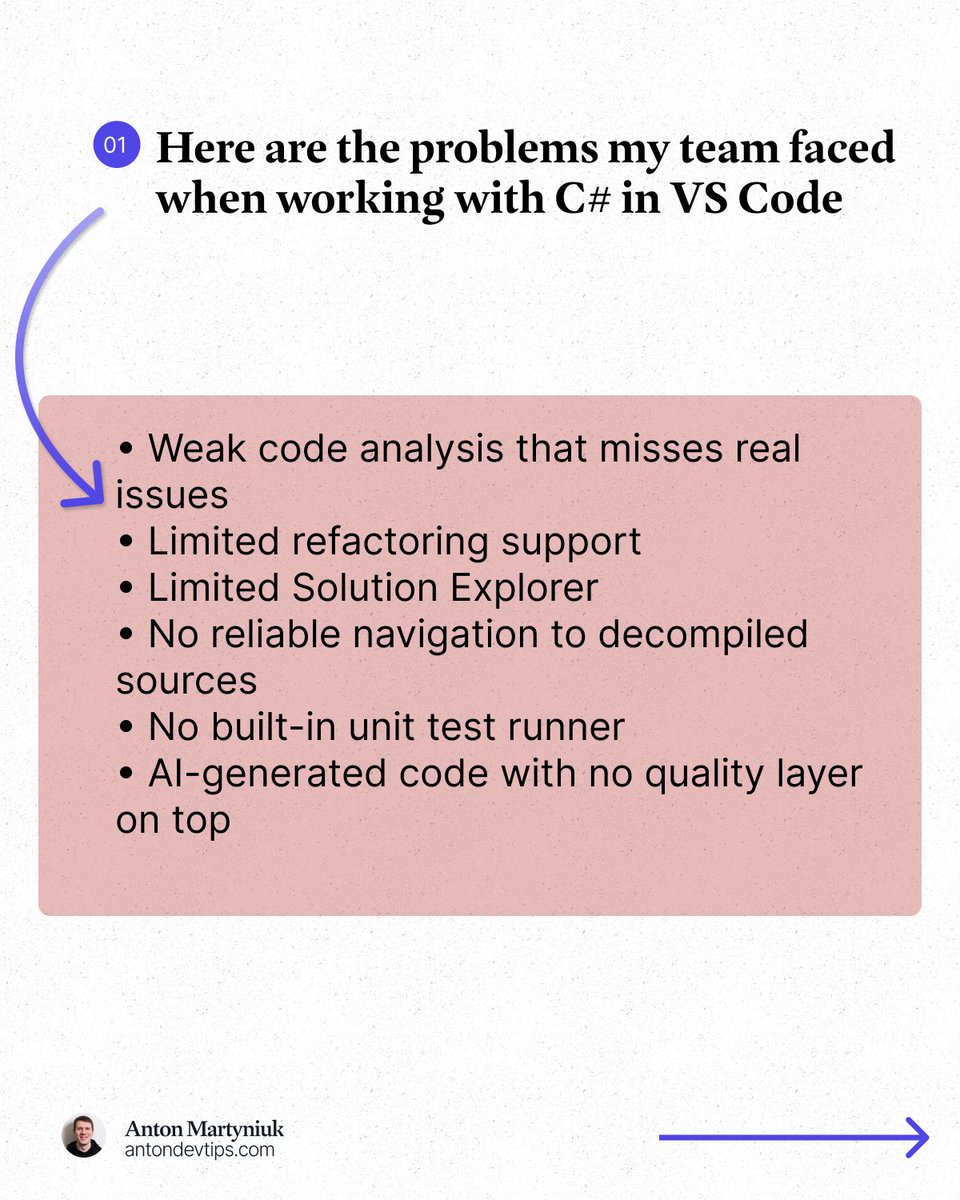
Here is what I kept running into:
• Weak code analysis that misses real issues
• Limited refactoring support
• Limited Solution Explorer
• No reliable navigation to decompiled sources
• No built-in unit test runner
• AI-generated code with no quality layer on top
For years, the only real options were:
❌ Use a full IDE like Visual Studio or Rider
❌ Piece together multiple VS Code extensions and hope they work
This changed in March.
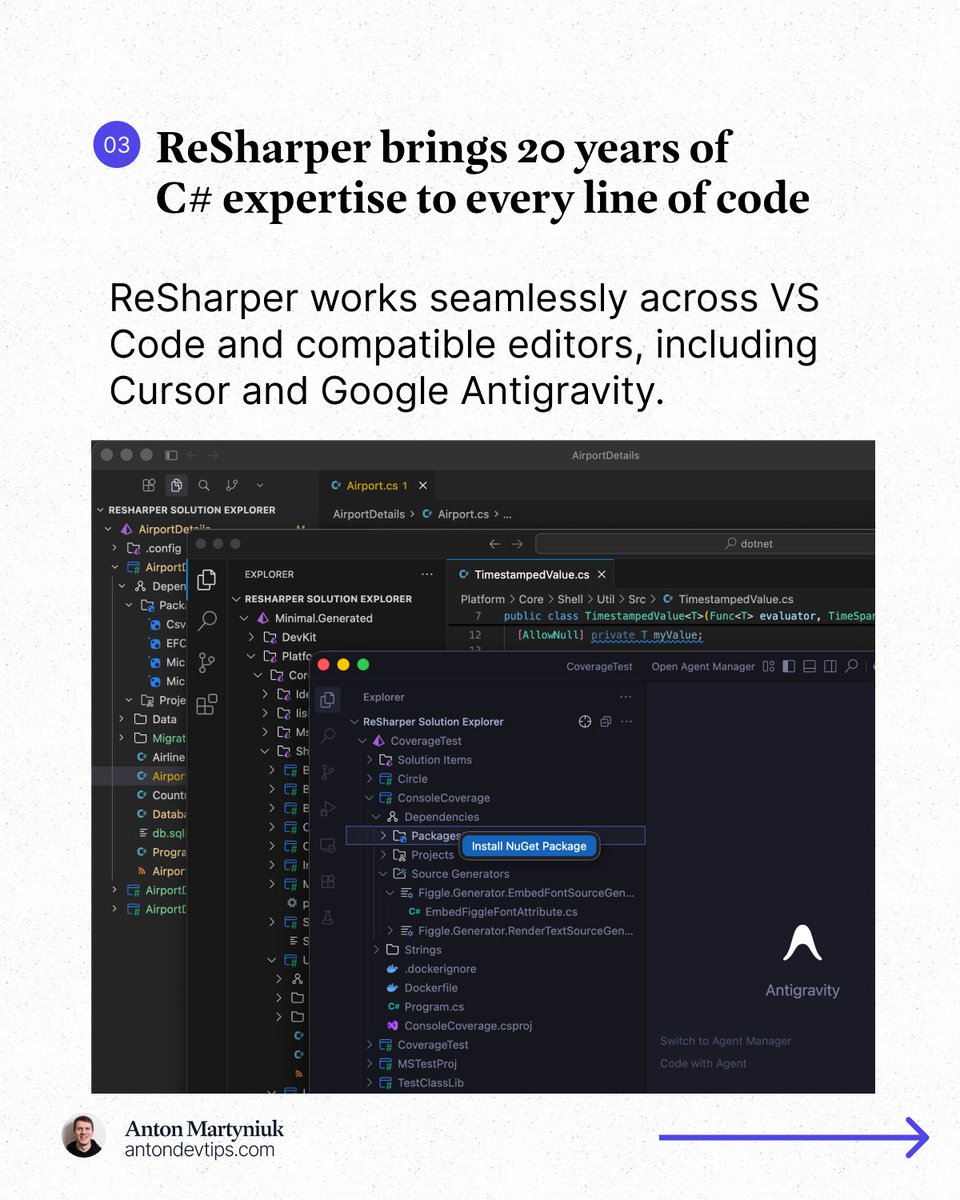
JetBrains officially released 𝗥𝗲𝗦𝗵𝗮𝗿𝗽𝗲𝗿 for VS Code, Cursor, and Google Antigravity: https://t.co/MVdN47IlJ7
This is the same ReSharper engine that millions of developers have trusted in Visual Studio for 20+ years, now running in VS Code, Cursor, and Google Antigravity.
𝗔𝗻𝗱 𝗵𝗲𝗿𝗲'𝘀 𝘁𝗵𝗲 𝗯𝗲𝘀𝘁 𝗽𝗮𝗿𝘁: 𝗶𝘁'𝘀 𝗙𝗥𝗘𝗘 𝗳𝗼𝗿 𝗻𝗼𝗻-𝗰𝗼𝗺𝗺𝗲𝗿𝗰𝗶𝗮𝗹 𝘂𝘀𝗲, 𝘀𝘁𝘂𝗱𝘆𝗶𝗻𝗴, 𝗮𝗻𝗱 𝗵𝗼𝗯𝗯𝘆 𝗽𝗿𝗼𝗷𝗲𝗰𝘁𝘀.
Here is what made a real difference for me:
1️⃣ Professional-grade code analysis
↳ Real-time inspections and quick-fixes for C#, Razor, Blazor, and XAML. It catches issues that basic extensions completely miss.
2️⃣ Smart coding assistance
↳ Context-aware completion, auto-imports, live templates, and inline documentation that go way beyond what a standard editor offers.
3️⃣ Solution Explorer inside VS Code
↳ A central hub for managing files, folders, NuGet packages, and projects across your entire solution. Just like in Rider or Visual Studio.
4️⃣ Refactoring you can trust
↳ Rename works across your whole solution while safely handling conflicts and references. No more search-and-replace guessing.
5️⃣ Fast navigation to any source
↳ Jump to symbols, usages, files, and types. When source code is not available, ReSharper decompiles assemblies and takes you directly to the declaration.
6️⃣ Built-in unit testing
↳ Run and manage tests for NUnit, xUnit .net, and MSTest directly in your editor with easy navigation to failing tests.
The next major area of focus for ReSharper for VS Code is debugging support.
JetBrains is actively working on support for launching debugging sessions and attaching to processes in .NET and .NET Framework applications.
👉 You can install ReSharper in the Extensions view of your editor (VS Code, Cursor, and Google Antigravity)
——
Many thanks to @jetbrains for sponsoring this post
@AntonMartyniuk I am a major fan of Resharper and JetBrains IDEs like Android Studio, it is really amazing to see Resharper being delivered to VS Code.
The only drawback of Resharper on Visual Studio is that it can feel heavy sometimes, particularly if you are on a low spec machine. Nice share.
How did I save 30 working hours?
Based on real numbers from real development.
I integrated @claudeai Code into my workflow last week and tracked everything:
Security reviews:
Before: 2-3 hours -> After: 15 minutes (-92%)
Refactoring:
Before: 5-6 hours -> After: 45 minutes (-87%)
Debugging:
Before 3-4 hours -> After: 30 minutes (-85%)
Context switching:
Before: 2-3 hours -> After: 15 minutes (-92%)
The results: 30 hours back in my schedule.
That's 120+ hours per month for deep work instead of toil.
The tech behind it: Claude Opus 4.6
This is, by far, the world's best coding model.
And it’s not just my opinion. It’s verified on the SWE-bench with 80.88%.
Because of that I strongly suggest you embrace AI in your daily usage.
It’s not about replacing us engineers.
It's about eliminating the toil so we can focus on solving problems.
So, try Claude Code today: https://t.co/yU3DPb14El
#AnthropicPartner