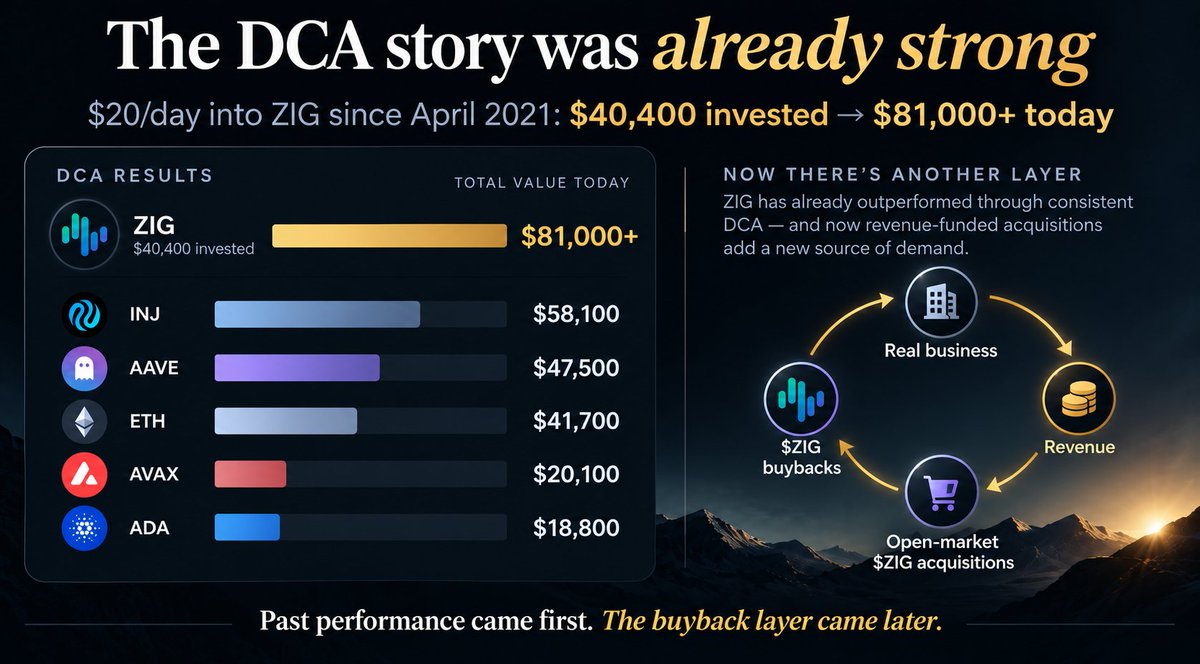
The part I find funny here is that $ZIG didn’t need the buyback story to outperform this basket.
A simple $20/day approach since launch would have turned $40.4K of total buys into about $81K based on the current comparison.
That’s ahead of SOL, BTC, XRP, BNB, INJ, AAVE and ETH in the same setup.
Now there’s another layer that didn’t exist back then:
@ZIGFinance is generating revenue and using part of it for recurring open-market $ZIG acquisitions.
Past performance obviously doesn’t tell you what happens next but it does make the current setup more interesting to watch.
A token needing the market to save the story is very different from a business that keeps producing revenue either way.
That’s the point @ZIGFinance is making with $ZIG.
Revenue from the business is being used to buy $ZIG from the open market and 1,194,300 $ZIG has already been burned permanently.
If the market turns bullish, great.
But the actual thesis is supposed to work before that happens.
Arbitrum is now another way to move native USDC into Sl8.
@cassator added the route through Circle’s CCTP which is the part I like here because the USDC stays native rather than turning into another wrapped version.
It sounds like a small backend detail but those are usually the things that make multichain wallets either convenient or annoying to use.
More routes, less unnecessary wrapping.
You can check here: https://t.co/rH4JCbrPlZ
The staking side of @cassator is one of those things where I’d look at the term before the APY.
There are 30, 90, 180 and 360-day options and the rate is fixed when you stake.
But early unstaking isn’t available.
So yeah, the higher number might look nicer but the real question is how long you’re actually okay leaving the funds there.
That’s probably the more important decision.
You can check here: https://t.co/rH4JCbrPlZ
Sl8 is starting to feel a lot less tied to one chain
@cassator has been quietly adding more routes into the same wallet, especially around USDC
Arc, Base, Solana, Ethereum, Avalanche, Optimism, Polygon and now Arbitrum have all been part of that expansion, with Circle infrastructure handling native USDC across supported routes
I think that’s the more interesting direction here
Not another bridge sitting on its own but making the chain you start from matter less once you’re actually inside Sl8
You can check here: https://t.co/rH4JCbrPlZ
The multichain part is probably what makes this update practical.
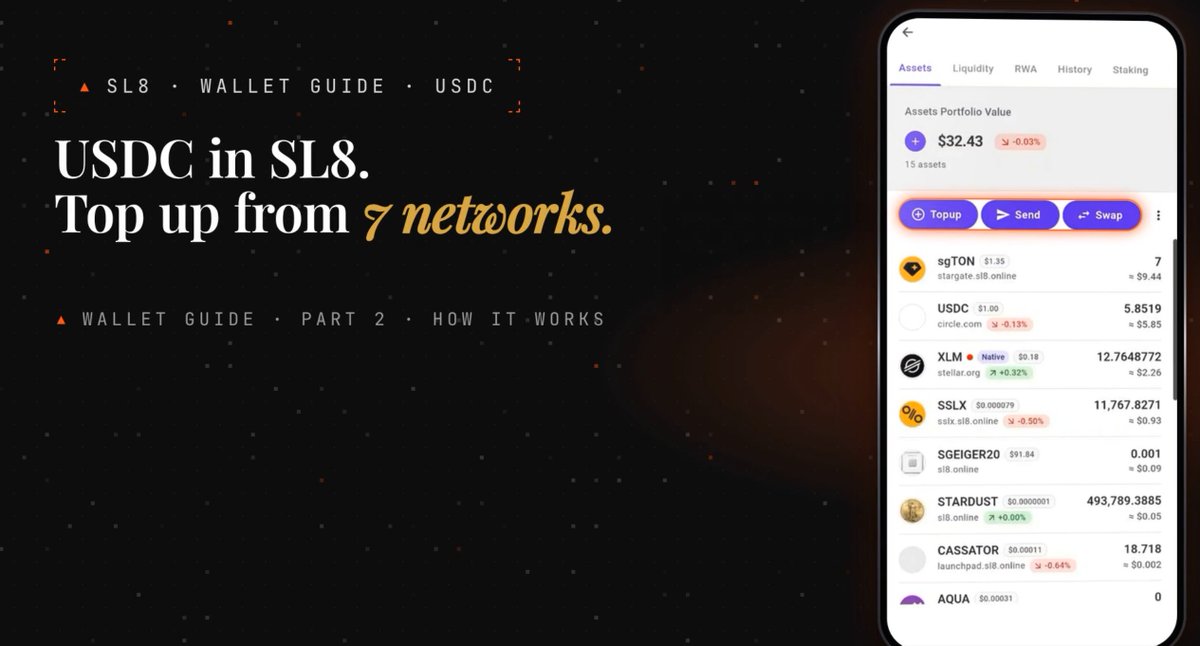
USDC deposits on Sl8 currently support Arc, Avalanche, Base, Ethereum, Optimism, Polygon and Solana and withdrawals can go back out through the same 7 networks.
@cassator also added a 6-level referral setup around staking, with rewards paid by the project rather than deducted from the referred user.
A lot going on in one wallet update.
You can check here: https://t.co/rH4JCbrPlZ
𝗕𝗿𝗶𝗱𝗴𝗲𝘀 𝗶𝗻 𝘁𝗵𝗲 Sl8 𝗪𝗮𝗹𝗹𝗲𝘁: $USDC 𝗗𝗲𝗽𝗼𝘀𝗶𝘁𝘀, 𝗦𝘁𝗮𝗸𝗶𝗻𝗴, 𝗮𝗻𝗱 𝗥𝗲𝗳𝗲𝗿𝗿𝗮𝗹 𝗥𝗲𝘄𝗮𝗿𝗱𝘀. 𝗣𝗮𝗿𝘁 𝟮
In our previous post https://t.co/FqzfLjUPvr, we introduced 𝗦𝘁𝗮𝗿 𝗚𝗮𝘁𝗲 𝗕𝗿𝗶𝗱𝗴𝗲 - 𝗮 𝗳𝗲𝗮𝘁𝘂𝗿𝗲 𝗯𝘂𝗶𝗹𝘁 𝗶𝗻𝘁𝗼 𝘁𝗵𝗲 Sl8 𝘄𝗮𝗹𝗹𝗲𝘁 and explained how to deposit cryptocurrency from different blockchains and receive the corresponding tokens from our 𝟭𝟬 𝗮𝘃𝗮𝗶𝗹𝗮𝗯𝗹𝗲 𝘀𝗴-𝗮𝘀𝘀𝗲𝘁𝘀:
• sgXRP - $XRP: via XRP Ledger.
• sgRLUSD - $RLUSD: via XRP Ledger.
• sgSOL - $SOL: via Solana.
• sgTRX - $TRX: via TRON.
• sgUSDT - $USDT: via Avalanche C-Chain, Ethereum, Solana, TON using the Jetton standard, and TRON using the TRC-20 standard.
• sgBNB - $BNB: via BNB Chain.
• sgPOL - $POL: via Polygon.
• sgETH - $ETH: via Ethereum and Optimism.
• sgTON - $TON ($GRAM): via the TON network.
• sgAVAX - $AVAX: via Avalanche C-Chain.
Now, let’s continue exploring our wallet and focus on $USDC - 𝗼𝗻𝗲 𝗼𝗳 𝘁𝗵𝗲 𝗺𝗮𝗶𝗻 𝗮𝘀𝘀𝗲𝘁𝘀 𝘂𝘀𝗲𝗱 𝗳𝗼𝗿 𝗽𝗮𝘆𝗺𝗲𝗻𝘁𝘀 𝗼𝗻 Sl8.
With $USDC, you can 𝗽𝘂𝗿𝗰𝗵𝗮𝘀𝗲 𝗮𝗰𝗰𝗲𝘀𝘀 𝘁𝗼 𝗽𝗮𝗶𝗱 𝗽𝗼𝘀𝘁𝘀 𝗮𝗻𝗱 𝗼𝘁𝗵𝗲𝗿 𝗰𝗼𝗻𝘁𝗲𝗻𝘁, 𝗽𝗮𝘆 𝗳𝗼𝗿 𝘀𝘂𝗯𝘀𝗰𝗿𝗶𝗽𝘁𝗶𝗼𝗻𝘀, 𝘀𝗲𝗻𝗱 𝘁𝗶𝗽𝘀, 𝗮𝗻𝗱 𝘀𝘂𝗽𝗽𝗼𝗿𝘁 𝗰𝗿𝗲𝗮𝘁𝗼𝗿𝘀 𝘄𝗶𝘁𝗵 𝘀𝗽𝗲𝗰𝗶𝗮𝗹 𝗹𝗶𝗸𝗲𝘀. Special likes also support $SSLX, the platform’s token, so you choose which asset to use when supporting a post.
$USDC is also used for 𝘁𝗿𝗮𝗻𝘀𝗳𝗲𝗿𝘀, 𝘀𝘄𝗮𝗽𝘀 𝗶𝗻𝘁𝗼 𝘀𝘂𝗽𝗽𝗼𝗿𝘁𝗲𝗱 𝘁𝗼𝗸𝗲𝗻𝘀, 𝗽𝗮𝗿𝘁𝗶𝗰𝗶𝗽𝗮𝘁𝗶𝗼𝗻 𝗶𝗻 𝗹𝗶𝗾𝘂𝗶𝗱𝗶𝘁𝘆 𝗽𝗼𝗼𝗹𝘀, 𝗮𝗻𝗱 𝘀𝘁𝗮𝗸𝗶𝗻𝗴. Payouts of available rewards through the 𝗣𝗮𝘆𝗼𝘂𝘁 section are also made in $USDC.
In this post, we’ll focus on 𝗳𝘂𝗻𝗱𝗶𝗻𝗴 𝘆𝗼𝘂𝗿 𝘄𝗮𝗹𝗹𝗲𝘁 𝗳𝗿𝗼𝗺 𝗱𝗶𝗳𝗳𝗲𝗿𝗲𝗻𝘁 𝗻𝗲𝘁𝘄𝗼𝗿𝗸𝘀, 𝘀𝘁𝗮𝗸𝗶𝗻𝗴 $USDC, 𝘁𝗵𝗲 𝗿𝗲𝗳𝗲𝗿𝗿𝗮𝗹 𝗽𝗿𝗼𝗴𝗿𝗮𝗺, 𝗮𝗻𝗱 𝘄𝗶𝘁𝗵𝗱𝗿𝗮𝘄𝗶𝗻𝗴 𝗳𝘂𝗻𝗱𝘀. We’ll explore other ways to use $USDC in more detail in future posts.
Importantly, 𝗦𝘁𝗮𝗿 𝗚𝗮𝘁𝗲 𝗕𝗿𝗶𝗱𝗴𝗲 𝗽𝗿𝗼𝘃𝗶𝗱𝗲𝘀 𝗮𝗻 𝗮𝗱𝗱𝗶𝘁𝗶𝗼𝗻𝗮𝗹 𝘄𝗮𝘆 𝘁𝗼 𝗳𝘂𝗻𝗱 𝘆𝗼𝘂𝗿 𝘄𝗮𝗹𝗹𝗲𝘁 𝗳𝗿𝗼𝗺 𝗼𝘁𝗵𝗲𝗿 𝗯𝗹𝗼𝗰𝗸𝗰𝗵𝗮𝗶𝗻𝘀. Direct deposits through the 𝗦𝘁𝗲𝗹𝗹𝗮𝗿 network continue to work as usual. You can still send supported Stellar assets, including $USDC 𝗮𝗻𝗱 $XLM, using the deposit details under 𝗧𝗼𝗽𝘂𝗽 → 𝗦𝘁𝗲𝗹𝗹𝗮𝗿.
If your $USDC is on another supported network, follow the deposit process below.
𝗛𝗼𝘄 𝘁𝗼 𝗱𝗲𝗽𝗼𝘀𝗶𝘁 $USDC 𝗳𝗿𝗼𝗺 𝗮𝗻𝗼𝘁𝗵𝗲𝗿 𝗯𝗹𝗼𝗰𝗸𝗰𝗵𝗮𝗶𝗻
In your Sl8 wallet, open 𝗪𝗮𝗹𝗹𝗲𝘁 → 𝗧𝗼𝗽𝘂𝗽 → 𝗚𝗮𝘁𝗲 𝗮𝘀𝘀𝗲𝘁𝘀 → 𝗨𝗦𝗗𝗖.
𝗦𝗲𝘃𝗲𝗻 𝗻𝗲𝘁𝘄𝗼𝗿𝗸𝘀 are currently available:
• 𝗔𝗿𝗰
• 𝗔𝘃𝗮𝗹𝗮𝗻𝗰𝗵𝗲 𝗖-𝗖𝗵𝗮𝗶𝗻
• 𝗕𝗮𝘀𝗲
• 𝗘𝘁𝗵𝗲𝗿𝗲𝘂𝗺
• 𝗢𝗽𝘁𝗶𝗺𝗶𝘀𝗺
• 𝗣𝗼𝗹𝘆𝗴𝗼𝗻
• 𝗦𝗼𝗹𝗮𝗻𝗮
Select the network where your $USDC is held. We’ll then display the 𝗱𝗲𝗽𝗼𝘀𝗶𝘁 𝗮𝗱𝗱𝗿𝗲𝘀𝘀, 𝗤𝗥 𝗰𝗼𝗱𝗲, 𝗮𝗻𝗱 𝗰𝘂𝗿𝗿𝗲𝗻𝘁 𝗹𝗶𝗺𝗶��𝘀 for that route.
𝗙𝗼𝗿 𝘁𝗵𝗶𝘀 $USDC 𝗱𝗲𝗽𝗼𝘀𝗶𝘁 𝗺𝗲𝘁𝗵𝗼𝗱, 𝘆𝗼𝘂 𝗿𝗲𝗰𝗲𝗶𝘃𝗲 𝗮 𝗽𝗲𝗿𝘀𝗼𝗻𝗮𝗹 𝗱𝗲𝗽𝗼𝘀𝗶𝘁 𝗮𝗱𝗱𝗿𝗲𝘀𝘀, 𝘀𝗼 𝗻𝗼 𝗠𝗘𝗠𝗢 𝗶𝘀 𝗿𝗲𝗾𝘂𝗶𝗿𝗲𝗱.
Copy the address into the external wallet or exchange you’ll be sending from. Select 𝗨𝗦𝗗𝗖, enter the amount, and check the details before confirming.
𝗧𝗵𝗲 𝘀𝗲𝗻𝗱𝗶𝗻𝗴 𝗻𝗲𝘁𝘄𝗼𝗿𝗸 𝗺𝘂𝘀𝘁 𝗺𝗮𝘁𝗰𝗵 𝘁𝗵𝗲 𝗻𝗲𝘁𝘄𝗼𝗿𝗸 𝘀𝗲𝗹𝗲𝗰𝘁𝗲𝗱 𝗶𝗻 Sl8. For example, if you opened deposit details for Solana, send your $USDC through Solana.
Check the minimum and maximum amounts for your selected route: 𝗹𝗶𝗺𝗶𝘁𝘀 𝗺𝗮𝘆 𝘃𝗮𝗿𝘆 𝗮𝗻𝗱 𝗰𝗵𝗮𝗻𝗴𝗲 𝗼𝘃𝗲𝗿 𝘁𝗶𝗺𝗲.
Also account for any fee charged by the service you’re sending from. If it deducts the fee from your transfer amount, fewer tokens will reach the address than you entered. The actual amount received must meet the deposit limits.
𝗗𝗲𝗽𝗼𝘀𝗶𝘁𝘀 𝗯𝗲𝗹𝗼𝘄 𝘁𝗵𝗲 𝗺𝗶𝗻𝗶𝗺𝘂𝗺 𝗮𝗿𝗲 𝗻𝗼𝘁 𝗰𝗿𝗲𝗱𝗶𝘁𝗲𝗱 𝗮𝘂𝘁𝗼𝗺𝗮𝘁𝗶𝗰𝗮𝗹𝗹𝘆 𝗮𝗻𝗱 𝗿𝗲𝗾𝘂𝗶𝗿𝗲 𝗰𝗼𝗻𝘁𝗮𝗰𝘁𝗶𝗻𝗴 𝘀𝘂𝗽𝗽𝗼𝗿𝘁.
Once the transfer has been processed, we’ll credit $USDC 𝗼𝗻 𝘁𝗵𝗲 𝗦𝘁𝗲𝗹𝗹𝗮𝗿 𝗻𝗲𝘁𝘄𝗼𝗿𝗸 𝗮𝘁 𝗮 𝟭:𝟭 𝗿𝗮𝘁𝗶𝗼. This ratio refers to the number of tokens; any costs of sending the transfer are accounted for separately.
You can check the transaction status using 𝗧𝗿𝗮𝗰𝗸 𝘁𝗵𝗶𝘀 𝗱𝗲𝗽𝗼𝘀𝗶𝘁 and your transaction history.
Once credited, the funds will appear in your 𝗔𝘀𝘀𝗲𝘁𝘀 list. Depositing adds funds to your balance. To participate in staking, you need to select and confirm a plan separately.
𝗛𝗼𝘄 𝘁𝗼 𝘀𝘁𝗮𝗸𝗲 $USDC
Open 𝗨𝗦𝗗𝗖 in your asset list and select 𝗦𝘁𝗮𝗸𝗲.
𝗧𝗵𝗲 𝗺𝗶𝗻𝗶𝗺𝘂𝗺 𝘀𝘁𝗮𝗸𝗶𝗻𝗴 𝗮𝗺𝗼𝘂𝗻𝘁 𝗶𝘀 𝘁𝗵𝗲 𝗲𝗾𝘂𝗶𝘃𝗮𝗹𝗲𝗻𝘁 𝗼𝗳 $100 𝗶𝗻 $USDC. This threshold applies specifically to staking and is separate from the wallet’s deposit limits.
You choose your staking period:
• 𝟯𝟬 𝗱𝗮𝘆𝘀
• 𝟵𝟬 𝗱𝗮𝘆𝘀
• 𝟭𝟴𝟬 𝗱𝗮𝘆𝘀
• 𝟯𝟲𝟬 𝗱𝗮𝘆𝘀
Your staking plan will show the 𝗔𝗣𝗬 𝗿𝗮𝘁𝗲 𝗮𝗻𝗱 𝗲𝘀𝘁𝗶𝗺𝗮𝘁𝗲𝗱 𝗿𝗲𝘄𝗮𝗿𝗱 𝗮𝘁 𝘁𝗵𝗲 𝗲𝗻𝗱 𝗼𝗳 𝘁𝗵𝗲 𝘁𝗲𝗿𝗺.
APY stands for annual percentage yield. It does not mean you receive the full annual percentage over 30 or 90 days. To assess the result for your chosen term, refer to the reward estimate shown in the plan.
𝗧𝗵𝗲 𝗔𝗣𝗬 𝗿𝗮𝘁𝗲 𝗶𝘀 𝗳𝗶𝘅𝗲𝗱 𝘄𝗵𝗲𝗻 𝘆𝗼𝘂 𝘀𝘁𝗮𝗸𝗲. 𝗥𝗲𝘄𝗮𝗿𝗱𝘀 𝗳𝗼𝗿 𝘀𝘁𝗮𝗸𝗶𝗻𝗴 $USDC 𝗮𝗿𝗲 𝗽𝗮𝗶𝗱 𝗶𝗻 $USDC.
Before confirming, check the amount, term, estimated reward, and automatic renewal settings.
𝗘𝗮𝗿𝗹𝘆 𝘂𝗻𝘀𝘁𝗮𝗸𝗶𝗻𝗴 𝗶𝘀 𝗻𝗼𝘁 𝗮𝘃𝗮𝗶𝗹𝗮𝗯𝗹𝗲. Staked funds cannot be transferred or withdrawn before the plan ends. Choose an amount and term that account for when you may need access to those funds.
Automatic renewal is enabled 𝗮𝘁 𝘆𝗼𝘂𝗿 𝗱𝗶𝘀𝗰𝗿𝗲𝘁𝗶𝗼𝗻. If it is disabled, once the term ends, 𝘆𝗼𝘂𝗿 𝘀𝘁𝗮𝗸𝗲𝗱 𝗽𝗿𝗶𝗻𝗰𝗶𝗽𝗮𝗹 𝗮𝗻𝗱 𝗿𝗲𝘄𝗮𝗿𝗱 𝘄𝗶𝗹𝗹 𝗯𝗲 𝗿𝗲𝘁𝘂𝗿𝗻𝗲𝗱 𝗱𝗶𝗿𝗲𝗰𝘁𝗹𝘆 𝘁𝗼 𝘆𝗼𝘂𝗿 𝘄𝗮𝗹𝗹𝗲𝘁 𝗶𝗻 $USDC.
You can view information about your active plan in the 𝗦𝘁𝗮𝗸𝗶𝗻𝗴 section.
In addition to rewards from your own stake, Sl8 lets you earn referral rewards from staking by participants in your referral network.
𝗪𝗵𝗮𝘁 𝘁𝗵𝗲 𝗿𝗲𝗳𝗲𝗿𝗿𝗮𝗹 𝗽𝗿𝗼𝗴𝗿𝗮𝗺 𝗼𝗳𝗳𝗲𝗿𝘀
By inviting users to Sl8, you can earn rewards from their participation in staking. The program extends through 𝘀𝗶𝘅 𝗹𝗲𝘃𝗲𝗹𝘀.
The first level consists of users you invite directly. The second consists of users they invite. This structure continues in the same way through the sixth level.
Your reward is calculated 𝗳𝗿𝗼𝗺 𝘁𝗵𝗲 𝗮𝗺𝗼𝘂𝗻𝘁 𝘀𝘁𝗮𝗸𝗲𝗱 𝗯𝘆 𝗮 𝗽𝗮𝗿𝘁𝗶𝗰𝗶𝗽𝗮𝗻𝘁 𝗮𝘁 𝘁𝗵𝗲 𝗰𝗼𝗿𝗿𝗲𝘀𝗽𝗼𝗻𝗱𝗶𝗻𝗴 𝗹𝗲𝘃𝗲𝗹:
��� 𝗟𝗲𝘃𝗲𝗹 𝟭 - 𝟲%
• 𝗟𝗲𝘃𝗲𝗹 𝟮 - 𝟱%
• 𝗟𝗲𝘃𝗲𝗹 𝟯 - 𝟰%
• 𝗟𝗲𝘃𝗲𝗹 𝟰 - 𝟯%
• 𝗟𝗲𝘃𝗲𝗹 𝟱 - 𝟮%
• 𝗟𝗲𝘃𝗲𝗹 𝟲 - 𝟭%
𝗥𝗲𝗳𝗲𝗿𝗿𝗮𝗹 𝗿𝗲𝘄𝗮𝗿𝗱𝘀 𝗮𝗿𝗲 𝗽𝗮𝗶𝗱 𝗯𝘆 𝘁𝗵𝗲 𝗽𝗿𝗼𝗷𝗲𝗰𝘁 𝗳𝗿𝗼𝗺 𝗶𝘁𝘀 𝗼𝘄𝗻 𝗳𝘂𝗻𝗱𝘀. The referred user does not pay for them: we do not deduct these amounts from their staked principal or rewards. They receive their funds and full staking reward according to their chosen plan’s terms.
Referral rewards are credited to the 𝗣𝗮𝘆𝗼𝘂𝘁 section. We’ll explain how this section works and how to receive other rewards in a separate post.
𝗛𝗼𝘄 𝘁𝗼 𝘄𝗶𝘁𝗵𝗱𝗿𝗮𝘄 $USDC
Once funds are available in your balance, open 𝗨𝗦𝗗𝗖 in your asset list and select 𝗪𝗶𝘁𝗵𝗱𝗿𝗮𝘄.
Withdrawals support 𝘁𝗵𝗲 𝘀𝗮𝗺𝗲 𝘀𝗲𝘃𝗲𝗻 𝗻𝗲𝘁𝘄𝗼𝗿𝗸𝘀 listed in the deposit section. You can choose any of them, regardless of which network you originally used to deposit.
Select the receiving network and paste the recipient’s address.
If you’re sending $USDC to an exchange, copy the address from its 𝗨𝗦𝗗𝗖 𝗱𝗲𝗽𝗼𝘀𝗶𝘁 𝘀𝗲𝗰𝘁𝗶𝗼𝗻 𝗳𝗼𝗿 𝘁𝗵𝗮𝘁 𝘀𝗽𝗲𝗰𝗶𝗳𝗶𝗰 𝗻𝗲𝘁𝘄𝗼𝗿𝗸. Make sure the recipient supports this asset on the selected blockchain.
For withdrawals, use 𝘁𝗵𝗲 𝗿𝗲𝗰𝗶𝗽𝗶𝗲𝗻𝘁’𝘀 𝗱𝗲𝗽𝗼𝘀𝗶𝘁 𝗱𝗲𝘁𝗮𝗶𝗹𝘀, rather than the address we provided for funding your Sl8 wallet.
Select 𝗡𝗲𝘅𝘁 and enter the amount.
𝗧𝗵𝗲 𝘄𝗶𝘁𝗵𝗱𝗿𝗮𝘄𝗮𝗹 𝗳𝗲𝗲 𝗶𝘀 ���.𝟱 𝗨𝗦𝗗𝗖 𝗽𝗲𝗿 𝘁𝗿𝗮𝗻𝘀𝗮𝗰𝘁𝗶𝗼𝗻. Two fee payment options are available:
• 𝗗𝗲𝗱𝘂𝗰𝘁 𝗳𝗿𝗼𝗺 𝗮𝗺𝗼𝘂𝗻𝘁. If you enter 10 USDC, 10 USDC will be deducted from your balance, and the recipient will receive 9.5 USDC.
• 𝗔𝗱𝗱 𝗼𝗻 𝘁𝗼𝗽. If you enter 10 USDC as the amount to receive, 10.5 USDC will be deducted from your balance.
To add the fee on top, your balance must cover 𝘁𝗵𝗲 𝘁𝗿𝗮𝗻𝘀𝗳𝗲𝗿 𝗮𝗺𝗼𝘂𝗻𝘁 𝗽𝗹𝘂𝘀 𝘁𝗵𝗲 𝗳𝗲𝗲. Check the current limits for your selected route.
At the final step, we’ll display the 𝗻𝗲𝘁𝘄𝗼𝗿𝗸, 𝗿𝗲𝗰𝗶𝗽𝗶𝗲𝗻𝘁 𝗮𝗱𝗱𝗿𝗲𝘀𝘀, 𝘁𝗼𝘁𝗮𝗹 𝗮𝗺𝗼𝘂𝗻𝘁 𝘁𝗼 𝗯𝗲 𝗱𝗲𝗱𝘂𝗰𝘁𝗲𝗱, 𝗳𝗲𝗲, 𝗮𝗻𝗱 𝗮𝗺𝗼𝘂𝗻𝘁 𝘁𝗼 𝗯𝗲 𝗿𝗲𝗰𝗲𝗶𝘃𝗲𝗱.
Review this information carefully. If you notice an error, return to the previous step and correct it. Once you’ve checked everything, select 𝗖𝗼𝗻𝗳𝗶𝗿𝗺 𝘄𝗶𝘁𝗵𝗱𝗿𝗮𝘄𝗮𝗹.
Processing usually takes a few minutes. The actual time depends on transaction processing and the destination network. When sending to an exchange, crediting also depends on its rules and required number of confirmations.
𝗪𝗲’𝗿𝗲 𝗰𝗼𝗻𝘁𝗶𝗻𝘂𝗶𝗻𝗴 𝘁𝗼 𝗲𝘅𝗽𝗮𝗻𝗱 𝘁𝗵𝗲 𝗮𝘃𝗮𝗶𝗹𝗮𝗯𝗹𝗲 𝗻𝗲𝘁𝘄𝗼𝗿𝗸𝘀
For $USDC, we plan to add 𝗔𝗿𝗯𝗶𝘁𝗿𝘂𝗺, 𝗛𝘆𝗽𝗲𝗿𝗹𝗶𝗾𝘂𝗶𝗱, 𝗮𝗻𝗱 𝗫𝗥𝗣 𝗟𝗲𝗱𝗴𝗲𝗿. These routes are currently marked as upcoming and are not yet available. We’ll announce their launch and terms of use separately.
𝗜𝗳 𝘆𝗼𝘂 𝗻𝗲𝗲𝗱 𝗵𝗲𝗹𝗽
Contact our support team:
• In the Sl8 app: 𝗦𝗲𝘁𝘁𝗶𝗻𝗴𝘀 → 𝗖𝗼𝗻𝘁𝗮𝗰𝘁 𝘀𝘂𝗽𝗽𝗼𝗿𝘁.
• On Telegram: Sl8 Support - https://t.co/FBbgetI3ob
If your question concerns a transfer, include the asset name, network, amount, and 𝗧𝘅𝗜𝗗 (𝘁𝗿𝗮𝗻𝘀𝗮𝗰𝘁𝗶𝗼𝗻 𝗵𝗮𝘀𝗵) from the transaction details. This will help us check its status.
𝗪𝗲’𝗿𝗲 𝗰𝗼𝗻𝘁𝗶𝗻𝘂𝗶𝗻𝗴 𝘁𝗼 𝗱𝗲𝘃𝗲𝗹𝗼𝗽 Sl8 𝗮𝗻𝗱 𝗲𝘅𝗽𝗮𝗻𝗱 𝗼𝘂𝗿 𝘄𝗮𝗹𝗹𝗲𝘁’𝘀 𝗰𝗮𝗽𝗮𝗯𝗶𝗹𝗶𝘁𝗶𝗲𝘀. 𝗧𝗵𝗮𝗻𝗸 𝘆𝗼𝘂 𝗳𝗼𝗿 𝘀𝘁𝗮𝘆𝗶𝗻𝗴 𝘄𝗶𝘁𝗵 𝘂𝘀!
In upcoming posts, we’ll explore other features of the Sl8 platform.
#Sl8 #Stellar #USDC #StarGateBridge #Staking