@docalysis I'm receiving this error when calling API to chat with a directory containing multiple files. The programming language is Javascript
{"success":false,"status":404,"error":"(404) An error occurred."}
CI/CD Pipeline Explained in Simple Terms
Section 1 - SDLC with CI/CD
The software development life cycle (SDLC) consists of several key stages: development, testing, deployment, and maintenance. CI/CD automates and integrates these stages to enable faster, more reliable releases.
When code is pushed to a git repository, it triggers an automated build and test process. End-to-end (e2e) test cases are run to validate the code. If tests pass, the code can be automatically deployed to staging/production. If issues are found, the code is sent back to development for bug fixing. This automation provides fast feedback to developers and reduces risk of bugs in production.
Section 2 - Difference between CI and CD
Continuous Integration (CI) automates the build, test, and merge process. It runs tests whenever code is committed to detect integration issues early. This encourages frequent code commits and rapid feedback.
Continuous Delivery (CD) automates release processes like infrastructure changes and deployment. It ensures software can be released reliably at any time through automated workflows. CD may also automate the manual testing and approval steps required before production deployment.
Section 3 - CI/CD Pipeline
A typical CI/CD pipeline has several connected stages:
- Developer commits code changes to source control
- CI server detects changes and triggers build
- Code is compiled, tested (unit, integration tests)
- Test results reported to developer
- On success, artifacts are deployed to staging environments
- Further testing may be done on staging before release
- CD system deploys approved changes to production
--
Subscribe to our weekly newsletter to get a Free System Design PDF (158 pages): https://t.co/uc5M7CdXXC
CAP, BASE, SOLID, KISS, What do these acronyms mean?
The diagram below explains the common acronyms in system designs.
🔹 CAP
CAP theorem states that any distributed data store can only provide two of the following three guarantees:
1. Consistency - Every read receives the most recent write or an error.
2. Availability - Every request receives a response.
3. Partition tolerance - The system continues to operate in network faults.
However, this theorem was criticized for being too narrow for distributed systems, and we shouldn’t use it to categorize the databases. Network faults are guaranteed to happen in distributed systems, and we must deal with this in any distributed systems.
You can read more on this in “Please stop calling databases CP or AP” by Martin Kleppmann.
🔹 BASE
The ACID (Atomicity-Consistency-Isolation-Durability) model used in relational databases is too strict for NoSQL databases. The BASE principle offers more flexibility, choosing availability over consistency. It states that the states will eventually be consistent.
🔹 SOLID
SOLID principle is quite famous in OOP. There are 5 components to it.
1. SRP (Single Responsibility Principle)
Each unit of code should have one responsibility.
2. OCP (Open Close Principle)
Units of code should be open for extension but closed for modification.
3. LSP (Liskov Substitution Principle)
A subclass should be able to be substituted by its base class.
4. ISP (Interface Segregation Principle)
Expose multiple interfaces with specific responsibilities.
5. DIP (Dependency Inversion Principle)
Use abstractions to decouple dependencies in the system.
🔹 KISS
"Keep it simple, stupid!" is a design principle first noted by the U.S. Navy in 1960. It states that most systems work best if they are kept simple.
Over to you: Have you invented any acronyms in your career?
–
Subscribe to our weekly newsletter to get a Free System Design PDF (158 pages): https://t.co/uc5M7CdXXC
REST API Cheatsheet.
The method to download high-resolution PDF is available at the end.
This guide is designed to help you understand the world of RESTful APIs in a clear and engaging way.
What's inside:
- An exploration of the six fundamental principles of REST API design.
- Insights into key components such as HTTP methods, protocols, versioning, and more.
- A special focus on practical aspects like pagination, filtering, and endpoint design.
Whether you're beginning your API journey or looking to refresh your knowledge, this blog and cheat sheet combo is the perfect toolkit for success.
–
Subscribe to our newsletter to download the 𝐡𝐢𝐠𝐡-𝐫𝐞𝐬𝐨𝐥𝐮𝐭𝐢𝐨𝐧 𝐜𝐡𝐞𝐚𝐭 𝐬𝐡𝐞𝐞𝐭. After signing up, find the download link on the success page: https://t.co/hge4A4mGmq
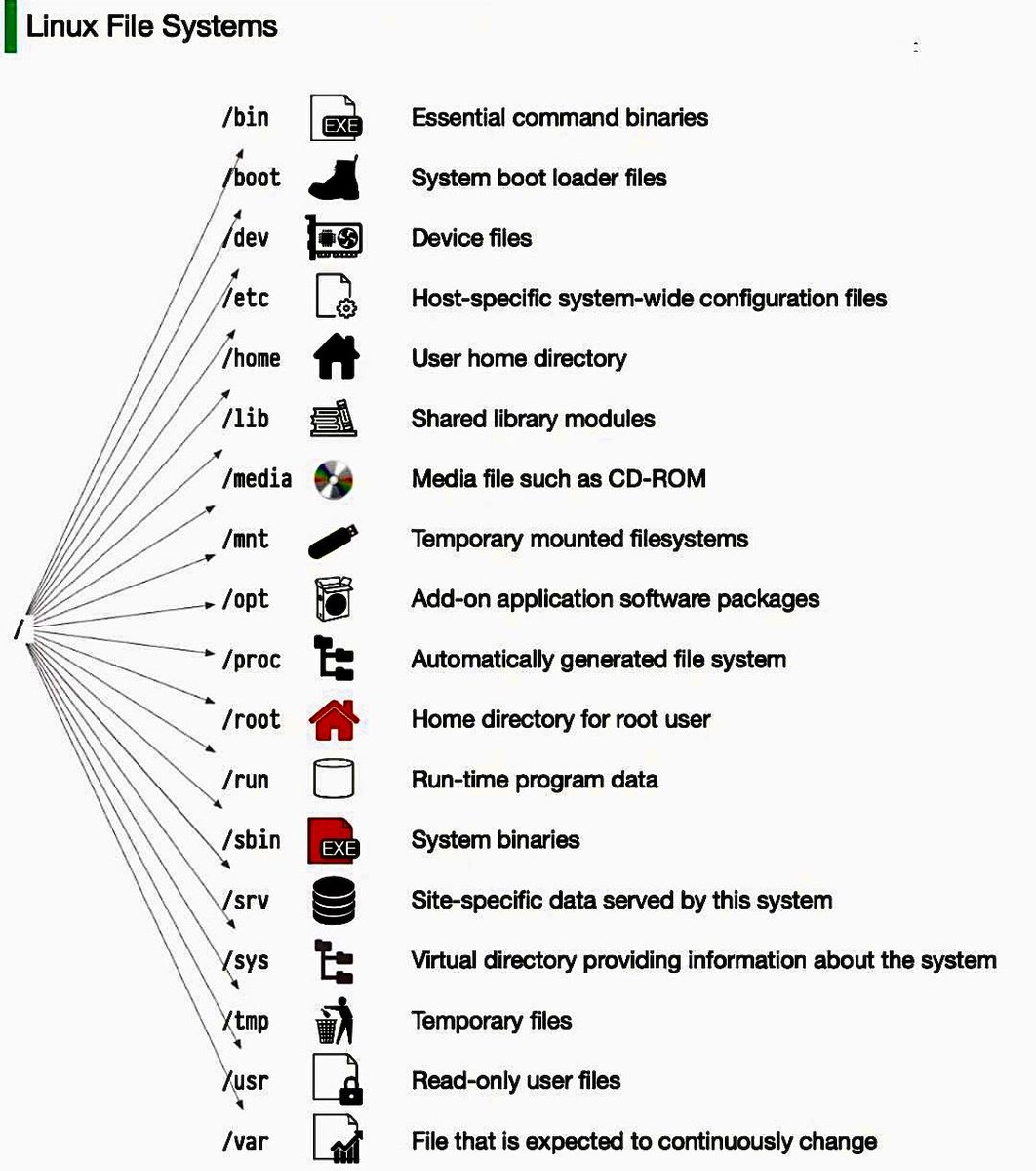
Linux file system explained.
The Linux file system used to resemble an unorganized town where individuals constructed their houses wherever they pleased. However, in 1994, the Filesystem Hierarchy Standard (FHS) was introduced to bring order to the Linux file system.
By implementing a standard like the FHS, software can ensure a consistent layout across various Linux distributions. Nonetheless, not all Linux distributions strictly adhere to this standard. They often incorporate their own unique elements or cater to specific requirements.
To become proficient in this standard, you can begin by exploring. Utilize commands such as "cd" for navigation and "ls" for listing directory contents. Imagine the file system as a tree, starting from the root (/). With time, it will become second nature to you, transforming you into a skilled Linux administrator.
Have fun exploring!
Over to you: which directory did you use most frequently?
–
Subscribe to our weekly newsletter to get a Free System Design PDF (158 pages): https://t.co/uc5M7CdXXC
How can Cache Systems go wrong?
The diagram below shows 4 typical cases where caches can go wrong and their solutions.
1. Thunder herd problem
This happens when a large number of keys in the cache expire at the same time. Then the query requests directly hit the database, which overloads the database.
There are two ways to mitigate this issue: one is to avoid setting the same expiry time for the keys, adding a random number in the configuration; the other is to allow only the core business data to hit the database and prevent non-core data to access the database until the cache is back up.
2. Cache penetration
This happens when the key doesn’t exist in the cache or the database. The application cannot retrieve relevant data from the database to update the cache. This problem creates a lot of pressure on both the cache and the database.
To solve this, there are two suggestions. One is to cache a null value for non-existent keys, avoiding hitting the database. The other is to use a bloom filter to check the key existence first, and if the key doesn’t exist, we can avoid hitting the database.
3. Cache breakdown
This is similar to the thunder herd problem. It happens when a hot key expires. A large number of requests hit the database.
Since the hot keys take up 80% of the queries, we do not set an expiration time for them.
4. Cache crash
This happens when the cache is down and all the requests go to the database.
There are two ways to solve this problem. One is to set up a circuit breaker, and when the cache is down, the application services cannot visit the cache or the database. The other is to set up a cluster for the cache to improve cache availability.
Over to you: Have you met any of these issues in production?
–
Subscribe to our weekly newsletter to get a Free System Design PDF (158 pages): https://t.co/uc5M7CdXXC
Explaining 8 Popular Network Protocols in 1 Diagram.
Network protocols are standard methods of transferring data between two computers in a network.
1. HTTP (HyperText Transfer Protocol)
HTTP is a protocol for fetching resources such as HTML documents. It is the foundation of any data exchange on the Web and it is a client-server protocol.
2. HTTP/3
HTTP/3 is the next major revision of the HTTP. It runs on QUIC, a new transport protocol designed for mobile-heavy internet usage. It relies on UDP instead of TCP, which enables faster web page responsiveness. VR applications demand more bandwidth to render intricate details of a virtual scene and will likely benefit from migrating to HTTP/3 powered by QUIC.
3. HTTPS (HyperText Transfer Protocol Secure)
HTTPS extends HTTP and uses encryption for secure communications.
4. WebSocket
WebSocket is a protocol that provides full-duplex communications over TCP. Clients establish WebSockets to receive real-time updates from the back-end services. Unlike REST, which always “pulls” data, WebSocket enables data to be “pushed”. Applications, like online gaming, stock trading, and messaging apps leverage WebSocket for real-time communication.
5. TCP (Transmission Control Protocol)
TCP is is designed to send packets across the internet and ensure the successful delivery of data and messages over networks. Many application-layer protocols build on top of TCP.
6. UDP (User Datagram Protocol)
UDP sends packets directly to a target computer, without establishing a connection first. UDP is commonly used in time-sensitive communications where occasionally dropping packets is better than waiting. Voice and video traffic are often sent using this protocol.
7. SMTP (Simple Mail Transfer Protocol)
SMTP is a standard protocol to transfer electronic mail from one user to another.
8. FTP (File Transfer Protocol)
FTP is used to transfer computer files between client and server. It has separate connections for the control channel and data channel.
–
Subscribe to our weekly newsletter to get a Free System Design PDF (158 pages): https://t.co/uc5M7CdXXC
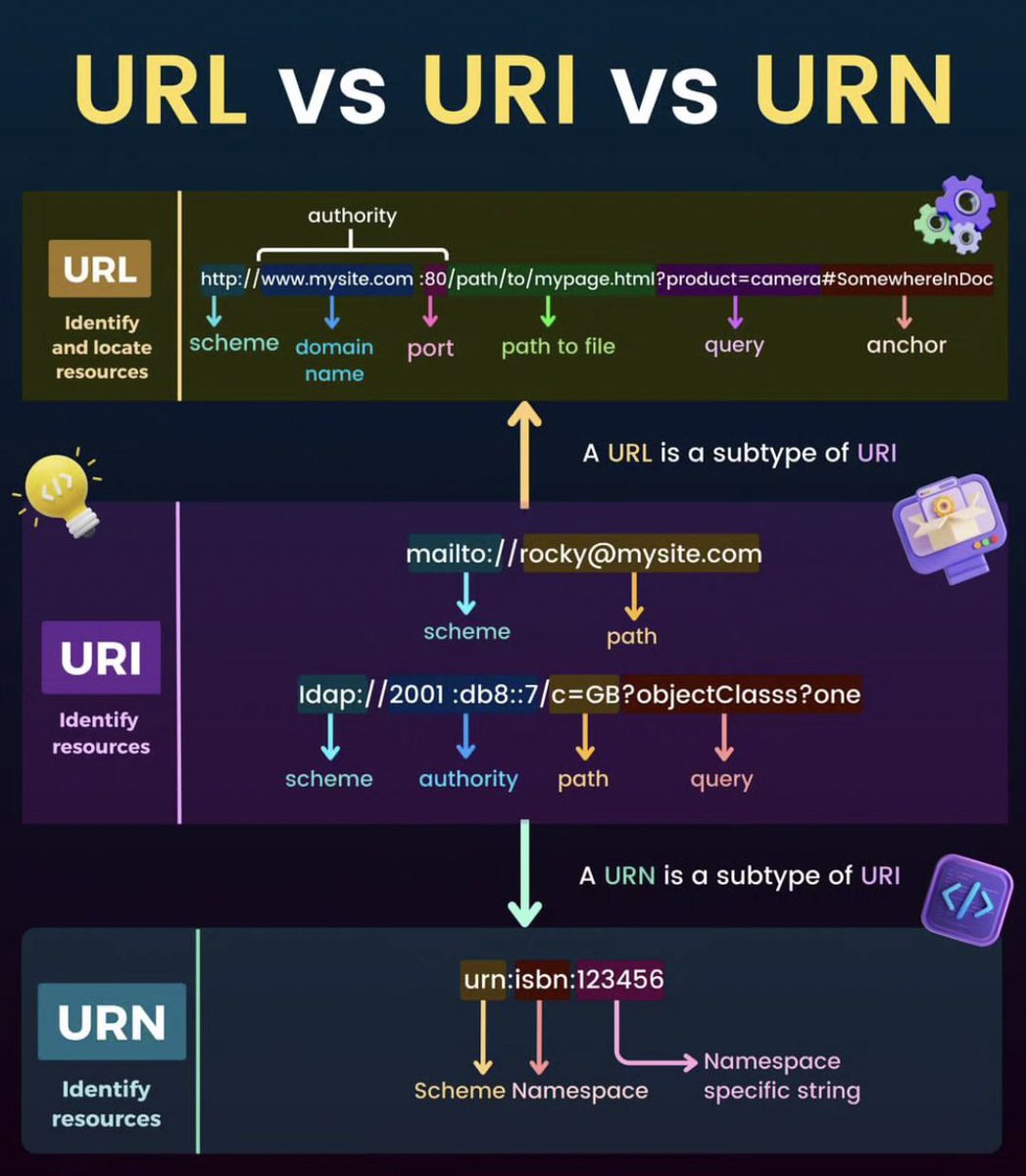
URL Vs URI Vs URN
URL (Uniform Resource Locator):
is a specific type of URI that provides the web address or location of a resource on the internet.
URI (Uniform Resource Identifier):
It is a string of characters that identifies a specific resource, such as a webpage, a file, or a service.
URN (Uniform Resource Name):
Is a type of URI that is used to uniquely identify a resource, independent of its location.