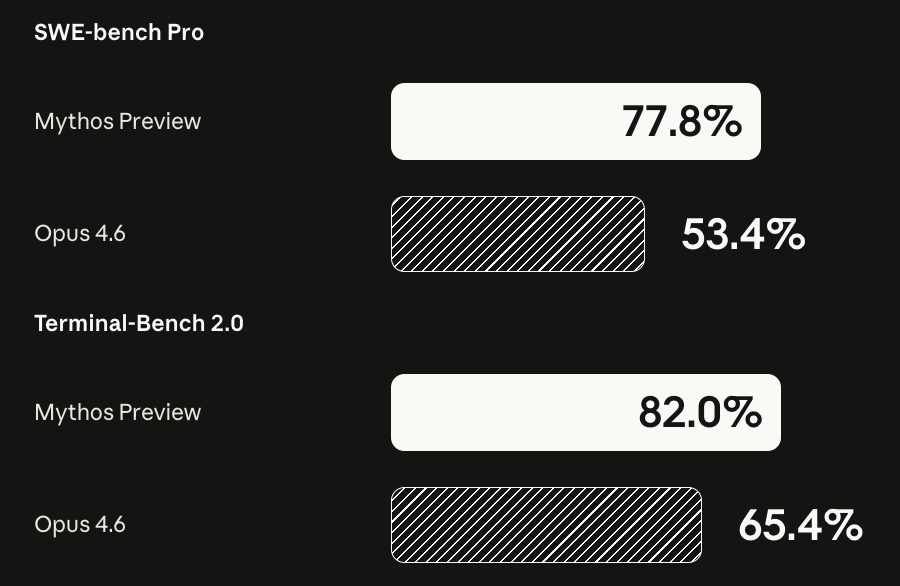
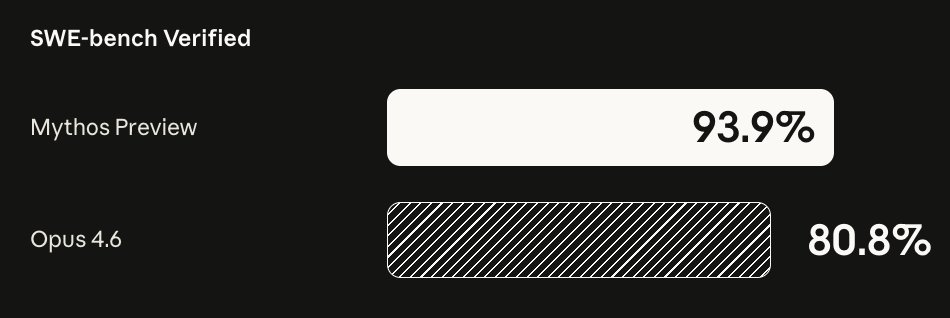
This level of callousness in maintaining availability will kill any other company. But not this one. If anything, it might even increase their valuation citing overwhelming demand for their product.
I’m not questioning the integrity of the labs that are producing these mind blowing results but when you have a dynamic entity that can willingly ignore instructions to achieve a goal, organizational integrity alone doesn’t get you far.
The time has come to move on from traditional benchmarking approaches for foundational models. Alignment faking is serious enough now that it undermines test results on any benchmark.
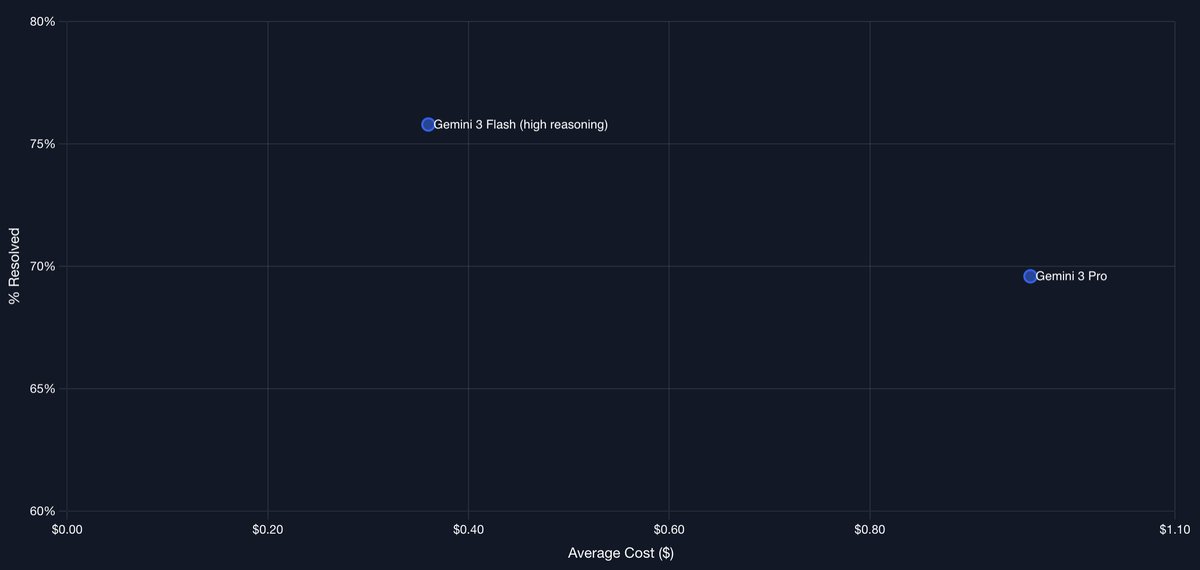
That said, it's a bit old news now. Google has shipped newer iterations since then, including Gemini 3.1 Pro which pushes SWE-bench Verified up to the ~80-81% range.
More relevantly, the Deep Think (high-reasoning / "thinking") mode on Gemini 3 Pro flips the script and outperforms the standard Flash variant on these agentic coding tasks by applying deeper inference-time compute where it counts.
Google's iteration speed on the Gemini 3 family has been impressive. The landscape moves fast!
These two models were only launched a month apart, with Flash being more recent. It's crazy how fast Google moved here. They were able to reduce cost by over 60% while beating the Pro model without breaking a sweat.
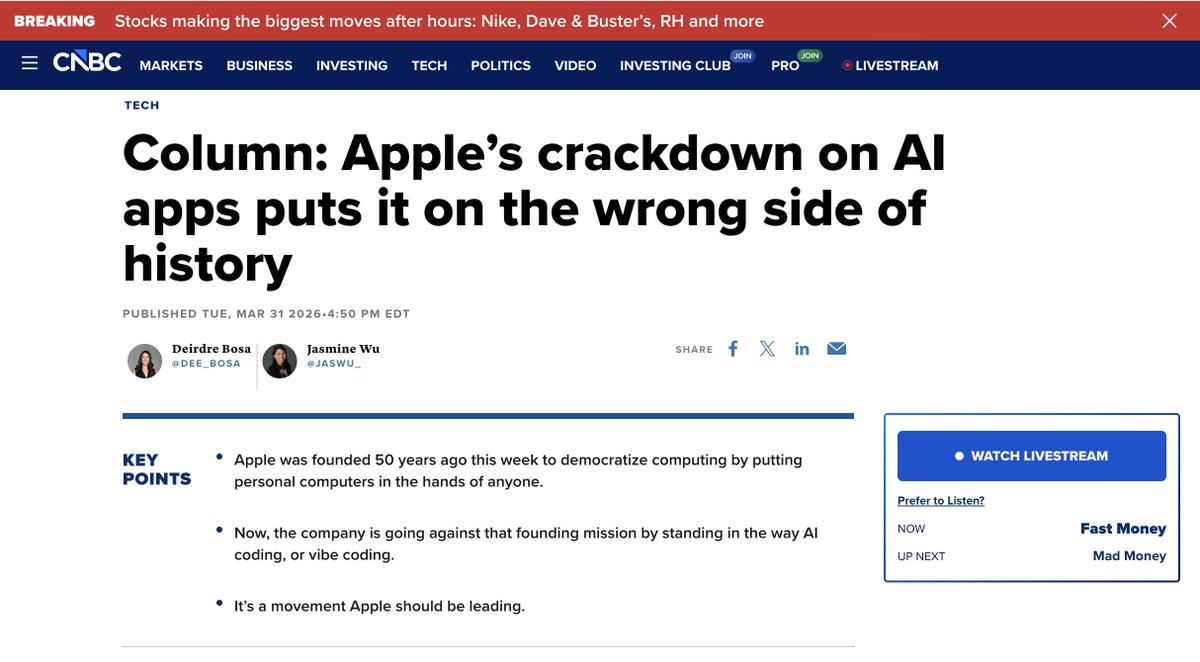
Apple’s rejection of Replit is technically defensible and consistent with their rules IMO. Yet approving similar AI tools in Xcode keeps the motive debate alive. Is it pure enforcement or moat protection? Worth watching if this pushes innovation to the open web. Where should the line be?
Apple's crackdown on vibe coding apps puts it on the wrong side of history
vibe coding is the biggest democratization of software since the App Store itself. But Apple is blocking the tools that make it possible.... the same week it turns 50.
The irony is that Apple should be leading this moment and instead its holding it back
w/ @jaswu_
Computer use is now in Claude Code.
Claude can open your apps, click through your UI, and test what it built, right from the CLI.
Now in research preview on Pro and Max plans.
🚀 @bcherny Exactly this principle, but for mobile apps! Give Claude visual verification and it will iterate until the UI perfectly matches the design.
My setup: Maestro for E2E UI tests and Xcode MCP to control the iOS simulator in real time.
I built a custom Claude skill that fires a workflow: it runs the relevant Maestro tests on every UI change (catches regressions instantly), visually verifies in the simulator, then auto-updates the test suite whenever it discovers new behavior.
Claude writes → tests visually → refines → repeat until pixel-perfect. Same agentic loop you get with the Chrome extension, just native mobile.
6/ Use the Chrome extension for frontend work
The most important tip for using Claude Code is: give Claude a way to verify its output. Once you do that, Claude will iterate until the result is great.
Think of it like any other engineer: if you ask someone to build a website but they aren't allowed to use a browser, will the result look good? Probably not. But if you give them a browser, they will write code and iterate until it looks good.
Personally, I use the Chrome extension every time I work on web code. It tends to work more reliably than other similar MCPs.
Download the extension for Chrome/Edge here: https://t.co/m7wwQUmp1C
If you have a limitless token budget like
@bcherny then use @claudeai worktrees. They're amazing! If you're on a more token constrained plan like me, then you can achieve pretty much the same effect with my setup in 20% the cost.
https://t.co/G7Z6oQAieN
10/ Use git worktrees
Claude Code ships with deep support for git worktrees. Worktrees are essential for doing lots of parallel work in the same repository. I have dozens of Claudes running at all times, and this is how I do it.
Use claude -w to start a new session in a worktree, or hit the "worktree" checkbox in the Claude Desktop app.
For non-git VCS users, use the WorktreeCreate hook to add your own logic for worktree creation.
Learn more: https://t.co/Yv3SlQr1Kr
I have found that using git worktrees with @geminicli and @claudeai, paired with a custom sync skill, is the best way to keep agents aligned.
Anybody else have this setup?
Most people are sleeping on the fact that Copilot CLI is just better than Claude Code or Codex subscription.
1. You switch between codex and claude in same subscription
2. $39 sub is great value (3-4x usage than $20 plans)
3. the CLI is so good! no flicker and /slash commands work even when model is working. Unlike CC or Codex.
@perplexity_ai is very good at building abstractions and apps on foundational models. Now that they've built Perplexity Computer, I wish they build a CLI product to orchestrate complex software development projects managing hand-offs between underlying models seamlessly. I'd pay for that! @AravSrinivas
Yes, these agents are absolutely horrible at writing decent-quality code.
But any time you say that out loud, there's a swarm of AI-apologists who've never built anything that scream at you, "skill issue!"
You might not care about the code, and that's alright, but you can't gaslight anyone who cares about good code.
Spend time organizing your codebase in accordance with good engineering practices like DRY, SOLID and KISS. They're tokens well spent. Your coding agent will be grateful to you and you will save a ton of time in the long run.