A few weeks ago, I started turning the Kubernetes commands I use every day into something I could actually keep as a reference.
Days of writing.
Reviewing commands.
Creating diagrams.
Simplifying explanations.
Going through every page again and again.
It finally became a 20-page Kubernetes Handbook. ☸️
I decided to give it away for free to DevOps & Kubernetes learners.
Less Googling. More practicing. 🚀
📘 Free download: https://t.co/sk8GgQphlU
36. You launched an EC2 instance.
But what actually happened? 👀
You didn't just create a server.
You selected:
→ AMI
→ Instance type
→ VPC / Subnet
→ Security Group
→ Storage
→ Optional public IP / key pair
Then AWS provisions the pieces:
Compute
→ Virtual server with your selected CPU/memory
Networking
→ Primary ENI
→ Private IP from the subnet
Storage
→ Root EBS volume for an EBS-backed AMI
Security
→ Security Group controls network traffic
Then the instance goes through:
Pending → Running → Status checks → Ready
That one Launch button is actually triggering the setup of compute, networking, storage and security.
That's what EC2 is really doing behind the scenes. 🚀
35. Your application can't reach the backend. 🚨
Security Group looks fine.
NACL looks fine.
Routes look fine.
So what actually happened?
Check VPC Flow Logs.
They can give you evidence about the traffic:
→ Source IP
→ Destination IP
→ Port / Protocol
→ Bytes / Packets
→ ACCEPT / REJECT
For example:
"10.0.1.10 → 10.0.2.20:443 → REJECT"
Now you know the traffic was rejected.
Then investigate:
→ Security Groups
→ NACLs
→ Route Tables
→ Other network configuration
But remember:
Flow Logs don't block traffic.
They record what happened.
Simple mental model:
VPC Flow Logs = network evidence 🔍
Don't guess.
Check the flow.
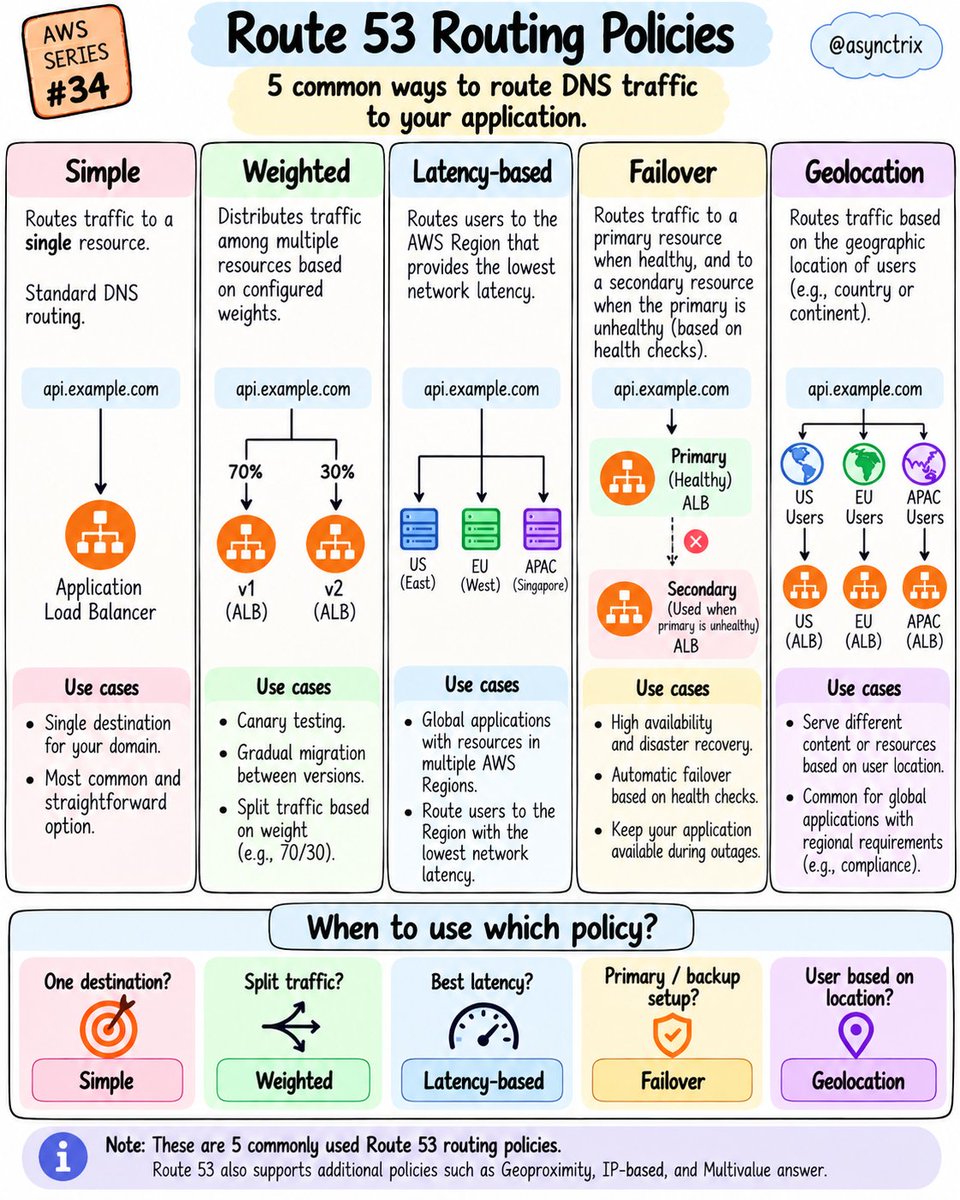
34. Route 53 Routing Policies ⚔️
Same domain.
Different routing requirements.
Which one do you choose?
→ Simple - One destination
→ Weighted - Split traffic between resources
→ Latency-based - Send users to the Region with the best network latency
→ Failover - Primary → Backup when the primary is unhealthy
→ Geolocation - Route based on user location
A simple way to remember:
One destination?
→ Simple
Split traffic?
→ Weighted
Best latency?
→ Latency-based
Primary + backup?
→ Failover
User location matters?
→ Geolocation
Route 53 isn't just DNS resolution.
It can also control how DNS queries are answered. 🌐
35. Your application can't reach the backend. 🚨
Security Group looks fine.
NACL looks fine.
Routes look fine.
So what actually happened?
Check VPC Flow Logs.
They can give you evidence about the traffic:
→ Source IP
→ Destination IP
→ Port / Protocol
→ Bytes / Packets
→ ACCEPT / REJECT
For example:
"10.0.1.10 → 10.0.2.20:443 → REJECT"
Now you know the traffic was rejected.
Then investigate:
→ Security Groups
→ NACLs
→ Route Tables
→ Other network configuration
But remember:
Flow Logs don't block traffic.
They record what happened.
Simple mental model:
VPC Flow Logs = network evidence 🔍
Don't guess.
Check the flow.