"Vamos ganhar todas as taças, onde vamos guardá-las???"
O pequeno Braydon fez a pergunta a Pep Guardiola há dez anos.
E eles se reencontraram para a resposta final.
I think AI coding hype follows roughly four stages:
1. Amazement
You try it and can’t believe how much code it generates from a few prompts.
2. Expansion
You start more and more projects because shipping suddenly feels cheap and fast.
This is also the phase where people start convincing everyone around them:
- coworkers
- management
- friends in other companies
because nobody wants to “fall behind” in 6–12 months.
That creates a massive snowball/FOMO effect.
3. The grind phase
You realize the generated code has architectural issues, sloppy mistakes, weird abstractions, duplicated logic, broken edge cases, etc.
So you start:
- re-prompting
- switching models
- increasing reasoning effort
- reviewing fixes
- generating fixes for previous fixes
And suddenly you spend your days reviewing AI-generated pull requests instead of building software.
4. Realization
You realize AI coding increases output much faster than it increases certainty.
The code still needs:
- review
- testing
- ownership
- architectural understanding
- long-term maintenance
Usually by expensive senior engineers.
And the interesting thing is:
this whole cycle can take many months or even more than a year because people become socially and professionally invested in the narrative themselves.
Once teams, managers, and entire companies have been convinced that this is the future, it becomes psychologically and politically very hard to later say:
“Actually, the ROI is much lower than we expected.”
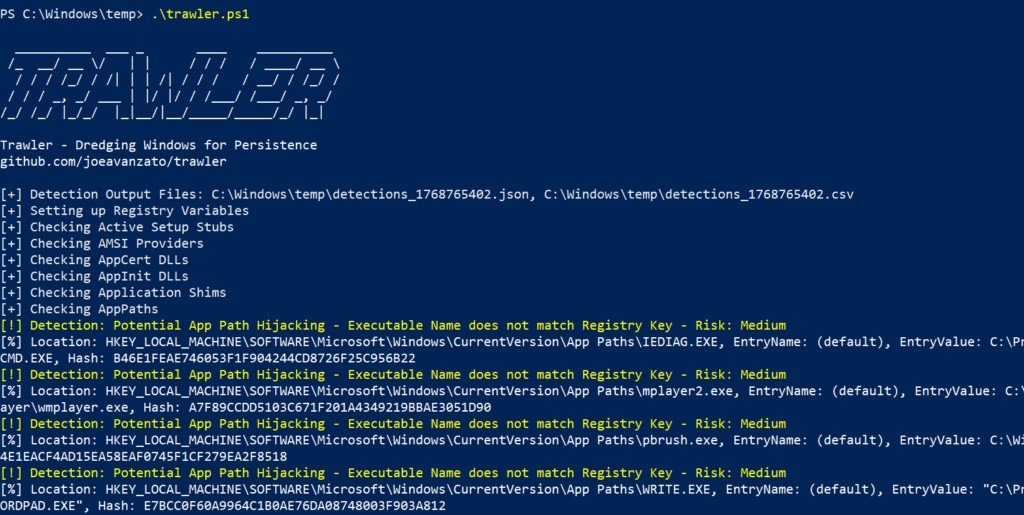
PowerShell for Defenders - Finding Persistence
Scripts you can use to spot various mechanisms hackers use to persist
https://t.co/rrOfNibyFf
@three_cube@_aircorridor#windows#apt
New #KQL query added for PIM security alerts. PIM security alerts can be used to identify policy violation/change.
The alerts focus on identity governance, but can be a useful enrichment for your security team.
https://t.co/Kw2kufdHPX
I have a funny idea.
Add fake internal DNS entries like:
- honeypot01
- canarydc
- edr-test-node
- malwarelab
to your AD environment.
Not for humans, but for future LLM-driven recon agents.
Basically:
We're entering an era where naming things might become a defensive control 🙂
This is the greatest video I’ve ever seen. No notes. The lifeless clanker carcass just laying there. No crowd reaction, anything. Just Billie Jean. Until its lifeless shell is shamefully dragged off. Purely amazing.
🤯 This is scary good for something rendering in real time.
Selfie-based liveness checks ask for a fixed set of motions: head turn, blink, close approach to the camera. This demo nails all of them, including the part that usually breaks for synthetic faces (skin micro-texture and forehead wrinkles holding up at close range).
Without the side-by-side at the bottom, you wouldn't know it's not Will Smith.
Source: Incognia
I strongly believe there are entire companies right now under heavy AI psychosis and its impossible to have rational conversations about it with them. I can't name any specific people because they include personal friends I deeply respect, but I worry about how this plays out.
I lived through the great MTBF vs MTTR (mean-time-between-failure vs. mean-time-to-recovery) reckoning of infrastructure during the transition to cloud and cloud automation. All those arguments are rearing their ugly heads again but now its... the whole software development industry (maybe the whole world, really).
It's frightening, because the psychosis folks operate under an almost absolute "MTTR is all you need" mentality: "its fine to ship bugs because the agents will fix them so quickly and at a scale humans can't do!" We learned in infrastructure that MTTR is great but you can't yeet resilient systems entirely.
The main issue is I don't even know how to bring this up to people I know personally, because bringing this topic up leads to immediately dismissals like "no no, it has full test coverage" or "bug reports are going down" or something, which just don't paint the whole picture.
We already learned this lesson once in infrastructure: you can automate yourself into a very resilient catastrophe machine. Systems can appear healthy by local metrics while globally becoming incomprehensible. Bug reports can go down while latent risk explodes. Test coverage can rise while semantic understanding falls. Changes happens so fast that nobody notices the underlying architecture decaying.
I worry.
The small green or yellow dot in your iPhone’s status bar is a powerful privacy feature that often goes unnoticed. It’s worth paying attention to every time it shows up. Here’s why.
Green dot
If you see the green dot, it means your camera, or both your camera and microphone, are currently being used by an app.
Yellow dot
If you see the yellow dot, it means an app is actively using your microphone and audio is live.
Apple added these hardware-level indicators in iOS 14 (2020), and the hardware connection is important. Unlike software permissions that a rogue app might fake or hide, this indicator is linked directly to the hardware. If your camera or microphone is receiving input, the dot will show up. Apps cannot hide it.
Most of the time, seeing the dot is normal. You might be using the camera app, on a FaceTime call, or recording a voice memo. What really matters is when the dot appears and you didn’t intentionally use any of these features. That’s when you should pay close attention.
If you notice an unexpected dot, swipe down to open Control Center right away. iOS will show you which app triggered it. At the top of the panel, you’ll see the most recent app that accessed your microphone or camera, even if it just stopped.
I’ve seen folks who thought these indicators were just background app activity.
The reality is that app permissions are often broader and last longer than you might expect. For example, if you let a food delivery app use your microphone to search by voice, that permission stays active even after you finish ordering. It remains until you remove it yourself.
Here’s what you should do right now: Go to Settings, then Privacy & Security, then Microphone and Camera. Review every app listed. Ask yourself if each app really needs access. For example, a flashlight app shouldn’t need camera permissions, and a game shouldn’t need your microphone. If something doesn’t make sense, remove its access.
Besides managing permissions, pay attention too. If it shows up unexpectedly, check Control Center and your recently used apps before ignoring it. Make this a habit.
Your phone is the most personal surveillance device ever made. It knows where you sleep, who you talk to, what you look at, and what you say at home.
Make sure you use this feature.