Even though Microsoft provided a PowerShell command in April 2025 to disable the SMTP DirectSend feature in Exchange Online, we are still seeing attackers successfully reach the inbox for organizations that do not have their DMARC DNS Record set to Reject or Quarantine. According to public DNS, 30% of the Fortune 500 are vulnerable. Small to Medium orgs are even more likely to be exposed.
It is recommended to perform threat hunting to identify these emails.
Here is KQL we used to successfully detect DirectSend Phishing in Microsoft Defender XDR or Microsoft Sentinel (https://t.co/YDnPaiAZMr)
EmailEvents
|where Timestamp > ago(30d)
| where EmailDirection == “Inbound”
| extend LeftPartSender = substring(SenderFromAddress, 0, indexof(SenderFromAddress, “@”))
| extend LeftPartRecipient = substring(RecipientEmailAddress, 0, indexof(RecipientEmailAddress, “@”))
| where LeftPartSender == LeftPartRecipient
| where isempty(Connectors) // not coming in on a connector
| where DeliveryLocation == “Inbox/folder”
| where parse_json(AuthenticationDetails) contains “fail”
| project Timestamp, RecipientEmailAddress, SenderFromAddress, Subject, NetworkMessageId, EmailDirection, Connectors, SenderIPv4
Threat hunting on the EmailEvents table requires the Microsoft Defender for Office P2 license. Otherwise, follow the MSFT reference links below for syntax on Historical Message Trace.
One of the easiest ways to detect DirectSend is when the sender and recipient are identical (which is typically unusual). We have observed cases where using an exact match of sender and recipient domain name does not detect all results. In some cases the sender domain is a MOERA domain ([email protected]) and they use a different alias on the same mailbox for the recipient address (such as the primary SMTP alias). We suspect this was done to evade the exact == comparison, so we updated the query above to look for the alias matching instead of domain matching (this resulted in finding additional results).
If you get too many results, try adding this where clause before the last project statement to reduce results:
| where Subject has_any (
'Pay Raise',
'Strategic Organizational Restructuring',
'Bonus Disbursement',
'Bonus Distribution',
'Merit-Based Pay',
'Compensation Bonus',
'Compensation Review',
'Wage Increase',
'Wages Increase',
'Incentive')
References:
https://t.co/bfm4CI3Zqh
https://t.co/LBYHhUIbws
https://t.co/f3TFxu7Qfs
If you don't have a valid use of DirectSend you can disable it with this Exchange Online PowerShell cmdlet:
Set-OrganizationConfig -RejectDirectSend $true
This is Dario Amodei.
He's the CEO behind Claude, one of the world's most advanced AIs.
Yesterday, in a 5.5 hour conversation with @lexfridman, he revealed our timeline to superintelligence.
Let me save you 5 hours: 🧵
Microsoft has >1.5 million low-code/no-code apps including 90K bots and AI copilots
this is how together we built a security program that managed to remediate 95% of vulns within 4m
I’m really excited to finally be able to share this -
https://t.co/iuuXxs6HEg
The Hidden Risk of Outsourcing Cybersecurity to MSSPs:
Organizations face an ever-growing array of cyber threats. To combat these, many businesses turn to Managed Security Service Providers (MSSPs) for their cybersecurity needs, entrusting these external entities with the critical task of safeguarding their networks. However, there's a growing concern that this outsourcing trend, while seemingly convenient, may actually be putting companies at greater risk.
One of the primary issues is that many MSSPs prioritize their profits over their clients' security. They typically have investors that seek high returns and mandate a private equity type return on investment.
Moreover, some MSSPs operate with a reactive mindset, focusing more on incident response rather than proactive threat detection and prevention. This approach can lead to a false sense of security, where organizations believe they are protected because they have an MSSP in place, only to discover the MSSP has earned even more money after the breach has occurred.
Another concerning aspect is the sheer volume of clients that MSSPs manage. With a large client base, it's challenging for these providers to give each organization the attention and care needed to maintain a robust security posture. As a result, businesses may find themselves as just another number in a long list of clients, receiving minimal engagement and support.
Ultimately, the reliance on MSSPs can create a dangerous disconnect between the organization's security goals and the service provider's business objectives. While MSSPs are essential in offering specialized expertise, companies must carefully vet these providers, ensuring that they truly align with their security needs. Organizations should also maintain some level of internal security oversight, fostering a collaborative relationship with their MSSP rather than a completely hands-off approach.
Table Top Scenario:
An employee buys a new personal laptop with Copilot+ Recall.
User logs into a company approved portal secured with MFA and a VDI session to work on a highly confidential project that involves PII. Recall is on and taking screenshots of the employees productivity.
A few weeks later the employees personal device is stolen. The laptop hard disk was never encrypted. Feel free to discuss.
I've spent the last 3+ years focused on attacking active directory/internal networks and I'm going to do my absolute best to provide a road map for sysadmins to secure AD.
Wed 5/29 12pm Eastern
Memes included, register here if you wanna come hang 👇
https://t.co/PgNcp382TC
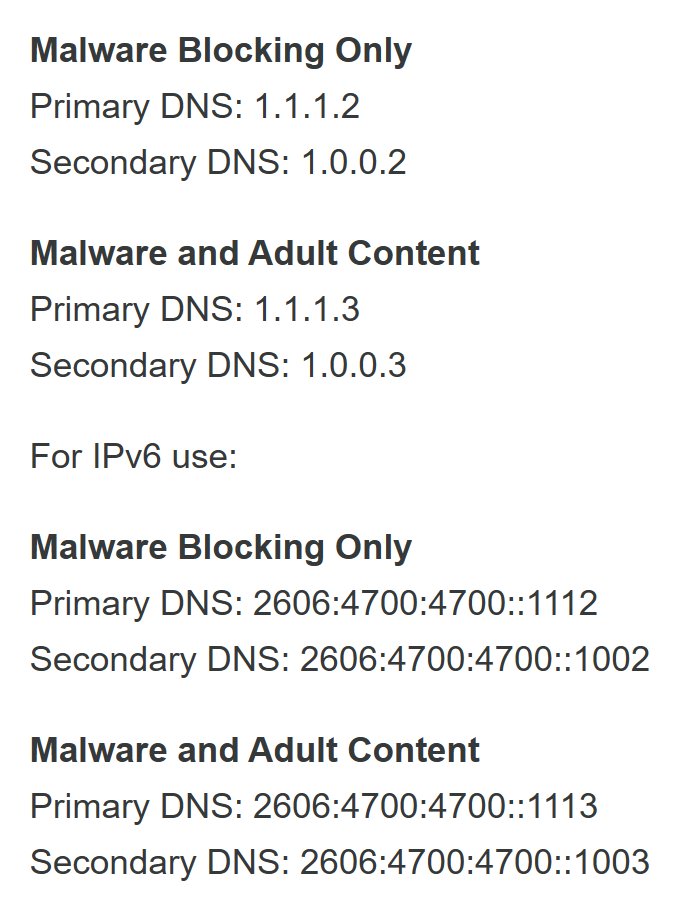
Did you know that @Cloudflare has public DNS servers that block Malware -or- Adult Content? 🤔
1.1.1.1 - Resolve Everything
1.1.1.2 / 1.0.0.2 - Block Malware
1.1.1.3 / 1.0.0.3 - Block Malware & Adult
Like, Follow & Share if you enjoy these Tweets! #TechTalk #Networking #Tips
Happy Friday! The Hydration Kit for a ConfigMgr, MDT and Intune is updated with ConfigMgr 2107 and Windows 11 support. The kit configures Reporting Services now, and has an improved installer https://t.co/YAtLQeKMy8
New Security Signals study shows firmware attacks on the rise; here's
how Microsoft is working to help eliminate this entire class of
threats
https://t.co/fUmn6BPEYD
The Ultimate Guide to Procmon by @adbertram | Learn everything there is to know with tons of examples in this all-in-one Procmon guide!
#UltimateGuide https://t.co/WbPjd8Vh2P Please RT if you like it!
Microsoft Vulnerabilities Report 2020
- Removing admin rights would mitigate 77% of all Critical Microsoft vulnerabilities in 2019.
- 100% of Critical vulnerabilities in Internet Explorer & MS Edge would have been mitigated by removing admin rights.
https://t.co/3Isco35RdO
How to Trim Strings in PowerShell by @alistek | Need to know how to use the PowerShell trim() or PowerShell trimend() method? If so, be sure to check out this tutorial! #Pow... https://t.co/08oxTX83PB Please RT if you like it!