Most token approvals don't expire.
That dApp you approved months ago might still have permission to move your tokens today.
Ask Ava in Telegram to check your wallet for risky approvals. Review the findings and revoke anything suspicious with your own wallet signature.
Most token approvals don't expire.
That dApp you approved months ago might still have permission to move your tokens today.
Ask Ava in Telegram to check your wallet for risky approvals. Review the findings and revoke anything suspicious with your own wallet signature.
@Igomutheman Exactly! Old wallets can accumulate forgotten approvals over time. Always worth checking what still has permission to move your tokens.
Thanks for the support! 🙌
Most token approvals don't expire.
That dApp you approved months ago might still have permission to move your tokens today.
Ask Ava in Telegram to check your wallet for risky approvals. Review the findings and revoke anything suspicious with your own wallet signature.
Checking needs no wallet connection, signature or deposit.
Just paste your public wallet address into Ava on Telegram to check for risky approvals.
Try it: https://t.co/XWMqrcbsFy
Ava 2.0 is here. Your DeFi agent, working while you're away.
Set up Aave repayment rules, scheduled Uniswap swaps and payments. Ask in plain English, choose a Skill, and configure it. Active on-demand jobs now have a Run now button.
Want tighter control? Turn off the standard permission on the Wallets page and choose narrower permissions with a cap on the token you pick.
You can also review runs, pause individual jobs and revoke permissions on the web.
Know which contracts can spend your tokens.
Ava’s Wallet Scan now resolves unlabeled spender to the contracts behind them, giving you useful context to decide which approvals to keep or revoke.
Quick check: how many token approvals does your wallet have open right now?
Most people have no idea. Old, unlimited approvals to forgotten contracts are how wallets get drained months later.
Ava watches them and flags the dangerous ones for you.
@Dave_crrypt Exactly 🙌 we think agent autonomy and user control should go together.
Let the agent act, but only within the boundaries you explicitly set.
Your permissions, your control.
Pause a job, revoke a permission to stop everything using it, or undo the upgrade to turn Auto off for that wallet on that network.
How it works: https://t.co/X9dGoThfuO
Try it: https://t.co/QHnvbCXk7d
We've been working hard to put you in control of how Ava acts.
Agent permissions are here. 🛡️
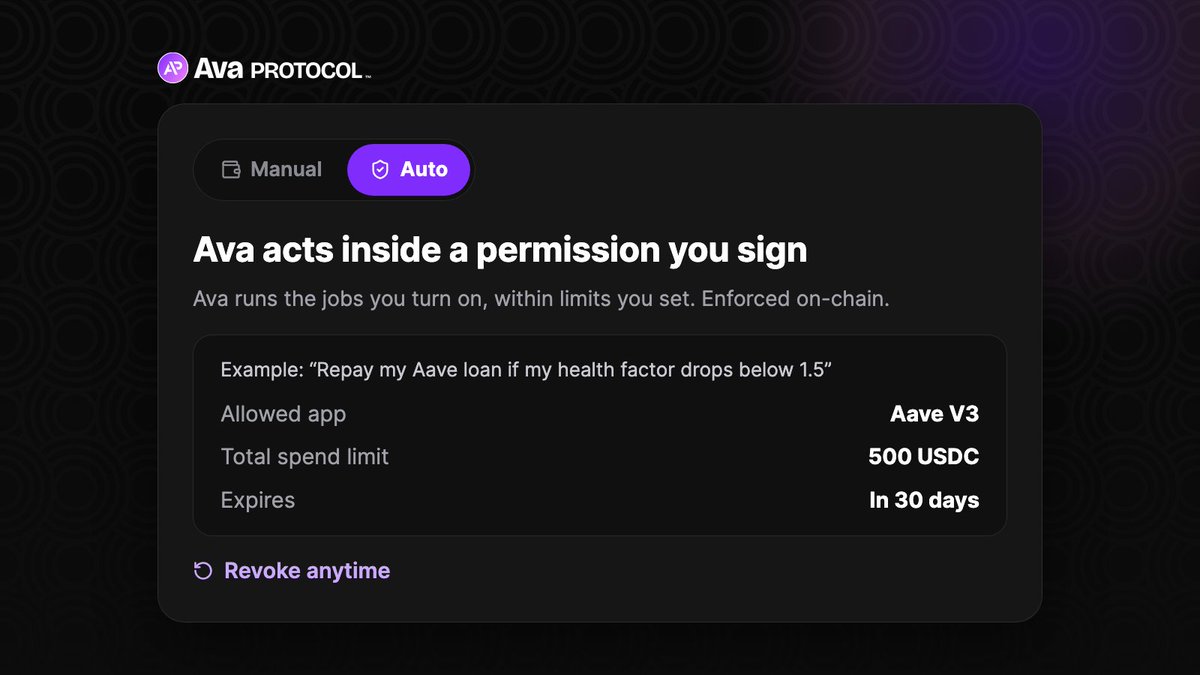
Choose allowed apps, total token spending caps, and an expiry. Ava runs the jobs you enable within those limits. Enforced on-chain, revocable anytime.
Inside those limits, Ava runs the jobs you turn on, like repaying your Aave loan when your health factor drops. No prompt each time.
It works on the wallet you already have, after a one-time upgrade. Your address and keys stay the same.
Thanks, the spend cap is already tested and live with weekly USDC payments. It's a running total that doesn't refill. Once the quota is used, the next payment fails on-chain.
We're testing more Skills, like repaying your Aave loan at 3am, but never past the total you set. Expiry is 30 days by default, so no permission runs forever.
We've been working hard to put you in control of how Ava acts.
Agent permissions are here. 🛡️
Choose allowed apps, total token spending caps, and an expiry. Ava runs the jobs you enable within those limits. Enforced on-chain, revocable anytime.