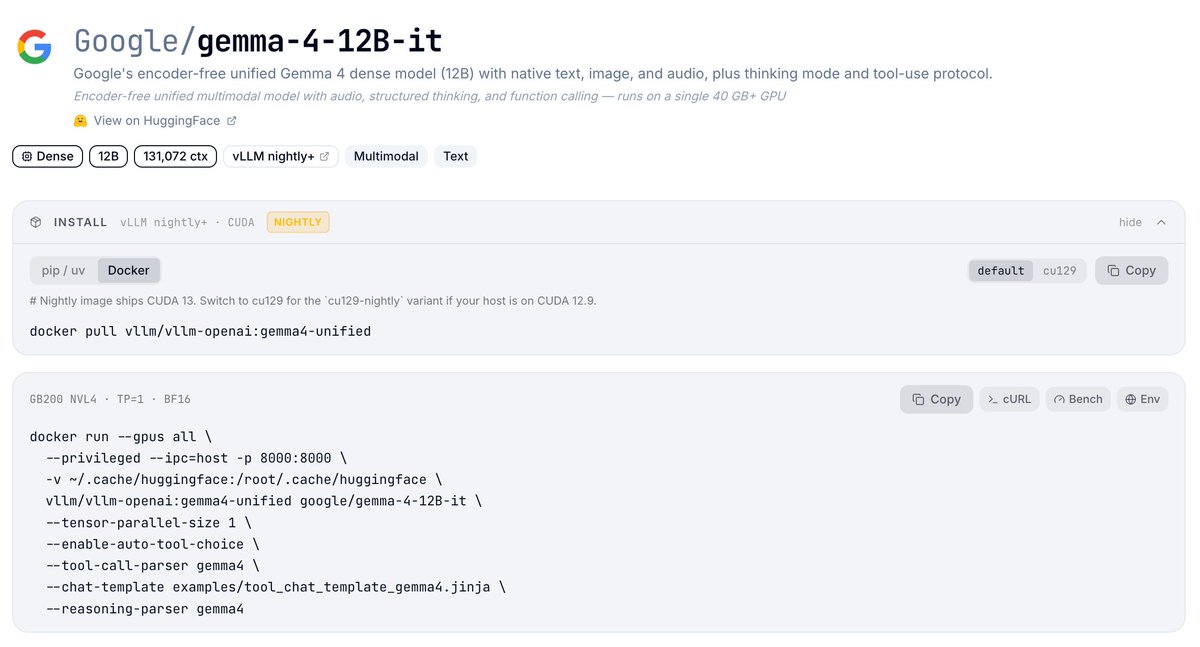
Congrats to the @googlegemma team on the Gemma 4 12B launch 🎉 Day-0 support on vLLM is ready to go.
It's an encoder-free unified multimodal model — text, image, audio, and video all project straight into the LLM's embedding space, no separate vision or audio towers. 256K context, built-in thinking, native tool calling.
Reasoning + tool parsers (`gemma4`), vision, and audio all served through the OpenAI-compatible API.
🔗 Recipe: https://t.co/MGJcoQkwzz
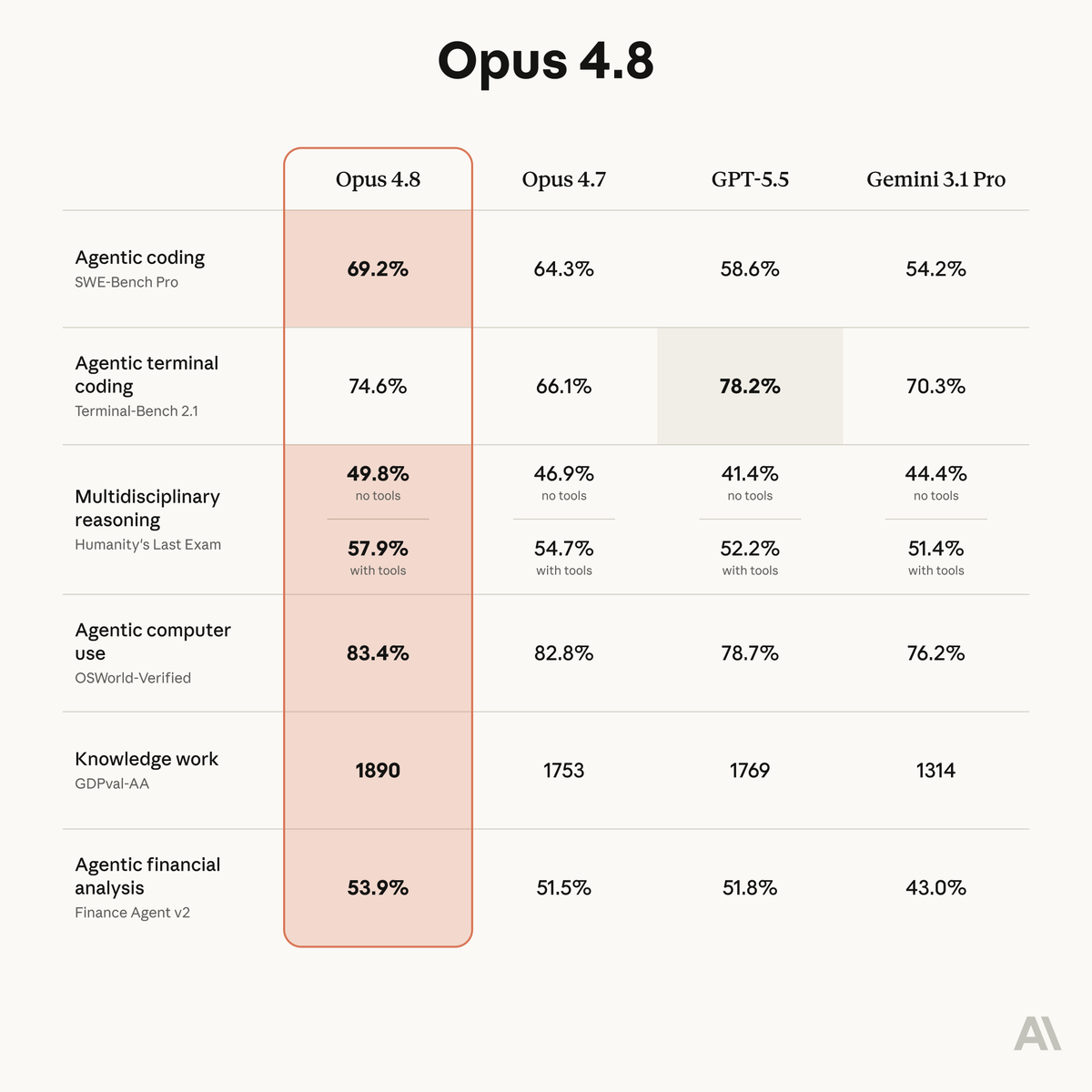
Introducing Claude Opus 4.8: it builds on Opus 4.7 with sharper judgment, more honesty about its own progress, and the ability to work independently for longer than its predecessors.
Available today at the same price.
Your TTS prototype doesn’t need a cloud API for every sentence.
Supertonic 3 is an on-device text-to-speech system, and supertonic-py is its Python package for running synthesis locally via ONNX.
It helps you add speech to apps faster by giving you a pip-installable SDK, a CLI, and a local HTTP server around the same engine.
Key features:
• On-device inference – runs locally through ONNX Runtime, with no GPU or network dependency required after setup
• Python + CLI quick start – install with pip, synthesize text, and save WAV output from code or the terminal
• Multilingual synthesis – supports 31 language codes plus an `na` fallback for unknown or unsupported input language
• Voice styles – includes 10 built-in voices and supports Voice Builder JSON exports for custom styles
• Local HTTP server – exposes native TTS and OpenAI-compatible speech endpoints, with batch synthesis support
It’s open-source (MIT license).
Link in the reply 👇
Your coding agent doesn’t need more vibes. It needs a stricter engineering loop.
ROACH PI is an extension suite for the pi coding agent that adds disciplined planning, orchestration, review, memory, code intelligence, MCP access, and faster search.
It helps you move from fuzzy request to verified implementation by forcing clarify → plan → worker → validator style workflows, with inspectable TypeScript and Markdown commands, tools, hooks, agents, and skills inside the repo.
Key features:
• Clarify + plan workflow – turns vague requests into context briefs, task plans, verification commands, and success criteria
• Subagent orchestration – delegates single, parallel, chain, or async work to separate pi processes
• Review pipelines – supports quick `/review` and deeper `/ultrareview` flows with multiple reviewers and synthesis
• Developer tooling – adds FFF search, LSP code intelligence, MCP adapter access, and workspace memory
• Installable pi extension – installs from GitHub, then runs `/setup` to configure the startup flow
It’s open-source (MIT license).
Link in the reply 👇
LLM demos are easy. The last mile is not.
LLM-engineer-handbook is a curated GitHub handbook of LLM frameworks, tools, tutorials, and learning resources for engineers building real LLM applications.
It helps you move beyond random tutorials by mapping resources across the LLM lifecycle: application frameworks, pretraining, fine-tuning, serving, prompt management, datasets, benchmarks, LLMOps, fundamentals, books, and communities.
Key features:
• Lifecycle map – resources span building apps, model training, serving, fine-tuning, prompt optimization, and LLMOps
• Tool index – includes frameworks and tools like DSPy, LlamaIndex, LangChain, Haystack, vLLM, Ollama, llama.cpp, Opik, and Agenta
• Data + eval sections – points to datasets, synthetic data tooling, fine-tuning datasets, benchmarks, and evaluation libraries
• Learning path included – collects courses, agent guides, modeling resources, fundamentals, books, and optimization material
• Community layer – lists social accounts and communities to follow for LLM engineering and ML systems updates
It’s open-source (MIT license).
Link in the reply 👇
If you want to understand RAG beyond “put docs in a vector DB”, this LangChain playlist is a good path.
It goes from basics into failure modes that matter in real systems:
• indexing
• retrieval
• generation
• query translation
• routing
• query structuring
Link in reply 👇