$BANSUN is live.
The token behind Bansun, the offline AI agent for Ethereum.
CA: 0x59f62cf35b108d80cbd3a00672ebbe26b7ffcf2e
Offline AI means:
The model runs on your own machine or in your browser
No internet needed once it’s downloaded
Your questions never reach a cloud AI
Your vault, journal and scam checks work offline too
Only verify the CA on https://t.co/5fIojnfas5. We never DM first.
https://t.co/5fIojnfas5
Two ways to run AI in Bansun. Neither sends your prompts to a cloud AI company.
1️⃣ Self-hosted server AI
Powered by @ollama, running Qwen2.5 3B by @Alibaba_Qwen.
▸ docker compose up starts Ollama, pulls the model (about 2 GB) and wires everything together
▸ Bansun talks to it through the OpenAI-compatible API at http://ollama:11434/v1
▸ Swap the model with one env var, or point it at llama.cpp, vLLM or LM Studio
▸ Powers Agent mode, with live tools for gas, prices, tokens, approvals and ENS, and a receipt for every step
2️⃣ On-device AI, in your browser
Built on WebLLM by @mlc_ai, with weights from @huggingface.
▸ Pick a quantized model (q4f16), from Qwen2.5 0.5B at about 0.4 GB up to bigger ones
▸ Weights download straight from Hugging Face, never through our server
▸ Inference runs on your own GPU through WebGPU
▸ Once cached, it keeps working offline. Your questions never leave the device
Server AI when you want live data. Local AI when you want zero trace.
Your keys. Your node. Your AI.
https://t.co/5fIojnfas5
"Human + LLM 2-of-2" is the right model for wallets.
The AI reads. The human signs.
That's how Bansun works:
the AI decodes every approval, Permit and Seaport order in plain words,
flags unlimited allowances and unknown spenders,
and leaves the final click to you.
It never gets your keys. It runs on your device.
https://t.co/5fIojnfas5
How Bansun gets prices without exposing you 🦙
All price data comes from the @DefiLlama coins API at https://t.co/YXtCSGS9s3. Free, open and trusted across DeFi.
What happens when you open Market, Portfolio or Token Check:
▸ /prices/current/ethereum:{token} gets the live price, with a 4h search window so thin tokens still resolve
▸ /percentage/{token}?period=24h gets the 24h change
▸ /chart/{token}?span=24&period=1h gets 24 hourly points for the sparkline
What DefiLlama sees: token contract addresses. That's it.
What DefiLlama never sees:
▸ Your wallet address
▸ Your balances
▸ Your IP. Requests leave from the Bansun server, not your browser
Every answer comes with a receipt: source, provider, fetch time and latency. No mystery numbers.
Public data in. Your identity stays out.
https://t.co/5fIojnfas5
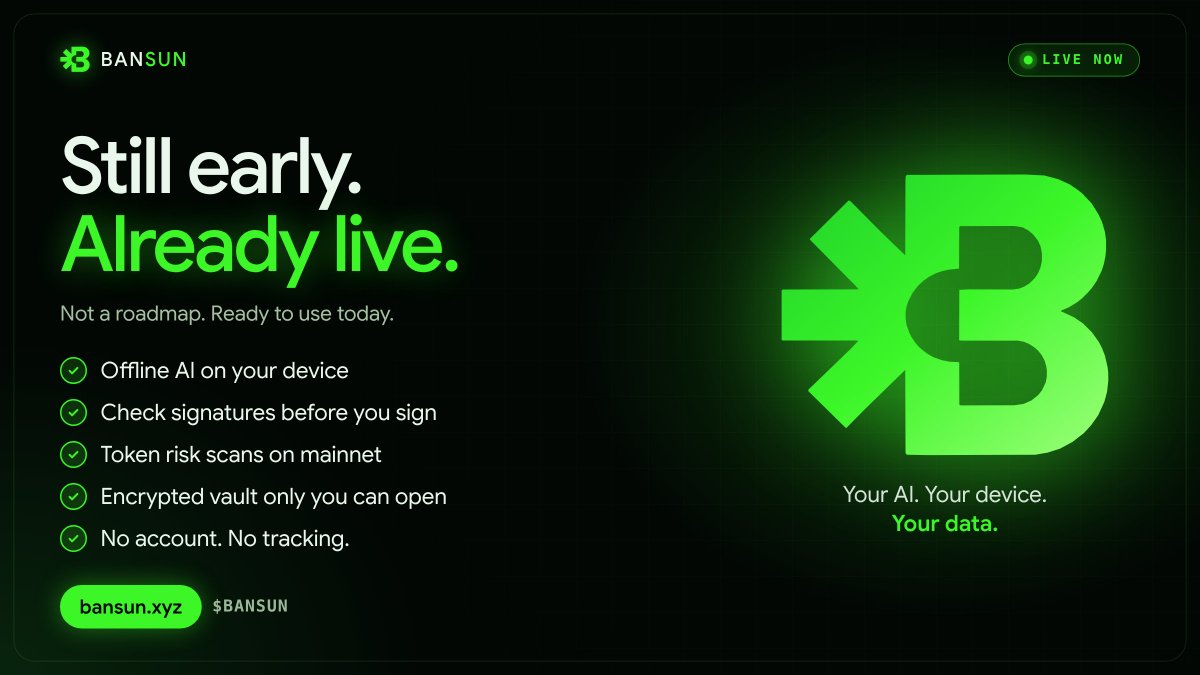
Still building. Still early.
But this isn't a roadmap. Everything is live today:
▸ Offline AI that runs on your device
▸ Signature and approval checks before you sign
▸ Token risk scans on Ethereum mainnet
▸ An encrypted vault that only you can open
▸ No account. No tracking. No cloud AI reading your trades.
This is the new way privacy works. Your AI. Your device. Your data.
Try it yourself 👉 https://t.co/5fIojnfas5
$BANSUN
Everyone is adding AI to crypto. Almost nobody is asking where your prompts go.
Every question you ask a cloud AI is a signal. What you're buying. When.
How much. How scared you are.
Bansun flips that. The AI runs on your device. Your questions stay there.
Private AI is the next wave in crypto. We're already shipping it. $BANSUN
"Human + LLM 2-of-2" is the right model for wallets.
The AI reads. The human signs.
That's how Bansun works:
the AI decodes every approval, Permit and Seaport order in plain words,
flags unlimited allowances and unknown spenders,
and leaves the final click to you.
It never gets your keys. It runs on your device.
https://t.co/5fIojnfas5
Your data stays yours.
Vault: AES-256-GCM encryption with your own passphrase
Recovery: split access across trusted people, for example any 3 of 5
Credits: experimental anonymous credits with blind signatures
Privacy: check permissions and erase Bansun data in one click
No accounts. No wallet connection. No tracking.
Everyone is adding AI to crypto. Almost nobody is asking where your prompts go.
Every question you ask a cloud AI is a signal. What you're buying. When.
How much. How scared you are.
Bansun flips that. The AI runs on your device. Your questions stay there.
Private AI is the next wave in crypto. We're already shipping it. $BANSUN
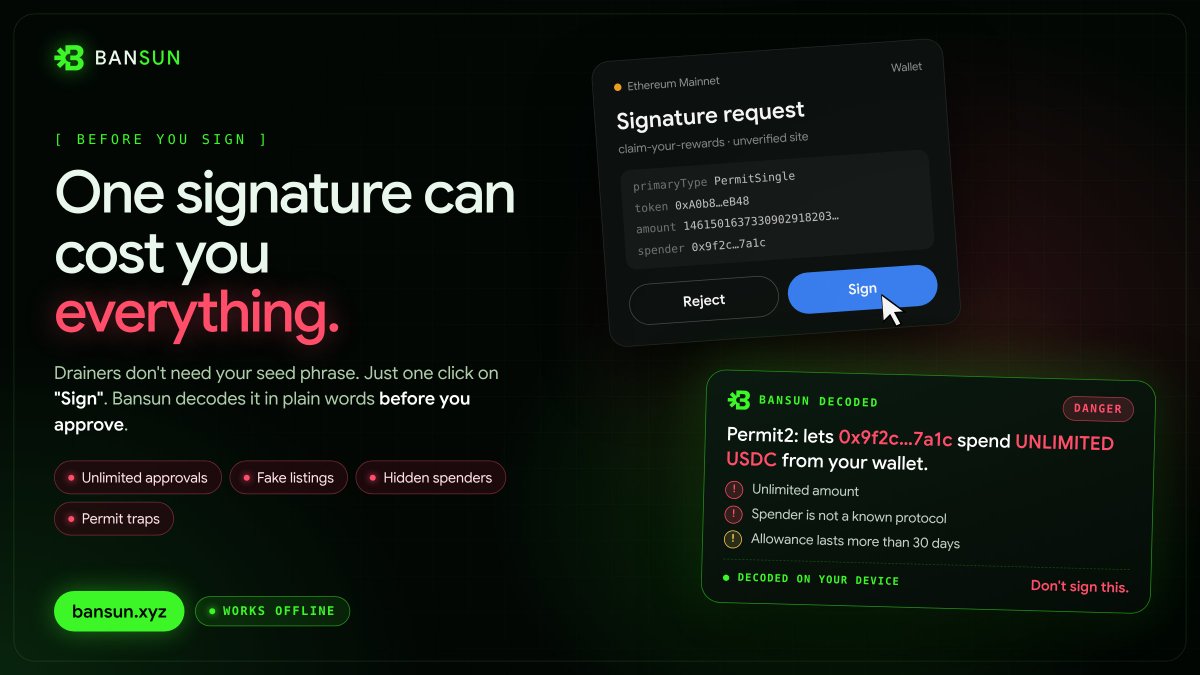
Every drainer needs one thing from you: a signature. Not your seed phrase. Not your password. Just one click on "Sign".
Bansun reads it first. Unlimited approvals. Fake listings. Hidden spenders. Permit traps. Decoded in plain words before you approve.
And it still works when you're offline. One signature can cost you everything. Check it first. https://t.co/5fIojnfas5
This is the direction we're building in.
Bansun brings the same idea to Ethereum traders, in a browser tab:
▸ Local AI: open Qwen2.5 models running on your own GPU, offline after one download
▸ Human in the loop: Bansun never signs anything. It decodes the approval, you decide
▸ No cloud: no account, no logs, questions stay on your device
Self-sovereign AI shouldn't need a NixOS setup. It should be one click.
https://t.co/5fIojnfas5
We’ve just launched the official Bansun story and feature site:
https://t.co/guDW5pLXbK
Hosted on IPFS and accessible through ENS, it brings together the story behind Bansun, our tools, and the limits of what they can do.
Here’s what’s inside:
• The name and inspiration. How the Bansunpei in Vitalik Buterin’s novel Snowmoon inspired Bansun’s name, with six connections across five chapters and links to the original text.
• All 15 tools explained. Before You Sign, Simplify, Scam Check, Approvals, Token Check, AI Agent, Market and Gas, Portfolio, Journal and Risk, Prediction Ledger, Vault, Recovery, Privacy, experimental Credits, and $BANSUN information. Each card explains its purpose, where it runs, and links to the main app.
• Nine on-device AI models. Eight GPU options through WebLLM and WebGPU, plus a CPU option through Transformers.js. The catalog includes model sources, download sizes, memory requirements, and device guidance.
• Privacy and offline requirements. What stays on your device, what needs live services, and why model and engine files must be cached before offline use.
• Clear limitations. AI can be wrong, scam checks are not guarantees, and vault recovery is not wallet recovery. Credits remain experimental; token staking and payments are not operational.
• The $BANSUN contract address, FAQs, documentation, and links to Terms, Privacy, Security, Licenses, and our official X account.
This is our standalone story site not a replacement for the app at https://t.co/kkZHsQqI1t. Bansun is independently developed; Snowmoon is an inspiration, not an endorsement.
Read what you sign. Keep what is yours.
Your data stays yours.
Vault: AES-256-GCM encryption with your own passphrase
Recovery: split access across trusted people, for example any 3 of 5
Credits: experimental anonymous credits with blind signatures
Privacy: check permissions and erase Bansun data in one click
No accounts. No wallet connection. No tracking.
5 tools, all running in your browser. No wallet connection. No account.
1️⃣ Scam Check (works offline)
Paste a DM, email or link. Bansun scores it from 0 to 100 and lists every red flag: seed phrase requests, fake support, urgency and look-alike domains.
2️⃣ Before You Sign (works offline)
Paste the transaction data or the signature request before you approve it. Bansun decodes it in plain words and flags unlimited approvals, Permit and Permit2 requests, unknown spenders and deadlines.
3️⃣ Token Check (live on mainnet)
Paste a contract address. See what the owner can do: mint, blacklist, pause, change taxes or upgrade the contract. You also get liquidity and price. This one needs a connection.
4️⃣ Journal & Risk (works offline)
Enter your account size, risk %, entry, stop and target. Your position size, loss at the stop and reward at the target update as you type. Log the trade and track your expectancy over time.
5️⃣ Vault (works offline)
Create a passphrase and save notes, trade plans and chats. Everything is encrypted with AES-256-GCM on your device. Sync is optional, and the server only ever stores ciphertext.
A low risk score means fewer warnings were found. It does not mean a token is safe. Always check the exact contract address.
Your data stays yours.
👉 https://t.co/5fIojneCCx
Download the model. Load it in your browser. Disconnect and keep chatting.
This walkthrough shows Bansun’s Local AI setup and offline conversation, with model files hosted on @huggingface
Under the hood, Bansun uses MLC AI’s WebLLM for GPU inference and Transformers.js for its CPU option. The local catalog includes Qwen2.5, SmolLM2, Llama 3.2, and Phi-3.5.
In Local AI mode, prompts are processed on your device not sent to Bansun’s AI server.
Offline chat requires the engine and model files to be fully cached. Live prices and wallet lookups still need internet.
https://t.co/5fIojnfas5
Stop signing blind. $BANSUN
1. Before You Sign: decode transactions and signature requests in plain words
2. Token Check: owner powers, mint, blacklist, taxes, proxies and liquidity
3. Approvals: find unlimited allowances and revoke them from your wallet
4. Scam Check: spot fake support, seed phrase requests and bad links
5 tools, all running in your browser. No wallet connection. No account.
1️⃣ Scam Check (works offline)
Paste a DM, email or link. Bansun scores it from 0 to 100 and lists every red flag: seed phrase requests, fake support, urgency and look-alike domains.
2️⃣ Before You Sign (works offline)
Paste the transaction data or the signature request before you approve it. Bansun decodes it in plain words and flags unlimited approvals, Permit and Permit2 requests, unknown spenders and deadlines.
3️⃣ Token Check (live on mainnet)
Paste a contract address. See what the owner can do: mint, blacklist, pause, change taxes or upgrade the contract. You also get liquidity and price. This one needs a connection.
4️⃣ Journal & Risk (works offline)
Enter your account size, risk %, entry, stop and target. Your position size, loss at the stop and reward at the target update as you type. Log the trade and track your expectancy over time.
5️⃣ Vault (works offline)
Create a passphrase and save notes, trade plans and chats. Everything is encrypted with AES-256-GCM on your device. Sync is optional, and the server only ever stores ciphertext.
A low risk score means fewer warnings were found. It does not mean a token is safe. Always check the exact contract address.
Your data stays yours.
👉 https://t.co/5fIojneCCx
Offline AI is live on Bansun 🔒
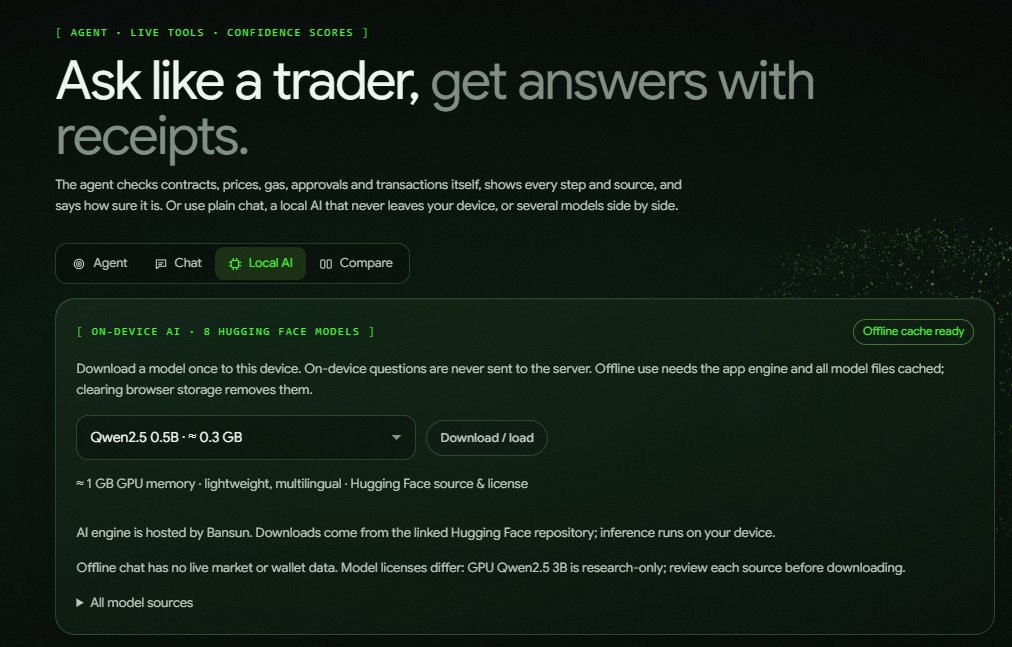
You can now run an AI model fully on your own device. Download it once, and after that your questions are never sent to any server.
How to start:
1. Open https://t.co/kkZHsQqI1t → Ask → Local AI
2. Pick a model. The lightest is Qwen2.5 0.5B at about 0.3 GB.
3. Tap Download / load and wait for "Offline cache ready"
4. Ask anything, even with no internet
What you can use it for:
▸ Learn crypto terms: slippage, MEV, liquidation, impermanent loss, gas
▸ Understand signatures: what approve, permit and setApprovalForAll actually allow
▸ Plan your trades: entry, stop, risk and a checklist before you click buy
▸ Simplify long text: paste a whitepaper section, staking terms or exchange rules
▸ Spot scam patterns: ask whether a DM or offer sounds like a known trick
▸ Think out loud: review your journal notes or a strategy idea in private
Why it matters:
▸ Your questions stay on your device
▸ No account, no logs, no cloud AI provider
▸ It runs on your own GPU, right inside the browser
▸ It keeps working on a plane, on bad Wi-Fi or with no connection
Good to know:
▸ Offline chat has no live prices or wallet data. For live data, use Agent mode.
▸ Small models can be wrong. Double-check anything important.
▸ Clearing browser storage removes the downloaded model.
▸ Model licenses differ, so check the source before downloading.
Private AI for crypto, on your own terms.
👉 https://t.co/5fIojnfas5
5 tools, all running in your browser. No wallet connection. No account.
1️⃣ Scam Check (works offline)
Paste a DM, email or link. Bansun scores it from 0 to 100 and lists every red flag: seed phrase requests, fake support, urgency and look-alike domains.
2️⃣ Before You Sign (works offline)
Paste the transaction data or the signature request before you approve it. Bansun decodes it in plain words and flags unlimited approvals, Permit and Permit2 requests, unknown spenders and deadlines.
3️⃣ Token Check (live on mainnet)
Paste a contract address. See what the owner can do: mint, blacklist, pause, change taxes or upgrade the contract. You also get liquidity and price. This one needs a connection.
4️⃣ Journal & Risk (works offline)
Enter your account size, risk %, entry, stop and target. Your position size, loss at the stop and reward at the target update as you type. Log the trade and track your expectancy over time.
5️⃣ Vault (works offline)
Create a passphrase and save notes, trade plans and chats. Everything is encrypted with AES-256-GCM on your device. Sync is optional, and the server only ever stores ciphertext.
A low risk score means fewer warnings were found. It does not mean a token is safe. Always check the exact contract address.
Your data stays yours.
👉 https://t.co/5fIojneCCx
Count us among the 9M+ builders.
Bansun is a private AI assistant for Ethereum traders, and its server AI runs on @ollama. Self-hosted, with open weights and no data sent to a cloud AI.
Open source made private AI for crypto possible. Congrats to the Ollama team.
https://t.co/5fIojnfas5
More open models on Ollama means more people can run AI on hardware they own.
That is exactly why we built Bansun's AI on @ollama. One command, and your trading assistant runs on your own machine. No API keys and no third-party provider. Your prompts never leave your setup.
Open models plus self-hosting is how crypto users get AI without giving up their privacy.
https://t.co/5fIojnfas5
5 tools, all running in your browser. No wallet connection. No account.
1️⃣ Scam Check (works offline)
Paste a DM, email or link. Bansun scores it from 0 to 100 and lists every red flag: seed phrase requests, fake support, urgency and look-alike domains.
2️⃣ Before You Sign (works offline)
Paste the transaction data or the signature request before you approve it. Bansun decodes it in plain words and flags unlimited approvals, Permit and Permit2 requests, unknown spenders and deadlines.
3️⃣ Token Check (live on mainnet)
Paste a contract address. See what the owner can do: mint, blacklist, pause, change taxes or upgrade the contract. You also get liquidity and price. This one needs a connection.
4️⃣ Journal & Risk (works offline)
Enter your account size, risk %, entry, stop and target. Your position size, loss at the stop and reward at the target update as you type. Log the trade and track your expectancy over time.
5️⃣ Vault (works offline)
Create a passphrase and save notes, trade plans and chats. Everything is encrypted with AES-256-GCM on your device. Sync is optional, and the server only ever stores ciphertext.
A low risk score means fewer warnings were found. It does not mean a token is safe. Always check the exact contract address.
Your data stays yours.
👉 https://t.co/5fIojneCCx
Your AI, on your own device. $BANSUN
Bansun’s Local AI downloads a model once and runs it on your GPU or CPU. Your questions stay on your machine, and no cloud AI provider ever sees them.
Need live data? Switch to Agent mode for prices, gas and on-chain lookups.
https://t.co/5fIojnfas5
Your crypto AI shouldn't live in someone else's cloud.
Bansun is an AI agent for Ethereum that runs offline, on your own machine.
Your questions, your wallets and your trading plans never leave your hardware. No API calls to an AI company. No account. No tracking.
It reads contracts, explains what you are about to sign and finds risky approvals, all powered by a model you own.
Offline AI for Ethereum.
https://t.co/5fIojneCCx
As Ethereum evolves, understanding what you sign still matters.
Bansun helps you inspect Ethereum transactions, token permissions, and contract signals before signing with sources to check and local AI options for privacy.
Read the chain before you sign.
What does it mean to be a “frontier blockchain”?
It means that, through dozens of upgrades, we're upgrading past the name blockchain. No other innovates its own fundamental parts so regularly without even a second of downtime. While others chase adoption through compromises, Ethereum remains confident users follow the most robust chain.
Ethereum Institutional is making that case clear. Institutions will build on Ethereum not because it optimizes for the highest bidders, but because it is the only blockspace capable of meeting the highest standards. The cryptographic world computer will have no equal. Read more here about where we've been and where we're headed on EI's visualization of Vitalik's blog post.
Bansun uses @DefiLlama price data for market views, portfolio valuations, and parts of its analysis.
Check prices alongside sources and timestamps. A price snapshot is not a forecast.
Read the chain before you sign.
https://t.co/CIa6DReOc3
AI should work for you, not watch you.
That's why Bansun's AI runs offline. On your laptop, your home server or straight in your browser.
You own the model.
You own the data.
You own the keys.
The more you trade on-chain, the more your privacy is worth. Bansun keeps both your AI and your wallet out of anyone else's reach.
Offline AI. On-chain clarity.
https://t.co/5fIojneCCx
Your crypto AI shouldn't live in someone else's cloud.
Bansun is an AI agent for Ethereum that runs offline, on your own machine.
Your questions, your wallets and your trading plans never leave your hardware. No API calls to an AI company. No account. No tracking.
It reads contracts, explains what you are about to sign and finds risky approvals, all powered by a model you own.
Offline AI for Ethereum.
https://t.co/5fIojneCCx
Every time you ask a cloud AI about a wallet or a trade, you leave a record.
Your addresses. Your positions. Your strategy.
Bansun keeps the thinking local:
1. The model runs on your computer or your own server
2. Local mode runs the AI inside your browser with WebGPU, fully offline once downloaded
3. Nothing you type is sent to an AI provider
4. Only public blockchain data is fetched, and it leaves from your server, never your browser
Ask anything. Reveal nothing.