Small improvement in the latest laravel-debugbar; it automatically detects the nonce from either Spatie laravel-csp or the Vite::useNonce(), so you no longer have to manually set them. Makes it easier to set stricter CSP while developing locally with Debugbar enabled.
Just added some instructions to the readme of laravel-csp on how you can use the nonce generated by @laravelphp’s Vite plugin
https://t.co/wzL7WJiU7U
👏 @timacdonald87 for his nice work on the plugin
#laravel#php
Check your Github Actions to make sure you're not using a pinned/old Composer version, and set the Github Tokens to Read instead of Read+write: https://t.co/0NqhR4vbqr
A version is tagged and it seems like shivammathur/setup-php is installing that already. But still watch out!
@tobias_petry@tomhacks@GoogleCloudTech It does work with http://localhost:<port>, it only needs to allow the redirect to that URL. But same goes for Laravel Herd/Valet with .test domains. Would be nice to allow more test domains besides only localhost.
@kayintveen Also because the data can indeed become huge, I lowered the depth for the dumps in 3.x but was annoyed by this. Now we can increase the depth and still reduce the size 👌And with lazy rendering it shouldn’t have much impact.
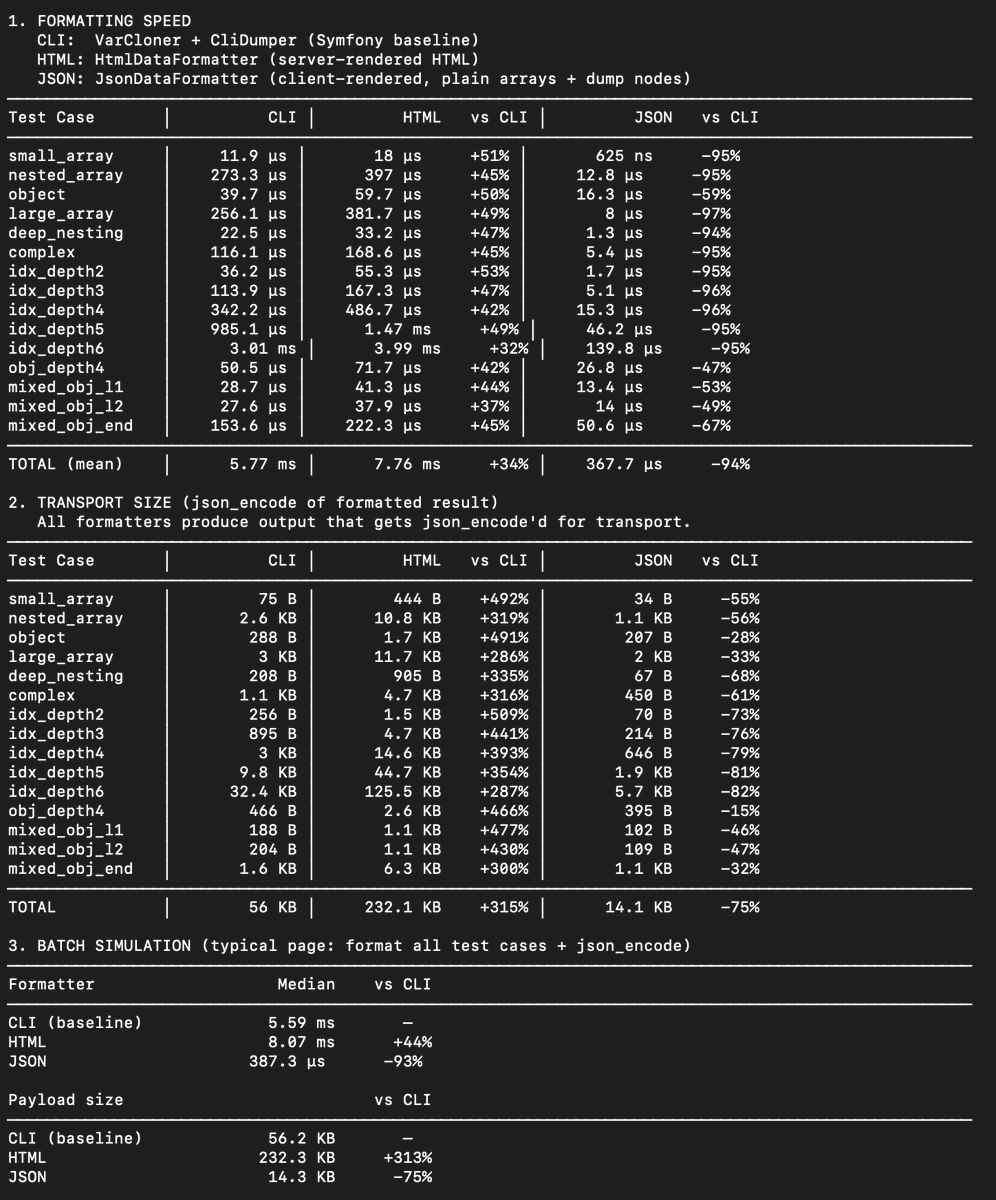
Performance improvement in Debugbar: replaced HtmlDumper with a new JsonDumper that stores pure JSON + a custom JS renderer.
This gives up to 20x speed and 15x size improvement 🔥
Bonus: lazy rendering to reduce front-end impact and added inline previews for a compacter view!
@kayintveen I wanted it earlier but didn’t really know how to do it. But now Claude did most of the hard work for me ;) But also, I wanted CLI access to the data (for Boost AI skills) which wasn’t really feasible with the string dumps, and easier/faster with JSON + created the reverse dumper
@niladam@freekmurze This in already in the latest php-debugbar, so 3.7.x which should be available for the latest laravel-debugbar. For the base debugbar you can enable the new formatter, see the demo bootstrap files.
The improvement is the biggest on simple arrays, which can now bypass the VarCloner entirely and return the value as-is. VarCloner/VarDumper remains essential for complex objects, but the improvement is still noticeable.
We also created a Caster to reverse this for CLI dumps.
@mattiasgeniar Goed idee, wellicht is een leeftijdsfilter een goede feature om te voorkomen dat ze denken dat Invincible een leuke tekenfilm over vader/zoon is 🤣
Al zijn ze hier gelukkig oud genoeg om films in originele audio te kijken, maakt het wel plezieriger voor ons om mee te kijken 😅
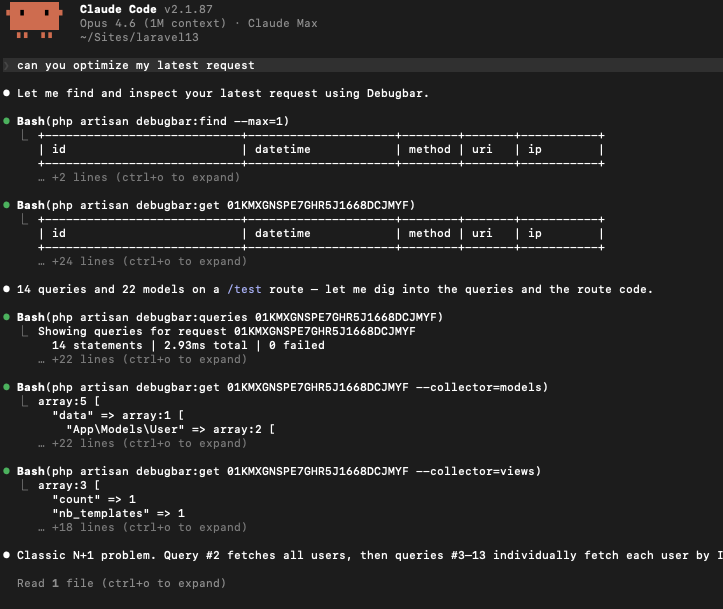
I added a @laravelphp Boost skill + cli to Laravel Debugbar to help you fix issues and optimize queries 🤖
It can:
- Browse latest requests
- See collected data and show details
- Show overview of queries (with duplicates)
- Query details (backtrace and even EXPLAIN results)
@dr4goonis@christophrumpel@laravelphp I think Laravel boost can do most of that probably, but you can combine it with the Debugbar cli to let AI inspect the actual queries and run EXPLAIN on your database directly.
Small new Laravel Debugbar feature: Re-run SELECT queries to help debug your results (opt-in via config)
You probably know you can use the Explain feature to find missing indexes, but now you can re-run the entire query and render it as a table or dump result, or expand it.
@faraweilyas@teamcodecourse Did you try the latest version? What issues do you run into with Octane and Livewire? v4 should be optimized more for both.
It's not enabled by default, but you can set the new 'show_query_result' option the the config, or DEBUGBAR_OPTIONS_DB_SHOW_QUERY_RESULT=true in your .env. (And needs to be in your local network by default)