Your Skill doesn't fire because you wrote it wrong.
Here's the exact Claude Skill anatomy that works:
The image shows all 9 parts. Save it.
But 7 of them barely matter.
Two decide if your Skill works at all:
1. The Description.
It's the part Claude reads to decide whether to fire.
Vague description = the Skill just sits there, not fire.
Fix it: describe when to reach for it, not what it is.
"Use whenever the user says X or wants to Z - even if they never say the skill's name."
2. The "Never do" line.
Skip it & your Skill hijacks chats it should ignore.
Fix: "Never use for [the thing it keeps stealing]
Two things the image can't show you:
✦ Skill won't fire? Ask Claude:
"When would you use this skill?" It reads its own description back. You instantly see what's vague.
✦ And installing 20 Skills won't eat your usage.
Claude only reads the 3-line header until a task matches. A task that cost 12,000 tokens raw cost 6,000 with a Skill. It saves money.
Easy part: you don't have to write any of this.
I already built the entire library, every Claude Skill as per this exact Skill anatomy:
Step 1. Go to https://t.co/psB7XxAv8w. Subscribe free.
Step 2. Open the welcome email (don't skip it).
Step 3. Click the Notion link. Open "Claude Skills."
Step 4. Download the whole library.
Step 5. Upload to Claude → Settings → Skills.
They're built right. They fire.
♻️ Repost this to save someone from a broken Skill.
Don't upgrade to the $100 Claude plan (yet).
These 21 hacks make the $20/month plan enough:
1. You upload PDFs raw. One page = 3,000 tokens.
Fix: Paste the text into a Google doc. Download as .md format, then turn it into a Skill.
2. You build files inside Cowork too early.
Fix: Plan in Chat first. Move to Cowork only when you know exactly what you want.
3. You write 500-word prompts that reload.
Fix: Write 29 words instead: "I want to [task] to [goal]. Ask me questions using AskUserQuestion."
4. You say "redo the whole thing" to fix section 3.
Fix: "Only redo section 3. Keep everything else. No commentary. Just the output."
5. You send 3 separate messages for 3 tasks.
Fix: One message, three tasks. "Summarize this, list the points, suggest a headline."
6. You type "No, I meant," stacking on the history.
Fix: Click 'Edit' on your original message. Fix it. Regenerate.
7. You rewrite prompts from scratch every time.
Fix: Keep a prompt library. Same structure, swap the variable.
8. You use Opus for a simple grammar check.
Fix: Sonnet for quick tasks. Save Opus (High) or Fable (High) for the real work.
9. Your about-me file is 22,000 words (too long).
Fix: Trim to under 2,000 words. End sessions with "Write a session-notes .md."
Paste my .md file prompt: https://t.co/LyV7fegv4c
10. You never restart & keep stacking long chats.
Fix: When Cowork goes sideways, click "Restart the conversation from here" on an earlier message.
11. You never summarize before things get long.
Fix: Every 15-20 messages → summarize, copy the brief, start a fresh session.
12. You use Projects for recurring files.
Fix: Use Projects. Upload once. Every chat inside references it without re-burning tokens.
13. You dump 50 files into Cowork "just in case."
Fix: Only include what this task needs. Zero folders for quick tasks like email drafts.
14. You keep 3 topics in 1 chat. Claude re-reads all.
Fix: New topic = new chat. Always. Dead context is dead tokens.
15. You leave search & connectors on by default.
Fix: Default everything off. Turn features on per task, not per account.
16. You manually run the same report every week.
Fix: Use /schedule. "Every Monday at 7am, create my weekly briefing."
17. You let Claude Code explore your whole repo.
Fix: Be specific. "Build a bar chart from this CSV. Save as chart .png."
18. Skip Personal Preferences & waste setup.
Fix: The minimum possible. Don’t give any info. Turn off Memory.
19. You type lazy prompts like "make it better."
Fix: Speak your prompts with wispr .ai. Richer context in one shot.
20. You burn your whole limit in one morning.
Fix: Claude runs on a rolling 5-hour window. Split it.
21. You use Claude for things it can't do.
Fix: Know your tools. Images → Gemini.
Real-time search → Grok.
To download my exact .md files:
1. Go to https://t.co/psB7XxAv8w.
2. Subscribe for free. Open my welcome email.
3. Go to the Notion link.
5. Copy-paste prompts, too.
SOMEONE WIRED 2,000 OF THEIR NOTES INTO A 3D BRAIN CLAUDE CAN READ - AND IT RUNS ON THE SAME TRICK I USE 23 TIMES
most people send Claude 100+ messages a week re-explaining who they are - and it forgets 100% of it the second the tab closes
this is the opposite. 1 file. written 1 time. read by Claude before every single task, forever
it's called SKILL.md. each one teaches Claude exactly 1 job - your voice, your research, your planning - and it never asks twice
the 3D brain in the video is just 1 skill maxed out: a memory pulled from 2,000 of your own notes, not a billion pages of internet sludge
i run 23 of them. same model everyone else opens - mine just shows up already knowing the work, 10x sharper
30 minutes for the first one. 5 minutes each after. 23 files, and the model turns into a different one
a prompt helps for 1 message. a skill pays you back every session, for life
the article below is the full folder - all 23, start to finish
My friend makes $1.2 million a year as an Anthropic engineer.
I asked him how he learned prompting so well.
He sent me a video that was never supposed to get out. Their core team's prompting playbook.
You won’t find anything better about prompting than this video.
I watched it last night.
Halfway through, I realized I've been using Claude completely wrong for two years.
Watch it, then read the article below.
AI can generate content in seconds. Great teaching generates understanding that lasts a lifetime.
Don't judge a lesson by how impressive it looks. Judge it by how deeply it changes the learner.
Technology creates experiences.
Teachers create transformation.
#AIinEducation
20 NotebookLM Prompts
To Learn Faster, Think Deeper & Research Smarter
01. Instant Summary
Turn long documents into digestible insights.
Prompt: “Summarize this source into the 10 most important ideas, key arguments, and practical takeaways in plain English.”
02. Beginner Explanation
Make complex topics easy to understand.
Prompt: “Explain this material as if I am a complete beginner. Use simple analogies, step-by-step logic, and avoid jargon.”
03. Deep Dive Breakdown
Understand the topic layer by layer.
Prompt: “Break this source into core concepts, hidden assumptions, expert-level nuances, and what most readers usually miss.”
04. Compare Sources
Spot agreements and contradictions.
Prompt: “Compare all uploaded sources. Show where they agree, where they conflict, and what unique insights each source contributes.”
05. Study Notes Builder
Create clean notes instantly.
Prompt: “Turn this content into structured study notes with headings, bullet points, definitions, and memorable examples.”
06. Flashcards Generator
Convert information into active recall.
Prompt: “Generate 25 high-quality flashcards from this material with question on front and concise answer on back.”
07. Quiz Me
Test your understanding.
Prompt: “Create a progressive quiz from easy to difficult based only on this source. Wait for my answers and grade me.”
08. Memory Hooks
Make information stick.
Prompt: “Create mnemonics, analogies, and memory anchors that help me retain the most important parts of this content.”
09. Timeline Extraction
Organize events chronologically.
Prompt: “Extract every important event, milestone, or development from these sources and arrange them into a clean timeline.”
10. Key Quotes Finder
Find the strongest supporting evidence.
Prompt: “Pull out the most impactful quotes, data points, and evidence from these sources that I can cite in writing or presentations.”
11. Research Gaps
See what’s missing.
Prompt: “Identify unanswered questions, weak arguments, missing evidence, and research gaps across these materials.”
12. Debate Both Sides
Sharpen critical thinking.
Prompt: “Present the strongest arguments for and against the main thesis of these sources as if two experts were debating.”
13. Turn Into Framework
Extract repeatable systems.
Prompt: “Convert the ideas in these sources into a practical framework, checklist, or repeatable system I can apply.”
14. Content Repurposing
Turn research into publishable content.
Prompt: “Use these sources to generate a LinkedIn post, article outline, tweet thread, and newsletter idea.”
15. Expert Interview Mode
Ask the notebook questions.
Prompt: “Act as the world’s top expert on these uploaded materials. I will ask questions answer only from the sources.”
16. Executive Briefing
Condense for busy decision making.
Prompt: “Create a 5-minute executive briefing with only the most strategic insights, implications, and action points.”
17. Lesson Plan Creator
Transform notes into a curriculum.
Prompt: “Turn this notebook into a 7-day learning plan with daily lessons, exercises, and checkpoints.”
18. Idea Generator
Use sources for new thinking.
Prompt: “Generate 20 original ideas, opportunities, or applications inspired by the uploaded materials.”
19. Simplify for Teaching
Prepare to explain to others.
Prompt: “Rewrite the key ideas from these sources into a teaching script that I can explain to someone in 5 minutes.”
20. Action Plan
Move from knowledge to execution.
Prompt: “Based on everything in these sources, create a practical action plan with first steps, priorities, and deadlines.”
❤️ Like
🔁 Retweet
🔖 Bookmark
Followv Nadia -with-Ai for more such posts
Most people think prompting is just writing better sentences
Anthropic shows why that's wrong
This 32-minute workshop breaks down how prompts are built for production
Not prompt hacks
Not "act as"
Not another $300 course
Actual systems
Evals
Edge cases
Model migration
Agent loops
Good prompt is not one message
It's a workflow the model can follow, test and improve
This matters because every new claude opus or sonnet will still reward the same rules
Watch the prompting playbook
Bookmark it before your next bad ai answer is just a bad setup
Most people think AI agents are just smarter chatbots.
They’re not.
AI agents follow a structured decision-making loop that allows them to observe, analyze, plan, act, evaluate, and improve over time.
🔹 Sense information from the environment
🔹 Interpret data and context
🔹 Strategize the best course of action
🔹 Execute tasks using tools and systems
🔹 Review outcomes and performance
🔹 Adapt based on feedback and results
This continuous cycle is what makes AI agents capable of handling complex workflows, automating decisions, and improving with every interaction.
The future of AI isn’t just generating answers.
It’s making decisions, taking actions, and continuously learning.
Which stage do you think is the most important for building reliable AI agents?
#AI #AIAgents #ArtificialIntelligence #MachineLearning #GenerativeAI #AgenticAI #Automation #FutureOfWork #TechInnovation #AITrends
GOODBYE POWERPOINT.
Claude 4.7 can create a complete presentation in 60 seconds.
Use these 6 prompts and watch the magic happen.
📌 Save this — it’ll come in handy later.
Claude just dropped 13 FREE AI courses (with certificates).
No $500 course needed.
No “guru” required.
Just real skills — straight from Anthropic.
Here’s the full list:
👇
1. Claude 101
https://t.co/0lV8Anj1Og
2. AI Fluency: Frameworks & Foundations
https://t.co/o6wwCtoXI6
3. Introduction to Agent Skills
https://t.co/WEoNpY3Znf
4. Building with the Claude API
https://t.co/3S1MMDgaqb
5. Claude Code in Action
https://t.co/rSXSS1OHXm
6. Introduction to Model Context Protocol
https://t.co/9Yxuhj0ixS
7. MCP: Advanced Topics
https://t.co/ZTzHsieQog
8. AI Fluency for Students
https://t.co/sfACWrD8nU
9. AI Fluency for Educators
https://t.co/P0sm8HMZh1
10. Teaching AI Fluency
https://t.co/9qM63FMNfn
11. AI Fluency for Nonprofits
https://t.co/ku4rdSHEcE
12. Claude with Amazon Bedrock
https://t.co/ZaoO1XwEAH
13. Claude with Google Vertex AI
https://t.co/pIsY4DBk5j
—
If you go through even HALF of these…
You’ll be ahead of 95% of people using AI.
Most people won’t.
Because they’re still:
• Watching random YouTube videos
• Buying overpriced courses
• “Learning AI” without actually building
Don’t be that person.
Do this instead:
1. Save this post (you’ll come back to it)
2. Pick 1 course → start today
3. Share it with someone who needs this
Free. Practical. No excuses.
Everyone is chasing the "best AI model."
Meanwhile, the smartest builders are focused on something else:
AI Agent Architecture.
Because GPT-5, Claude, Gemini, or any future model is just one piece of the puzzle.
What actually makes an AI agent useful?
✓ Clear goals
✓ Strong system prompts
✓ Tool integrations
✓ Long-term memory
✓ Workflow orchestration
✓ Human feedback loops
✓ Continuous evaluation
The truth nobody tells beginners:
A well-designed agent with an average model will outperform a poorly designed agent with the most powerful model.
Models are becoming commodities.
Systems are becoming the advantage.
Learn to build the system, not just use the model. 🚀
🔖 Save this roadmap before your next AI project.
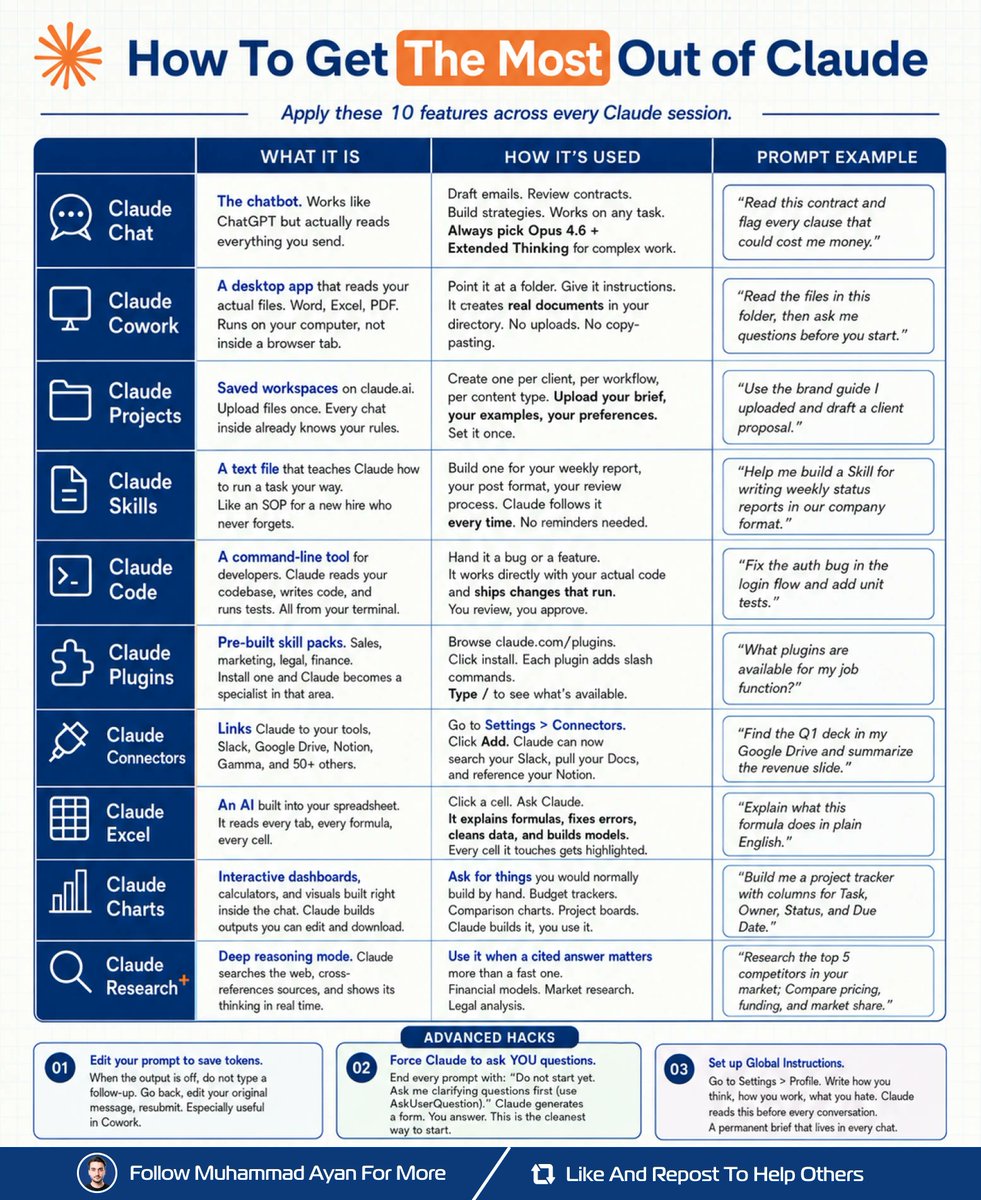
I rebuilt my entire workflow inside Claude.
No extra tools. No subscriptions.
Just 10 features I wasn't using.
Here's exactly how (save this):
𝗦𝘁𝗲𝗽 𝟭: Set the foundation
↳ Open Settings > Profile
↳ Write your Global Instructions
↳ Claude reads this before every chat
𝗦𝘁𝗲𝗽 𝟮: Build your workspace
↳ Create a Project per client or workflow
↳ Upload your brief, rules, and examples
↳ Every new chat inherits full context
𝗦𝘁𝗲𝗽 𝟯: Write your Skills
↳ One text file per repeating task
↳ Weekly reports. Post formats. Reviews.
↳ Claude follows it. No reminders needed.
𝗦𝘁𝗲𝗽 𝟰: Connect your tools
↳ Settings > Connectors
↳ Add Slack, Drive, Notion, Gamma
↳ Claude searches across all of them
𝗦𝘁𝗲𝗽 𝟱: Pick the right surface
↳ Chat: Opus 4.6 + Extended Thinking
↳ Files on your desktop: Cowork
↳ Spreadsheets: Claude Excel
↳ Visuals and dashboards: Claude Charts
↳ Cited research: Claude Research+
↳ Code: Claude Code in terminal
Once set up:
Claude knows my brand without asking.
Claude runs tasks without reminders.
Claude searches my tools, not just the web.
It doesn't just answer questions anymore.
It runs the operation.
What would you set up first?
Save this for later. Repost ♻️ for others.
Anthropic just dropped a 31-page prompting guide.
Here's everything you actually need (in 10 rules):
1. You write "review this contract" and pray.
Fix: Name every output. "Review this contract. Flag risks per clause. Rate severity 1-5. Return as a table."
2: You say "summarize this" on a 40-page report.
Fix: 4.8 sizes the answer to the input. Cap it: "5 bullets. Each under 15 words. Start each with an action verb."
3: You write "don't use jargon. don't be salesy."
Fix: Negative instructions don't stick.
Flip them: "Write in plain English a 16-year-old could read aloud."
4: You type "can you help me with the email?"
Fix: Each verb ships something. For example: "Go to Gmail. Find [contact]. Write the send-ready reply. Under 90 words. Tone: confident, casual."
5: You wait for Claude to web search on its own.
Fix: Claude opus 4.8 calls fewer tools than 4.6.
Force it: "Use web search aggressively. Verify every claim with at least 2 sources."
6: You miss the warm tone from old Claude.
Fix: Claude opus 4.8 is direct. Almost zero emojis. Paste 2-3 sentences in the voice you want.
Tell Claude to match the rhythm.
7: You ask for "a landing page" & get bare minimum.
Fix: Drop this one line on every creative task
→ "Go beyond the basics."
It's from Anthropic's own doc.
8: You forget Claude 4.8 doesn't reason by default.
Fix: They call it "Thinking." Effort: High
Add this at the end: "Think before answering (maximum reasoning)." Free upgrade. Every time.
9: You rewrite the same prompt 14 times a week.
Fix: A skill is a command with instructions pre-built.
Write the same prompt twice? Make it a skill.
10: You assume Claude knows what you meant.
Fix: Old Claude 4.6 guessed.
New Claude 4.8 does exactly what you typed.
Spell it out. Output. Order. Length. Tone. Format.
If you don't say it, you don't get it.
To go even further & download my .md files directly:
Step 1. Go to https://t.co/psB7XxAv8w.
Step 2. Subscribe for free. Don't pay anything.
Step 3. Open my welcome email (most skip this).
Step 4. Hit the automatic reply button inside.
Step 5. Download my .md files from my Notion.
Bonus. Enjoy my best copy-paste prompts, too.
15 ChatGPT prompts every researcher should keep handy 📚.
Use AI to:
• Create research plans
• Review studies faster
• Identify research gaps
• Analyze datasets
• Build stronger hypotheses
• Spot emerging trends
• Check ethical considerations
• Design better methodologies
Work smarter, think deeper, and save hours on research.
Infographic credit : @AndrewBolis
Bookmark
Like
Retweet
Follow @ayzha_ai for more content





![rubenhassid's tweet photo. Your Skill doesn't fire because you wrote it wrong.
Here's the exact Claude Skill anatomy that works:
The image shows all 9 parts. Save it.
But 7 of them barely matter.
Two decide if your Skill works at all:
1. The Description.
It's the part Claude reads to decide whether to fire.
Vague description = the Skill just sits there, not fire.
Fix it: describe when to reach for it, not what it is.
"Use whenever the user says X or wants to Z - even if they never say the skill's name."
2. The "Never do" line.
Skip it & your Skill hijacks chats it should ignore.
Fix: "Never use for [the thing it keeps stealing]
Two things the image can't show you:
✦ Skill won't fire? Ask Claude:
"When would you use this skill?" It reads its own description back. You instantly see what's vague.
✦ And installing 20 Skills won't eat your usage.
Claude only reads the 3-line header until a task matches. A task that cost 12,000 tokens raw cost 6,000 with a Skill. It saves money.
Easy part: you don't have to write any of this.
I already built the entire library, every Claude Skill as per this exact Skill anatomy:
Step 1. Go to https://t.co/psB7XxAv8w. Subscribe free.
Step 2. Open the welcome email (don't skip it).
Step 3. Click the Notion link. Open "Claude Skills."
Step 4. Download the whole library.
Step 5. Upload to Claude → Settings → Skills.
They're built right. They fire.
♻️ Repost this to save someone from a broken Skill.](https://pbs.twimg.com/media/HNFLllsa8AA7Y6p.png)
![rubenhassid's tweet photo. Don't upgrade to the $100 Claude plan (yet).
These 21 hacks make the $20/month plan enough:
1. You upload PDFs raw. One page = 3,000 tokens.
Fix: Paste the text into a Google doc. Download as .md format, then turn it into a Skill.
2. You build files inside Cowork too early.
Fix: Plan in Chat first. Move to Cowork only when you know exactly what you want.
3. You write 500-word prompts that reload.
Fix: Write 29 words instead: "I want to [task] to [goal]. Ask me questions using AskUserQuestion."
4. You say "redo the whole thing" to fix section 3.
Fix: "Only redo section 3. Keep everything else. No commentary. Just the output."
5. You send 3 separate messages for 3 tasks.
Fix: One message, three tasks. "Summarize this, list the points, suggest a headline."
6. You type "No, I meant," stacking on the history.
Fix: Click 'Edit' on your original message. Fix it. Regenerate.
7. You rewrite prompts from scratch every time.
Fix: Keep a prompt library. Same structure, swap the variable.
8. You use Opus for a simple grammar check.
Fix: Sonnet for quick tasks. Save Opus (High) or Fable (High) for the real work.
9. Your about-me file is 22,000 words (too long).
Fix: Trim to under 2,000 words. End sessions with "Write a session-notes .md."
Paste my .md file prompt: https://t.co/LyV7fegv4c
10. You never restart & keep stacking long chats.
Fix: When Cowork goes sideways, click "Restart the conversation from here" on an earlier message.
11. You never summarize before things get long.
Fix: Every 15-20 messages → summarize, copy the brief, start a fresh session.
12. You use Projects for recurring files.
Fix: Use Projects. Upload once. Every chat inside references it without re-burning tokens.
13. You dump 50 files into Cowork "just in case."
Fix: Only include what this task needs. Zero folders for quick tasks like email drafts.
14. You keep 3 topics in 1 chat. Claude re-reads all.
Fix: New topic = new chat. Always. Dead context is dead tokens.
15. You leave search & connectors on by default.
Fix: Default everything off. Turn features on per task, not per account.
16. You manually run the same report every week.
Fix: Use /schedule. "Every Monday at 7am, create my weekly briefing."
17. You let Claude Code explore your whole repo.
Fix: Be specific. "Build a bar chart from this CSV. Save as chart .png."
18. Skip Personal Preferences & waste setup.
Fix: The minimum possible. Don’t give any info. Turn off Memory.
19. You type lazy prompts like "make it better."
Fix: Speak your prompts with wispr .ai. Richer context in one shot.
20. You burn your whole limit in one morning.
Fix: Claude runs on a rolling 5-hour window. Split it.
21. You use Claude for things it can't do.
Fix: Know your tools. Images → Gemini.
Real-time search → Grok.
To download my exact .md files:
1. Go to https://t.co/psB7XxAv8w.
2. Subscribe for free. Open my welcome email.
3. Go to the Notion link.
5. Copy-paste prompts, too.](https://pbs.twimg.com/media/HM6-aEbaIAArTt2.jpg)




![rubenhassid's tweet photo. Anthropic just dropped a 31-page prompting guide.
Here's everything you actually need (in 10 rules):
1. You write "review this contract" and pray.
Fix: Name every output. "Review this contract. Flag risks per clause. Rate severity 1-5. Return as a table."
2: You say "summarize this" on a 40-page report.
Fix: 4.8 sizes the answer to the input. Cap it: "5 bullets. Each under 15 words. Start each with an action verb."
3: You write "don't use jargon. don't be salesy."
Fix: Negative instructions don't stick.
Flip them: "Write in plain English a 16-year-old could read aloud."
4: You type "can you help me with the email?"
Fix: Each verb ships something. For example: "Go to Gmail. Find [contact]. Write the send-ready reply. Under 90 words. Tone: confident, casual."
5: You wait for Claude to web search on its own.
Fix: Claude opus 4.8 calls fewer tools than 4.6.
Force it: "Use web search aggressively. Verify every claim with at least 2 sources."
6: You miss the warm tone from old Claude.
Fix: Claude opus 4.8 is direct. Almost zero emojis. Paste 2-3 sentences in the voice you want.
Tell Claude to match the rhythm.
7: You ask for "a landing page" & get bare minimum.
Fix: Drop this one line on every creative task
→ "Go beyond the basics."
It's from Anthropic's own doc.
8: You forget Claude 4.8 doesn't reason by default.
Fix: They call it "Thinking." Effort: High
Add this at the end: "Think before answering (maximum reasoning)." Free upgrade. Every time.
9: You rewrite the same prompt 14 times a week.
Fix: A skill is a command with instructions pre-built.
Write the same prompt twice? Make it a skill.
10: You assume Claude knows what you meant.
Fix: Old Claude 4.6 guessed.
New Claude 4.8 does exactly what you typed.
Spell it out. Output. Order. Length. Tone. Format.
If you don't say it, you don't get it.
To go even further & download my .md files directly:
Step 1. Go to https://t.co/psB7XxAv8w.
Step 2. Subscribe for free. Don't pay anything.
Step 3. Open my welcome email (most skip this).
Step 4. Hit the automatic reply button inside.
Step 5. Download my .md files from my Notion.
Bonus. Enjoy my best copy-paste prompts, too.](https://pbs.twimg.com/media/HJoSjWJa0AA7KX8.jpg)





