EXCLUSIVE: Tesla has just officially received approval for its full Autonomous Vehicle Network Company permit in Nevada, clearing the way for Tesla to launch a paid public Robotaxi service in Las Vegas.
This officially allows @Tesla to deploy up to 5,000 robotaxis over the next 12 months. The permit approval covers all of Clark County (which includes Las Vegas), but this approval actually allows Tesla to operate across the entire state of Nevada, according to the commission, as long as Tesla notifies the commission of when they want to expand their geofence.
I just watched live the Nevada Transportation Authority’s entire 4-hour long August 20th General Session meeting, and a few minutes ago the Commission approved Tesla’s permit.
Tesla representatives were at the meeting today, and they said that they won't deploy all 5,000 robotaxis at once in the beginning (obviously), but that this permit approval gives them the flexibility to deploy more vehicles over time. They'll start with a small launch of a few vehicles and then grow from there.
Tesla completed Nevada’s self-certification process for Robotaxi last November, and applied for an Autonomous Vehicle Network Company permit on June 3, 2026. Now with all approvals, Tesla can begin commercial Robotaxi operations in the state once they complete a few simple administrative things (vehicle inspections, insurance, provide the rates to be charged for transportation, etc). That should happen within the next 30 days.
To be clear, today's approval is separate from the interim operating order Tesla previously received, which limited its robotaxi fleet to just 10 vehicles. Today’s approval replaces that previous interim operating order, and authorizes a fleet of up to 5,000 fully autonomous vehicles.
Three moments in Tesla Self-Driving 14.3.7 that really impressed me today:
1. I was waiting in the left turn lane for a long time, and then realized there was a tow truck in front of us towing a car that broke down. The car intelligently excited the left turn lane, went around the tow truck, and pulled in right in front of it. It realized the tow truck wasn’t moving before I did.
2. At a four way stop in Palos Verdes, there was a traffic cop motioning people to go instead of stop (due to high traffic at these hours). The car intelligently ignored the stop sign and kept going based on the hand motions and other cars
3. Going to an engagement party at my cousin’s house, I set the car to street parking at arrival. Rather than park on the main Palos Verdes Boulevard (which is what the address actually said) it pulled onto a side street and found street parking perfectly on its own — just the same way I would have done.
In general I continue to feel that this build is a work of art in dense LA traffic. I feel amazement and awe at the subtlety of its maneuvers much like I feel when seeing an incredible show, concert, or a great work of art. It is a truly beautiful and magical thing.
Grok Bot is not just another chatbot. It is an always-on AI teammate with its own computer.
It can sign in to your tools, work across apps, inboxes and websites, keep working 24/7 and return with finished work.
Here are 100 useful tasks you could give Grok Bot:
Sales:
• Research companies, customers, leads and competitors
• Build targeted lists of potential customers
• Find and score high-intent sales prospects
• Enrich contact details and company records
• Draft personalized emails and LinkedIn messages
• Turn call transcripts into CRM notes and follow-ups
• Prepare detailed account briefs before meetings
• Keep CRM records and customer details updated
• Flag stalled deals, risks and overdue next steps
• Prepare weekly sales reports and pipeline scoreboards
Marketing and content:
• Research content ideas and trending topics
• Prepare marketing campaign briefs
• Create and manage campaigns across different tools
• Research competitors’ marketing strategies
• Build weekly or monthly content calendars
• Repurpose content for social media, email and other platforms
• Draft social posts, newsletters and blog content
• Create multiple versions of advertisements and copy
• Monitor brand mentions and prepare responses
• Prepare campaign performance reports
Inbox and administration:
• Monitor your inbox and organize emails
• Draft replies in your preferred writing style
• Create a daily summary of important messages
• Extract tasks, deadlines and action items from emails
• Follow up on stalled conversations and forgotten tasks
• Prepare meeting agendas and discussion points
• Turn meeting notes into tasks and follow-ups
• Organize email attachments and cloud files
• Enter information into forms and internal systems
• Update project trackers, documents and dashboards
Finance and operations:
• Process invoices received through Gmail
• Extract invoice information automatically
• Match invoices with purchase orders
• Track expenses and prepare finance updates
• Organize receipts and expense claims
• Clean and reconcile financial spreadsheets
• Compare vendor prices and prepare recommendations
• Monitor software subscriptions and renewals
• Track inventory and flag low supplies
• Handle repetitive office operations
Hiring and HR:
• Help onboard new employees
• Organize seating, accounts and equipment for new hires
• Draft job descriptions
• Research and identify potential candidates
• Organize applications and candidate information
• Coordinate interview schedules
• Prepare candidate briefs before interviews
• Combine interview feedback into one report
• Create training materials and onboarding guides
• Prepare employee offboarding checklists
Customer support and success:
• Monitor incoming customer requests
• Create and categorize support tickets
• Prioritize urgent customer issues
• Draft customer support replies
• Search internal documentation for answers
• Escalate important problems to the correct team
• Send product updates to customers
• Keep follow-up tasks synchronized across tools
• Prepare customer health and renewal reports
• Turn customer feedback into clear themes
Product and engineering:
• Prepare and test product demo environments
• Fix stale demo data and create readiness checklists
• Reproduce software bugs inside the product interface
• File detailed bug reports with steps and evidence
• Hand bugs to another debugging Bot to work on fixes
• Test websites and apps for common problems
• Run repetitive quality-assurance checks
• Test logins, forms, buttons and checkout flows
• Update project boards and release notes
• Turn user feedback into organized feature requests
Research and reporting:
• Conduct detailed web research
• Collect sources and prepare cited summaries
• Compare competitors’ products and pricing
• Monitor industry news and important announcements
• Organize research findings into tables
• Clean and analyze large spreadsheets
• Create daily, weekly or monthly reports
• Update internal dashboards with new information
• Prepare presentation outlines and meeting briefs
• Summarize long documents, emails and transcripts
E-commerce and online business:
• Update product listings across platforms
• Check inventory and identify low-stock products
• Monitor competitors’ prices
• Analyze customer reviews and common complaints
• Track delayed or problematic orders
• Prepare return and refund cases for approval
• Follow up with vendors about missing orders
• Create promotional campaign drafts
• Clean product catalogs and remove outdated information
• Prepare daily store performance summaries
Events and project management:
• Research venues, vendors and service providers
• Compare quotes and prepare options
• Create event checklists and timelines
• Coordinate invitations and attendee lists
• Track project deadlines and responsibilities
• Remind team members about overdue work
• Collect progress updates from different tools
• Prepare weekly project status reports
• Identify blockers before they delay a project
• Keep everyone aligned on the latest information
Bots, routines and automation:
• Watch you complete a workflow and learn how you do it
• Save workflows as reusable routines
• Repeat multi-step tasks without being taught again
• Learn your voice, preferences and edge cases
• Manage several specialist Bots simultaneously
• Let Bots communicate and share information
• Place Bots in group chats to coordinate work
• Use one chief-of-staff Bot to manage the others
• Run research, reporting and other jobs overnight
• Ask for your approval only when a decision requires you
You can message Grok Bot like a coworker, teach it how you prefer things done and let it improve over time. The real value is not just getting an answer. It is handing off an entire job and getting finished work back.
New episode of Jay Leno's Garage with Tesla Chief Designer Franz von Holzhausen just came out, with Franz showing off his personal 2006 Pontiac Solstice that he designed. https://t.co/INVcvbKhHG
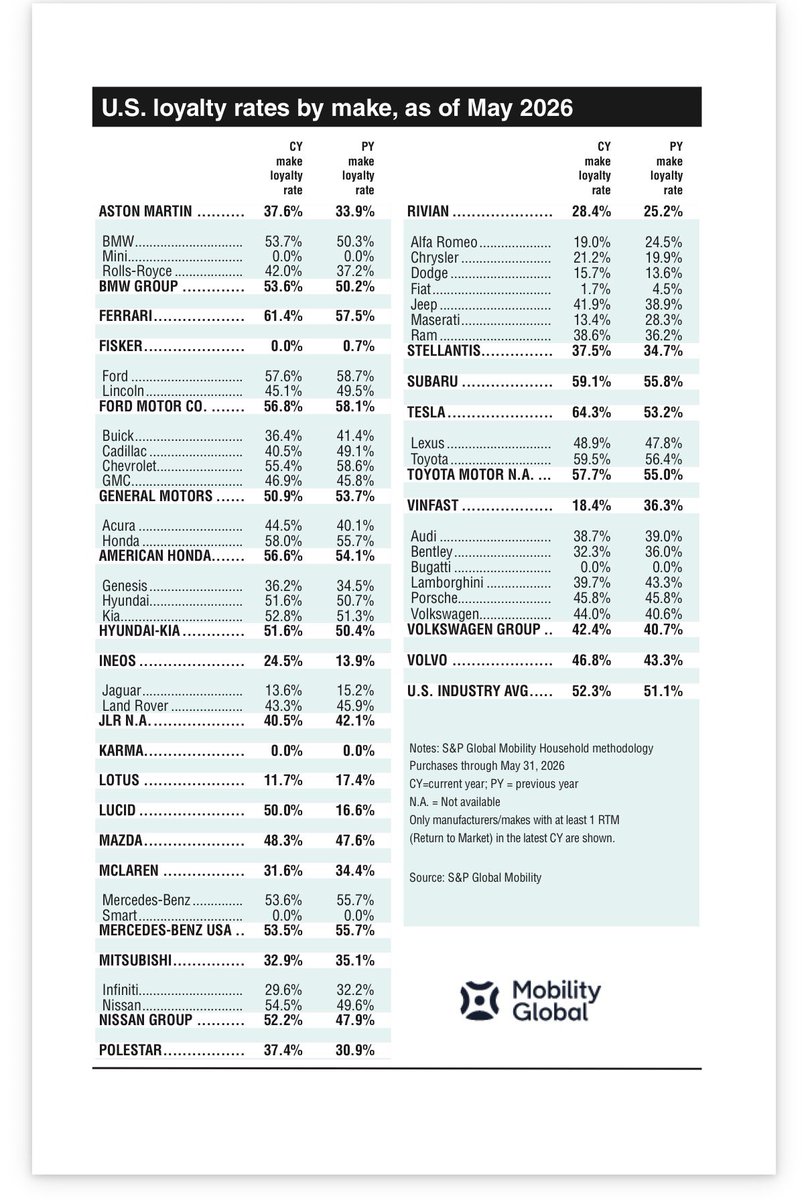
U.S. Automotive Loyalty Rates by Make
1. Tesla
2. Ferrari
3. Toyota
4. Subaru
5. Honda
6. Ford
7. Chevrolet
8. Nissan
9. BMW
10. Mercedes-Benz
11. Kia
12. Hyundai
13. Lucid
14. Lexus
15. Mazda
16. Porsche
17. Lincoln
18. Acura
19. Volkswagen
20. Land Rover
I am going to @theXtakeover for the first time later this year. This will also be the first time the event is held at Tesla Giga Texas. Look forward to meeting a lot of you there!
There's a limited number of tickets left, so if you want to go, register here: https://t.co/HECTcfpINK
Giveaway time! Here's your chance to win the DJI Lito X1 — sub-249g, 1/1.3-inch sensor, Forward LiDAR omnidirectional obstacle avoidance, 36-minute flight on the standard battery.
How to enter:
1. Follow @DJIGlobal
2. Like and share this post
3. Bonus Chance: Comment below — what's the one
@robotaxi Now that you're partnered with Samsung on chips, I'd think you'd give some love their way and get the Android app going. It's March now, so when?
@SawyerMerritt@tesla Its very disappointing that Tesla would do this to their new customers. The lane centering feature in Auto-Pilot is a standard feature in most new cars now. For Tesla to remove it is absurd and will make a lot of potential new customers look elsewhere.