Spot on — those three are exactly what the ⚠ risky-spots pass targets. Two notes from building it:
① "Auth in comments, not code" is the one people miss most — the doc says it's handled, so the brain autocompletes "done." We treat that as a named blind spot: a finding can't go green until you open the actual code path, not the comment.
② "Destructive ops without confirmation" literally bit the audit tool itself — the 3-AI review caught our own bundle step deleting a directory with no guard. The pattern really is everywhere.
The whole design is built so a non-engineer gives an explicit allow/deny on exactly those spots, and it won't show green while any is unresolved. Would genuinely love your eyes on the critical-review mode.
[Open Source] I built a tool that lets you READ and REVIEW AI-generated code — even if you can't read code.
Vibe coding is everywhere now. Non-engineers (me included) are shipping real apps with AI. But there's a problem nobody solved:
"The AI wrote my entire app. I can't read a single line of it. Should I really ship this?"
That fear is justified. Independent testing found that roughly 45% of AI-generated code contains known security flaws (Veracode). We've all seen the incidents — production databases deleted, apps shipped with their user data wide open. The AI can build it. But there was no way for the person who asked for it to check it.
So I built one. It's called Code Interpreter (コード通訳), and it's open source as of today.
▼ What it does
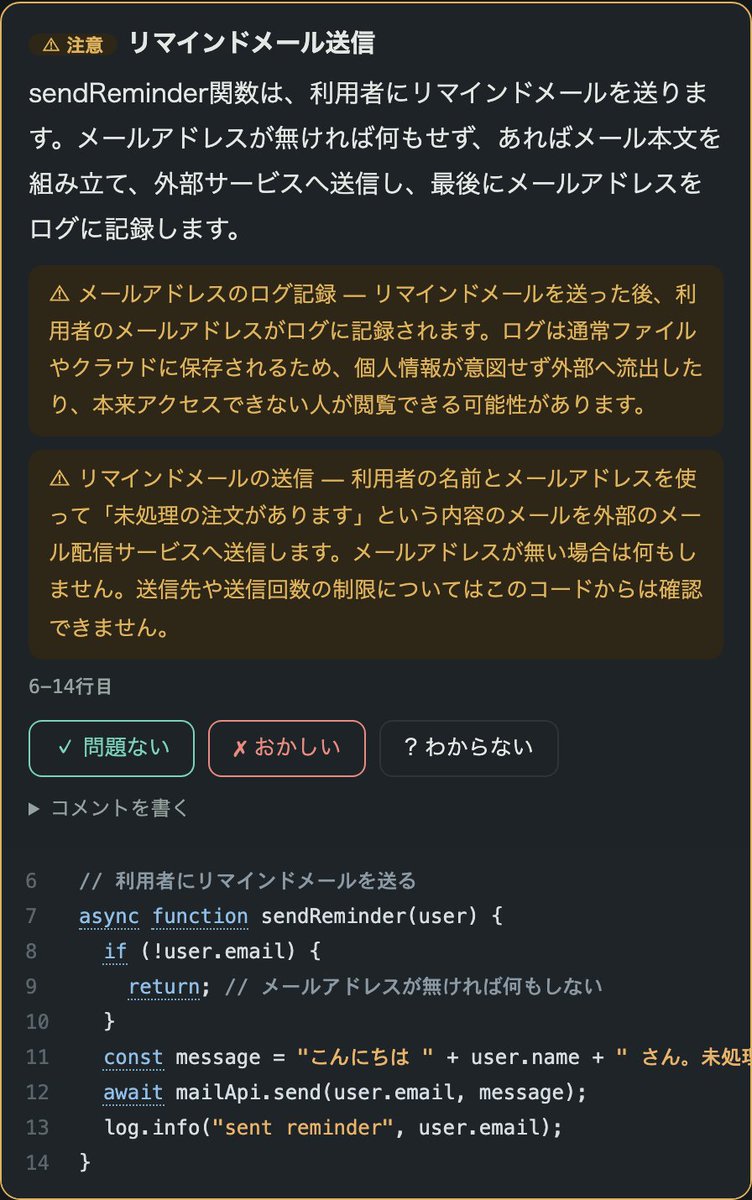
It splits your code into small "units of meaning" (a few lines each) and shows a plain-English explanation next to the actual code — like a bilingual book. Then you review each unit with three buttons:
✓ Looks right (this is what I asked for)
✗ Wrong (I never asked for this)
? Not sure
It's not a quiz. You're just answering: "is this what I wanted?"
▼ Every feature
- Press a file name → that file appears, already translated (translation is pre-generated, so it's instant)
- Risky spots — money, personal data, deletion — get a ⚠ Caution mark with an amber explanation of what could go wrong. A floating button tours only the ⚠ spots
- Hover any line of code for its one-line translation; hover keywords like `if` and `const` for hints
- Write free comments in ordinary language ("add a confirmation screen before sending")
- Your ✗ answers and comments are saved to a file. Tell the AI "fix the flagged items" in chat and it fixes them in bulk
- A verdict at the bottom: it turns green ONLY when every unit is marked ✓, every file was read, and nothing critical was detected
- When the code changes, all answers auto-expire — approvals of old code are never recycled for new code
- Learning mode: explanations are hidden, you guess what the code does, then click to check. Flashcard-style active recall — you actually learn to read code by reviewing your own app
- Works in English (--lang en) and Japanese
▼ The design principle I care about most
This tool never says "your code is safe."
Unread files are shown in red. AI explanations can be wrong, so the real code always sits right next to them. The verdict won't turn green while anything is unanswered or unverified. What it gives you is not reassurance — it's an honest record of what YOU reviewed and what remains unchecked.
Polished reports make people careless. So I built the opposite.
▼ Getting started (3 steps)
1. git clone (see README)
2. code-translate your-app --open --lang en
3. Your browser opens. From then on, just double-click the launcher file it drops in your folder
Works standalone or with Claude Code (~$0.1–0.3 per translation for a small app; unchanged code is never re-translated).
If you're vibe coding anything real — or reviewing what an AI or contractor shipped you — I'd love your feedback. Stars appreciated more than you know.
GitHub: https://t.co/STaK9oNqSj
English manual (with screenshots): https://t.co/AIqR1QZ2Ne
日本語マニュアル: https://t.co/ffuctJXSuX
#OpenSource #VibeCoding #AIcoding #BuildInPublic #ClaudeCode
More and more people are having AI build their apps. But—
**"It runs. Yet is it doing anything weird inside? Is it actually safe? I can't tell for myself."**
I've open-sourced a tool that answers that worry head-on. It's called **ai-audit**.
The core idea is simple:
👉 **Don't let the AI that wrote the code check its own work.**
👉 **Bring in "eyes other than the maker's" — a different company's AI (OpenAI's Codex, xAI's Grok) audits it with a stranger's eyes.**
Even humans miss the typos in their own writing while a stranger spots them instantly. AI is the same: the AI that wrote the code carries the assumption "I'm sure I got it right," and overlooks its own mistakes. So you show it to an AI that *isn't* the author. We call this **cognitive independence.**
—
And here's the proof I most want to share.
**Before launching, I had three AIs audit ai-audit itself.**
They found defects the implementing AI (me, Claude) had missed — each with reproduction steps. And the striking part:
**Grok and Codex found completely *different* holes.**
🟣 What Grok (xAI) found
· A deletion-permission check that could be spoofed with a single marker file
· A "highest severity" vuln (CVSS 9.8) misread as "low" and missed
🟢 What Codex (OpenAI) found
· A bypass when the input path is a shortcut (symlink)
· Broken/forged scan results read as "all clear"
· A scan labelled "whole history" that actually only looked at current files
· An empty "seal" that could be created covering zero files
Meanwhile, in the very first round, **both AIs agreed on the same critical bugs** (like a data-loss risk).
So:
**Everyone flags the big ones; they divide up the subtle ones.**
The more different-vendor AIs audit it, the more coverage adds up. That's the clearest evidence for "several AIs beat one." With a single AI, half of those holes would still be there.
I fixed them all, added 102 regression tests and machine gates, and left the entire trail in the repo. **The fact that my own audit tool keeps getting holes pointed out by independent AIs — and that I show all of it — is the most honest evidence that independent auditing actually works.**
—
**And the other half of it: don't stop at "found."**
Detection alone doesn't make code better. The heart of ai-audit is a **convergence loop**: **fix → a different AI re-audits → fix again**, repeated **until no serious findings remain.**
I demonstrated this too. It didn't finish in one pass before launch:
**Round 1** — 4 critical bugs → fixed → **Round 2** (a different AI, Grok) found residual holes *inside my round-1 fixes* → fixed → **Round 3** (Codex) found finer ones → fixed. **Each round, the independent AIs found fewer — it converged.**
The catch: **"loop until the checker goes quiet" over-fits to that AI's blind spots and backfires.** So there are four rules:
① **Separate who fixes from who judges** (Claude implements; a different-vendor AI judges)
② **Rotate the auditor each round** (don't stop at the first green; stop when independent passes come back clean in a row)
③ **Record *why* each finding was found**
④ **Stop honestly** (never weaken a test or gate just to pass)
**Detection (several independent AIs) × convergence (loop until it passes, correctly).** That product is the difference between a one-shot review that just points at things and a system that actually raises quality.
—
**Who is it for?**
"An AI built it" earns no trust from executives or clients. What you need is a deliverable that explains, with evidence, *what was checked against which standard, how far, and what remains unverified.* ai-audit generates exactly that — a technical audit report linking requirement IDs, tests, and evidence. It turns a verbal "I checked it" into a traceable document at delivery time. In any setting where your work is audited or inspected, having that explainable trail is what earns trust.
And **reviewing code isn't easy for non-engineers.** This tool takes over that "checking" work — not by trusting one AI, but by using several independent, different-vendor AIs.
**Two AIs is fine; three is recommended.**
· Claude + Codex (two) = officially supported minimum
· + Cursor (Grok) (three) = recommended; rotate auditors and catch more *different* holes
—
⚠️ Honestly: this is not magic that guarantees "safe." Its job is to show, without hiding anything, what was checked and what is still unverified — and never to relabel "not tested" as "safe." It's currently a **v1.8 Preview with limitations stated openly.**
—
📘 The gentlest guide (for non-engineers)
https://t.co/zr3QWToSEp
💻 GitHub (MIT, free). If it helps, a ⭐Star is hugely appreciated
https://t.co/ixMEhsNr69
Three steps: ①have your AI read the repo →②build your app as usual →③say "audit the code."
#AI #GenAI #Claude #ChatGPT #Codex #Grok #Cybersecurity #OpenSource #IndieHackers #vibecoding #CodeReview #AIagents #AppSec
Cursor: Cloud Agents and Cursor Harness Improvements
What changed:
- Cloud agents can now subscribe to PRs, Slack threads, and scheduled tasks, waking automatically when something happens
- Subagents can run on their own virtual machines, each with an isolated copy of the project and clean context
- Use /goal to give an agent a long-lived objective to work toward until fully complete
- Steer the agent mid-run without interruption — follow-ups wait for the next tool call instead of cutting it off
Details in thread ↓
I’ve released an open-source Work Automation Atlas for freelancers, solo developers, internal automation teams, and small agencies.
The challenge in business automation is rarely just “Can AI generate this document?”
The real questions are:
• What work is actually being performed?
• Which parts can be standardized?
• What information and historical materials are required?
• Which exceptions must be handled?
• Who reviews and approves the result?
• What should never be fully automated?
• Is the workflow ready for a proof of concept?
The toolkit classifies client work using 25 reusable automation patterns evaluated against 122 government, enterprise, and manufacturing cases.
For example, if a client wants to automate a monthly report, the completed PDF alone is not enough.
You may also need:
• source data from the same reporting period
• matching historical reports
• calculation formulas
• exception-handling rules
• terminology and formatting requirements
• the person responsible for approval
• the final delivery channel
• rules for correcting or reissuing the report
Once those materials are identified, an AI agent can provide a much more useful answer during the first discovery meeting:
“This part can be tested now.”
“These materials are still missing.”
“This decision must remain with a human.”
“This is the realistic scope of the first proof of concept.”
Classification does not automatically mean that a workflow is easy to automate. It gives developers and clients a shared structure for discussing feasibility, missing evidence, risks, human approvals, and implementation scope before making promises.
The project can be used with Codex, Claude Code, and Cursor, helping AI agents analyze a workflow and prepare an initial automation diagnosis.
GitHub:
https://t.co/75Us3gKg9j
English manual:
https://t.co/NZAuXQff9c
#AI #Automation #WorkflowAutomation #BusinessAutomation #AIAgents #OpenSource #FreelanceDeveloper #DigitalTransformation
Origin, our code hosting platform, is now live.
It's fast, easy to use, and deeply integrated with Cursor.
Get started by syncing your repos from GitHub.


![boboga777's tweet photo. [Open Source] I built a tool that lets you READ and REVIEW AI-generated code — even if you can't read code.
Vibe coding is everywhere now. Non-engineers (me included) are shipping real apps with AI. But there's a problem nobody solved:
"The AI wrote my entire app. I can't read a single line of it. Should I really ship this?"
That fear is justified. Independent testing found that roughly 45% of AI-generated code contains known security flaws (Veracode). We've all seen the incidents — production databases deleted, apps shipped with their user data wide open. The AI can build it. But there was no way for the person who asked for it to check it.
So I built one. It's called Code Interpreter (コード通訳), and it's open source as of today.
▼ What it does
It splits your code into small "units of meaning" (a few lines each) and shows a plain-English explanation next to the actual code — like a bilingual book. Then you review each unit with three buttons:
✓ Looks right (this is what I asked for)
✗ Wrong (I never asked for this)
? Not sure
It's not a quiz. You're just answering: "is this what I wanted?"
▼ Every feature
- Press a file name → that file appears, already translated (translation is pre-generated, so it's instant)
- Risky spots — money, personal data, deletion — get a ⚠ Caution mark with an amber explanation of what could go wrong. A floating button tours only the ⚠ spots
- Hover any line of code for its one-line translation; hover keywords like `if` and `const` for hints
- Write free comments in ordinary language ("add a confirmation screen before sending")
- Your ✗ answers and comments are saved to a file. Tell the AI "fix the flagged items" in chat and it fixes them in bulk
- A verdict at the bottom: it turns green ONLY when every unit is marked ✓, every file was read, and nothing critical was detected
- When the code changes, all answers auto-expire — approvals of old code are never recycled for new code
- Learning mode: explanations are hidden, you guess what the code does, then click to check. Flashcard-style active recall — you actually learn to read code by reviewing your own app
- Works in English (--lang en) and Japanese
▼ The design principle I care about most
This tool never says "your code is safe."
Unread files are shown in red. AI explanations can be wrong, so the real code always sits right next to them. The verdict won't turn green while anything is unanswered or unverified. What it gives you is not reassurance — it's an honest record of what YOU reviewed and what remains unchecked.
Polished reports make people careless. So I built the opposite.
▼ Getting started (3 steps)
1. git clone (see README)
2. code-translate your-app --open --lang en
3. Your browser opens. From then on, just double-click the launcher file it drops in your folder
Works standalone or with Claude Code (~$0.1–0.3 per translation for a small app; unchanged code is never re-translated).
If you're vibe coding anything real — or reviewing what an AI or contractor shipped you — I'd love your feedback. Stars appreciated more than you know.
GitHub: https://t.co/STaK9oNqSj
English manual (with screenshots): https://t.co/AIqR1QZ2Ne
日本語マニュアル: https://t.co/ffuctJXSuX
#OpenSource #VibeCoding #AIcoding #BuildInPublic #ClaudeCode](https://pbs.twimg.com/media/HQj0APIbEAAihGp.png)
![boboga777's tweet photo. [Open Source] I built a tool that lets you READ and REVIEW AI-generated code — even if you can't read code.
Vibe coding is everywhere now. Non-engineers (me included) are shipping real apps with AI. But there's a problem nobody solved:
"The AI wrote my entire app. I can't read a single line of it. Should I really ship this?"
That fear is justified. Independent testing found that roughly 45% of AI-generated code contains known security flaws (Veracode). We've all seen the incidents — production databases deleted, apps shipped with their user data wide open. The AI can build it. But there was no way for the person who asked for it to check it.
So I built one. It's called Code Interpreter (コード通訳), and it's open source as of today.
▼ What it does
It splits your code into small "units of meaning" (a few lines each) and shows a plain-English explanation next to the actual code — like a bilingual book. Then you review each unit with three buttons:
✓ Looks right (this is what I asked for)
✗ Wrong (I never asked for this)
? Not sure
It's not a quiz. You're just answering: "is this what I wanted?"
▼ Every feature
- Press a file name → that file appears, already translated (translation is pre-generated, so it's instant)
- Risky spots — money, personal data, deletion — get a ⚠ Caution mark with an amber explanation of what could go wrong. A floating button tours only the ⚠ spots
- Hover any line of code for its one-line translation; hover keywords like `if` and `const` for hints
- Write free comments in ordinary language ("add a confirmation screen before sending")
- Your ✗ answers and comments are saved to a file. Tell the AI "fix the flagged items" in chat and it fixes them in bulk
- A verdict at the bottom: it turns green ONLY when every unit is marked ✓, every file was read, and nothing critical was detected
- When the code changes, all answers auto-expire — approvals of old code are never recycled for new code
- Learning mode: explanations are hidden, you guess what the code does, then click to check. Flashcard-style active recall — you actually learn to read code by reviewing your own app
- Works in English (--lang en) and Japanese
▼ The design principle I care about most
This tool never says "your code is safe."
Unread files are shown in red. AI explanations can be wrong, so the real code always sits right next to them. The verdict won't turn green while anything is unanswered or unverified. What it gives you is not reassurance — it's an honest record of what YOU reviewed and what remains unchecked.
Polished reports make people careless. So I built the opposite.
▼ Getting started (3 steps)
1. git clone (see README)
2. code-translate your-app --open --lang en
3. Your browser opens. From then on, just double-click the launcher file it drops in your folder
Works standalone or with Claude Code (~$0.1–0.3 per translation for a small app; unchanged code is never re-translated).
If you're vibe coding anything real — or reviewing what an AI or contractor shipped you — I'd love your feedback. Stars appreciated more than you know.
GitHub: https://t.co/STaK9oNqSj
English manual (with screenshots): https://t.co/AIqR1QZ2Ne
日本語マニュアル: https://t.co/ffuctJXSuX
#OpenSource #VibeCoding #AIcoding #BuildInPublic #ClaudeCode](https://pbs.twimg.com/media/HQjz8uSboAAbXz7.jpg)
![boboga777's tweet photo. [Open Source] I built a tool that lets you READ and REVIEW AI-generated code — even if you can't read code.
Vibe coding is everywhere now. Non-engineers (me included) are shipping real apps with AI. But there's a problem nobody solved:
"The AI wrote my entire app. I can't read a single line of it. Should I really ship this?"
That fear is justified. Independent testing found that roughly 45% of AI-generated code contains known security flaws (Veracode). We've all seen the incidents — production databases deleted, apps shipped with their user data wide open. The AI can build it. But there was no way for the person who asked for it to check it.
So I built one. It's called Code Interpreter (コード通訳), and it's open source as of today.
▼ What it does
It splits your code into small "units of meaning" (a few lines each) and shows a plain-English explanation next to the actual code — like a bilingual book. Then you review each unit with three buttons:
✓ Looks right (this is what I asked for)
✗ Wrong (I never asked for this)
? Not sure
It's not a quiz. You're just answering: "is this what I wanted?"
▼ Every feature
- Press a file name → that file appears, already translated (translation is pre-generated, so it's instant)
- Risky spots — money, personal data, deletion — get a ⚠ Caution mark with an amber explanation of what could go wrong. A floating button tours only the ⚠ spots
- Hover any line of code for its one-line translation; hover keywords like `if` and `const` for hints
- Write free comments in ordinary language ("add a confirmation screen before sending")
- Your ✗ answers and comments are saved to a file. Tell the AI "fix the flagged items" in chat and it fixes them in bulk
- A verdict at the bottom: it turns green ONLY when every unit is marked ✓, every file was read, and nothing critical was detected
- When the code changes, all answers auto-expire — approvals of old code are never recycled for new code
- Learning mode: explanations are hidden, you guess what the code does, then click to check. Flashcard-style active recall — you actually learn to read code by reviewing your own app
- Works in English (--lang en) and Japanese
▼ The design principle I care about most
This tool never says "your code is safe."
Unread files are shown in red. AI explanations can be wrong, so the real code always sits right next to them. The verdict won't turn green while anything is unanswered or unverified. What it gives you is not reassurance — it's an honest record of what YOU reviewed and what remains unchecked.
Polished reports make people careless. So I built the opposite.
▼ Getting started (3 steps)
1. git clone (see README)
2. code-translate your-app --open --lang en
3. Your browser opens. From then on, just double-click the launcher file it drops in your folder
Works standalone or with Claude Code (~$0.1–0.3 per translation for a small app; unchanged code is never re-translated).
If you're vibe coding anything real — or reviewing what an AI or contractor shipped you — I'd love your feedback. Stars appreciated more than you know.
GitHub: https://t.co/STaK9oNqSj
English manual (with screenshots): https://t.co/AIqR1QZ2Ne
日本語マニュアル: https://t.co/ffuctJXSuX
#OpenSource #VibeCoding #AIcoding #BuildInPublic #ClaudeCode](https://pbs.twimg.com/media/HQjz54qbIAE7wll.jpg)


![boboga777's tweet photo. [Open Source] I built a tool that lets you READ and REVIEW AI-generated code — even if you can't read code.
Vibe coding is everywhere now. Non-engineers (me included) are shipping real apps with AI. But there's a problem nobody solved:
"The AI wrote my entire app. I can't read a single line of it. Should I really ship this?"
That fear is justified. Independent testing found that roughly 45% of AI-generated code contains known security flaws (Veracode). We've all seen the incidents — production databases deleted, apps shipped with their user data wide open. The AI can build it. But there was no way for the person who asked for it to check it.
So I built one. It's called Code Interpreter (コード通訳), and it's open source as of today.
▼ What it does
It splits your code into small "units of meaning" (a few lines each) and shows a plain-English explanation next to the actual code — like a bilingual book. Then you review each unit with three buttons:
✓ Looks right (this is what I asked for)
✗ Wrong (I never asked for this)
? Not sure
It's not a quiz. You're just answering: "is this what I wanted?"
▼ Every feature
- Press a file name → that file appears, already translated (translation is pre-generated, so it's instant)
- Risky spots — money, personal data, deletion — get a ⚠ Caution mark with an amber explanation of what could go wrong. A floating button tours only the ⚠ spots
- Hover any line of code for its one-line translation; hover keywords like `if` and `const` for hints
- Write free comments in ordinary language ("add a confirmation screen before sending")
- Your ✗ answers and comments are saved to a file. Tell the AI "fix the flagged items" in chat and it fixes them in bulk
- A verdict at the bottom: it turns green ONLY when every unit is marked ✓, every file was read, and nothing critical was detected
- When the code changes, all answers auto-expire — approvals of old code are never recycled for new code
- Learning mode: explanations are hidden, you guess what the code does, then click to check. Flashcard-style active recall — you actually learn to read code by reviewing your own app
- Works in English (--lang en) and Japanese
▼ The design principle I care about most
This tool never says "your code is safe."
Unread files are shown in red. AI explanations can be wrong, so the real code always sits right next to them. The verdict won't turn green while anything is unanswered or unverified. What it gives you is not reassurance — it's an honest record of what YOU reviewed and what remains unchecked.
Polished reports make people careless. So I built the opposite.
▼ Getting started (3 steps)
1. git clone (see README)
2. code-translate your-app --open --lang en
3. Your browser opens. From then on, just double-click the launcher file it drops in your folder
Works standalone or with Claude Code (~$0.1–0.3 per translation for a small app; unchanged code is never re-translated).
If you're vibe coding anything real — or reviewing what an AI or contractor shipped you — I'd love your feedback. Stars appreciated more than you know.
GitHub: https://t.co/STaK9oNqSj
English manual (with screenshots): https://t.co/AIqR1QZ2Ne
日本語マニュアル: https://t.co/ffuctJXSuX
#OpenSource #VibeCoding #AIcoding #BuildInPublic #ClaudeCode](https://pbs.twimg.com/media/HQj0CWSaIAALDiz.png)