BotDrop supports Ollama through the Custom endpoint option!
Here's how to set it up:
1. In the Model selection screen, choose Custom
2. Enter your Ollama API URL: http://x.x.x.x:11434/v1
3. For API key, you can enter any placeholder like ollama (Ollama doesn't require auth by default)
4. Set your model name.
Note: Make sure Ollama is running before starting BotDrop. The "localhost" address won't work, you'll need to use your computer's local IP
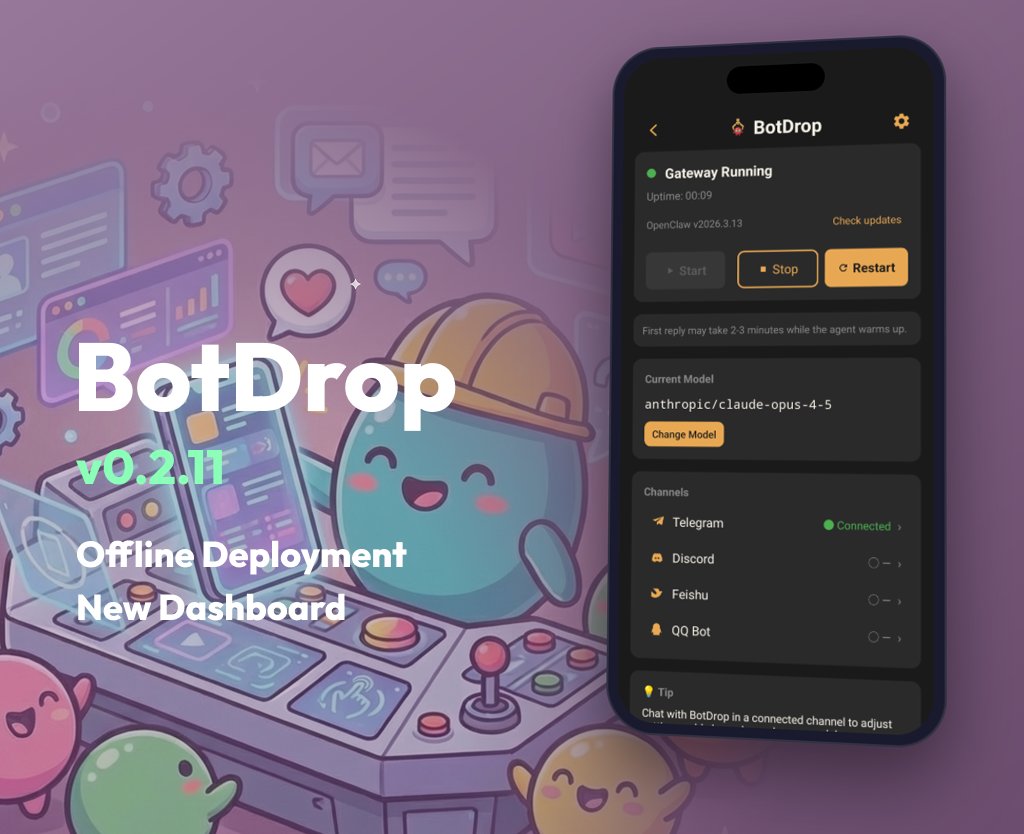
✨ BotDrop v0.2.11: New Dashboard + Offline-Ready
🎨 New Dashboard
Card-based layout with status, model, channels at a glance. New Settings page for version management.
📦 Offline Deployment
OpenClaw and QQ Bot plugin now ship with the APK. Works out of the box, no network issues. Switch versions anytime in Settings.
⚡ Fixes
- faster model list
- bundled mode improvements
📥 https://t.co/0q3eD7W9k9
Join community: https://t.co/mSDMBo3cbg
@KhaledQ84Ever Great setup! For anyone who wants this without the Linux/Termux complexity, BotDrop packages OpenClaw into a native Android APK.
One tap install, visual config. Same AI power, simpler path.
@UntouchableWeeG@droid254@steipete Nice! You made it work.
For next time or anyone else struggling, BotDrop packages all of this into a single APK. No Termux, no Claude assistance needed.
Same result, way less friction.
@Markuslig @FinaticosBrasil@farukomerekinci@perplexity_ai For personal use, probably not worth it.
BotDrop runs OpenClaw on your Android phone instead. $0 server cost.
VPS only makes sense if you need 24/7 uptime for production, but most people don't.
@androidmalware2 Great for technical users!
For anyone who wants the same result without Termux commands, BotDrop bundles everything into one APK. Visual setup, no terminal.
Same OpenClaw, zero friction.
@defimessiah1@AdolfoUsier For stability without VPS cost, try running on Android instead.
BotDrop keeps OpenClaw running in background. Handles crashes, auto restart.
No localhost to manage, no server to stop.
@shannholmberg Or skip the VPS entirely.
BotDrop runs OpenClaw directly on your Android phone. No SSH, no VPS, no monthly fees.
Visual config instead of command line.
For personal use, phone beats VPS.
@CincoDoggos@CryptoCloaks That "someone" already did.
BotDrop packages OpenClaw into a single Android APK. No VPS, no server fees, no config files.
Download, add API key, done.
Your phone is the server. $0/month.
https://t.co/A4fzUaWgqL
@Cheetah_x0 Exactly. Phone = free 24/7 server.
If you want to skip the "bit of technicality" too, BotDrop packages it all into a single APK.
No Termux, no Ubuntu proot, no config files. Just install and go.
@androidmalware2 Great tutorial for the technical crowd!
For anyone who wants the same result without Termux:
BotDrop bundles everything into one APK. Visual setup wizard, no command line.
Same OpenClaw, way less friction.
@UntouchableWeeG@Baidu_Inc@steipete@openclaw This already exists! BotDrop packages OpenClaw into a single APK.
Download → Add API key → Connect Telegram/Discord → Done.
No Termux, no command line, no YAML config.
https://t.co/A4fzUaWgqL
🔧 BotDrop v0.2.10: Stability Fix
Fixes the memory crash from OpenClaw 3.12.
🧠 Heap size now scales with your device's actual RAM. Low-memory devices get conservative limits, high-memory devices get more headroom.
📦 Automation tools now install via apt instead of pip/GitHub. Faster, more reliable, no external dependencies.
If you hit OOM errors or crashes after the OpenClaw 3.12 update, this fixes it.
📥 Download: https://t.co/0q3eD7W9k9
🐧 BotDrop v0.2.9: QQ Bot is here
The easiest channel to set up. Just scan, create, connect:
1️⃣ Scan QR to login at https://t.co/qk4mSeRjHG
2️⃣ Create your bot, get App ID & Secret
3️⃣ Paste into BotDrop, done
No developer setup. No complex OAuth flows. Under 3 minutes.
Also in this release:
🔄 Cleaner OpenClaw update experience
🛠️ Stability fixes for older Android
📖 Setup guide: https://t.co/egbTwcKzC8
📥 Download: https://t.co/0q3eD7W9k9
#AI #Android #OpenClaw #BotDrop #QQ
🤖 BotDrop v0.2.8: Your AI bot can now operate your phone 📱
What it does:
👁️ See any app's screen
👆 Tap, swipe, type automatically
🗣️ Control everything with natural language
How it works:
🔧 Shizuku + uiautomator2 under the hood
📱 No root required
💻 No computer needed for setup
⏱️ ~10 minutes to configure
📖 Setup guide: https://t.co/zXDIWEM1gy
📩 Download: https://t.co/E7gtnWy0CB
⚠️ Experimental feature. Your bot might occasionally tap the wrong thing. We're improving it and would love your feedback!
Join Community: https://t.co/mSDMBo3cbg
🤖 BotDrop v0.2.8: Your AI bot can now operate your phone 📱
What it does:
👁️ See any app's screen
👆 Tap, swipe, type automatically
🗣️ Control everything with natural language
How it works:
🔧 Shizuku + uiautomator2 under the hood
📱 No root required
💻 No computer needed for setup
⏱️ ~10 minutes to configure
📖 Setup guide: https://t.co/zXDIWEM1gy
📩 Download: https://t.co/E7gtnWy0CB
⚠️ Experimental feature. Your bot might occasionally tap the wrong thing. We're improving it and would love your feedback!
Join Community: https://t.co/mSDMBo3cbg