[Ad-Venture] Color Correct
They escaped from the Shadow Keep but they're not out of the woods yet. Greth keeps an eye out for danger as Nanji mage-splains the benefits of the Color Correct web app for AI filmmakers in this ad-venture. Filmed as one continuous AI shot using Color Correct to seamlessly stitch consecutive generations.
Created with: Color Correct, MidJourney, Nano Banana 2, Kling 3, Seedance 2, Higgsfield, Magnific, Replicate, Eleven Labs, Sync-3, Magnific Speak, and Lipsync 2 Pro.
I just discovered the free Lunacy graphic design software ( https://t.co/7h53etacVB ). First impressions: full-featured with a UI that's reminiscent of Figma (but easier to understand), very fast and responsive (Sketch-like). Perfect for my occasional SVG icon needs!
Toma Mi Mano — A Love Story
Two hearts. Two languages. One beautiful love story.
Toma Mi Mano (Take My Hand) is a romantic duet that weaves together English and Spanish in a celebration of love that knows no borders.
Follow Brom and Ana as a chance meeting in Mexico blossoms into something extraordinary. From their first moments together to shared adventures, a romantic proposal, and the promise of forever, their story unfolds through music and animation.
A song about finding the one person whose hand you never want to let go.
Una historia de amor contada en dos idiomas. Desde un encuentro inesperado en México hasta la promesa de una vida juntos, Toma Mi Mano celebra el amor que no conoce fronteras.
Credits
Written by Brom Bresenham & Hannah Pralle
Music & Vocals: Suno
Video: AI-assisted animation created using Kling, Seedance, Nano Banana, GPT Image, https://t.co/AApamg5lKa for color consistency, and other creative tools.
Lyrics
I was a lonely girl by the ocean tide
Yo era un hombre mirando el mar
Sun on my skin but an ache inside
Con tanta gente pero en soledad
Watching the waves roll in and out
Mirando al mundo sin tu señal
Wondering who I was dreaming about
Preguntando si eras real
Two hearts drifting far away
Dos destinos sin dirección
Every night I’d hope and pray
Esperando esta conexión
Across the distance love would find a way
Take my hand — toma mi mano
Stay with me — quédate aquí
You don’t have to face the world alone
No tienes que vivir sin mí
Close to my heart — cerca de mí
Now we are where we’re meant to be
Take my hand — toma mi mano
Love brought you to me
Then one day fate changed the sky
Un día el mundo cambió de color
You said hello and time stood still
Tu voz encendió mi interior
Just one touch lit up the dark
Una chispa se volvió calor
Somehow I knew there in my heart
Supe que eras mi amor
No more wishing on distant waves
Ya no sueño en soledad
Every road led me to you
Todo me trajo a tu verdad
Now forever starts today
Take my hand — toma mi mano
Stay with me — siempre así
You don’t have to face the world alone
Yo viviré para ti
Close to my heart — cerca de mí
Now we are where we’re meant to be
Take my hand — toma mi mano
Love brought you to me
Every dream led me to your light
Cada paso me llevó a tu amor
No more lonely endless nights
Ya no existe el dolor
One world, one life, one destiny
Take my hand — toma mi mano
Stay with me — quédate aquí
You don’t have to face the world alone
Para siempre junto a mí
Close to my heart — cerca de mí
Now we are where we’re meant to be
Take my hand — toma mi mano
Love brought you to me
Take my hand — toma mi mano
We are home eternally
#TomaMiMano #LoveSong #LoveStory #RomanticMusic #BilingualMusic
“Everyone’s terrified, convinced the studios don’t need artists anymore. It’s the artist that doesn’t need the studios.”
Yes! Every word of this. So well said. I love this video so much.
Related: this was the initial two-clip video sequence I made for the ad. After I made it, I realized it was gonna be too gory for the ad networks (Google at least), so I made a new second clip without the blood.
After jumping through all the PITA hoops to advertise https://t.co/0XFufKcYuP on Meta and Google, supplying three videos and three images in three different aspect ratios each - and with no real ability to target the ads - advertising on X is refreshingly simple and powerful. It needs a square piece of media, you write a normal post for it, and you can specify keywords and the audiences of specific popular accounts to target. I just set up X, but I feel like I'm gonna get better advertising results for my niche (but excellent) web app.
All that said, this 16:9 version of my latest ad prolly isn't gonna see the light of day (in favor of the 1:1 version) on the ad networks, so I'm posting it here for posterity.
Random Access [0002] - Tea Time
Absurd short videos.
Crafted with https://t.co/OWnc36QlXy, MidJourney, Nano Banana 2, Kling 3, Seedance 2, sync-3, and Higgsfield.
Random Access [0001]
The first in a series of absurd short videos.
Made with MidJourney, Nano Banana 2 & Kling via Higgsfield, Magnific Speak, and https://t.co/1pyjHZ0hDO
Color Correct Marketing Devlog - Oh Snap
Two things modern AI video generators struggle with: stoplight intersections (which I discovered a few weeks ago) and now finger snapping.
I've been making an AI marketing video for my Color Correct web app. It's going well overall, but just getting this girl to snap her fingers has been pretty difficult!
Here's a blooper reel. Ignore the voices and lipsync - I redo those using separate tools anyway.
• Good-looking bloopers: Kling 3.0.
• Fat-fingered + cartoon-voice bloopers: Wan 2.7.
• Got it right at the end: seedance 2.0.
Color Correct DevLog
I fully embraced vibe coding for this project. I had initially resisted using AI for coding. Then when I started playing around with it I was amazed at the excellent results, as well as a little black-pilled about the future of software engineering as a profession, especially in the wake of so many companies laying off their junior devs.
Now I'm fully on board and enthusiastic about the future of AI-assisted software engineering. It took all my experience as a developer to make this app, including making architecture decisions and writing design specifications for the AI to follow. We still need software engineers as much as ever, but now we've all got personal expert junior devs to do all the grunt work. AI coding is a huge force multiplier for engineers. I made this app from scratch in 7 weeks. I'm sure it would have taken at least 3-4 times that without AI, especially as this particular tech stack is outside my usual wheelhouse.
Development Schedule:
- Core algorithms (3 weeks)
- CLI-based color-matching and drift-correction.
- Web app (2 weeks)
- SvelteKit, Supabase, Cloudflare R2, Render
- User accounts, landing page, help page (1 week)
- Postmark for Magic Link emails.
- Initial integration with Paddle (1/2 week)
- Switch from Paddle to Stripe (1/2 week)
I was initially going to use Paddle as my payment provider, but they rejected me because they thought Color Correct was generative AI, which is against their TOS. I appealed the decision and they reversed it three days later, but by then I'd already moved on to Stripe.
I spent the last two months building a color-matching tool to fix and prevent color drift in AI-generated video – like the brightness change you get when you use the exported end frame from one clip as the start frame of the next clip.
The cause of the problem is two-fold:
1. Operating systems often display videos with a gamma boost to make them brighter. When you export a frame, the video editor boosts the image gamma too to make it look the same as the video – but underneath the colors have already drifted when you plug that image in as the start frame of the next clip.
2. Images use RGB color data and videos use YUV420P. When you convert from one to the other, the colors drift slightly. The more round-trips get made, from video to frame to video again, the more the color drifts.
The Color Correct web app fixes and prevents color drift in two ways:
Fix: an input video is color-matched to a reference video by selecting a frame pair with matching content such as the end frame of the reference video and the start frame of the input video. A color correction profile is built from this frame-pair and applied to all frames of the input video. The result is seamless.
Prevent: any frame exported from the input video has no gamma boost applied and it uses "drift correction" to pre-compensate for the RGB ↔ YUV420P round trip(s) the frame's colors will make as a new clip is generated from it. The result is once again seamless with no post-processing required.
Check out the web app here (designed for desktop): https://t.co/e9dNmONsf6
Launching today: Color Correct — a precision color-matching web tool for AI filmmakers and video editors. Lock clip-to-clip color together with frame-pair matching.
Free to start. https://t.co/tAjk66Sr9X
@ScreenFlow please add a "preview your project in full screen" option besides "hide the inspector, hide the timeline, then go into full screen editor, then manually zoom in to about the right level while still showing a few UI borders". 😩
I figured how to compensate for the color shift I was seeing when generating a new video clip from the thumbnail of an existing video clip. The video clips were coming back with no color profile specified, but if I use ffmpeg to assign the srgb color profile then the video colors stay much closer to the original thumbnail when I import it into Final Cut Pro. My shell command to assign a color profile:
ffmpeg -i input.mp4 -c copy -color_primaries bt709 -color_trc iec61966-2-1 -colorspace bt709 -color_range pc output.mp4
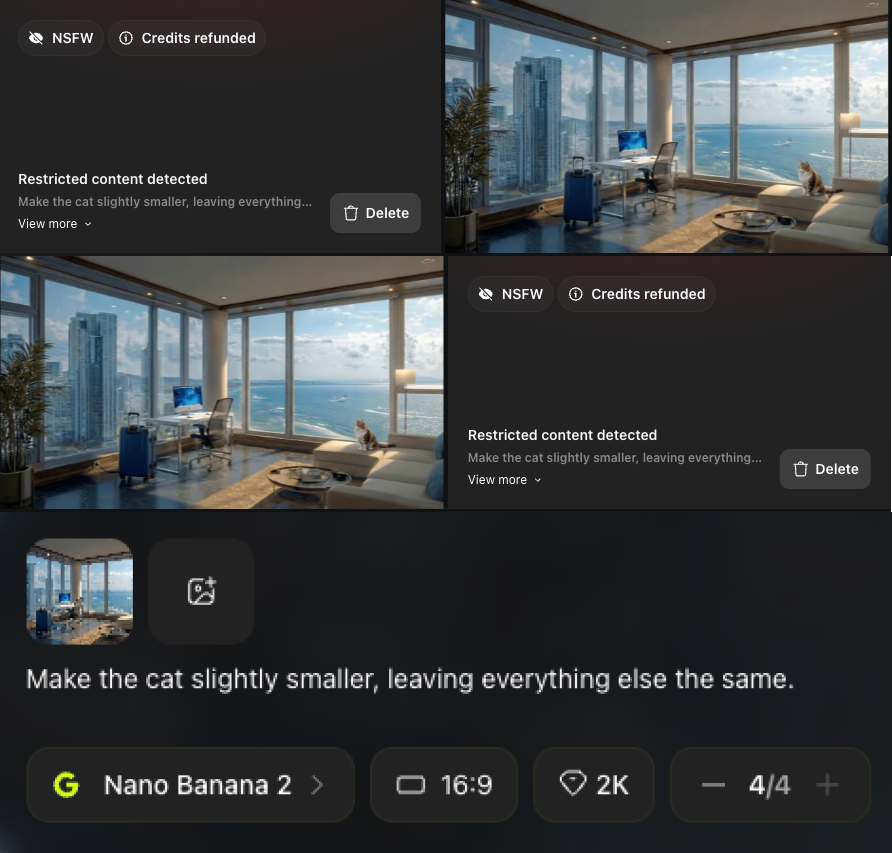
@NanoBanana 2 is approaching Adobe Firefly levels of NSFW detection accuracy. Here are the four results for the same image modification request via Higgsfield.
Toma Mi Mano Devlog - Color Drift
These days the second biggest challenge for AI filmmaking is maintaining consistent environments. The current tools have pretty much solved character consistency, but keeping the environment consistent across shots can be tough - including not only physical structure, but like background extras walking into a shot from an empty area the camera just finished panning over.
The biggest challenge is maintaining color consistency across multiple shots. I'll use Nano Banana 2 to modify a frame grab to create a start frame for another shot and the colors will drift slightly. Multiple consecutive edits drift a little further each time, as shown in the video here.
Prompting Nano Banana to keep the current color temperature etc. - or to match the color grade of the original frame, before edits - doesn't fix it.
And it's not just Nano Banana - I've noticed that e.g. Kling 3.0's videos will have a small amount of additional color drift from the original start frame.
For now the solution seems to be to color correct my edited start frames in Photoshop and/or color correct video sequences in DaVinci Resolve. Both of which are tedious... the automatic options aren't sufficient.
This is on top of the color profile hell I went through for a few days on Mac. I was originally using ScreenFlow but I noticed that just exporting a frame and reimporting it would cause a color shift in the frame. I tried switching to Premiere and frame export/import worked fine, but it it would color shift video clips. Finally I've switched to Final Cut Pro, which does fine in both of those cases and is a great editing experience.
The problem with ScreenFlow and Premiere was that images and/or videos would be missing a color profile and the software would assume the wrong color profile.
I could have also switched entirely to DaVinci Resolve, but while it's very full-featured and I need to use its color correction options anyways, it just feels slightly clunky to me.