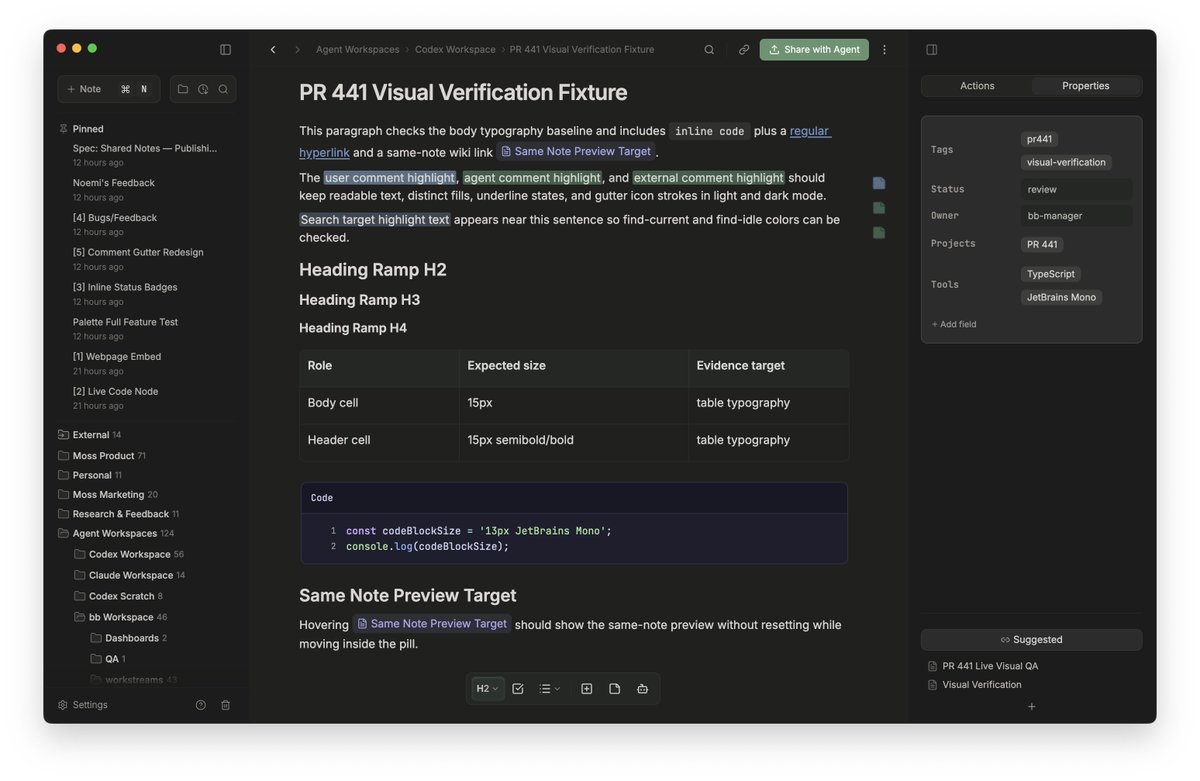
Moss 0.9.0 is out!
This release is a big step toward a simple idea: Moss presents information in the form factor that’s easiest to understand and act on.
Some of my fav features & workflows ↓
Great in theory, but really expensive in practice.
You can have the best of both worlds and just use markdown that embeds HTML.
All the structure, flexibility and interactivity in a format you can edit and comment on without spending tokens.
What if your coding agent had an integrated markdown editor you both could use?
Complete with interactive features like charts, color picker, a canvas, video embeds, etc.
So then I went a bit crazy and had a team of agents document the entire Moss design system using these features...all inside of Moss.
My favorite parts are the interactive components embedded in each note that you can use directly.
Recently released all of the skills the in-app Moss agent uses publicly: https://t.co/VWTct784gD
So now you can do this + more with any agent you like!
This was a fun lil experiment, but so far I think I like keeping my design system docs in Moss over other tools.
Easier for me and my agent to update, don't need to start a server just to view them, and changes automatically become prompts for an agent to update my codebase.
Recently, I've been using Moss more from the terminal and via coding agents.
I overhauled my design system and used Codex to replace a bunch of manual review & QA. As it worked, it created detailed reports in Moss with screenshots, charts, and embedded HTML. It felt like magic.
as someone with astigmatism and night blindness, designing a dark mode has been one of the most frustrating experiences i've put myself through. the irony is not lost on me lol
Great in theory, but really expensive in practice.
You can have the best of both worlds and just use markdown that embeds HTML.
All the structure, flexibility and interactivity in a format you can edit and comment on without spending tokens.
@clairevo@trq212 I think you can have the best of both worlds by embedding HTML in rich markdown. You get all the flexibility and interactivity of HTML in a format you can easily edit.