HTTPS is used everywhere.
But most engineers can’t explain how it simply works.
Let’s change that.
HTTP is a protocol to exchange data, most popularly used between a web browser and a website. 💡
HTTPS is the secure version of that protocol. 🛡
Why is it secure?
Encryption. 😶🌫️
The data is encrypted so that only the web browser and the website can read it locally.
Without this, man-in-the-middle (MITM) attacks could intercept your traffic and read sensitive data like passwords, credit card details, etc. 😱
The protocol used to encrypt the data is TLS (Transport Layer Security).
HTTPS = HTTP + TLS. Simple as that.
HTTPS uses asymmetric cryptography to encrypt the data. You have:
🔑 a private key - the website’s SSL certificate’s secret key that isn’t shared with anyone.
🔑 a public key - the certificate’s public key, shared with everyone who wants to interact with the website.
💡 Asymmetric cryptography simply means information that’s encrypted by the public key can only be decrypted by the private key. And vice versa.
In contrast, symmetric cryptography is when only one key is used, and data can be encrypted/decrypted with that same key.
HTTPS actually uses both types! 😎
Asymmetric cryptography is used to verify the server and securely generate a session key that’ll be used for symmetric cryptography.
The session key, as it implies, only lives within the session and is used by both the client & server to encrypt/decrypt data.
Most interestingly, this key is deterministically generated by both the client and server independently - it never crosses the wire. 🪄
So. What are the steps?
1. Client (browser) connects to a server (web page)
2. Server sends its SSL certificate (includes the public key).
3. Client & Server do a TLS handshake & generate a session key to encrypt/decrypt future HTTP data.
4. Business as usual.
The details are in the TLS handshake, and that’s frankly the most interesting part of how HTTPS works.
The TLS handshake serves three purposes:
🧐 1. authenticate the identity of the server
✨ 2. generate session keys for encryption during this single session
🤝 3. decide which version of TLS and what cipher suites you’ll use
Step by step (RSA Algorithm):
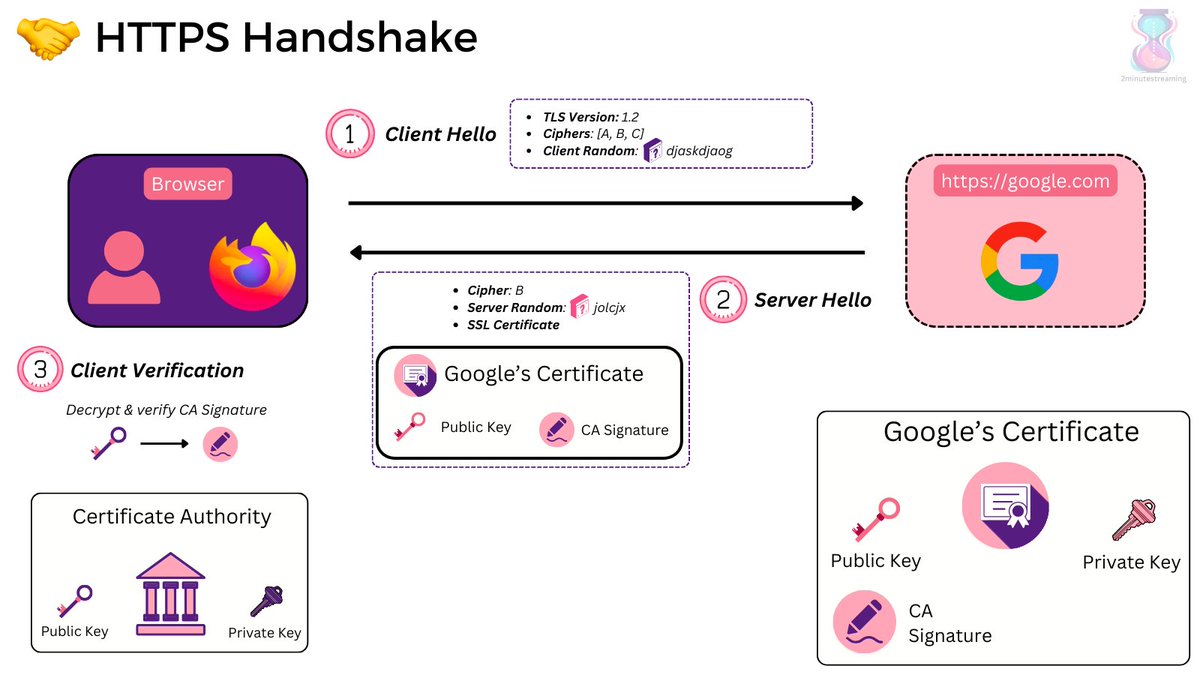
1. Client Hello Request: The client initiates the handshake with a message including what TLS version and ciphers it supports, including a string of random bytes (client random)
2. Server Hello Response: The server chooses a cipher suite and generates its own random string bytes (server random). It responds with the suite, its SSL certificate, and the server random.
3. Client Verification: The client verifies the certificate via the trusted certificate authority that issued it. The SSL certificate has a digital signature that’s signed by the CA’s private key so the client uses the CA’s public key to decrypt it.
After this step, the Client has verified that the certificate is the legitimate one verified via the CA - not one fabricated on the fly.
Note it still doesn’t know for sure whether the server actually owns that certificate (i.e has the private key)
Side note: who says what Certificate Authority can be trusted?
Your browser’s provider!
Apple, Microsoft, Google, Mozilla and etc. all maintain their own lists of CAs.
Your browser and operating system ship with this list of trusted CAs.
It’s all based on “trust”, so you better trust them!
Anyway, continuing...
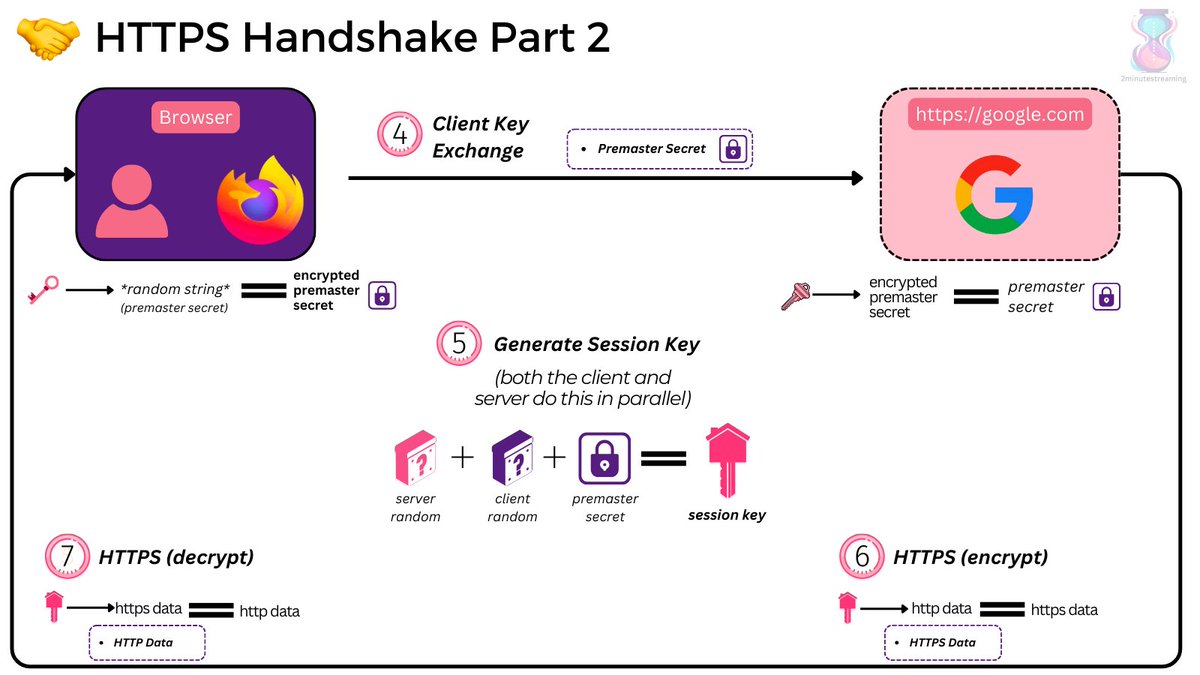
4. Client Key Exchange: The client creates a random string of bytes called the “premaster secret”. It encrypts it with the public key of the server it got from the SSL certificate and sends it over.
5. Session Key Generation: The server decrypts the premaster secret using the SSL certificate’s private key. Both the client and server, independently, generate session keys using the client random, server random, and the premaster secret.
Since they’re using the same data and deterministic algorithm, they should arrive at the same results. If they don’t - the subsequent encryption/decryption won’t result in the HTTP protocol.
💡 This step indirectly verifies to the client that the server has possession of the SSL certificate it presented (it didn’t just pretend to have it)
6. Done! The session key is now used to symmetrically encrypt/decrypt HTTP data.
@HMRCcustomers Morning, I moved abroad 2 years ago, so I have a new address, new phone number, and a new phone device.
I'm currently unable to login using HMRC auth app, and can't answer the credit reference. Any advice?
@GergelyOrosz@ppgosavi We stay positive by intentionality and deliberate empathy. One needs to spend time with humans, with young and early on career people, and in those moments recapture what it was like to be those people. That’s how I stay positive and non-salty. Salty is jaded. Recapture wonder.
@stephaniecodes agree with you on mobx, I grew tired of redux so I switched to mobx.... then realised that I disliked mobx more and decided just to use hooks and context
When dealing with SMS validation code form, don't forget to add the autocomplete attribute with the value "one-time-code".
It allows iOS to autofill the input with the incoming SMS 📩
@a_adewusi@ScalaBridgeLON@londonscala@Scalainthecity@gdndevelopers I know very little about Scala, only enough from my friend who was a former Guardian dev who raved about it. So it would be nice to know more about the basics and what makes it a nice language to work with.