@drawsgood You are using ForEach to loop but your loop does not return a View. ForEach designed for views, and it returns a view. Replace ForEach(myArray) with regular loop like "myArray.forEach" or "for item in myArray"
@corneliusmark@krzyzanowskim It seems you've run swift example on debug mode. I got decent result on release. (3e-05 vs 7e-05)
To maximize speed, you can use ContiguousArray in Swift and C array in ObjC (for contiguous memory). Keep in mind, swift also has overflow check for array.
@GroovinChip You need to split List into List(selection: _) + ForEach(items) and add Section around ForEach. That way, Section will treat ForEach as a single group and add spacing between SearchTextField and Items.
@GroovinChip Assuming you just want a small space, separate List and ForEach, then wrap ForEach with with section.
For a bigger one, you can just add a Spacer along side with first element.
Personally I would use a custom search TextField because searchable offers no customization
@To_Me_Digital You probably made the purchase previously, hence you don't get the purchase sheet again. You can remove transactions by going Debug->StoreKit->Manage Transactions.
@AndroidDev_News@androiddevnotes It's a dessert made from layers of paper thin dough and nuts (pistachios walnuts almonds) cooked with sweet syrup. Crispy and sweet.
Also, Baklava fits the Android version naming convention.
@androiddevnotes In such cases where return/done button does not exist, we may add a button above keyboard as toolbar or make any interaction outside of keyboard auto-dismiss keyboard. Sometimes we auto dismiss keyboard when field is filled like 2FA code fields.
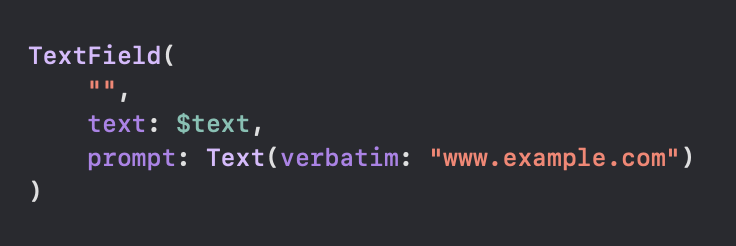
@Bartozo_ TextField does not put the prompt inside input field but instead a Text view overlay.
Text by default handles url schemes.
To handle your case, use TextField with prompt like this
@GroovinChip@TahaTesser@ChristianSelig There is. I usually recommend default as it just works but...
If you want something custom, keep icon size relative to text. Maybe utilize "sidebarRowSize" env value.
Also going over Apple's HIG at least once is nice. Just to have some familiarity. https://t.co/iKX1WZ9MHZ
@Tabingtons Track your feature major update in AppStorage, then do a version comparison with your current version at app launch.
Nil ->Fresh install
Current is bigger ->Already seen it
Current is smaller ->Show whats new
Always set/update current version, even after reset
@androiddevnotes I heard you wanna decrease number of imports. You don't have to explicitly import Foundation if you already have SwiftUI imported. SwiftUI already imports that in backstage.
@GroovinChip@TahaTesser@ChristianSelig You are trying to set label of NavLink twice with that. Try something like this. FYI you are not limited to Label, and use pretty much any view. Or since you have access to binding, using a button is also an option.
@xdevnotes Looks like your gitignore isn’t configured properly. That user interface state file is about Xcode, gui state, opened tabs etc. check your gitignore file. You can check out GitHub/gitignore/Swift.gitignore
@indiana_sloan@ivcanet@the_AndroidDev@androiddevnotes I don't see how it could go out of hand. How many DZRequest imp do you need? On the second imp, I would start questioning why do we need a new imp. In code review, I shouldn't scroll to top to see which 1 of the 10 imp is used. Naming must be concise