If you are using Google @antigravity on macOS, you may be running the app in slow mode without realizing it.
On some Mac models, it appears to render via CPU by default.
You can run the following command in Terminal to reveal the true performance of the IDE and force-enable GPU acceleration:
Open -a "Antigravity" --args --disable-gpu-driver-bug-workarounds --ignore-gpu-blacklist --enable-gpu-rasterization
I found a nice Clawdbot thread, those who are interested should definitely take a look.
It contains useful information and resources, from methods of protection from prompt injection to different use cases. 👇
ClawdBot is blowing up on X.
Everyone’s sharing great experiments, automations, even jokes!
I pulled together the 15 most interesting posts right now 🧵↓
Ready for the best vibe coding session of your life?
The secret isn’t dumping everything on Claude—it’s letting Claude interview YOU.
Here’s the killer workflow with Claude Code (Plan Mode + interactive questions):
1. Open Claude Code → press Shift + Tab twice to enter Plan Mode (read-only safety net, no accidental changes 🔥)
2. Dump your full idea, goals, files (@tag them for context), requirements—be as detailed as possible.
3. At the end of your prompt, add this magic line:
“Don’t hesitate to ask clarifying questions whenever needed. Feel free to use the askuserquestiontool as many times as required to gain full clarity!”
Claude will now:
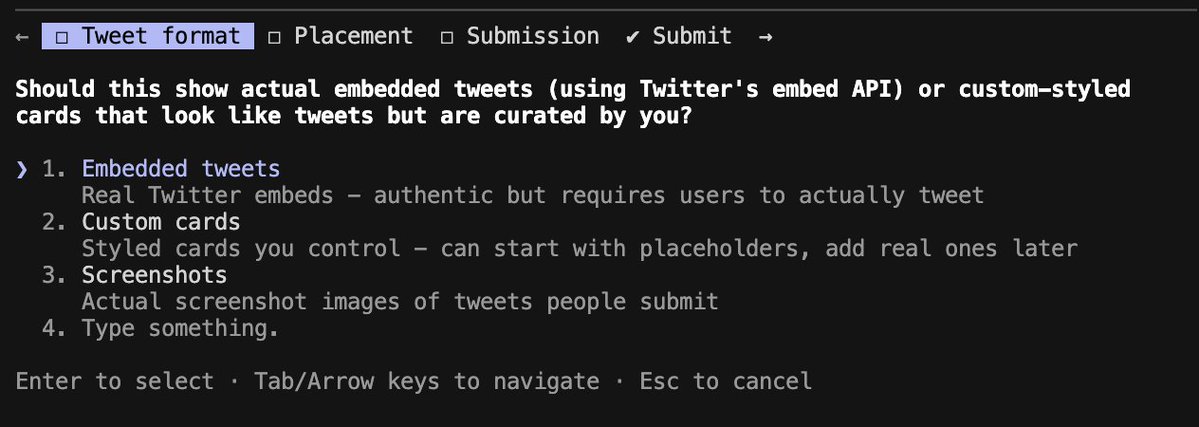
• Pause & ask smart, targeted questions (multiple choice + “Other” for custom answers)
• Build a crystal-clear plan interactively
• Only execute once everything’s perfect
Result? Zero assumptions, zero rework, pro-level code on the first try.
Give Claude Code as much of your idea as you can
End it with this: "Use the askuserquestiontool to ask as many follow ups as you need to reach clarity"
Now, it will think through what you said, look for gaps that it doesn't know then ask it to you with multiple choice
Ask Claude at the end of the work you do:
Whichever language you coded, for example, Android. "You have been developing and publishing android applications for 15 years. You are also an expert who does pre-publication error reporting. Prepare a technical report for me before the publication and let me know by scoring the deficiencies"
You will see the places you missed.
System that processes Hundreds of Articles at once
There is a tool called DeepScholar developed by a team from Stanford and Berkeley universities. This tool collects hundreds of academic articles from the internet, processes them as if it were reading them, and produces a nice summary based on the research topic you provide. It performs similarly to a similar feature from OpenAI, but in some cases works twice as fast.
It's completely free and anyone can use it. You just go to the site, write your research task, and it takes care of the rest. It was released as a preview two weeks ago, and due to high demand, some issues arose, but they've now relaunched it with updates, making it more stable.
It's perfectly timed for catching up on readings after conferences like NeurIPS. It works with an open-source system called LOTUS, which enables efficient processing of papers. If you're doing benchmarking or development work, they've also shared their benchmark dataset and code, with ExaAI as a sponsor.
🚀Excited to share we've re-launched DeepScholar, with a set of updates and fixes to support the volume of requests we've gotten since launching our research preview two weeks ago
DeepsScholar is still openly-accessible, fast, and capable of efficiently processing 100s are articles from the web for research synthesis
... and hopefully its just in time to help you catch up on your post-neurips reading list
Let us know what you're using DeepScholar for, and what features you'd like to see next
Links below 👇
A New Tool to Read Academic Articles Fast and Effectively
A team called Intelligent Internet developed a new tool called II-Commons and made it available in the beta version. This vehicle works with Gemini 3 model. Its main job is to accelerate scientific research. It especially allows you to search for large academic databases such as arXiv and PubMed in one place. When you find an article, you can chat directly with it, that is, you can ask questions about the content of the paper and get an answer in the real context.
You can read the articles either in the original PDF format or as a cleaner Markdown. You can try the hosted beta version right now.
Research at the speed of thought with II-Commons 🧠
Powered by Gemini 3
🔍 Search arXiv + PubMed in one agent
💬 Chat inside papers for real context
📑 Read in native PDF or clean Markdown
Try hosted II-Commons Beta 👇
Direct Learning from Human Videos to Robots is Now Possible
The Physical Intelligence team noticed something interesting in the artificial intelligence models that control robots. These models, such as π0, which combine vision, language, and movement, begin to perceive human videos in the same way as robot data when trained with sufficiently large and diverse robot data.
In other words, once the model has thoroughly learned to guide robots, it can learn new tasks simply by watching videos made by humans.
To do this, they use wrist-mounted cameras to capture videos from the human's own perspective and use hand positions as movements. When the fully trained π0.5 model is further developed using these human videos, its performance in the tasks shown in the videos can double.
Experiments show that this ability depends on how varied and extensive the training is; it doesn't happen with little data, but as the scale increases, human and robot images become more similar to each other for the model. Ultimately, it becomes easier to directly use the abundance of human videos on the internet to teach robots.
For more details, you can check out their blog and articles, where they have also compared the benefits of wrist cameras.
We discovered an emergent property of VLAs like π0/π0.5/π0.6: as we scale up pre-training, the model learns to align human videos and robot data!
This gives us a simple way to leverage human videos. Once π0.5 knows how to control robots, it can naturally learn from human video.
you can generate like this with Nano Banana Pro 🍌
prompt; Recreate the photo I sent as a stop-motion scene using handmade colored clay (plasticine). Maintain the character's pose; emphasize the texture of the clay, the fingerprints, and the slightly imperfect, chunky modeling aesthetic. Use warm studio lighting.
Before telling Claude Code to "write code," install the spec kit.
"uv tool install specify-cli --from git+ https://github. com/github/spec-kit.git
"
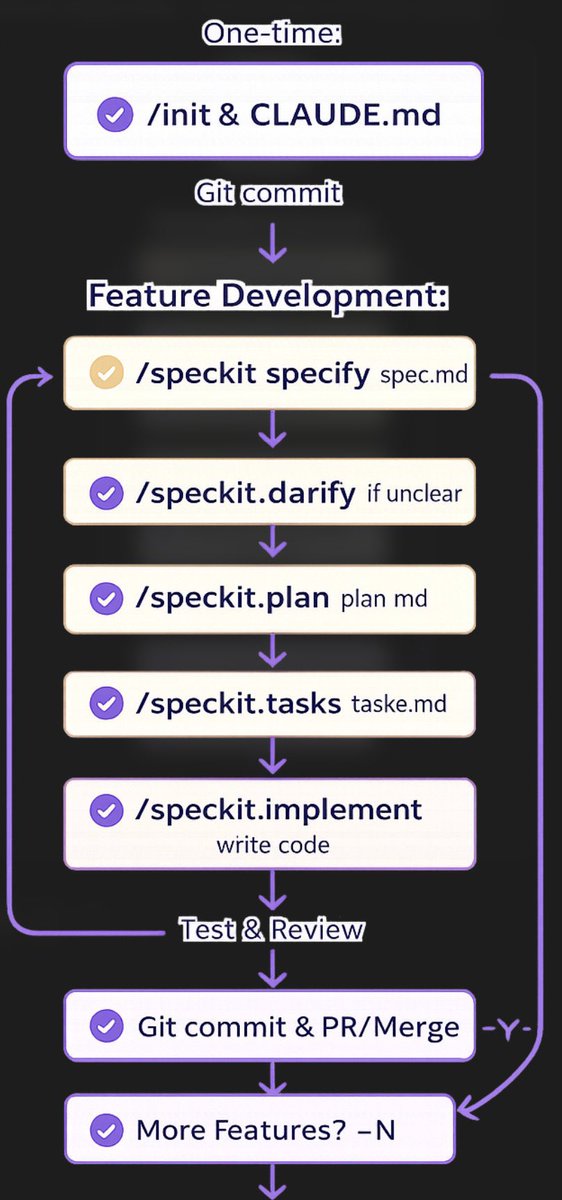
I'm writing the steps for developing an application with the spec kit. If you follow this cycle, you won't get too much of a headache.
GitHub Spec-Kit says:
First, teach YZ how to think.
When starting a project with Claude Code:
Once:
→ /init
→ https://t.co/OPO9nXPgc4 (the rules of the game)
→ commit
For each feature:
→ /speckit.specify (what & why)
→ /speckit.clarify (stop if unclear)
→ /speckit.plan (how)
→ /speckit.tasks (break it down)
→ /speckit.implement (code)
test → commit → merge
then repeat.
If you develop all features this way, you will have a good plan and narrow down the AI's margin for error.
Only update your https://t.co/OPO9nXPgc4 file for major changes. Don't use it like a notepad.
Google has just announced an experience that will change the way we use the internet forever. @GoogleLabs
Name: Disco.
Engine: New monster Gemini 3. 🧠
Now browser tabs are not just one page. With the "GenTabs" feature, it converts your open tabs to custom apps in seconds.
No code. No mess. There is only "Remixing" the tabs.
Here is the waiting list for early access to the future of the web 👇
🚨NEW LABS EXPERIMENT 🚨
Introducing Disco, an experimental way to discover new generative AI features on the web. Our first feature, GenTabs, uses Gemini 3 to remix your open tabs into totally custom apps to help you get more out of the web.
Learn more and join the waitlist → https://t.co/3eph6xXi1l
Do you want to make a logo on your mobile application? With this prompt and image, send your app name to ChatGPT. Your logo is ready.
'Look at this app icon style and generate a high-quality app icon for "X app", following the exact same visual style.'