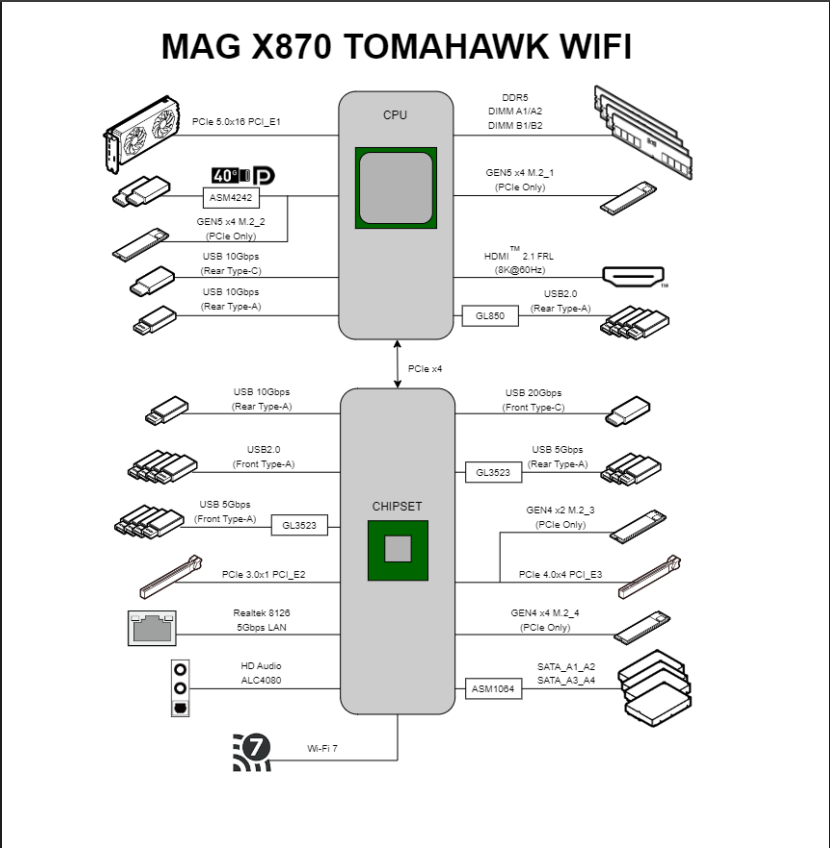
Not all USB ports on your motherboard are equal. Some are connected directly to the CPU, while others are routed through the chipset. Understanding the difference can help you make better use of your USB devices.
Reduce USB contention by distributing your devices across different USB controllers whenever possible.
On systems used for both work and gaming, avoid connecting all USB devices to the same xHCI controller. Using your motherboard's block diagram as a reference, connect latency-sensitive devices such as your mouse and keyboard to USB ports that are connected directly to the CPU's xHCI controller. Place higher-bandwidth or less latency-sensitive devices such as USB speakers, webcams, Stream Decks, audio interfaces, capture cards, and external storage across the remaining controllers as evenly as possible.
By balancing devices across available controllers, you can reduce controller congestion, avoid unnecessary bandwidth contention, improve USB stability, and ensure each device has access to the resources it needs.
TL;DR: Connect your mouse and keyboard to USB ports that bypass the chipset and connect directly to the CPU's USB controller. Distribute your remaining USB devices as evenly as possible across the other controllers managed by the motherboard chipset.
Hey, @FLCm0NESY literally dominated the Major using these exact settings.
Who knows, maybe copying his setup is your last hope to finally escape hardstuck status and reach 20k in Premier. Just saying.
🚨NVIDIA Users:
You NEED to enable "Low Latency Mode"
If you're playing a game where NVIDIA Reflex isn't supported, this is the next best option⬇️
Open the NVIDIA App -> click Graphics -> Global Settings -> Low Latency Mode🙌
Cathedral of Counter-Strike is calling!
Final count down before the door of Lanxess opens.
We’ll see you at the ZOWIE boothS, and yes, there are more than 1 booth this year!
We want to hear from you!
Share your thoughts and grab a ZOWIE Arm Sleeve to level up your aim 🙌
- Where: ZOWIE Booth (C10)
- When: June 18 - 21
- Reward: Premium ZOWIE Arm Sleeve
First come, first served!
Your feedback, your ZOWIE Arm Sleeve!
#ZOWIEProductExperience
El CEO de Anthropic dándose cuenta de que un tipo usó Claude Code para construir un sistema de YouTube de $62,000/mes y acaba de filtrar toda la estrategia gratis
📝 PC GAMERS 📝
Clipping Softwares are DESTROYING your FPS
The only way you should be clipping your gameplay is through OBS Replay Buffer. To Enable it -> Open your OBS Settings -> Output -> Replay Buffer -> Enable Replay Buffer -> Set Hotkey to Save Replay.
Now all you have to do is Open OBS and click Start Replay Buffer to have the best FPS possible while still being able to clip 🙌⬇️
Question: How do you drop a crazy 2.0+ Rating against Tier-1 pros?
@donk1337 has the answer!
He doesn’t play by the meta—he breaks it🔥
That is Donk! That is Team Spirit's prodigy!
He doesn't wait for permission, he just walks in and clears the site. To unlock this kind of raw, unfiltered breaking power, tracking every micro-second is what sets you apart.
Ready to make history like donk?
Check his settings below ⚡
#StriveForPerfection
#ZOWIEOfficialMonitor
#donk