KEEP CONTEXT IN A MULTI-TURN AI CHAT.
A follow-up question only works when the model can see what it is following up on.
When using AINFT's Messages API, conversations can be handled as single-turn or multi-turn interactions. The key to a useful follow-up is providing the relevant conversation history along with the latest request.
📊 How Multi-Turn Context Works
1️⃣ Understand Why Context Matters
Imagine asking an AI to write a product introduction.
After receiving the first draft, you say:
→ "Make it shorter."
→ "Use a more professional tone."
→ "Keep the key details but simplify the wording."
Without the earlier conversation, these instructions may lack the information needed to understand what should be changed.
2️⃣ Represent the Conversation as Messages
A multi-turn conversation is built from a sequence of messages.
→ User: Provides the original request.
→ Assistant: Generates a response.
→ User: Sends a follow-up instruction.
→ Assistant: Responds using the available conversation context.
By including the relevant previous user and assistant messages, the API can interpret the latest request as part of an ongoing interaction.
3️⃣ Carry Forward Relevant History
More context does not always mean better context.
→ Include the original task when it is still relevant.
→ Keep the assistant's previous answer if the user wants it revised.
→ Include important constraints, preferences, or details established earlier.
→ Leave out unrelated conversation turns that do not help with the current request.
The goal is to provide enough history for continuity without adding unnecessary information.
4️⃣ Review the Follow-Up Response
After receiving the response, check whether the model understood the latest instruction in context.
→ Did it modify the correct content?
→ Did it preserve the important details?
→ Did it follow the new requirements?
If something is missing, provide a clearer follow-up with the necessary context.
⭐ Why This Matters
Multi-turn context makes AI conversations more useful for iterative work, from refining drafts and debugging code to developing ideas through several rounds of discussion.
📌 In One Line
A productive AI conversation is not just a series of isolated questions. Each turn can build on the information established before it.
💡 Carry forward the right context, and each new turn can build on the last.
@justinsuntron #TRONEcoStar @AINFTcom
CHOOSE THE RIGHT AI MODEL FOR THE TASK.
The best model for a task is the one whose capabilities match the work in front of you.
With AINFT, users can access multiple AI models. Instead of assuming one model is always the best, start by understanding what you need to accomplish.
🎯 A Practical Approach to Model Selection
1️⃣ Define the Task First
Different tasks require different capabilities.
→ Drafting: Focus on clear writing, structure, and following instructions.
→ Reasoning: Look for the ability to analyze information and handle complex questions.
→ Coding: Consider code generation, debugging, and understanding technical requirements.
→ Image Input: Check whether the model supports image understanding and visual analysis.
The clearer the task, the easier it is to identify suitable models.
2️⃣ Review Each Model's Capabilities
Before making a choice, examine the model's current profile.
→ Check its supported input and output formats.
→ Review its documented capabilities and limitations.
→ Consider context length and other relevant specifications.
→ Confirm that the model supports the workflow you intend to use.
3️⃣ Test with a Representative Prompt
Specifications are useful, but practical results matter.
→ Prepare a prompt that reflects your actual task.
→ Evaluate accuracy, relevance, clarity, and instruction-following.
→ For coding, test whether the output works as intended.
→ For reasoning, check whether the explanation is consistent and well-supported.
A small test can reveal more about task suitability than a general ranking.
4️⃣ Revisit Your Choice Over Time
AI models continue to evolve.
→ New models may become available.
→ Existing models may receive capability updates.
→ Your requirements may change as your workflow develops.
Review your selection periodically rather than treating it as permanent.
⭐ Why This Matters
Choosing a model based on the task helps users make more informed decisions instead of relying on popularity or a fixed leaderboard.
📌 In One Line
Good model selection starts with a clear objective, not a universal ranking.
💡 Define the task, check the model details, and let a small test guide the final choice.
@justinsuntron #TRONEcoStar @AINFTcom
FILTER STALE PRICES BEFORE DEFI LOGIC.
A valid-looking price can still be unsafe if its update time is too old.
For DeFi applications, reading a price feed is only one part of the integration. Smart contracts must also verify that the data is recent enough before using it to make decisions.
📊 How Developers Can Check Price Freshness
1️⃣ Read the Update Timestamp
→ Price feeds provide an updatedAt timestamp through latestRoundData().
→ This value indicates when the reported price was last updated.
→ Developers can use it to determine whether the returned data is still within an acceptable age.
2️⃣ Configure a Maximum Price Age
→ Define a MAX_PRICE_AGE threshold for the application.
→ Compare the current block timestamp with the feed's updatedAt value.
→ If the data is older than the configured limit, reject it before proceeding with price-sensitive operations.
3️⃣ Account for the Feed Heartbeat
Every price feed has a heartbeat interval that defines its expected update frequency.
→ Set MAX_PRICE_AGE with the feed's heartbeat in mind.
→ Consider the application's risk tolerance and how quickly market conditions can change.
→ Avoid using one universal threshold for every asset pair or application.
4️⃣ Validate the Returned Round
Before relying on a price, developers should also check:
→ Round Completeness: Confirm that the returned round contains a valid, completed answer.
→ Timestamp Validity: Ensure updatedAt is nonzero and not in the future.
→ Data Freshness: Confirm that the price has not exceeded MAX_PRICE_AGE.
⭐ Why This Matters for DeFi
In lending protocols, collateral valuation and borrowing decisions depend on price data.
If a contract accepts an outdated price, it may calculate collateral values or risk parameters using market information that no longer reflects current conditions.
A freshness check helps prevent stale data from silently influencing these decisions. It should be combined with other safeguards, including appropriate price bounds and feed validation.
📌 In One Line
A price feed is useful only when its data is suitable for the decision being made.
💡 Check freshness before relying on a feed value in a contract decision.
@justinsuntron #TRONEcoStar @WinkLink_Oracle
ONE MEDIAN. SEVEN INDEPENDENT NODES. ONE ON-CHAIN PRICE ANSWER.
A DeFi contract cannot check an exchange screen on its own. It needs a structured on-chain price source that smart contracts can read and use.
This is where WINkLink price feeds play an important role.
📊 How the Price Feed Works
1️⃣ Seven Independent Nodes Report Data
→ WINkLink price feeds aggregate price reports from seven independent nodes.
→ Each node contributes data to the aggregation process, helping avoid reliance on a single external report.
2️⃣ The Aggregator Combines the Reports
→ The Aggregator collects the submitted reports.
→ The median of the reported values becomes the resulting on-chain price answer.
→ Using a median helps reduce the influence of an unusually high or low individual report compared with simply relying on one quote.
3️⃣ Smart Contracts Read the On-Chain Aggregator
→ Consumer contracts access the feed through its Aggregator.
→ Instead of querying an exchange interface directly, a contract reads structured price data available on-chain.
→ This gives DeFi applications a standardized way to consume external price information.
⭐ What Developers Should Check
Before integrating a price feed, make sure to verify:
→ Feed Pair: Confirm the exact asset pair matches the application’s requirements.
→ Round Context: Review the round information associated with the returned answer.
→ Update Context: Check when the feed was last updated and whether the data is sufficiently recent for the intended use.
→ Integration Logic: Apply appropriate validation and safeguards before using the price in sensitive contract operations.
📌 In One Line
Reliable on-chain price consumption depends on more than reading a number. Developers need to understand how reports are aggregated and what the resulting answer represents.
💡 Understand the feed’s pair, aggregation, and update context before building around its answer.
@justinsuntron #TRONEcoStar @WinkLink_Oracle
📈 USDD SUPPLY ON TRON GREW 3.4% MONTH OVER MONTH.
A change in supply can tell a different story from a change in transaction volume.
According to the September 2026 USDD Transparency Report, USDD supply on the TRON network increased by 3.4% month over month, comparing August and September 2026.
📊 Breaking Down the Metric
→ Network: TRON
→ Comparison Period: August vs. September 2026
�� Reported Supply Growth: +3.4%
1️⃣ What Does Supply Growth Mean?
→ It reflects an increase in the amount of USDD supply recorded on TRON during the comparison period.
→ It provides insight into how the stablecoin's supply distribution changed on this particular network.
2️⃣ Supply Growth Is Not Transaction Activity
These metrics measure different things:
→ Supply: How much USDD is issued or circulating on a network.
→ Transaction Volume: How much value is transferred through transactions.
→ Active Users: How many users engage with the network during a given period.
A 3.4% increase in supply does not automatically mean transfers or active users increased by the same percentage.
3️⃣ Look at the Full Network Distribution
→ Compare TRON's supply with USDD distribution across other supported networks.
→ Review the August and September figures using the same reporting definitions.
→ Use the complete network breakdown to understand the broader supply picture.
💡 Why This Matters
Network-level supply data adds another layer to the overall USDD transparency snapshot, helping readers understand not just the total supply, but also where that supply is distributed.
📌 Keep the network and comparison period attached to the figure whenever you share it.
@justinsuntron #TRONEcoStar @USDDecentralize
📊 USDD SEPTEMBER 2026 TRANSPARENCY SNAPSHOT — UNDERSTANDING THE NUMBERS.
A stablecoin transparency report is most useful when you know what each number measures—and when it was recorded.
According to the USDD September 2026 report, the figures recorded on September 30, 2026 provide a snapshot of its circulating supply and reserve backing.
💰 USDD Transparency Snapshot
→ Circulating Supply: $1.52 billion
→ Reserve Assets: $2.24 billion
→ Collateral Ratio: 146.95%
1️⃣ Circulating Supply — Tokens in the Market
→ Represents the reported value of USDD tokens in circulation.
→ It helps readers understand the scale of the stablecoin supply at the reporting date.
2️⃣ Reserve Assets — Reported Backing
→ Represents the value of assets reported as reserves supporting the USDD ecosystem.
→ Reviewing reserve composition helps readers understand what assets contribute to the reported backing.
3️⃣ Collateral Ratio — Comparing Reserves and Supply
→ The collateral ratio describes the relationship between reported collateral value and circulating USDD supply.
→ A reported ratio of 146.95% indicates that the reported reserve value was higher than the circulating supply value at that snapshot date.
🔍 Why Does the Reporting Date Matter?
These figures describe conditions on September 30, 2026, not necessarily the current reserve position.
→ Reserve values can change with market prices and asset movements.
→ Circulating supply can increase or decrease.
→ A historical collateral ratio does not guarantee future stability or eliminate market, liquidity, and operational risks.
📌 Read the snapshot as a dated view of reserves and supply, then check the latest official data before drawing conclusions.
@justinsuntron #TRONEcoStar @USDDecentralize
₿ HOW BTC BECOMES WBTC — UNDERSTANDING THE MINTING PROCESS.
Minting WBTC is a coordinated process: the BTC deposit must be verified before the corresponding tokens are issued.
Unlike a regular BTC transfer, direct WBTC minting involves authorized merchants and a custodian working through a defined process.
1️⃣ Find an Authorized WBTC Merchant
→ Start by identifying an authorized WBTC merchant.
→ Verify the provider through official WBTC resources.
→ Review its supported networks, requirements, fees, and minimum deposit amounts.
2️⃣ Follow the BTC Deposit Instructions
→ Request a minting transaction through the authorized provider.
→ Follow the provider's official instructions to send BTC to the designated deposit address.
→ Double-check the address and required deposit details before transferring.
3️⃣ Wait for Deposit Verification
→ The BTC deposit must receive the required blockchain confirmations.
→ The authorized merchant and custodian verify the deposit according to the minting process.
→ WBTC is not issued simply because a BTC transaction has been broadcast.
4️⃣ WBTC Is Issued
→ After the deposit is confirmed and the required checks are completed, an equivalent amount of WBTC is issued.
→ The issued tokens are delivered to the designated destination address on the supported smart-contract network.
5️⃣ Verify the Result
→ Check the destination network and receiving wallet.
→ Confirm the WBTC balance through the provider's interface.
→ Where available, inspect the issuance transaction using the relevant blockchain explorer.
⚠️ Important: Direct minting through authorized merchants is not the same as buying WBTC on an exchange or swapping through a cross-chain service. Each route may follow different procedures, fees, and verification requirements.
📌 Follow the authorized provider's instructions and verify the resulting issuance on the correct network.
@justinsuntron #TRONEcoStar @WrappedBTC
₿ BITCOIN FOR SMART CONTRACTS — WHEN DOES WBTC FIT THE TASK?
Do I need native BTC, or a token that a smart-contract application can use?
Bitcoin and WBTC are closely linked, but they serve different purposes across blockchain networks.
1️⃣ Native BTC — Bitcoin's Original Asset
→ BTC operates natively on the Bitcoin network.
→ It is used for Bitcoin transactions and can be held directly in a Bitcoin wallet.
→ Native BTC is the natural choice when your goal is to transact or hold assets on the Bitcoin network.
2️⃣ WBTC — Bringing Bitcoin Exposure into DeFi
→ WBTC is a tokenized representation of Bitcoin designed to maintain a 1:1 relationship with BTC.
→ It operates on supported smart-contract networks, allowing compatible applications to recognize and use it.
→ Users can access DeFi strategies involving lending, borrowing, and liquidity pools without directly using native BTC in those applications.
3️⃣ Why Does the Difference Matter?
The right choice depends on what you want to do:
→ Want to transact directly on Bitcoin? Consider native BTC.
→ Want to interact with a compatible smart-contract application? WBTC may be the appropriate asset.
→ Want to explore lending or liquidity opportunities? First check whether the application supports WBTC on your selected network.
4️⃣ Verify Before Moving Funds
→ Check the destination network.
→ Confirm the exact WBTC contract address through an official source.
→ Make sure your wallet and target application support the selected asset.
→ Review the transfer route and fees before confirming.
⚠️ Important: WBTC is not native BTC. It introduces token, custody, bridge, and smart-contract-related considerations depending on its implementation and network. Its intended 1:1 relationship does not eliminate these risks or guarantee that its market price will always match BTC.
📌 Choose the asset that fits the network and application—and verify the destination before moving funds.
@justinsuntron #TRONEcoStar @WrappedBTC
📊 TRON’S ON-CHAIN HISTORY: MORE THAN 16 BILLION TRANSACTIONS.
Every transaction adds another entry to the network’s public history.
By November 2026, TRON had processed more than 16 billion total transactions, marking another milestone in the growth of its blockchain activity.
1️⃣ Understanding the 16 Billion Milestone
→ This is a cumulative transaction count, representing transactions recorded over the network's history.
→ It reflects activity accumulated over time, not the number of transactions processed in a single day, week, or quarter.
2️⃣ Transaction Count vs. Transfer Volume
These two metrics answer different questions:
→ Transaction Count: How many transactions have been recorded on-chain?
→ Transfer Volume: How much value has moved through the network?
→ A high transaction count demonstrates recorded activity, but it doesn't automatically indicate an equally high amount of value transferred.
3️⃣ Why Public On-Chain Records Matter
→ Blockchain explorers allow users to inspect recorded transactions.
→ Public records provide a transparent foundation for tracking network activity.
→ Historical transaction data helps researchers and community members study how network usage evolves.
4️⃣ Look Beyond the Headline Number
When comparing TRON with other blockchain networks, consider the reporting period, transaction definitions, and counting methodology.
Different networks may classify or count transactions differently, so comparisons require consistent measurement.
💡 From Historical Growth to Current Usage
Cumulative activity shows how much has happened over time. Daily and monthly transaction data provide a clearer picture of how the network is being used today.
📌 Cumulative activity tells one part of the story; time-based data shows how the network is being used now.
@justinsuntron #TRONEcoStar @trondao
🌐 TRON’S NETWORK REACH: MORE THAN 414 MILLION RECORDED ACCOUNTS.
What does a network with more than 414 million recorded accounts look like at scale?
According to TRONSCAN data cited by TRON DAO, TRON surpassed 414 million total user accounts as of November 2026.
📊 What Does This Milestone Tell Us?
→ 414M+ total accounts reflects the cumulative scale of TRON's recorded network footprint.
→ Account growth provides an important indicator of how widely a blockchain network has expanded.
→ A larger account base creates a broader foundation for participation across the ecosystem.
🔹 Reach Is Only Part of the Picture
Account totals tell us how many accounts have been recorded, but they don't necessarily represent unique individuals or currently active users.
To understand how the network is being used, it's important to look beyond the headline number:
→ Network Activity: How frequently are accounts interacting with the blockchain?
→ Transaction Volume: How much on-chain activity is taking place?
→ Application Usage: Are users engaging with DeFi, stablecoin payments, and other ecosystem services?
🚀 From Network Growth to Real Utility
A large account base demonstrates the scale of TRON's footprint. Consistent activity and application adoption provide additional insight into the network's practical usage and ecosystem development.
📌 Account growth shows reach; ongoing activity helps reveal how that reach is being used.
@justinsuntron #TRONEcoStar @trondao
🌍 BITTORRENT'S WIDE CLIENT FOOTPRINT — REACH MEETS DAILY ACTIVITY.
Gross reach and daily activity describe different parts of a client network. How do they compare?
According to the BitTorrent Client Matrix snapshot published on November 19, 2026, two important metrics highlight the scale of its client network.
📊 Client Matrix — Weekly Snapshot
→ Gross Reach: 40.76 million
→ Average Daily Active Users (DAU): 8.69 million
1️⃣ Gross Reach — Measuring Network Reach
→ Gross reach reflects the broader audience reached by the client network during the reporting period.
→ It provides a view of the network's overall footprint.
2️⃣ Average DAU — Measuring Daily Engagement
→ Average DAU represents the average number of active users per day during the measured period.
→ Unlike gross reach, this metric focuses on daily participation and usage.
3️⃣ Why Both Metrics Matter
→ Gross reach helps illustrate the breadth of the client network.
→ Average DAU offers a closer look at how many users actively engage with it each day.
→ Together, they provide a more informative picture than either number alone.
💡 Look Beyond a Single Snapshot
These figures represent a weekly snapshot, not a permanent network count. Changes between reports should be evaluated using consistent metric definitions and comparable reporting periods.
📌 Keep the metric definition and snapshot date beside every Client Matrix figure.
@justinsuntron #TRONEcoStar @BitTorrent
BITTORRENT: A NETWORK BUILT AT GLOBAL SCALE.
BitTorrent’s client installation count has reached 589,205,823 as reported on November 10, 2026.
That's more than 589 million installations. But what does this milestone actually tell us?
📊 Understanding the Numbers
→ 589,205,823 cumulative installations
→ Reporting date: November 10, 2026
→ The figure represents the total number of reported client installations accumulated over time.
Why Does This Matter?
🔹 A Long-Standing Global Footprint
→ BitTorrent's installation milestone reflects the broad reach of its client software across its history.
🔹 The Power of Peer-to-Peer Technology
→ BitTorrent enables users to distribute and download data through a peer-to-peer network, helping participants share distribution workloads.
🔹 A Growing Digital Legacy
→ A cumulative installation count provides a measurable indicator of software adoption over time and the scale of BitTorrent's distribution footprint.
💡 One Important Distinction
Cumulative installations are not the same as active users. The figure does not tell us how many people are currently using BitTorrent or how many installations remain active.
📌 Read the count as a cumulative milestone and keep its reporting date in view.
@justinsuntron #TRONEcoStar @BitTorrent
THREE RISK CATEGORIES ON JUSTLEND — KNOW WHAT TO WATCH.
Protocol risk has several sources. Can you tell a contract issue from an oracle or collateral issue?
Understanding these three categories helps users recognize how risks can arise in a DeFi lending market and what safeguards JustLend uses to address them.
1️⃣ Smart Contract Risk — Code Vulnerabilities
→ Smart contracts may contain bugs or weaknesses that could affect protocol security and user assets.
Documented mitigation measures:
→ Public third-party security audits.
→ Community review of proposed protocol changes.
→ An ongoing bug bounty program to encourage vulnerability discovery.
2️⃣ Oracle Risk — External Data Dependencies
→ JustLend relies on third-party oracles for important information, including price feeds and redemption ratios for liquid staking tokens.
→ Incorrect, outdated, or compromised data could affect asset valuations, lending conditions, and liquidation decisions.
Documented mitigation measures:
→ Decentralized oracle services such as Chainlink.
→ Additional security measures and community oversight to support data integrity.
3️⃣ Collateral Risk — Asset Value and Liquidity
→ Collateral values can fluctuate with market conditions.
→ A sharp decline in collateral value or liquidity may lead to under-collateralization, liquidation, or bad debt.
Documented mitigation measures:
→ Risk service providers monitor collateral performance and market stability.
→ Protocol risk parameters, including borrowing limits, help manage exposure.
→ JUST DAO governance provides oversight of risk parameter adjustments.
📊 What Should Users Monitor?
→ Your collateral value and borrowing limit.
→ Changes in market conditions and asset liquidity.
→ Your account's risk metrics and potential liquidation exposure.
You can review account-level risk information through the JustLend dashboard.
💡 These safeguards are designed to reduce risk, not eliminate it. Users should continue monitoring their positions and understand the risks of the assets they supply or borrow.
📌 Identify the risk category first, then read the safeguard that applies to it.
@justinsuntron #TRONEcoStar @DeFi_JUST
HOW JUST DAO ROLES CONNECT — GOVERNANCE, GROWTH, AND RISK MANAGEMENT.
JUST DAO brings together several roles. What does each one do for the ecosystem?
To understand how the ecosystem operates, start by exploring its governance overview and identifying the responsibilities behind each initiative.
1️⃣ Start with the Governance Overview
→ Visit the official JUST website.
→ Explore the governance information and discover the different roles contributing to the ecosystem.
2️⃣ Grants DAO — Supporting Ecosystem Growth
→ Grants DAO focuses on supporting ecosystem development.
→ Its role is to help initiatives and projects access support that can contribute to the broader JUST ecosystem.
→ Follow its public resources to learn about grant activities and ecosystem initiatives.
3️⃣ Risk DAO — Managing Protocol Risks
→ Risk DAO focuses on protocol risk management.
→ Its responsibilities are distinct from Grants DAO, with attention directed toward identifying and managing risks across the protocol ecosystem.
→ Explore its public disclosures to better understand its risk-related work.
4️⃣ Follow the Public Resources
→ Start with the role relevant to your interests.
→ Read the linked documentation, announcements, and available disclosures.
→ Keep track of updates instead of assuming every DAO group has the same responsibilities.
💡 Why Do These Roles Matter?
Ecosystem growth and protocol risk management serve different purposes, but both contribute to the development of a stronger DeFi environment.
📌 Start with the role you want to understand, then follow its official resources.
@justinsuntron #TRONEcoStar @DeFi_JUST
⛽ YOUR FIRST GASFREE TRANSFER — CHECK THE ACTIVATION FEE BEFORE SIGNING.
Your first GasFree transfer may include an account activation step. What should you review before signing?
According to the official GasFree documentation, GasFree accounts are inactive by default and are automatically activated during the first GasFree transfer.
Here's what to check before authorizing it.
1️⃣ Check Your GasFree Account Status
→ Open the GasFree option in your supported wallet.
→ Review whether your account has already been activated.
→ If this is your first GasFree transfer, be prepared for the activation step.
2️⃣ Review the Activation Fee
→ The first activation may involve an activation fee.
→ This fee is separate from the transfer fee associated with later authorizations.
→ Check the fee displayed in your wallet before proceeding.
3️⃣ Confirm Your Transfer Details
→ Verify the recipient address.
→ Check the token, network, and transfer amount.
→ Make sure the selected provider supports your intended transfer.
4️⃣ Review the Wallet Request Before Signing
→ Read the authorization details carefully.
→ Check the displayed fees and transaction information.
→ Sign only when everything matches your expectations.
💡 Why Does the First Transfer Matter?
Understanding the activation step helps you distinguish the initial account setup cost from fees associated with subsequent transfers.
📌 Check the account status and displayed activation fee before authorizing the first transfer.
@justinsuntron #TRONEcoStar @DeFi_JUST
⛽ CHECK BEFORE YOU TRANSFER — IS YOUR TOKEN SUPPORTED BY GASFREE?
Before sending a GasFree transfer, how do you know your token and provider are supported?
A quick compatibility check can help you avoid preparing a transfer with an unsupported token or service provider.
1️⃣ Open GasFree in Your Wallet
→ Navigate to the GasFree option in your supported wallet.
→ Review the available transfer options before proceeding.
2️⃣ Check the Supported Token List
→ Find the token you intend to transfer.
→ Verify that the token and its network are supported.
→ Don't assume every token available in your wallet is eligible for GasFree.
3️⃣ Review Available Service Providers
→ Check which GasFree service providers are available.
→ Compare their supported tokens and service conditions.
→ Remember that token support may differ from one provider to another.
4️⃣ Confirm Compatibility Before Proceeding
→ Select a provider that supports your intended token.
→ Review the current requirements and transfer details.
→ Continue only when the token and provider are compatible.
💡 Why Does This Check Matter?
GasFree support is not necessarily universal. Different providers may offer different token options, so checking the latest supported list helps you choose the right route before preparing a transfer.
📌 Check the supported token and provider first, then prepare the transfer.
@justinsuntron #TRONEcoStar @DeFi_JUST
SELECT ONLY THE FILES YOU NEED — DOWNLOAD SMARTER WITH BITTORRENT.
A torrent can include more files than you need. How do you download only the useful parts?
Imagine downloading an open-licensed project archive. It may contain documentation, sample datasets, source files, and alternative formats. Instead of downloading everything, you can review the file list and choose what matters.
1️⃣ Open the Torrent's File List
→ Add the torrent to your BitTorrent client.
→ Open the file selection panel to see the folders and individual files included in the task.
2️⃣ Select the Items You Need
→ Choose the specific files required for your project.
→ For example, select the dataset and documentation while leaving out examples or alternative formats you don't need.
3️⃣ Exclude Unwanted Items
→ Uncheck files or folders that aren't relevant to your task.
→ Review the folder structure carefully so you don't accidentally exclude important supporting files.
4️⃣ Review Before Starting
→ Double-check your selected files.
→ Confirm the destination folder and available storage space.
→ Start the download once everything matches your requirements.
💡 Why Selective Downloading Matters
You can avoid downloading unnecessary content, reduce storage usage, and keep your files better organized.
📌 Review the file list first so the download matches the task you came for.
@justinsuntron #TRONEcoStar @BitTorrent
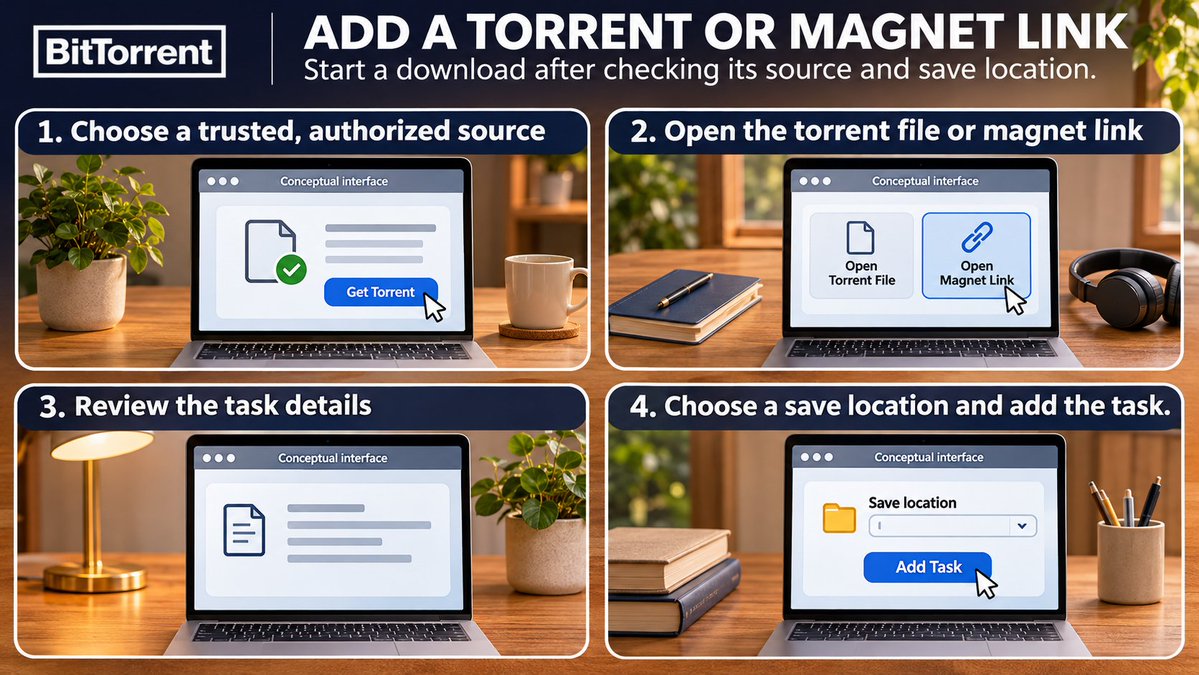
🌐 ADD A TORRENT OR MAGNET LINK — CHECK BEFORE YOU DOWNLOAD.
A torrent or magnet link can start a download in moments. What should you check before adding the task?
With BitTorrent, adding a download is more than simply clicking a link. A few quick checks can help you avoid untrusted sources and save files to the wrong location.
1️⃣ Choose a Trusted Source
→ Get torrent files or magnet links from sources you trust and are authorized to use.
→ Be cautious of unfamiliar websites, misleading download buttons, and suspicious links.
2️⃣ Open the Torrent or Paste the Magnet Link
→ Select the torrent file from your device, or copy and paste the magnet link into your BitTorrent client.
→ Make sure you've selected the intended file or link before proceeding.
3️⃣ Review the Task Details
→ Check the torrent name and the files included in the download.
→ Review the available task information before adding it.
→ Make sure the content matches what you intended to download.
4️⃣ Choose Your Save Location
→ Select the destination folder where the downloaded files should be stored.
→ Check that the folder is appropriate and has enough available storage space.
→ Confirm the task details and add the download.
💡 A Better Download Habit
Taking a moment to review the source, file details, and destination can help prevent unnecessary mistakes and keep your downloads organized.
📌 Review the source, task details, and save location before adding the download.
@justinsuntron #TRONEcoStar @BitTorrent
🔍 FIND THE RIGHT AUDIT — MATCH THE REPORT TO THE FEATURE.
You found an audit link for your sTRX article. Does its scope include the feature in your headline?
An audit reference is only useful when it supports the specific security claim you're making. Before describing a feature as audited, check exactly what the report covers.
1️⃣ Identify the Component
→ Start with the official JustLend documentation directory.
→ Look for the audit resources relevant to your topic.
→ JustLend provides separate audit references for Supply & Borrow and Staked TRX.
→ Writing about sTRX? Start with the Staked TRX audit entry rather than assuming another report covers it.
2️⃣ Examine the Audit Report
Once you open the report, record three important details:
→ Scope: Which contracts or components did the auditors examine?
→ Review date: When was the assessment conducted?
→ Version or code reference: Which implementation did the report review, if specified?
3️⃣ Match the Evidence to Your Claim
→ Make sure the report actually includes the feature discussed in your article.
→ Don't extend an audit's findings to components outside its documented scope.
→ If you cannot match the reviewed code to the currently deployed version, describe the audit as a historical assessment.
💡 For example, "The report examined the components listed in its scope" is more precise than claiming that the entire platform has been audited.
📌 Give readers the component name, the reviewed version where available, and the report they can open themselves.
@justinsuntron #TRONEcoStar @DeFi_JUST
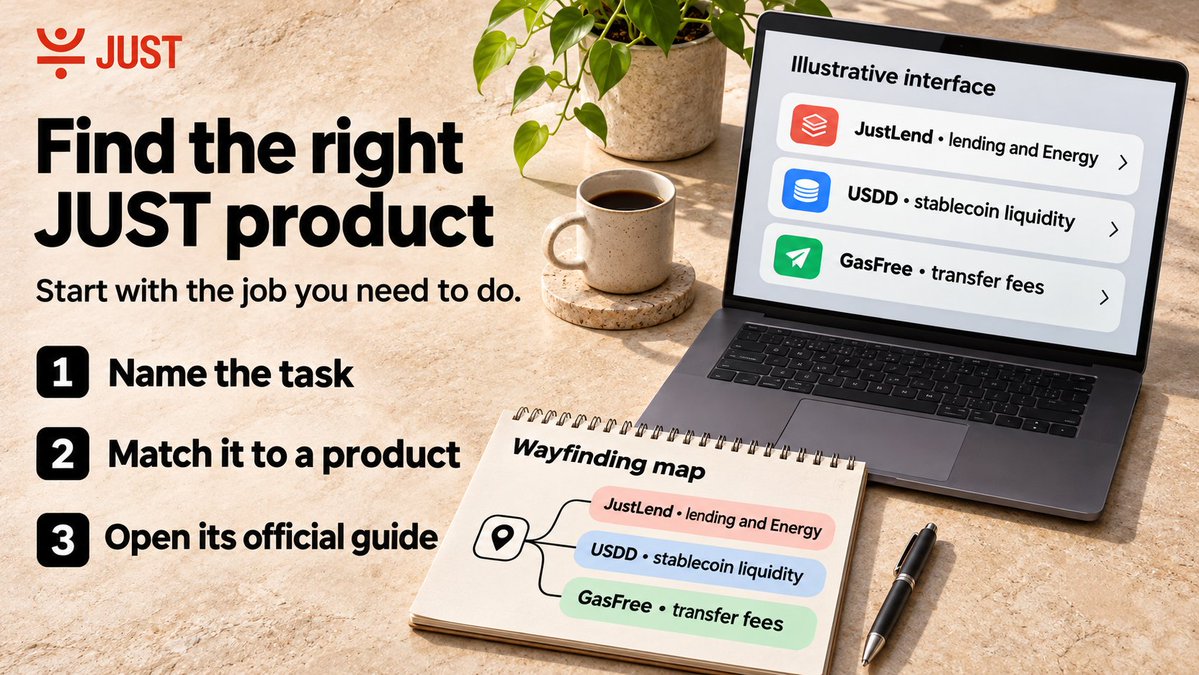
🧭 FIND THE RIGHT JUST PRODUCT — START WITH YOUR QUESTION.
You want to pay a transfer fee in stablecoins. The JUST homepage gives you three product names. Which one do you open?
The easiest way to navigate the JUST ecosystem is to start with the task you want to complete, then follow the product designed for it.
1️⃣ GasFree — Paying Transfer Fees in Tokens
→ Your question: Which token can cover my transfer fee?
→ Open the GasFree section and check its supported fee-payment options.
→ Review the supported tokens and wallet requirements before making your transfer.
2️⃣ USDD — Exploring Stablecoin Options
→ Your question: How can I explore stablecoin swaps through the PSM?
→ Follow the USDD entry to learn about its stablecoin ecosystem and PSM functionality.
3️⃣ JustLend — Lending Markets and Energy
→ Your question: Where can I explore lending markets or Energy services?
→ Open JustLend to find information about supplying, borrowing, and Energy-related services.
💡 A Simple Navigation Tip
Don't start by clicking every product. Keep your original task in mind and open the guide that answers it.
If you're preparing a transfer, focus on the fee-token information for that specific transfer rather than assuming every wallet or token is supported.
📌 For this transfer, start with GasFree and check which fee token your wallet supports.
Explore the official JUST ecosystem: https://t.co/YUbuzS9f3y
@justinsuntron #TRONEcoStar @DeFi_JUST