AI Software Engineer | Full-Stack Developer | AI Automation Specialist | Generative AI | Specialized in building and deploying scalable, AI-powered applications
How to Become a Software Developer in 2026 — An Honest, No-Fluff Guide
I remember staring at my first “Hello, World!” and thinking: “Is this really it? Can I actually do this?”
Let me give you the real picture, not the “learn to code in 30 days” fantasy.
The landscape has shifted
AI writes code now. Tools like GitHub Copilot, Cursor, and Claude are everywhere.
This doesn’t mean developers are obsolete, it means the bar has moved from writing syntax to thinking in systems.
Your job in 2026 is to direct, review, and architect, not just type.
If you’re just starting out, this is actually great news. You can move faster than ever before.
Your realistic roadmap:
1. Pick ONE language and go deep
Python for backend/data. JavaScript for web. Don’t hop. Depth beats breadth in year one. Get comfortable with loops, functions, data structures, and debugging before anything else.
2. Build things nobody asked you to build
A personal expense tracker. A playlist generator. A tool that texts you the weather. Small, finished projects beat big abandoned ones every time. Ship ugly things. Refine later.
3. Learn Git early — like, embarrassingly early
Version control feels bureaucratic until the day you accidentally delete three hours of work. That day will come. Be ready.
4. Understand how the web works
HTTP. APIs. Databases. Even if you never touch a backend, knowing how data moves makes you a dramatically better developer. Read the request. Read the response. Ask “why.”
5. Get comfortable being uncomfortable
Every senior developer I know still Googles basic things. Stack Overflow, documentation, and AI tools are not cheating, they’re the job. The skill is knowing what to search.
6. Join a community before you feel ready
Discord servers. Local meetups. Open-source projects. You don’t need a portfolio to participate in conversations. Show up curious. Ask questions. Help where you can.
7. Don’t ignore the soft skills
Writing clearly. Explaining your thinking. Working with non-technical teammates. These are the skills that will get you promoted once you land the role.
Honest timeline:
With consistent daily effort (1–2 hrs/day), most people reach “junior developer capable of landing a job” in 12–18 months. Some faster. Some slower. Your pace is not your worth.
What nobody tells you:
The hardest part isn’t learning to code. It’s continuing on the days when nothing works, the error messages make no sense, and you feel like everyone else just gets it except you.
You don’t need a CS degree. You don’t need an expensive bootcamp. You need curiosity, consistency, and the humility to be a beginner for a while.
What’s one thing you wish you’d known when you started learning to code? Drop it below, someone reading this needs to hear it. 👇
#SoftwareDevelopment #LearnToCode #TechCareers #CodingJourney #WebDevelopment #CareerChange #Programming #TechIn2026 #DeveloperLife #AITools #GrowthMindset #BreakIntoTech #CodeNewbie #CareerAdvice #BuildInPublic
🤖 Stop asking AI to write. Start asking it to think.
Most people use AI like a vending machine: prompt in, content out.
That’s basic.
Use AI to analyze, challenge ideas, solve problems, strategize, and make better decisions.
That’s where the real value is.
#GenerativeAI#AI
The barrier to building apps just collapsed. Here’s how to walk through.
Twelve months ago, “I want to build an app” meant enrolling in a bootcamp. Today, it means opening a chat window.
This shift has a name — vibe coding — and it’s quietly minting a new kind of builder: people who’ve never written a line of code but are shipping real products.
Here’s the exact process to go from idea to live app 👇
1. Learn the loop first
Describe → AI generates → review → refine → repeat. Everything else is just this, at scale.
2. Pick one tool and stick with it
Cursor for code editing, Claude Code for terminal workflows, Codex for pure coding tasks. Commit early, context-switch later.
3. Start embarrassingly small
One user. One problem. One weekend. Scope creep kills more projects than bad code ever did.
4. Define it like you’re briefing a contractor
What it does. Who uses it. What success looks like. Vague prompts produce vague software.
5. List only 3–5 core features
Everything else is a v2 problem. Park the fancy stuff. Build the useful thing.
6. Write a proper first prompt
Include: purpose, features, design style, your experience level, and always end with “give me the complete project files.”
7. Let it build, then verify
Run it locally before anything else. Confirm the core features work before adding anything new.
8. Improve one thing at a time
Note friction, request specific fixes, move to the next thing. Patience here compounds fast.
9. Debug without shame
Copy the full error. Paste it back. Ask for a plain English explanation. Let AI fix it. Screenshots help for visual issues.
10. Deploy and ship it
Vercel or Netlify. Free. Ask AI for the exact steps. Test the live link. Then share it — publicly.
The winners right now aren’t elite engineers. They’re the people who just start.
Which step trips you up most? Drop it below — I’ll help you work through it. 👇
#VibeCoding #NoCode #AITools #BuildInPublic #Productivity #Entrepreneurship #FutureOfWork #TechForEveryone #SideProject #AIForBeginners
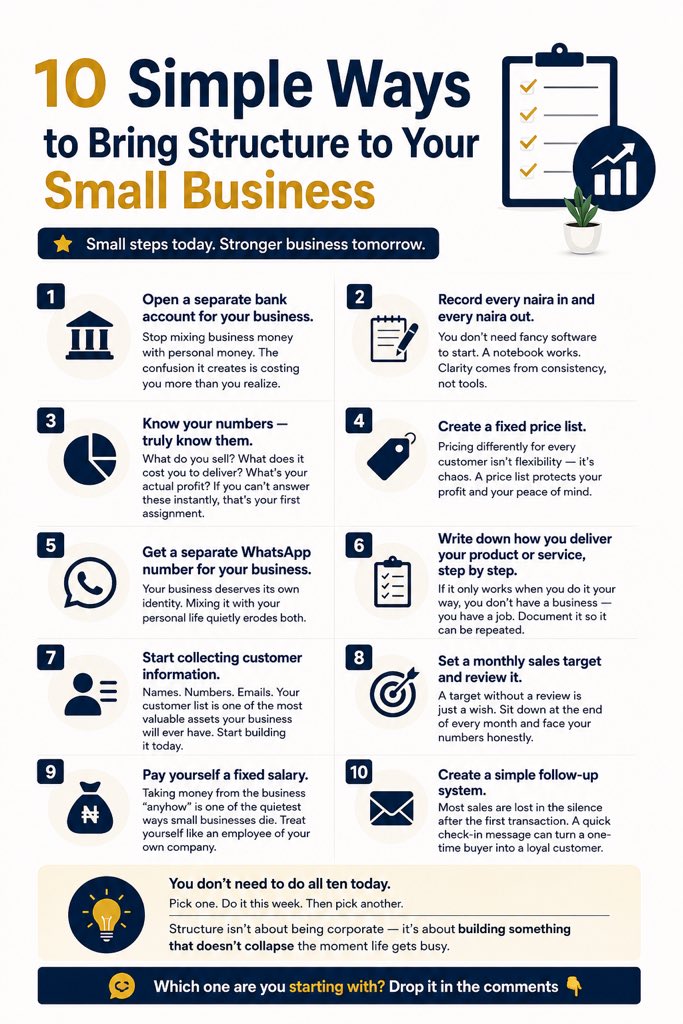
Nobody told me that running a small business could feel like juggling ten things at once with no hands.
If you’ve ever felt like your business is running you instead of the other way around, this is for you.
Here are 10 simple ways to bring structure to your small business, no consultant needed, no overwhelm required:
1. Open a separate bank account for your business.
Stop mixing business money with personal money. The confusion it creates is costing you more than you realize.
2. Record every naira in and every naira out.
You don’t need fancy software to start. A notebook works. Clarity comes from consistency, not tools.
3. Know your numbers — truly know them.
What do you sell? What does it cost you to deliver? What’s your actual profit? If you can’t answer these instantly, that’s your first assignment.
4. Create a fixed price list.
Pricing differently for every customer isn’t flexibility, it’s chaos. A price list protects your profit and your peace of mind.
5. Get a separate WhatsApp number for your business.
Your business deserves its own identity. Mixing it with your personal life quietly erodes both.
6. Write down how you deliver your product or service, step by step.
If it only works when you do it your way, you don’t have a business, you have a job. Document it so it can be repeated.
7. Start collecting customer information.
Names. Numbers. Emails. Your customer list is one of the most valuable assets your business will ever have. Start building it today.
8. Set a monthly sales target and review it.
A target without a review is just a wish. Sit down at the end of every month and face your numbers honestly.
9. Pay yourself a fixed salary.
Taking money from the business “anyhow” is one of the quietest ways small businesses die. Treat yourself like an employee of your own company.
10. Create a simple follow-up system.
Most sales are lost in the silence after the first transaction. A quick check-in message can turn a one-time buyer into a loyal customer.
You don’t need to do all ten today.
Pick one. Do it this week. Then pick another.
Structure isn’t about being corporate — it’s about building something that doesn’t collapse the moment life gets busy.
Which one are you starting with? Drop it in the comments 👇
#SmallBusiness #BusinessGrowth #Entrepreneurship #SmallBusinessTips #BusinessStructure #StartupAfrica #NigerianEntrepreneur #BusinessMindset #SoloPreneur #BuildingInPublic
How to Automate Your Workflow with AI (A Practical Playbook)
Most people use AI to write emails faster.
The ones winning right now? They’ve rebuilt their entire workflow around it.
Here’s the exact framework I use and what actually moves the needle:
1. Audit Before You Automate
Don’t automate chaos. Before touching any AI tool, list every repetitive task that takes you 30+ minutes a week.
Research, drafting, summarizing, data entry, scheduling, write it all down.
That list is your automation roadmap.
2. Match Tools to Tasks
Not all AI is created equal.
Here’s how I break it down:
→ Writing & communication → Claude, ChatGPT
→ Research & web data → Perplexity, Claude with search
→ Workflow automation → Make, Zapier + AI actions
→ Meeting notes & summaries
→ https://t.co/oUWGtLcq5i, Fireflies
→ Data & spreadsheets →
Claude in Excel, Noteable
One tool trying to do everything = mediocre results everywhere.
3. Build Your “AI Stack” in Layers
Think of it like plumbing:
🔹 Input layer — where information enters (emails, Slack, forms)
🔹 Processing layer — AI reads, sorts, drafts, or decides
🔹 Output layer — action taken (reply sent, doc created, task logged)
A real example: Client fills out intake form → Zapier triggers → Claude drafts a personalized proposal → lands in your Notion for review.
You touch it once, at the end.
4. Templatize Your Prompts
Your prompts ARE your automation. A vague prompt gives vague output.
Build a personal prompt library for your 10 most common tasks. Store them in Notion, a doc, anywhere. Treat them like SOPs.
“Summarize this meeting transcript in 5 bullets, flag action items, and identify any unresolved decisions” → runs in seconds, every time.
5. Keep a Human in the Loop (Strategically)
The goal isn’t to remove yourself — it’s to remove yourself from the low-value parts.
AI handles the draft. You make the call.
AI surfaces the data. You spot the insight.
AI sends the reminder. You build the relationship.
Automation without judgment is just faster mistakes.
The honest truth:
Most people spend 2 hours doing something AI could do in 4 minutes not because the tools don’t exist, but because they never stopped to ask: “Does this task actually need me?”
Start there.
What’s one workflow you’ve automated (or want to)? Drop it in the comments 👇
#AI #Productivity #WorkflowAutomation #FutureOfWork #AITools
🧠 How I Actually Use AI as a Developer (No Hype, Just Honest Truth)
Three years ago, I thought AI coding tools were going to replace me.
Today, I think they’re the best thing that has happened to my career.
But here’s the thing nobody tells you, the developers getting the most out of AI aren’t the ones using it as a magic wand.
They’re the ones who’ve learned to treat it like a really fast, sometimes overconfident pair programmer.
Here’s what actually works for me:
1. Use AI to unblock, not to replace thinking
When I’m stuck on an approach, I don’t ask AI to “write the solution.” I ask it to explain tradeoffs.
“Should I use a queue or a pub/sub pattern here?” forces me to stay in the driver’s seat while AI acts as a sounding board.
2. Let it handle the stuff that drains you
Boilerplate. Regex. Writing unit test scaffolding. SQL queries I’ve written 50 times.
These tasks are important but mentally expensive. AI handles them in seconds so I can save my focus for the architecture decisions that actually matter.
3. Code review before the review
Before I push a PR, I paste my diff and ask: “What edge cases am I missing? What would a senior engineer flag here?” It has caught real bugs. Multiple times.
4. Learn faster, not less
I still learn the underlying concepts. But if I’m working in an unfamiliar codebase or language, AI helps me move at a reasonable pace while I deepen my knowledge in parallel.
It’s like having a map when you’re exploring a new city, you’re still walking, just not lost.
5. Treat AI output like junior dev code
Review it. Question it. Test it.
AI confidently writes broken code sometimes.
The developers who get burned are the ones who ship without reading.
The ones who thrive are the ones who verify everything.
The honest truth? AI hasn’t made me a lazy developer.
It’s made me a better one, because I spend less energy on repetitive tasks and more energy on creative problem-solving, system design, and genuinely understanding what I’m building.
The skill isn’t prompting. The skill is still being a good developer, AI just removes some of the friction.
What’s one way AI has changed how you work? Drop it in the comments 👇
#SoftwareDevelopment #AITools #DeveloperLife #CodingTips #TechCareer #MachineLearning #Productivity #WebDevelopment #ProgrammingLife #CareerGrowth #AIAssistant #CodeSmarter