Turn Claude Code into a full academic research team with this guide.
> Deep Research: 13 agents, 8 modes
> Academic Paper: 12 agents, 11 modes
> Academic Paper Reviewer: 7 agents
> Academic Pipeline: 10-stage orchestrator with citation verification
Free for non-commercial use.
🔥 Claude is quietly becoming every creator's secret weapon.
Not for writing captions.
For growing entire Instagram pages.
10 powerful prompts to grow faster in 2026: 👇
People are using AI to make short movie series on Instagram and it's so nice.
If you have a very good story in your head, you can allow AI help you make a very good series.
These are the steps:
Use an AI video generator (Runway, Pika, Focal, Doitong, Kravix) to create consistent characters, generate episodes, and export in 9:16 format for Reels.
1. 🧠 Write Your Story (or Let AI Do It)
Use an AI writer to generate:
Episode ideas
Character descriptions
Dialogue
Story arcs
Tools that help:
ChatGPT for scriptwriting
Focal can turn an idea into a script automatically (supports script editing with natural language)
Tip: Keep episodes 20–40 seconds for Instagram Reels.
2. 🎨 Generate Characters & Visual Style
You need consistent characters across episodes.
Tools that support character consistency:
Kravix Studio (built for episodic films)
Doitong (keeps character identity across scenes using Nano Banana Pro)
Focal (supports reusable characters & locations)
Choose a style:
Pixar‑like 3D
Anime
Realistic
Ghibli
Dark cartoon
3. 🎥 Turn Images or Text Into Video
This is where your movie comes alive.
Best text‑to‑video tools:
Runway ML – cinematic text‑to‑video, editing, sound design
Pika Labs – fast animation, motion control, 4K output
Luma AI – smooth camera moves, natural lighting (great for cinematic shots)
Doitong – 30+ models including Veo, Seedance, Runway, Kling
Kravix Studio – auto‑generates full short films from your script
Tip: Generate each scene as a separate clip (3–5 seconds each) for easier editing.
4. 🎙️ Add Voiceovers & Sound
You can narrate or use AI voices.
Tools:
ElevenLabs (realistic voices)
Doitong (built‑in voice cloning)
Kravix Studio (multiple narrator voices)
For Instagram, narration + subtitles = higher retention.
5. ✂️ Edit for Instagram Reels
Use:
CapCut (free, best for Reels)
Descript (edit by editing text)
Focal (timeline editing built‑in)
Key editing steps:
Set aspect ratio to 9:16
Add captions
Add background music
Add transitions between scenes
Keep pacing fast (1–2 seconds per shot)
6. 📲 Export & Publish
Most AI tools export in HD or 4K.
Doitong can auto‑post to Instagram directly.
Kravix Studio exports movies in 3 clicks.
📌 Recommended Workflow (Beginner-Friendly)
Write script with ChatGPT
Generate characters in Kravix Studio
Create scenes in Runway or Pika
Add voice in ElevenLabs
Edit in CapCut
Publish to Instagram Reels.
Here's a 746-page collection of 20 free guides on academic writing by top universities of the world.
Click the link below to download the collection for free.
Follow Silvi on LinkedIn for more free resources on academic writing.
https://t.co/8BegQlW3I0
طلاب الدكتوراه - كيفية إنشاء ملخص رسومي في ثوانٍ؟
1. اذهب إلى https://t.co/TeFaou1xSr
2. انسخ ولصق ملخصك
3. سيقوم ResearchViz بإنشاء الملخص الرسومي.
يمكنك تنزيله كملف PPT وإجراء أي تعديلات.
👇👇
طلاب #الدكتوراه 👨🎓
هل سيتم قبول ورقتك البحثية أم رفضها؟
استخدم Review-it للحصول على مراجعة أولية مدعومة بالذكاء الاصطناعي:
✅ نقاط القوة والضعف
✅ الأخطاء اللغوية والإملائية
✅ تقييم جودة البحث
اطلع على سياسة حماية البيانات قبل الرفع.
https://t.co/35jf6bRQeK
If you need access to:
- 1,300 Free Online Courses
- 1,150 Free Movies
- 150 Free Business Courses
- 700 Free Audio Books
- 800 Free eBooks
- 200 Free Textbooks
- 300 Free Language Lessons
then check out this Website.
https://t.co/FUcbCJYgWG
Retweet & Tag your friends
AI Tools Every Researcher Should Try in 2026
𝟏. 𝐀𝐧𝐬𝐰𝐞𝐫𝐓𝐡𝐢𝐬
➝ Helps you to identify research gaps in literature
↳ Link: https://t.co/wH2DSQWXis
𝟐. 𝐒𝐜𝐢𝐒𝐩𝐚𝐜𝐞
➝ Extract data from papers for your literature review
↳ Link: https://t.co/Xn7lEskEG2
𝟑. 𝐖𝐢𝐬𝐏𝐚𝐩𝐞𝐫
➝ Helps you in searching papers for your literature review
↳ Link: https://t.co/ztyiwEYvG1
𝟒. 𝐋𝐢𝐭𝐦𝐚𝐩𝐬
➝ Identify and analyze papers for your literature review
↳ Link: https://t.co/d8jKsHOd0I
𝟓. 𝐏𝐚𝐭𝐒𝐧𝐚𝐩 𝐄𝐮𝐫𝐞𝐤𝐚
➝ Helps you in identifying trends in your research field
↳ Link: https://t.co/bknskud3FP
𝟔. 𝐏𝐚𝐩𝐞𝐫𝐩𝐚𝐥
➝ Proofread your papers to fix grammar and typo issues
↳ Link: https://t.co/jLDR3VvU3d
𝟕. 𝐑𝐞𝐬𝐞𝐚𝐫𝐜𝐡𝐂𝐨𝐥𝐥𝐚𝐛
➝ Identify different types of research gaps
↳ Link: https://t.co/1M9u4q6VMb
𝟖. 𝐍𝐎𝐀𝐇 𝐀𝐈
➝ Helps you prepare the first draft of your literature review
↳ Link: https://t.co/JwYCN9GnXL
𝟗. 𝐆𝐚𝐭𝐬𝐛𝐢
➝ Helps you in writing a systematic literature review
↳ Link: https://t.co/TVVf9kemSz
𝟏𝟎. 𝐓𝐡𝐞𝐬𝐢𝐟𝐲
➝ Evaluates the quality of your thesis
↳ Link: https://t.co/MzhV4GjF6l
𝟏𝟏. 𝐦𝐨𝐚𝐫𝐚
➝ An AI-powered reference mangaer to insert references
↳ Link: https://t.co/eMotK5FSoT
𝟏𝟐. 𝐌𝐨𝐂𝐥𝐚𝐰
➝ Automate various research taks to 10x your productivity
↳ Link: https://t.co/09Ca09Bb9h
𝟏𝟑. 𝐋𝐢𝐧𝐞𝐫
➝ Insert citations in your text.
↳ Link: https://t.co/vdB6pTL1BU
𝟏𝟒. 𝐑𝐞𝐯𝐢𝐞𝐰-𝐢𝐭
➝ Provides feedback on your papers like a human
↳ Link: https://t.co/PMrNAhmMUe
Any other tool you'd like to add?
PhD Students - How to generate a graphical abstract in seconds?
1. Go to https://t.co/RsrnvLCAYu
2. Copy and paste your abstract
3. ResearchViz will generate graphical abstract.
You can download it as PPT and make any changes.
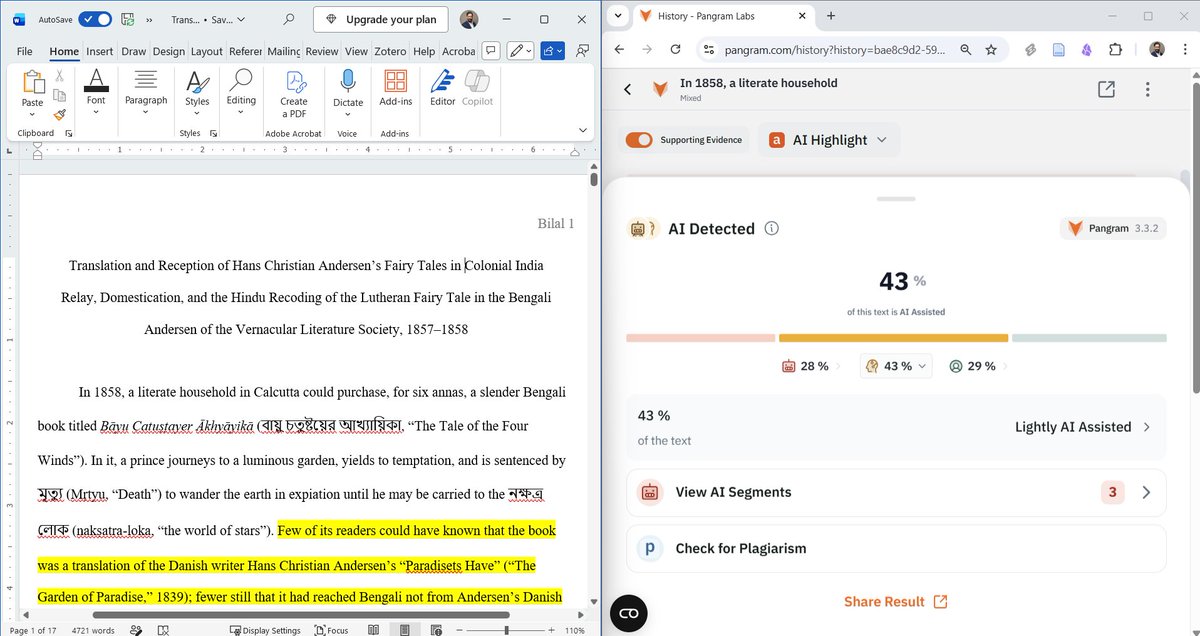
🚨Claude Code just gave me a complete research paper with a single prompt.
The paper has a strong argument and even beats AI-detection app, Pangram.
With a little editing, it can pass for 100% human, and can be easily submitted for peer review.
Here's the workflow I used:
65 outils utiles en ligne (1/2)
N'hésitez pas à compléter.
🔒 Contourner les restrictions
https://t.co/kF6x3wQApl — contourne les paywalls des articles en ligne.
https://t.co/Yj2xVjjjaU — millions de livres et manuels gratuits (miroir stable de Library Genesis)
https://t.co/VA9u4MHoau — accès libre aux articles de recherche scientifique
https://t.co/Mj6VmQ2RHj — méta-moteur des bibliothèques shadow (Libgen, Z-Lib, etc.)
📚 Culture & lecture
https://t.co/an5CI1Cl9Y — 70 000 livres classiques du domaine public
https://t.co/ddpb5ZDULy — cours gratuits des meilleures universités mondiales
https://t.co/1hbVnGE2GB — téléchargement gratuit de PDF
https://t.co/1s70S9uJOy — archive de toutes les pages web + millions de médias libres
🔬 Recherche académique
https://t.co/7GpNbqxyzJ — moteur de recherche académique gratuit propulsé par l'IA
https://t.co/QTCu0CZEXd — visualise les liens entre articles de recherche
https://t.co/TmjC613fAq — assistant IA pour analyser des papiers scientifiques
https://t.co/2sD9JKAaDZ — cherche ce sur quoi la science est unanime
https://t.co/WgkkdPuZBM — explique n'importe quel article de recherche en langage simple
✍️ Écriture & traduction
https://t.co/d66WOAuxZE — meilleur traducteur automatique, nettement au-dessus de Google Traduction
https://t.co/ekozQtQJm8 — analyse la lisibilité d'un texte, signale les phrases trop lourdes
https://t.co/Jo5aDClhZi — correction grammaticale et stylistique en temps réel (anglais)
🤖 IA généraliste
https://t.co/uqdUEOBkiW — transforme tes documents en base de connaissance interrogeable, génère des podcasts audio
https://t.co/pPl3FYxSNJ — assistant IA excellent pour lire et résumer de longs documents
https://t.co/iDoRgtLONG — transforme un texte en schéma visuel automatiquement
https://t.co/6A836YlEMl — moteur de recherche IA
🗂️ Organisation & productivité
https://t.co/QWxQuoAHRS — tout-en-un : notes, bases de données, wikis, projets
obsidian.md — prise de notes Markdown avec graphe de liens, 100% local et privé
https://t.co/RP6wnEJ5oS — tableau blanc collaboratif style croquis, idéal pour brainstormer
https://t.co/zS8dx2k1Dv — gestionnaire de favoris intelligent, multi-appareils
🎨 Image & design
https://t.co/7EVnfWdbZc — Photoshop complet, 100% dans le navigateur
https://t.co/f12qPska8m — compresse n'importe quelle image gratuitement
https://t.co/AvEEFnbEHq — supprime l'arrière-plan d'une photo en un clic
https://t.co/t3Ec3g6IxK — efface des objets/personnes d'une photo par IA
https://t.co/mi98eGGp7P — suppression d'arrière-plan vidéo par IA.
How to write a journal paper for publication?
Your paper should have the following 9 sections.
1. Abstract
2. Introduction
3. Literature Review
4. Methodology
5. Results
6. Discussion
7. Conclusion
8. Acknowledgements
9. References
Research just got 10x faster.
Claude just became your research assistant.
Paste the papers, run these prompts, and skip straight to clarity.
(Bookmark this)
Writing abstracts for research papers is always tricky.
Here's how ChatGPT can help you draft your drafts (prompts included) 👇
Start by enabling ChatGPT's "Advanced data analysis."
Click on:
your profile photo > Settings & Beta > Beta features > Advanced data analysis.
This will enable you to upload PDF to ChatGPT.