The ClearFeed Podcast is here 🎉
Real, unfiltered chats with founders & builders shaping the future of SaaS.
In Ep1, @ku1deep , co-founder at @last9io , opens up about building deep-tech from India, scaling globally, & winning in a crowded Observability space.
Full episode: https://t.co/I5JhwQXxFF
NEW: MS Teams Shared Channel support in ClearFeed 🚀
Support teams can now manage shared channel requests from Slack - route conversations to triage, reply from Slack or the ClearFeed Web App, create tickets in Zendesk/Freshdesk, & keep everything synced with MS Teams.
👉 Full blog: https://t.co/u18zjyWGD4
ClearFeed is now HIPAA compliant! 🎉
This milestone reflects our continued commitment to security, privacy, and protecting the data teams trust us with.
With SOC 2, GDPR, and now HIPAA compliance, we continue to raise the bar for data protection.
NEW: Multi-inbox email support in ClearFeed 🚀
Support teams juggle support@, billing@, ops@ and more. That means inbox switching, manual forwarding, and replies going out from the wrong address.
Now, manage multiple inboxes from one ClearFeed account - route to the right Slack Triage, reply from the right address, track everything in one place.
👉 https://t.co/qCdodFYcPp
HubSpot pings Slack. But deal context, ownership, and CRM write-back? Still a manual mess.
Here's what a real Slack-HubSpot setup looks like for sales teams: https://t.co/m744PFicow.
NEW: ClearFeed MCP Server 🚀
You can now interact with your ClearFeed support data using MCP-compatible AI clients like Claude, Cursor & Codex.
Run multi-step workflows like - search requests, update tickets, generate reports, and more.
Full blog: https://t.co/lx0trBbi2M
Not every Slack chatbot does the same job.
Some answer questions. Some take action. Some run full support workflows.
8 of the best, compared for 2026:
https://t.co/a6siNukXwp.
NEW: Dynamic Approvers in ClearFeed 🎉
ClearFeed can now route approval requests to the right manager in Slack automatically. It does this by:
-fetching manager details from tools like Okta before the workflow starts
-populating the approver automatically in the request
-routing the approval to the right manager in Slack
-using a backup approver if the lookup fails
Full blog: https://t.co/4x3zo5iAEu
NEW: Manage Discord community support directly from Slack 🎉
-Sync messages between Discord & Slack automatically
-Collaborate on issues from Triage Channels in Slack
-Turn Discord conversations into trackable tickets
-Respond from the Web App & sync replies back to Discord
Full blog: https://t.co/zqV2aZKCpE
NEW: Research Agent in ClearFeed ✨
Ask Research Agent anything about your support data in plain English & get answers in seconds.
-Query request volume, SLAs, & resolution times
-Investigate customer trends/patterns
-Search requests by topic or keyword
-Find your most common issue types
Full blog: https://t.co/hzNmb9Cbg9
Most support teams already work out of Slack.
The messy part is tracking everything somewhere else.
Here are 8 help desk tools that work well with Slack and do more than send notifications: https://t.co/6lfRaWw63y.
Pylon works well for customer support, but it's not the only choice.
If you need more control over workflows or deeper Slack integration, there are strong alternatives.
Read more: https://t.co/TgXUqA7WOB.
Thena served you well. But your team has grown.
And growing support teams need more — tighter workflows, deeper integrations, AI that works today.
We pulled together a practical guide to the best alternatives to Thena.
What’s better, what’s different, and what’s actually worth your time.
If you’re comparing support tools right now, start here: https://t.co/Le1MG5j3wQ.
"Slack AI" and "Slack Agentic AI" aren't the same thing.
Slack AI = summaries, search, recaps. It helps you understand work.
Agentic AI = intake, context, action, resolution.
It gets work done — inside the same Slack thread.
Full breakdown of what it is, how it works, and real use cases for support, IT, and ops: https://t.co/PFMBDLKtcP.
Using Slack for support? Here’s how to pick the right ticketing system.
Once support moves into Slack, you hit the wall: messages everywhere, no queue, and “we’ll come back to this” as the process.
The real decision isn’t “which tool.” It’s: do you want a Slack-native queue, or Slack as the front door to Zendesk/HubSpot/Salesforce?
Find the answers and the best ticketing system here: https://t.co/Wc9rVS73dl.
“Slack forms” aren’t one feature. Here’s how to actually use them for requests.
Most teams hit the same wall: half-baked Slack asks, missing context, buried in threads, impossible to track.
We broke “Slack forms” into what people really mean: native Workflow Builder forms, external tools posting into Slack, and forms that kick off real work (tickets, tasks, approvals).
Read more: https://t.co/NDG4HksbRt.
Slack feels noisy? Here’s a simple way to organize it so work actually moves.
Slack is great… until it’s 200 channels, a thousand pings, and nobody remembers where the real decision happened.
We wrote a practical guide to organize Slack for real productivity (not just more channels + emojis): https://t.co/mMfJXCN6eh.
Tracking issues in Slack? Two setups actually work.
Most issues don’t start as “tickets” — they start as a message, a bug report in a channel, or an “anyone else seeing this?” thread. Without a process, they’re hard to assign and even harder to close.
Check out the guide: https://t.co/lMg8wQWCtt.
We turned Slack onboarding chaos into a repeatable workflow.
It starts well. Then you hit 10–20 customer channels, and suddenly no one knows what’s done, what’s next, or who owns what.
Onboarding ends, and the channel quietly becomes a messy support inbox.
Here’s the practical guide: https://t.co/aoow9nfu7s.
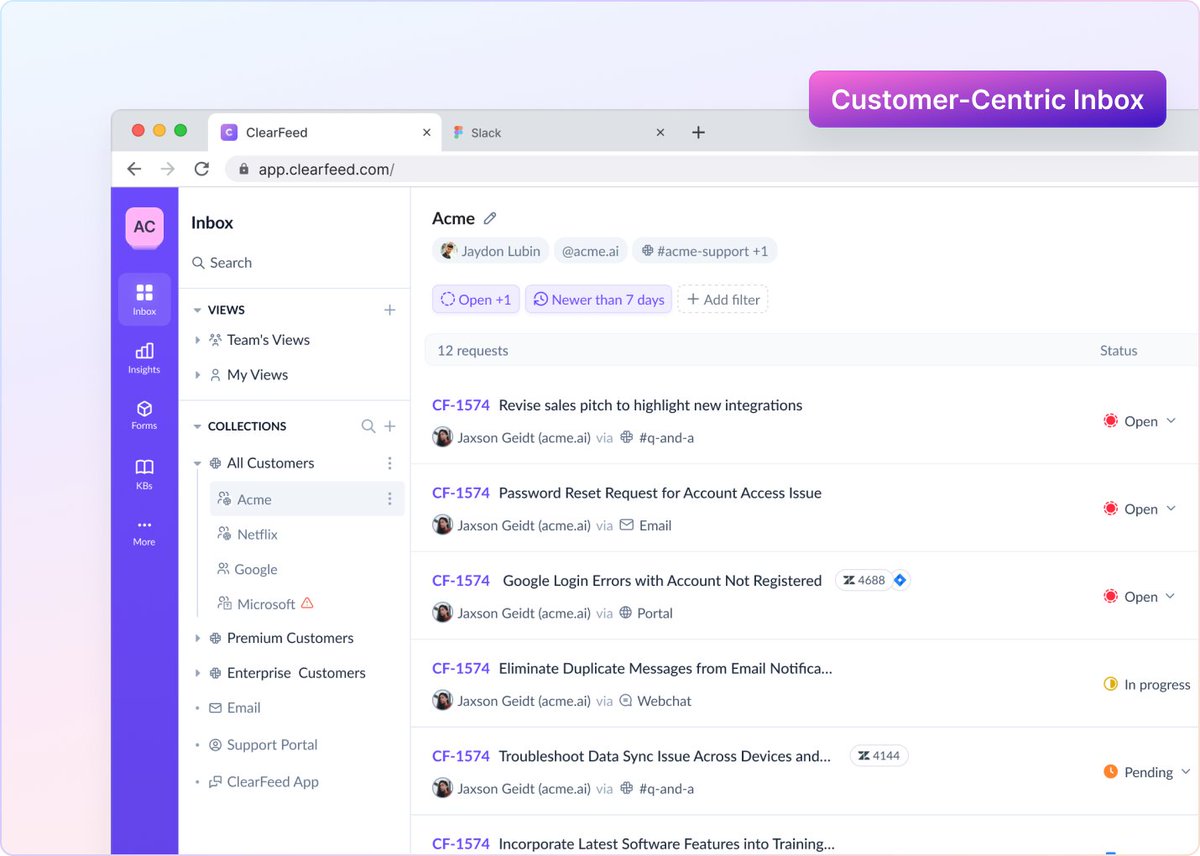
NEW: Customer-Centric Inbox in ClearFeed
All your customer conversation across Slack, email, chat, portal now live in one place.
-See all activity for a customer in one view
-Route requests by customer
-Apply consistent ownership & SLAs
-Work with full customer context
Full blog: https://t.co/DTIkhIVveQ