Rent GPUs like the RTX 5090. Billed per minute, rounded up, 1-minute minimum, stops when destroyed. Model API: DeepSeek, Kimi, GLM, MiniMax. Card or USDT.
CloudGPU: GPUs and a model API on one prepaid balance:
1) GPUs billed per minute: RTX 3090 / 4090 / 5090, A100, H800, RTX PRO 6000
2) One OpenAI-compatible API for DeepSeek, Kimi, GLM and MiniMax
Here's how each works 🧵
@gofelixpy Not mine, but a 4090 data point: 1344×768, 24fps, ~15s clip, about 4m24s in ComfyUI with the official FL2VA adapter https://t.co/x2iUHjqCgo
Quality vs API: per Pika's README, local runs top out at 768p; 1080p–4K and audio stems are API-only.
I work on CloudGPU
@TheLateBuild Respect, Wan 2.1 i2v on 6 GB is no joke. Quantized weights plus offloading make it run; the cost is time. My split: iterate locally, then rent a 24–32 GB card for the final 720p render. (Disclosure: I work on CloudGPU.)
@doguwan@cursor_ai Per Cursor's own-key docs, DeepSeek isn't on the provider list and no custom base URL is described. I haven't tried a workaround. For DeepSeek in VS Code, Cline's "OpenAI Compatible" provider takes any base URL, key and model ID. I work on CloudGPU, we serve DeepSeek that way.
@NateNoustalgia@opencode Easiest check is an A/B on the same prompt. opencode.json takes a custom provider ("npm": "@ai-sdk/openai-compatible" + options.baseURL), so you can add a second endpoint next to Go. We serve deepseek-v4.1-flash that way: https://t.co/ClPzAOgifx I work on CloudGPU.
@nksages@learn_with_san On 6GB, QLoRA (4-bit) is the way. Unsloth's VRAM table lists 3B at 3.5 GB and 8B at 6 GB minimum, so a small Gemma fits; 8B is at your limit. Keep batch size 1–2. 16-bit LoRA on a 7B needs 19 GB per the same table, that's when renting a card helps. I work on CloudGPU
ComfyUI on a rented RTX 5090, driven from Python on your laptop:
POST /prompt → poll /history → GET /view
All over a public HTTPS URL that exists only while the instance runs. The template ships ComfyUI itself; you bring the FLUX weights.
AI that deploys AI.
Templates: Ollama, ComfyUI, JupyterLab, raw GPU.
One OpenAI-compatible API key: DeepSeek, GLM, Kimi, MiniMax, Qwen.
With MCP, your agent can rent its own GPU.
Billed per minute, rounded up, 1-minute minimum, stops when destroyed.
https://t.co/jaWntUeryY
@Banyu_Biroeee@strangelooptv@ComfyUI The README lists 24 GB VRAM for video (built on a 32 GB RTX 5090). At 24 GB+ video defaults to 720p, below that 480p; Setup > Render size changes it. 12 to 16 GB runs stills. If your card is short, we have 5090s billed per minute. I work on CloudGPU: https://t.co/Dnwc2bd4Cl
We haven't run this end to end on kimi-k3 yet, so check yours:
- llm.invoke(...).content has text
- usage_metadata shows token counts
- tool calling: test one small tool first
- 401 invalid_api_key = wrong key, 400 model_not_found = ID typo
kimi-k2.6 is a one-field swap.
Kimi K3 in LangChain: ChatOpenAI accepts a custom base_url, so one OpenAI-compatible endpoint is all it needs.
- base_url: https://t.co/WePNRE7lXk
- api_key: your CLOUDGPU_API_KEY
- model: kimi-k3 (or kimi-k2.6)
Setup and the one catch below. Model IDs: https://t.co/BT3kG4J5Uf
The catch: multi-turn chats and agents. Kimi K3's model card wants the full assistant message back, reasoning_content included. ChatOpenAI's docs say non-standard fields like that are not extracted or preserved.
Single calls, chains, stream() and batch() send nothing back.
MiniMax in Aider through an OpenAI-compatible endpoint:
export OPENAI_API_BASE=https://t.co/WePNRE7lXk
export OPENAI_API_KEY="$CLOUDGPU_API_KEY"
aider --model openai/minimax-m3
The openai/ prefix comes from Aider's docs. Not tested by us in Aider.
https://t.co/NJ21eP5pvo
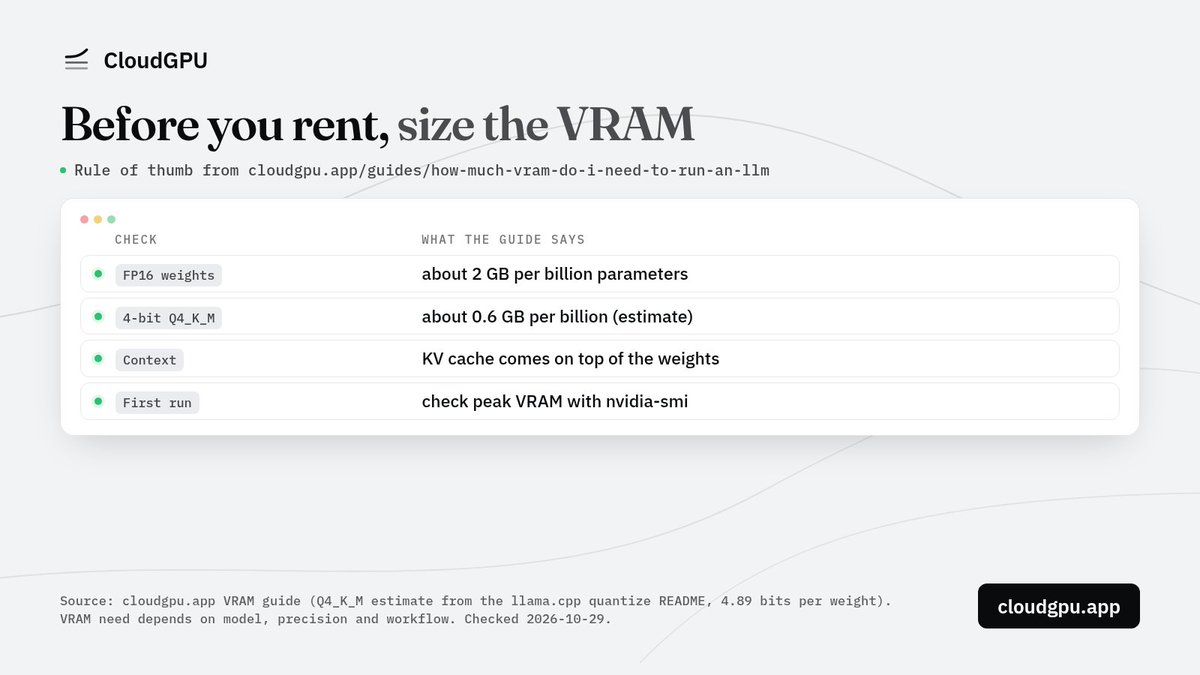
Before you rent a card, size the VRAM:
FP16 weights: about 2 GB per billion parameters
4-bit Q4_K_M: about 0.6 GB per billion (estimate)
Context (KV cache) comes on top
First run: check peak VRAM with nvidia-smi
Per our VRAM guide.
https://t.co/O3kpt9KgPO
@ollama@togethercompute@vipulved@jmorgan@ollama For security teams: OLLAMA_NO_CLOUD=1 turns off cloud models and web search, and the log then shows "Ollama cloud disabled: true". It binds 127.0.0.1:11434 by default, so on a remote GPU box prefer an SSH tunnel over setting OLLAMA_HOST=0.0.0.0. I work on CloudGPU
@zontyp_tweets@sudoingX@zontyp_tweets 3090 has 24 GB VRAM. Ollama's default gemma3:27b (Q4_K_M) is 17 GB, so it fits; the Q8 build is 30 GB and won't. Pick the model first, then the card. To test first, CloudGPU rents 3090s by the minute: https://t.co/VlQN1C0Gmc
I work on CloudGPU


![cloudgpu_app's tweet photo. qwen3-coder-480b in Continue:
models:
- name: coder
provider: openai
model: qwen3-coder-480b
apiBase: https://t.co/WePNRE6O7M
apiKey: ${{ secrets.CLOUDGPU_API_KEY }}
roles: [chat, edit]
Per Continue docs; not tested by us.
https://t.co/T45eceuR9I https://t.co/VqHeQQhbS4](https://pbs.twimg.com/media/HV1yYRwaEAAgCKc.jpg)