Get CMake now! Got any questions about CMake? Just let me know.
Here to keep tabs on actionable complaints regarding CMake on Twitter.
Not affiliated w/ Kitware
@onemanmmo If you explain your issues here, I may be able to provide solutions.
Alternatively, you are also welcome to join the cmake channel of the C++ Slack for assistance: https://t.co/eGJiXK3G5I
@Made_by_Aleks @mallocmyheart@yacineMTB The official documentation has a tutorial: https://t.co/RLfvlxn0Cm
cmake-init's generated projects and examples show how a lot of things ought to be done: https://t.co/pJtTJhAjmI
If you need assistance, there is the cmake channel of the C++ Slack: https://t.co/eGJiXK3G5I
@onemanmmo LLVM and GCC need to be in your PATH to work. In this example, you can see that I have a separate script to create a venv for GCC, but LLVM is already in my PATH, while MSVC is made available with the Microsoft provided vcvars venv:
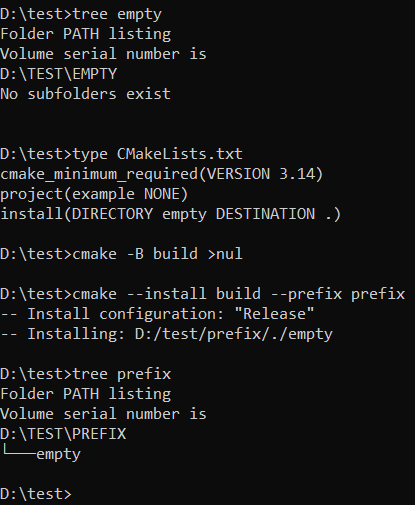
@AnnatarTheMaia If the directory already exists in the source directory, then a simple install(DIRECTORY) will do. If you have to create the directory during install, you must not disregard the user's wishes and thus must script with these considerations in mind.
@sevenc_nanashi clangd uses compile_commands.json which can be generated using CMake via https://t.co/VL57p7bcRj
Conan does not really enter the picture here.
@knenet Yes you can. Visual Studio is primarily a text editor and CMakeLists.txt is just a text file. Visual Studio has built-in support for CMake managed projects, which is enhanced further by using CMake presets.
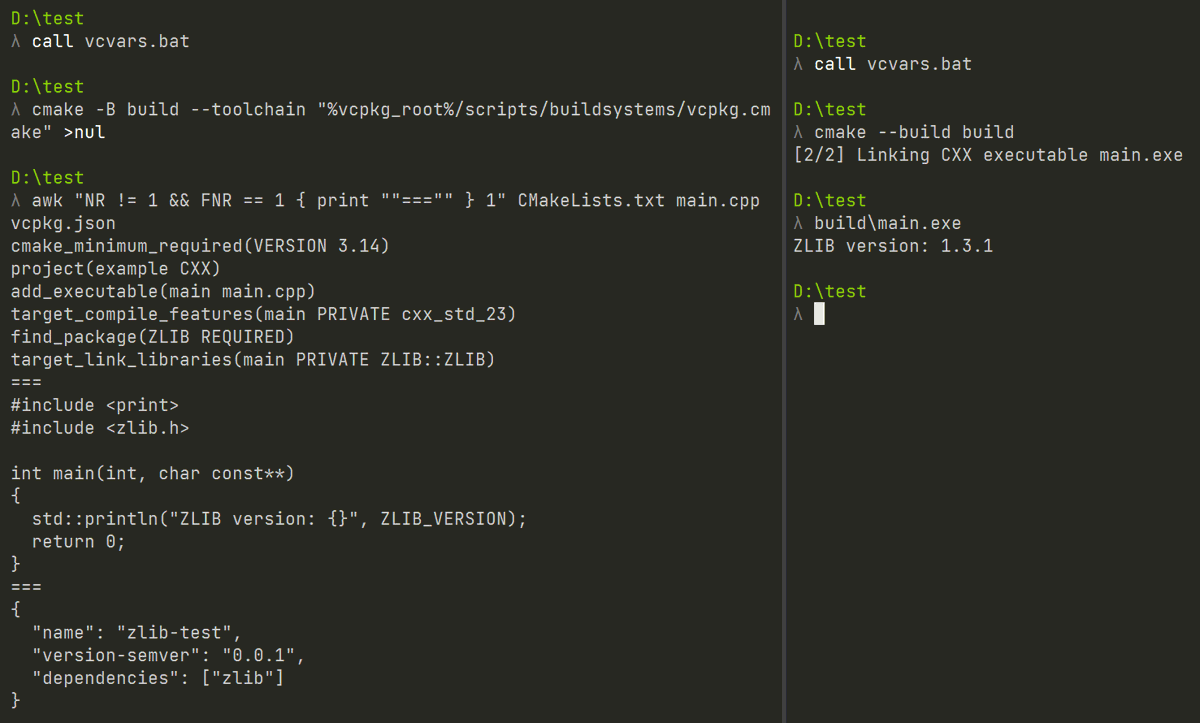
@sevenc_nanashi I heavily recommend using a package manager such as Conan (https://t.co/L5C3YLPXr9) and vcpkg (https://t.co/d2zKMJOXeu) with your CMake projects. I put this quick example together in a couple minutes easily using vcpkg:
@Sickeroni @m_adduci That may not be necessary. If you host your own Artifactory server, you can upload prebuilt packages. CMake is also available for many platforms from Kitware:
https://t.co/HotvxTfeGy
https://t.co/4QMdEJFTfe
https://t.co/WYCGwFTjpX
@DeviousMalcon_t If you ever need assistance with anything CMake related, you are welcome to join the cmake channel of the C++ Slack: https://t.co/eGJiXK3G5I
@cazaugg@okonomiyonda@parsley72 VS2022 is just an IDE. It supports CMake and thus you can use any toolchain for your project(s) with a toolchain file. I use VS2022 solely for CMake managed projects, where my toolchain can be MSVC, LLVM or GNU (via w64devkit).
@noam_yy@zoriya_dev@kennethnym The cxx_std_20 meta compilation feature was added in CMake 3.12. If you are looking for modules support, CMake was forced to wait a long time due to compiler support, but with CMake 3.28 there is non-experimental support: https://t.co/uxheqMxLPs
@espresso3389 "File exists" is a message returned by the Win32 API for the error code. Unfortunately, that's all Windows tells you here and the reason for the error can be many things.
@MikkoMononen I warmly recommend Visual Studio Community Edition 2022. It actually does not suck and hooks up to cmake out of the box (just open cmake project and point it at cmakelists.txt ... boom, all of sweet computer graphics open source in github almost instantly buildable with no pain)
@lnearwaju@kiiroi_jacket Nowadays you should be using vcpkg's manifest mode: https://t.co/BaEdLCBDy0
CMake also has a -B command line option: https://t.co/wf6kYK4Ch9
With all these, you only need one command:
cmake -B build --toolchain "$VCPKG_ROOT/scripts/buildsystems/vcpkg.cmake"
@Omar_Otaku369 @Mo7amedAbofarag Visual Studio (Code) both support CMake managed projects and thus they have no issues working with custom toolchains. I regularly use MSVC, LLVM and w64devkit's GCC all on the same CMake managed project(s) easily from Visual Studio Community.
@tomlikesnakes You told CMake to generate a Makefiles build system, which does not run jobs in parallel. You can specify the number of jobs to run using --parallel https://t.co/Z6EKo4mZz9 or by generating a build system that runs as many jobs as you have cores like Ninja.