I got 9/10. Take the quiz:
Can You Identify These Crypto Coins In One Minute?
Stand a chance to win $10.00 when you take this quiz and share your result https://t.co/QPwbFrJ4Wo via @useaccrue
Visitors hesitate to click CTAs when they don’t know what happens next.
So we built an animated Process Widget near the CTA, clearly showing each step after they take action.
When visitors understand the process, they move forward with confidence.
Simple addition, big impact.
Clarity = Confidence = Conversions.
The biggest Bull Run in history starts this week🚨
Historically, $BTC goes parabolic 315 days after the Halving
The 2025 Bull Run isn't an exception—BTC’s next target is $250,000
Here's the list of alts with 1000x potential 🧵👇
using CSS grid you can avoid width change in the parent container whilst making it responsive 🤙
the trick: update and transition the grid-template-columns for the list on :focus/:hover ✨
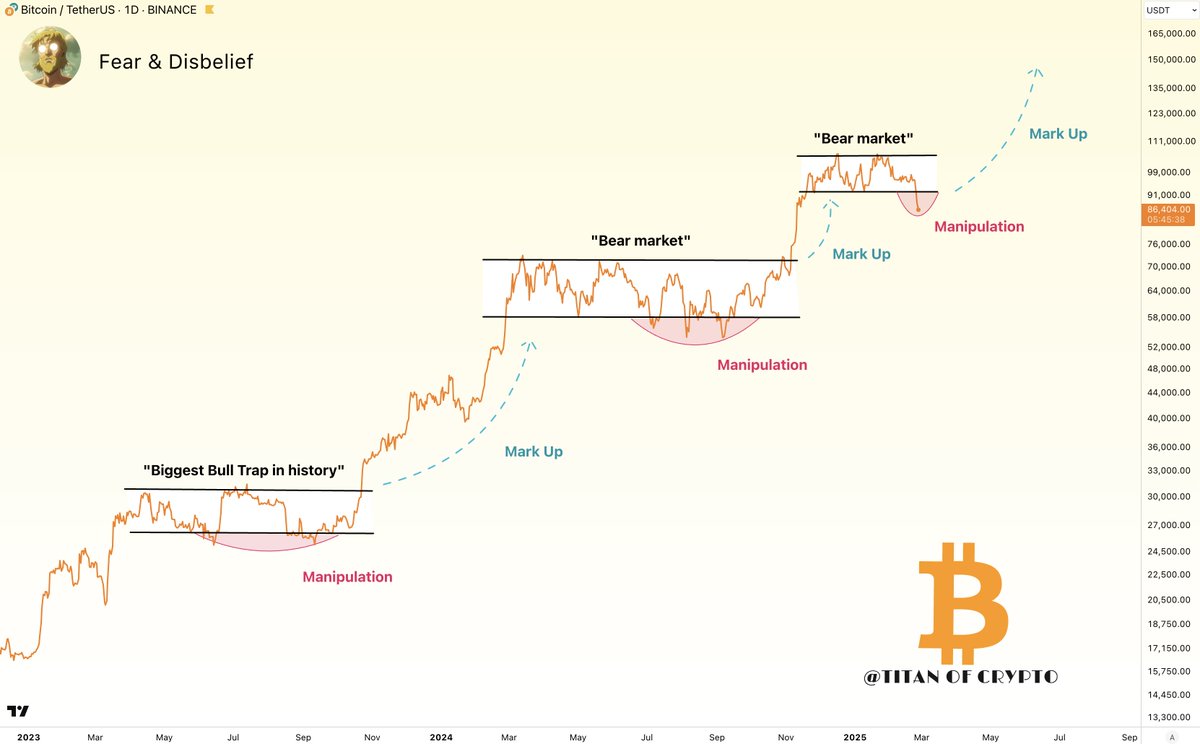
#Bitcoin Vibes: Fear & Disbelief
Weeks from now, many will pretend it was obvious that the bear market was never here.
Like always, they’ll buy higher, then panic at the next dip. 🔄
To celebrate 2K Followers I'm excited to share this high-quality Mobile app design from scratch by me.
8 Screens pages. It's FREE for the next 48 hours.
Like this post, and comment "Clean" to receive the file. (Make sure you’re following so I can DM you)
3 reasons to start designing in sections in @figma Today!
With Sections, you can create more dynamic, interactive prototypes. Arranging your screens I sections will cut the time you spend on your Figma prototypes by half.
Secondly, When working on larger projects, designing in sections helps break the work into manageable pieces. It also help keep your work more organised.
Finally, Designing in sections makes it simpler to switch entire screens from dark to light mode (or vice versa). Now you know some simple tricks to design better and faster. Let me get back to work ✌🏽.
#figma #uxdesign #uidesign #figmatips