@SharifdotG@ClaudeDevs hey! can you expand on what you mean here? the update should be rolling out to everyone!
i'd love to know what feels like it's missing from Windows!
@awakecoding@anaisbetts cool that confirms it! the fix has landed and should be out in the next release or two. until then, trimming your user PATH under 4096 and signing out and back in should bring your tools back!
If you're using Claude Code with the VS Code extension, I'd love to hear what's keeping you in the IDE. I think Claude Code on desktop is a better place to multi-Claude and we've love to close any gaps keeping you in VS Code!
Germans really get around. You'll be in the most isolated place hiking up a mountain most of the locals don't even know about and a German on their 5th vacation of the year will pop out of nowhere
You can now open Claude from your Dock, taskbar, Spotlight, file manager and GNOME search! Start a chat, pick up your last session or open Claude Code in a folder without leaving what you're doing 💡
Out now in the Claude desktop app!
Claude Desktop now starts ~2x faster than it did a month ago.
When the app started in the background, its timers got throttled and the JS engine dropped into power-saving mode. We now boot at full speed even while the window's still hidden, along with some smaller perf fixes!
Claude Code can design now. The new /design skill (research preview) brings Claude Design's artboard workflow into the CLI and Desktop, built on artifacts.
Run /design to get editable artboards for your UI — pick one, tweak it, then have Claude implement it.
I hate when people at work ask you what books you are reading for professional development. I am reading books to counteract the effects of being professionally developed. I am reading books that bring me back to being human.
Claude Code now has a screen reader mode.
Running `claude --ax-screen-reader` swaps the visual terminal UI for plain, linear text that screen readers (like VoiceOver and NVDA) can follow.
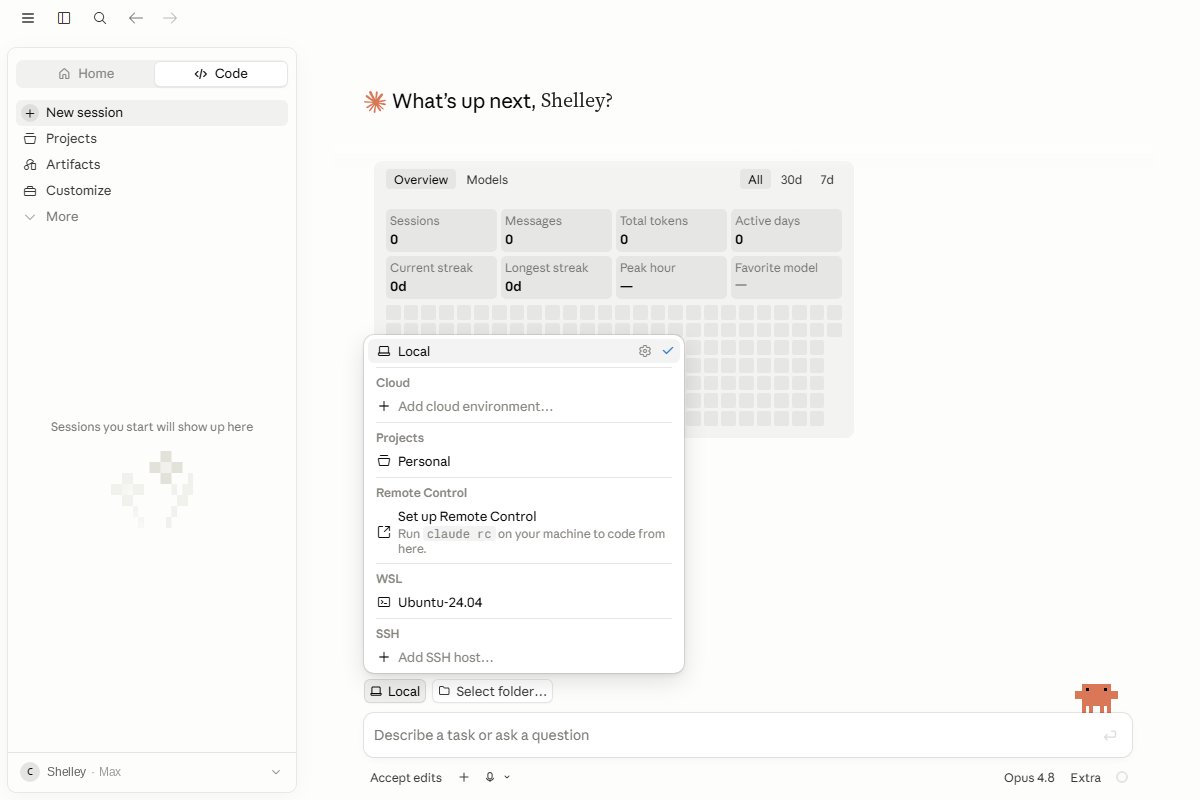
just shipped native WSL support in claude code desktop - pick your distro from the environment picker, pick a folder, go.
your ubuntu, your toolchain, (theoretically) zero duct tape. tell me what breaks!