Helping startup founders hire better talent using AI systems
Hiring • Talent • AI Systems
Founder @Nxthiring
Linkedin: 52K+ Followers
Instagram: 31K+ Follower
People think learning AI takes months.
It's really just a couple of hours.
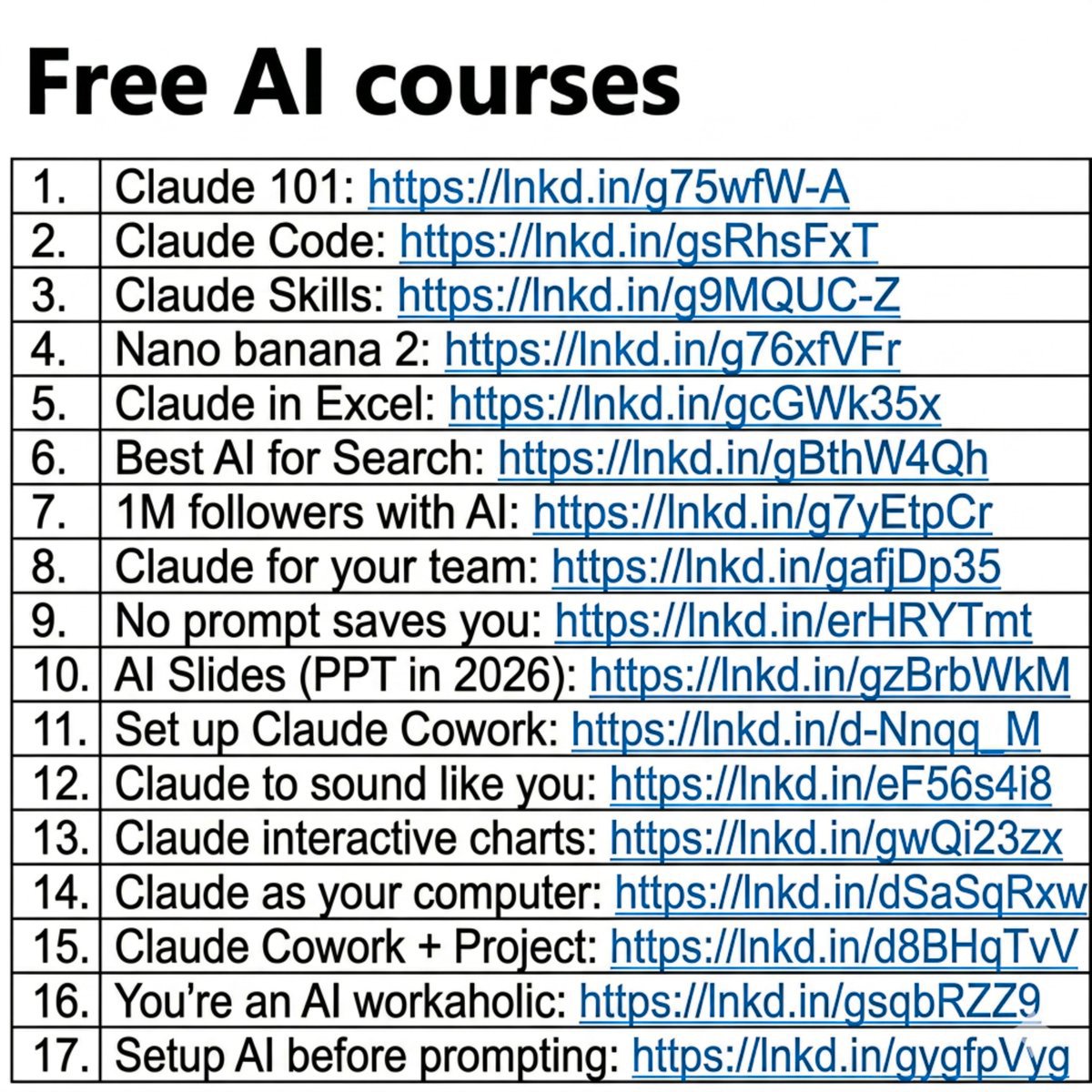
And I wrote 17 free guides to start right away:
Claude 101: https://t.co/1NinCyzCTW
Claude Code: https://t.co/IjipIuHgWs
Claude Skills: https://t.co/DsDGtnxPQu
Nano banana 2: https://t.co/NRAGdRJrn3
Claude in Excel: https://t.co/H9Ay886k3U…
Best AI for Search: https://t.co/TegupBAVUC
1M followers with AI: https://t.co/9JHEb7jdQ3
Claude for your team: https://t.co/XPHLb7Adkm…
No prompt saves you: https://t.co/B8TQ7Gx4R1
AI Slides (PPT in 2026): https://t.co/abQxrGp4gA
Set up Claude Cowork: https://t.co/ooZids3tgG…
Claude to sound like you: https://t.co/C9K42JCeXj…
Claude interactive charts: https://t.co/JV4F9MOrOj
Claude as your computer: https://t.co/6TKwVMuQqo…
Claude Cowork + Project: https://t.co/ooZids3tgG…
You're an AI workaholic: https://t.co/gdw0yZhofM
Setup AI before prompting: https://t.co/64ibzAxsyM…
___
1. Save this list for later (three dots, top right).
2. Share it with a friend by ♻️ reposting this image.
FORGET PowerPoint.
Claude can build an entire presentation in minutes!
No templates.
No design skills.
No all-nighters before the big meeting.
Just 6 prompts that do the work for you.
👇
📌 Prompt 1. The Blueprint
"Act as a senior presentation strategist. Build a blueprint for [topic].
Give me:
- The ONE message they must remember
- Who the audience is + what they care about
- 3 angles that hook them emotionally
- The slide-by-slide flow
- Ideal slide count
Keep it tight. No filler."
📌 Prompt 2. The Structure
"Create a slide-by-slide outline for [topic].
For each slide:
- Title
- One-line purpose
- What the audience should feel
Make the sequence build like a story — tension, then payoff."
📌 Prompt 3. The Story Frame
"Turn [topic] into a presentation built on narrative.
Hook → grab attention in 5 seconds
Problem → the pain they feel
Insight → the part they didn't expect
Solution → what to do about it
Proof → one stat or example
Takeaway → a single clear action
Cut anything that doesn't move the story forward."
📌 Prompt 4. The Visual Direction
"Act as a presentation designer. For each slide on [topic], recommend:
- A visual that carries the emotion (image, not clipart)
- The right format for any data (chart type, not a table dump)
- An icon or grid layout for lists
Suggest a clean 3-color palette and one font pairing."
📌 Prompt 5. The Content
"Write the full slide content for a [number]-slide deck on [topic].
Per slide:
- A punchy title (6 words max)
- 3–5 bullets, under 10 words each
- One speaker note for delivery
Audience: [describe]. Tone: [professional/casual]."
📌 Prompt 6. The Build
"Now build it.
Create the full presentation on [topic] as a downloadable file.
[number] slides with bold titles, tight bullets, and speaker notes on every slide.
Clean layout, logical flow from open to close, ready to present."
Most people still build slides line by line.
Manually. Slowly. Painfully.
The shift isn't about saving time.
It's about showing up sharper than everyone in the room.
While they format bullet points, you're already prepping the meeting.
Do this:
1. Save this post (you'll come back to it)
2. Pick 1 prompt → build your next deck with it
3. Send it to someone still fighting with templates
📌 Fast. Clean. No excuses.
1. Follow @coder_surya
2. Save the post.
3. Repost to your network.
4. Join AI Community: https://t.co/ioQEJKhR1q
____________________________
The Right AI Model for Every Type of User
__________
I used to ask one question:
Which AI model is the best?
Now I ask a better one:
Which AI model is best for this job?
Because the "best" model changes based on what you need.
For example:
Perplexity works well for research.
Claude is strong for long documents and coding.
Gemini is useful if your work lives inside Google.
Llama is better when control and privacy matter.
ChatGPT is still the easiest daily all-rounder.
The mistake most people make is simple:
They use one model for every task.
That is like using one app for writing, design, research, meetings, and code.
Possible, but not always smart.
You do not need every AI tool.
You need the right one for the right moment.
That is how AI becomes a real advantage, not another tab open on your browser.
What AI model do you use the most right now?
P.S. Save this cheat sheet before your next AI task.
AI Plays Worth Stealing
Your fastest coworker does not use AI.
They run it.
The difference is four levels deep.
This chart shows 12 specific Claude plays.
It is also a map of four levels of how professionals actually use Claude.
Level 1. Prompt user.
You type. You get answers. You copy and paste into a doc.
If you cannot rerun your best prompt without rewriting it, you are here.
None of the 12 plays on this chart live at this level.
This is where most professionals are still operating today.
Level 2. Workflow builder.
You teach Claude repeatable patterns it can run on command.
If you can trigger a whole workflow with one slash command, you are here.
This is where /commands, custom skills, and AskUserQuestion live.
You stop rewriting the same prompt every Monday morning.
Level 3. Integrated operator.
Claude works inside the tools and files you already use.
If Claude has access to the apps where your real work happens, you are here.
Slides, Excel, Slack, Gmail, Drive, Notion, role-specific plugins, design outputs.
You stop switching tabs. The work happens where the work lives.
Level 4. Delegated owner.
Claude runs work for you with memory, schedule, or autonomy.
If Claude does work while you sleep, you are here.
Claude Code, computer use, scheduled tasks, Cowork as an AI employee, projects that remember.
You stop doing the work. You direct it.
The leverage compounds at every level.
Level 2 saves you minutes.
Level 3 saves you hours.
Level 4 changes the kind of work you can take on at all.
Level 1 is conversation. Level 4 is operation.
The gap between them is the difference between using AI and running AI.
The professionals pulling ahead right now are not working harder.
They moved up two or three levels while everyone else kept refining prompts.
You do not need to be smarter than the people pulling ahead. You need to operate where they operate.
I describe this as the AI Execution Gap at an individual scale. The fix is not more effort. It is moving up one level at a time.
If you lead a team that is still typing prompts and copying outputs, you are paying for AI you are not deploying. The license is the easy part. The leverage starts at level two.
Start with one question this week.
Which of these 12 plays would replace something you did manually yesterday?
Pick that one. Move up one level. Compound from there.
💾 Save this for your next AI skill review.
1. Follow @coder_surya
2. Save the post.
3. Repost to your network.
4. Join AI Community: https://t.co/ioQEJKhR1q
____________________________
@balamuralimenon We had quite a few customers outside India, so payment methods were something we paid attention to. Cashfree supports international cards and Apple Pay, which can be useful if most of your users are in markets like the US or UK.
The Best AI Tools for Marketing in 2026
__________
The Best AI Tools For Marketing In 2026 🚀
A few days ago, I was constantly testing random AI tools…
Trying everything.
Saving hundreds of “must-have” tools.
And honestly? Most of them never became part of my workflow.
That’s when I realized:
The goal isn’t to use MORE AI tools.
It’s to find the few that actually make your work faster and better.
Here’s a simple breakdown of some of the best AI tools marketers are using in 2026 👇
🔹 General Assistants
• ChatGPT
• Claude
• Perplexity
🔹 Research & Writing
• Gemini
• NotebookLM
• Grammarly
🔹 Productivity
• Notion
• Wispr
• Manus
🔹 Dev & No-code
• Cursor
• Replit
• Base44
• Lovable
🔹 Content Creation
• HeyGen
• Synthesia
• Descript
• Opus Clip
• Gamma
🔹 Visuals & Audio
• Midjourney
• Runway
• Kling
• Veo
• ElevenLabs
• Suno
🔹 Automation
• Zapier
• Make
• n8n
• Clay
• Apollo
Personally, a few tools I use almost daily are:
ChatGPT, Canva, Perplexity, Gamma, and Zapier.
They save hours every single week.
The biggest advantage in 2026 won’t be just “using AI.”
It’ll be:
Using the right AI tools together to save time, create faster, and market smarter.
Which AI tool are you using the most right now? 👇
1. Follow @coder_surya
2. Save the post.
3. Repost to your network.
4. Join AI Community: https://t.co/ioQEJKhjbS
____________________________
12 of the Major Consulting Reports on Agentic AI
__________
Your board is reading these reports.
Your strategy team is summarizing them.
Your execution team needs something they do not contain.
This curation lists 12 of the major consulting reports on agentic AI from the last six months. Read them all and you will hear the same story told in different vocabularies.
The wave is here. Data and governance are the foundation. Org design is the bottleneck. The opportunity is real.
Eight major firms reaching the same conclusion in different vocabularies is not market noise. It is the strongest signal you will get this year.
None of these reports will tell you what to do on Monday.
The reports are excellent at the what. They are silent on the how. The companies that read these as strategy will build decks. The companies that read them as a brief will build agents.
I have watched Fortune 500 leadership teams read all twelve and still produce the same pattern. A great strategy deck. A confident board update. A pilot that quietly never scales.
The reports keep arriving. The architecture is still missing. That gap is the AI Execution Gap at enterprise scale.
The reading list, in the order I would walk it.
The current state
1/ The State of AI in 2025 (McKinsey) → https://t.co/fX1c8TP2HP
2/ AI Radar 2026 (BCG) → https://t.co/3G4ghQfQMm
3/ State of AI in the Enterprise 2026 (Deloitte) → https://t.co/fYzVaVm5rm
The opportunity scale
4/ Seizing the Agentic AI Advantage (McKinsey) → https://t.co/2VuYe4LpTQ
5/ 2026 AI Business Predictions (PwC) → https://t.co/2shSAEo16I
The foundation
6/ Technology Report 2025 (Bain) → https://t.co/SfjaiKRvSl
7/ Global AI Pulse Q1 2026 (KPMG) → https://t.co/ERIT7HwCh6
The oversight gap
8/ AI Pulse Survey Wave 3 (EY) → https://t.co/57UICZTU6P
9/ AI Agents in Action (WEF x Capgemini) → https://t.co/XhMkFvcQDF
The org rewire
10/ The AI Transformation Manifesto (McKinsey) → https://t.co/pTibHm889q
The 2028 horizon
11/ Agentic Enterprise 2028 (Deloitte) → https://t.co/nn0YhPxnBZ
12/ The $200B Agentic AI Opportunity (BCG) → https://t.co/mLvmPuE1k3
Pick the report that names the gap inside your company most directly. The one that makes you wince when you reach the conclusion. That is your diagnostic. Start there.
💾 Save this as your agentic AI reading list for the quarter.
1. Follow @coder_surya
2. Save the post.
3. Repost to your network.
4. Join AI Community: https://t.co/ioQEJKhR1q
____________________________
#ai #future #innovation #education #Creativity
New Free AI Agents Course from Google. Worth more than $10,000 bootcamps
__________
Google released Free AI Agents Course.
Worth more than $10,000 bootcamps.
Includes:
→ Whitepapers
→ Code samples
→ Hands-on projects
→ MCP
→ Memory systems
→ Production deployment
-----
Day 1 - Introduction to AI Agents
Learn how AI agents:
→ Plan
→ Reason
→ Take actions autonomously
🔗 https://t.co/zW5IJw06PR
Build Tutorial 1: https://t.co/QmJdHDPzcH
Build Tutorial 2: https://t.co/Qnulitq9ta
Day 2 - Tools & MCP
Connect agents with:
→ APIs
→ Software tools
→ External systems using MCP
🔗 https://t.co/UYQZXhwVS8
Build Tutorial 1: https://t.co/XNFjRKvFfD
Build Tutorial 2: https://t.co/fmYHVDwHaM
Day 3 - Context Engineering & Memory
Teach agents to:
→ Remember conversations
→ Maintain long-term context
→ Learn across interactions
🔗 https://t.co/LduKn1UUkY
Build Tutorial 1: https://t.co/t44paFh2Kq
Build Tutorial 2: https://t.co/gjYEQUMFYx
Day 4 - Evaluation & Observability
Learn how to:
→ Debug agents
→ Trace failures
→ Evaluate outputs
→ Improve reliability
🔗 https://t.co/JywpNPePOi
Build Tutorial 1: https://t.co/o0FENKdLNs
Build Tutorial 2: https://t.co/VAttlxnj4Z
Day 5 - Production-Ready Deployment
Move from demos to production systems:
→ Vertex AI deployment
→ Multi-agent workflows
→ Safety systems
→ Scaling infrastructure
🔗 https://t.co/oZefZy49z8
Build Tutorial 1: https://t.co/1tqnveAHLA
Build Tutorial 2: https://t.co/jWTmGqijdm
Most people think AI agents are just prompts.
Real AI agents are systems.
This course explains the full stack properly.
1. Follow @coder_surya
2. Save the post.
3. Repost to your network.
4. Join AI Community: https://t.co/ioQEJKhR1q
.
.
.
____________________________
#ai #future #innovation #education #Creativity
9 Free AI Courses to Learn AI
__________
The best AI education in 2026 is free.
These nine courses prove it.
Google, Microsoft, Amazon, OpenAI, AWS, Vanderbilt, and the Linux Foundation all have free AI courses live right now.
The barrier to learning AI has never been lower.
Here are all nine with links:
1. Google AI Essentials - practical AI skills for everyday workflows and tool usage.
https://t.co/XwbbzEjGqe
2. Google - Introduction to Generative AI - how LLMs generate text, images, and ideas under the hood.
https://t.co/XwbbzEjGqe
3. Google - Responsible AI - AI ethics, bias prevention, and building systems people trust.
https://t.co/XwbbzEjGqe
4. Microsoft - Career Essentials in Generative AI - GenAI fundamentals and how to apply AI tools in your work.
https://t.co/uin1UwNMYx
5. Vanderbilt - Prompt Engineering Masterclass - how to write prompts that get consistent, reliable outputs every time.
https://t.co/HNggw0kw1N
6. AWS - Foundations of Prompt Engineering - prompt design strategies you apply to any AI tool.
https://t.co/ISU2pONpk3
7. Amazon - Generative AI for Decision Makers - how businesses are using generative AI for productivity and growth.
https://t.co/EYnD53MHPD
8. OpenAI - Practical Guide to Building Agents - how AI agents use tools and workflows to complete real tasks.
https://t.co/ardL6KK3Ic
9. Linux Foundation - Data and AI Fundamentals - core concepts of data, AI systems, and modern digital infrastructure.
https://t.co/weLrsuP2f3
Save this and start with whichever one fills the biggest gap in what you know right now.
1. Follow @coder_surya
2. Save the post.
3. Repost to your network.
4. Join AI Community: https://t.co/ioQEJKhjbS
____________________________
30 Must Know Terms in Claude
__________
Claude is moving faster than most people can learn it.
So I made a simple 30-term map to catch up in 5 minutes:
1. Models
Opus = deep thinking, strategy, writing
Sonnet = daily work, editing, workflows
Haiku = quick, cheap, lightweight tasks
2. Core Apps
Chat = basic Claude interface
Projects = your workspace for repeat work
Claude Code = for developers and builders
3. Newer Surfaces
Claude Design = build visuals and websites
Claude in Excel = work inside spreadsheets
Claude in Chrome = browse and take action
4. Context & Memory
Projects = task-specific context
Custom Instructions = project-level rules
Memory = remembers useful details across chats
5. Outputs
Artifacts = docs, code, apps, previews
Markdown = Claude's clean output format
CLAUDE.md = instruction file for Claude Code
6. Skills System
Skills = reusable workflows
SKILL.md = instructions behind a skill
Plugins = skills + connectors bundled together
7. Connections
Connectors = Claude linked to your apps
Computer Use = Claude clicks and types
Dispatch = run tasks from mobile to desktop
8. Power Modes
Extended Thinking = better reasoning
Research = deep reports
Web Search = live internet results
9. Smart Helpers
Scheduled Tasks = recurring Claude actions
Global Instructions = default working style
AskUserQuestion = structured input from you
10. Foundations
Prompt = what you ask
Style = how Claude responds
Vibecoding = building by prompting
Most people don't need to learn everything.
But if you understand this map, Claude stops feeling like "just another chatbot" and starts becoming a real work system.
I'm building a full Claude learning library for non-technical professionals.
1. Follow @coder_surya
2. Save the post.
3. Repost to your network.
4. Join AI Community: https://t.co/ioQEJKhR1q
____________________________
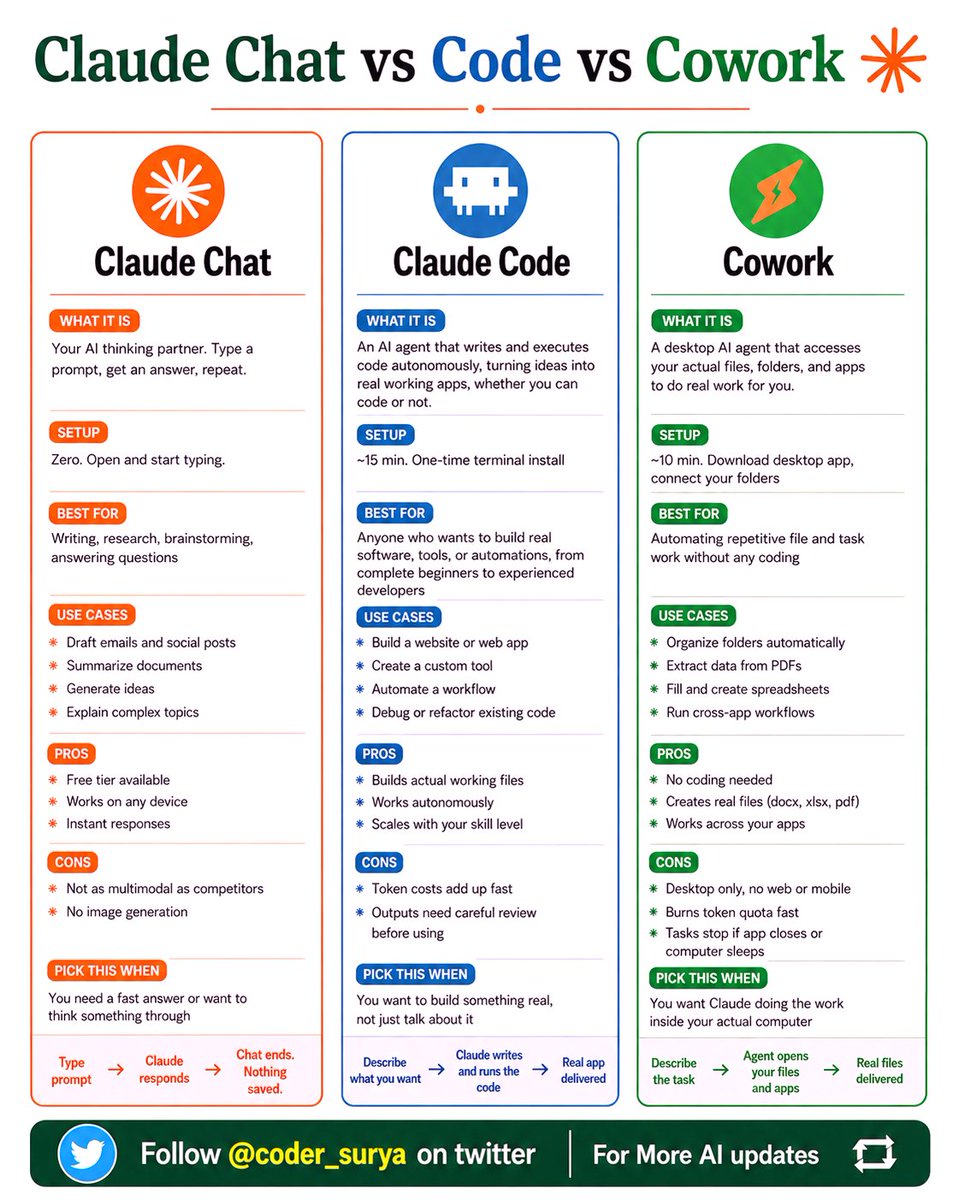
Claude Chat vs Code vs Cowork
__________
Stop defaulting to Claude Chat for everything.
Here's how to pick the right Claude for the job:
Claude has 3 versions now.
Most people have only ever opened one.
✦ Claude Chat
-Type a prompt. Get an answer. Chat ends. Nothing saved.
-Best for: writing, research, quick answers, brainstorming.
-Setup time: zero. Open and start typing.
✦ Claude Code
-Describe what you want. Claude writes and runs the code. A real working app gets delivered.
-No coding experience needed. Best for: building tools, automations, and web apps.
-Setup time: 15 minutes. One terminal install.
✦ Cowork
-Claude opens your actual files and apps. Does real work. Organizes folders. Fills spreadsheets.
-Runs cross-app workflows. Best for: repetitive tasks without any coding.
-Setup time: 10 minutes. Download the desktop app.
The difference that matters:
Chat ends when you close the tab.
Code ships something that doesn't.
Cowork does the work while you watch.
One image. Three tools. Zero confusion.
Save this. Send it to your team.
1. Follow @coder_surya
2. Save the post.
3. Repost to your network.
4. Join AI Community: https://t.co/ioQEJKhR1q
____________________________
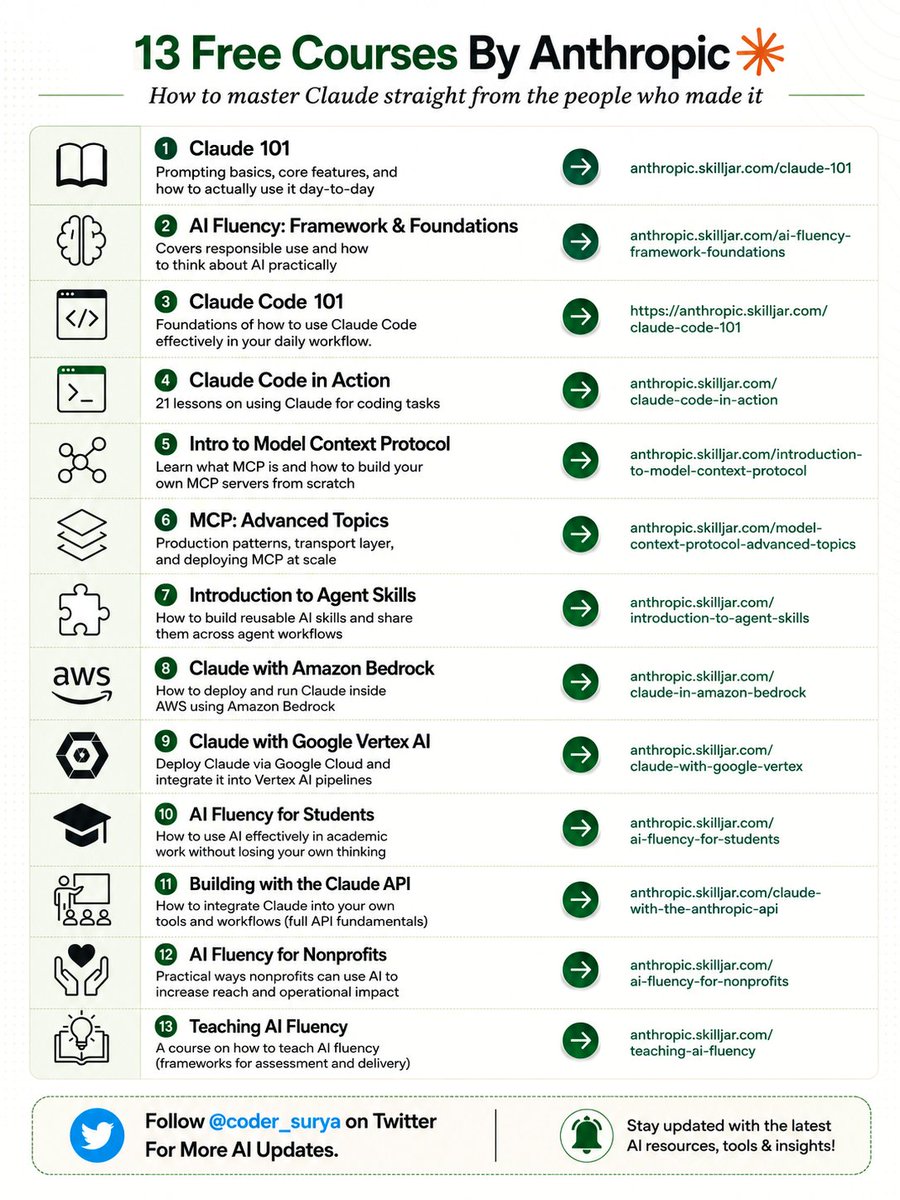
13 Free Courses by Anthropic
__________
Anthropic built a full AI curriculum and made it FREE.
Try these 13 courses to get ahead of 90% of people using AI:
AI literacy is an absolute necessity now in 2026.
Arya Nagabhyru proved that to me back in December when he taught me Claude Code in a few days.
Not even joking, my life changed completely.
I could build things in hours that would take weeks before.
So trust me when I say it's 100% worth your time to sit down and learn these tools.
And the best way to start is from the source itself.
These are 13 valuable courses from Anthropic you can do for free:
1. Claude 101
-> The basics. Prompting, core features, how to actually use it day-to-day.
-> https://t.co/sStfLeRBUY
2. AI Fluency: Framework & Foundations
-> How to think about AI responsibly and practically.
-> https://t.co/UwfHXyGR5j
3. Building with the Claude API
-> How to integrate Claude into your own tools and workflows.
-> https://t.co/wHpd6DpipE
4. Claude Code 101
-> Foundations of Claude Code and how to bring it into your daily workflow.
-> https://t.co/FEieqC0YU0
5. Claude Code in Action
-> 21 lessons on using Claude for real coding tasks.
-> https://t.co/QPXDL9tWXa
6. Intro to Model Context Protocol
-> What MCP is and how to build your own MCP servers from scratch.
-> https://t.co/d0GfvNCXKT
7. MCP: Advanced Topics
-> Production patterns, transport layer, deploying MCP at scale.
-> https://t.co/qFUTmSgjho
8. Introduction to Agent Skills
-> How to build reusable AI skills and share them across agent workflows.
-> https://t.co/mal07MI0vx
9. Claude with Amazon Bedrock
-> How to deploy and run Claude inside AWS.
-> https://t.co/Fmw4sLgokG
10. Claude with Google Vertex AI
-> Deploy Claude via Google Cloud and plug it into Vertex AI pipelines.
-> https://t.co/2ApmfZ4gtg
11. AI Fluency for Students
-> How to use AI effectively in academic work without losing your own thinking.
-> https://t.co/RApjdFysCR
12. AI Fluency for Nonprofits
-> Practical ways nonprofits can use AI to do more with less.
-> https://t.co/LvafBUyjRI
13. Teaching AI Fluency
-> How to teach AI fluency, frameworks for assessment and delivery included.
-> https://t.co/MZ5UYh2gbC
The barrier to learning AI properly now is zero.
What you do with that is on you.
What are you using Claude for right now?
1. Follow @coder_surya
2. Save the post.
3. Repost to your network.
4. Join AI Community: https://t.co/ioQEJKhR1q
____________________________
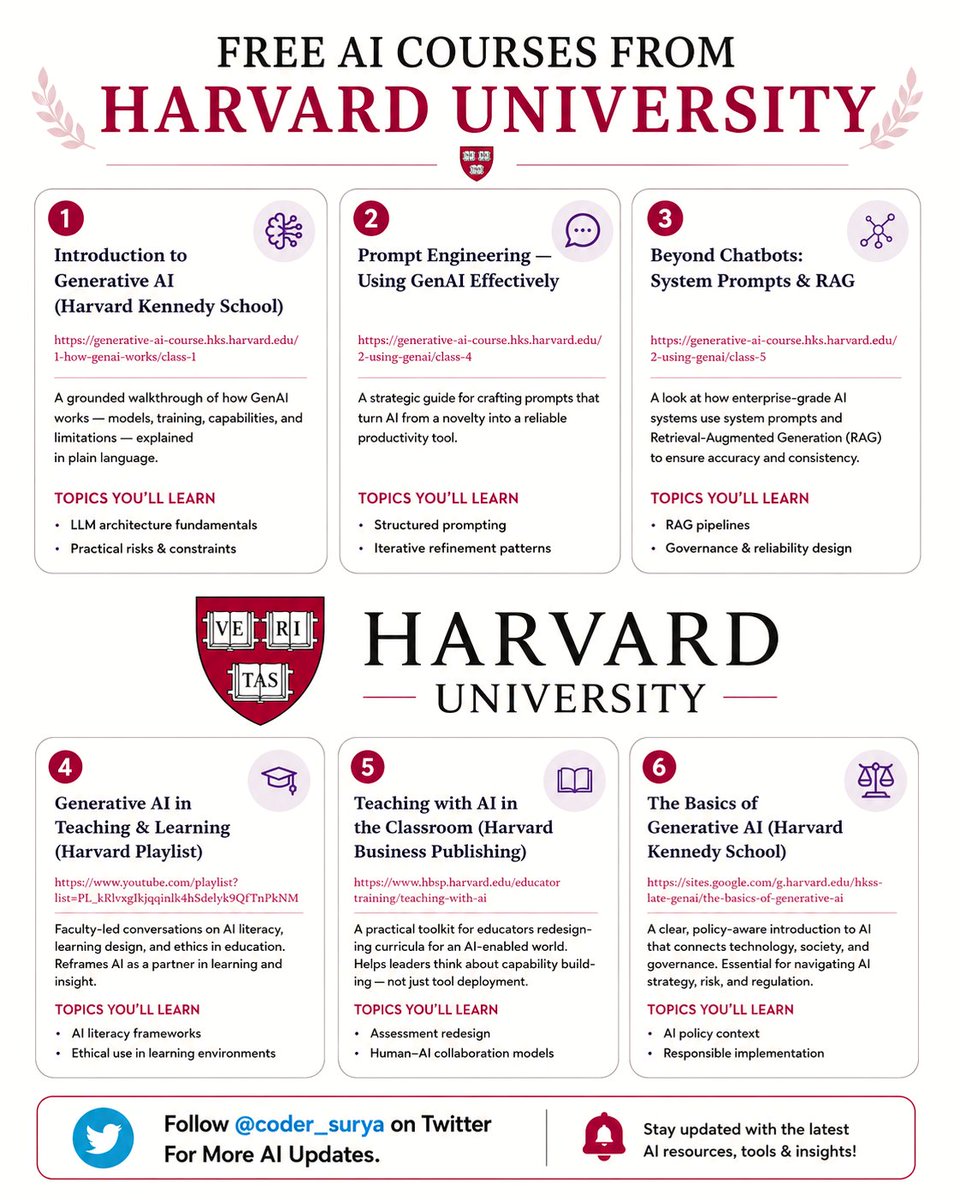
Companies pay thousands for Harvard-level AI education. These 6 courses are free.
Here's the complete list with direct links 👇
✦ 01. Introduction to Generative AI — Harvard Kennedy School. How GenAI works: models, training, capabilities, and limitations in plain language.
→ https://t.co/f4qophydFw
✦ 02. Prompt Engineering — Using GenAI Effectively — Harvard Kennedy School. Structured prompting and iterative refinement patterns that turn AI from a novelty into a reliable productivity tool.
→ https://t.co/d5e7gR86Dx
✦ 03. Beyond Chatbots: System Prompts & RAG — Harvard Kennedy School. How enterprise-grade AI systems ensure accuracy and consistency. RAG pipelines and governance design.
→ https://t.co/0ivcekmR0S
✦ 04. Generative AI in Teaching & Learning — Harvard Playlist. AI literacy frameworks and ethical use in learning environments. Faculty-led conversations.
→ https://t.co/qaOKbzxv1H
✦ 05. Teaching with AI in the Classroom — Harvard Business Publishing. Assessment redesign and human-AI collaboration models. Built for leaders thinking about capability building.
→ https://t.co/7ywOlgWNMk
✦ 06. The Basics of Generative AI — Harvard Kennedy School. AI policy context, responsible implementation, and navigating AI strategy, risk, and regulation.
→ https://t.co/mlc3aBnZVz
Save this before you spend another dollar on AI training.
Which of these 6 are you starting this week?
Repost if your network is still paying for AI education that Harvard gives away for free.
Most people use one AI for everything...
and wonder why AI "isn't working" for them.
It's not the prompt.
It's not the model.
It's the wrong tool for the job.
Here's exactly what to use and when:👇
🤖 CHATGPT → Speed Layer
When you need something fast and good enough beats perfect.
→ Brainstorming and quick drafts
→ Image generation on the fly
→ Voice mode when you're moving
Ideas start here. They don't finish here.
🧠 CLAUDE → Thinking Partner
Strategy. Long docs. Deep work that actually needs to be right.
→ Drop entire briefs, codebases, whole books — 1M token context
→ Projects + Skills = a custom operator built per client
→ Extended Thinking for problems that resist quick answers
Use this when the output has consequences.
🔍 PERPLEXITY → Research Specialist
When you need facts with receipts — nothing else comes close.
→ Every claim sourced
→ Every source clickable
→ Real-time web, not cached knowledge
This is where "I think" becomes "I know."
💼 GEMINI → Google-Native Layer
When your workflow already lives in Google, Gemini fits like a glove.
→ Deep Workspace integration — Docs, Sheets, Gmail
→ Multimodal inputs — text, image, audio, video
→ Real-time search baked in
Best when you're not leaving the ecosystem anyway.
⚡ GROK → Real-Time Signal Reader
When the news cycle matters, Grok is watching it.
→ Live X data — nothing else has this
→ Built for trends, sentiment, and what's happening now
→ Cuts through noise when timing is everything
In summary:
→ CHATGPT for speed
→ CLAUDE for deep work
→ PERPLEXITY for research
→ GEMINI for Google workflows
→ GROK for real-time signals
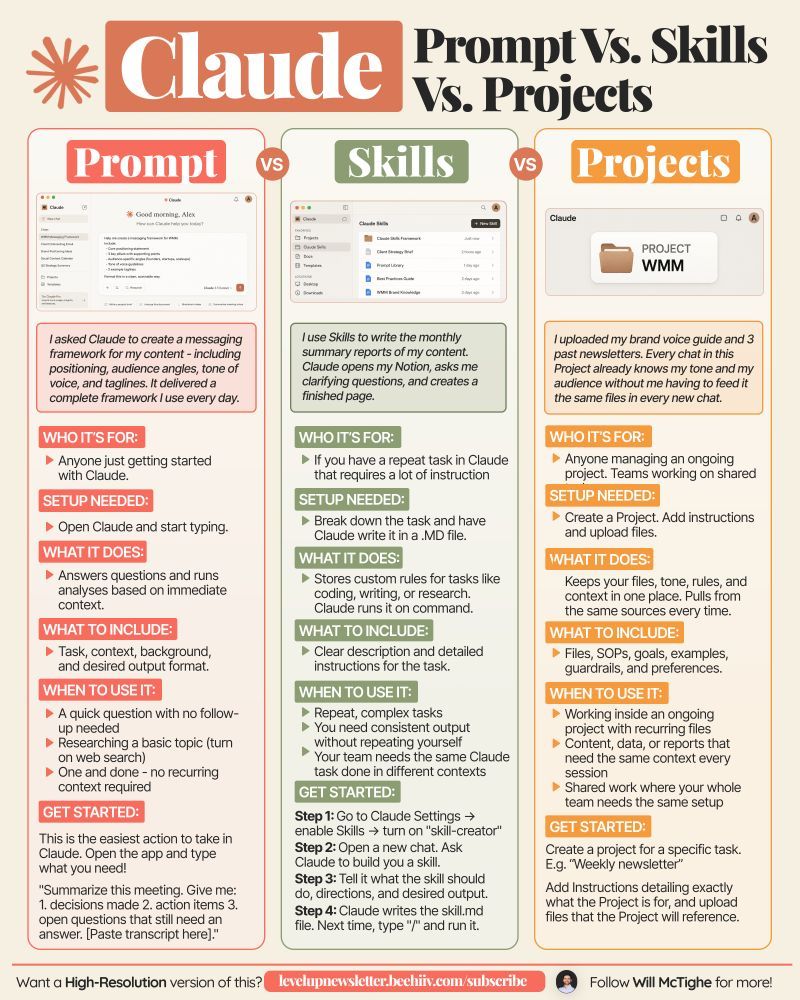
Claude Prompt vs Skills vs Projects
________
Are you using the right Claude feature?
Most people are not.
The most common way to use Claude is to open it and just start typing.
That works for simple tasks.
But for anything you do more than once, there are better ways.
Here's how 3 of them work:
1/ Claude Prompt:
For 90% of users, 90% of the time.
Use it when you just need a fast answer like draft an email, summarize a PDF, brainstorm ideas, etc. Or weird tasks like matching socks with your outfits like I did (ONCE).
Every chat starts from scratch. It's perfect when you need Claude quickly for a one off task.
2/ Claude Project:
For tasks you repeat at least 2x a week.
Use it when you keep giving Claude the same background again and again. Like working with different clients, analyzing customer calls, tracking expenses, etc.
A Project is basically a workspace - you upload files once, write the instructions and Claude uses that context every time. You can also update the files and instructions with time.
3/ Claude Skills:
For tasks that need strict standardized results.
Use it when you want Claude to follow a particular process the same way every time. This is best for automating workflows, brand guidelines, tool integrations, etc.
I recently created an Anti AI Slop skill that automatically detects AI tones, mistakes, and styles in anything that my team creates.
Before your next Claude session, ask one question, "Will I need to do this exact thing again?"
If no, prompt it.
If yes, build a dedicated project or a skill.
📌 If you want a high-res PDF of this guide:
1. Follow @coder_surya
2. Save the post.
3. Repost to your network.
4. Join AI Community: https://t.co/ioQEJKhjbS
Credit to Will McTighe. Follow him for more.
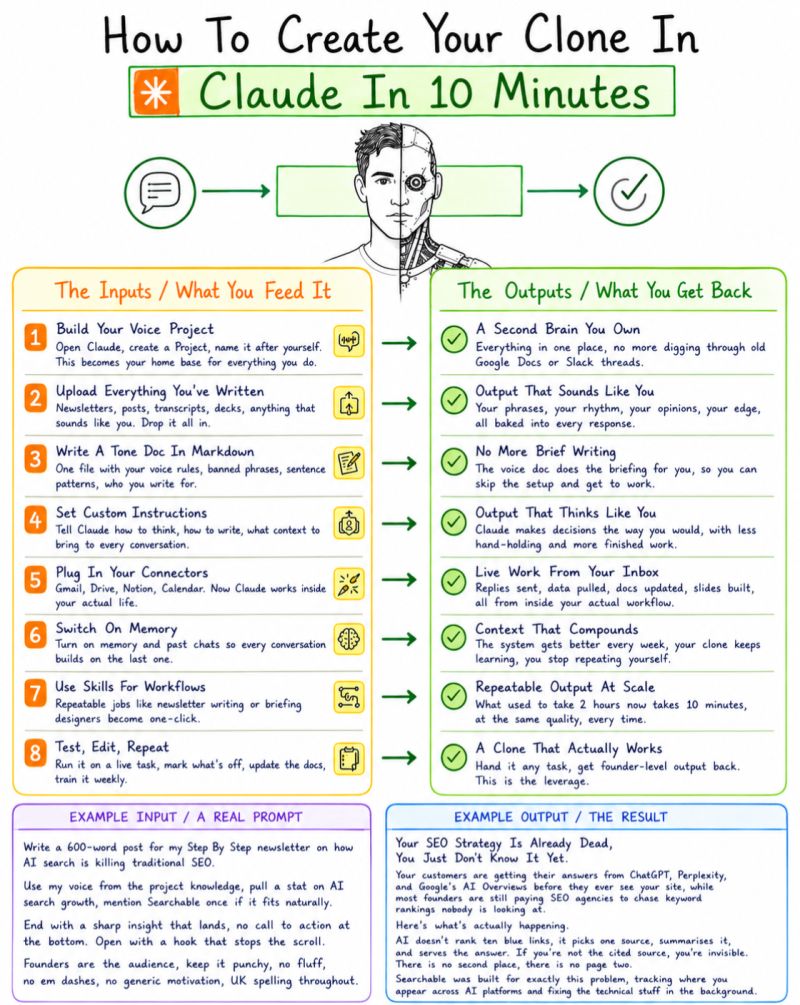
I spent 3 hours every week briefing Claude from scratch.
Same context. Same tone rules. Same "here's who I write for."
Every. Single. Time.
Then I stopped treating Claude like a chatbot and started treating it like a system.
Here's what changed →
- I built a Project named after myself.
- Dropped every post I've written, every brand brief, every tone rule into it.
- Wrote a markdown doc with my banned phrases, sentence patterns, and what I never say.
- Turned on memory.
- Connected my calendar.
- Set custom instructions once.
Now I open Claude and say: "Draft a post about RAG pipelines for a non-technical audience."
That's it.
No preamble. ❌
No "I'm a Data Engineer who writes like this." ❌
No context dump. ❌
It already knows. ✅
The output sounds like me, my edge, my rhythm, my opinions.
Not a polished LinkedIn robot.
Not a GPT-flavoured thought leader.
Me. 💯
I'm not the only one doing this.
But most people are still using Claude like Google Search, one prompt, one answer, no memory.
Comment "CLONE" if you want the exact setup I use, I'll guide you.
1. Follow @coder_surya
2. Save the post.
3. Repost to your network.
4. Join AI Community: https://t.co/ioQEJKhR1q
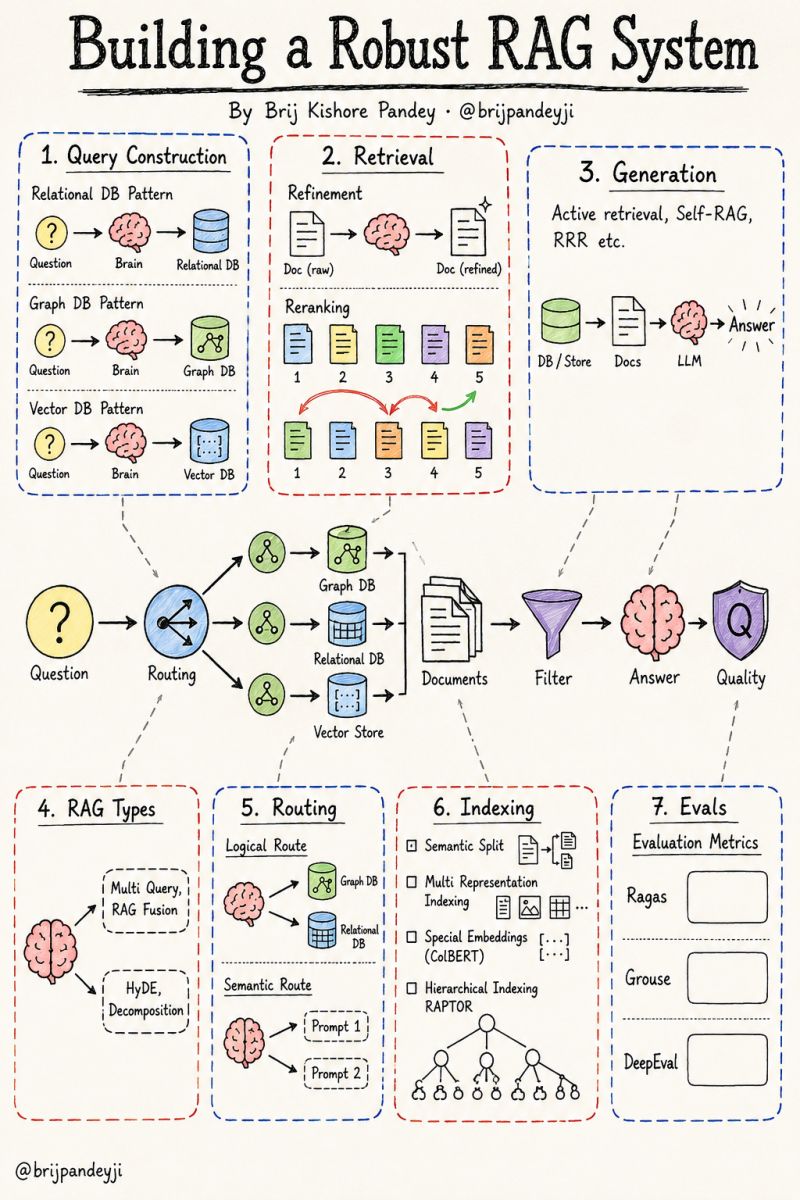
Most RAG systems fail in production for one reason: people treat "retrieval + LLM" as the whole architecture.
It isn't. It's maybe 20% of it.
A robust RAG system is a pipeline of decisions, and every stage is a place where quality leaks out before the answer ever reaches the user.
Here's the full picture, stage by stage.
𝗤𝘂𝗲𝗿𝘆 𝗖𝗼𝗻𝘀𝘁𝗿𝘂𝗰𝘁𝗶𝗼𝗻
Before you retrieve anything, you translate the question into the language of your data store.
→ Relational data needs text-to-SQL
→ Graph data needs text-to-Cypher
→ Vector data needs a clean semantic query
The store decides the translation. Skip this and you retrieve noise.
𝗤𝘂𝗲𝗿𝘆 𝗧𝗿𝗮𝗻𝘀𝗹𝗮𝘁𝗶𝗼𝗻 (𝗥𝗔𝗚 𝗧𝘆𝗽𝗲𝘀)
One user question is rarely the best question to search with.
→ Multi-Query and RAG-Fusion widen the net
→ HyDE generates a hypothetical answer to search against
→ Decomposition breaks complex questions into sub-questions
The goal is the same: give retrieval a better shot.
𝗥𝗼𝘂𝘁𝗶𝗻𝗴
Now decide where the question should go.
→ Logical routing picks the right data source (graph vs relational vs vector)
→ Semantic routing picks the right prompt for the job
A question about relationships goes to the graph. A factual lookup goes elsewhere. Routing is what makes the system feel intelligent instead of brute-force.
𝗜𝗻𝗱𝗲𝘅𝗶𝗻𝗴
This is the quietest stage and the one that decides everything downstream.
→ Semantic splitting chunks by meaning, not character count
→ Multi-representation indexing stores summaries for retrieval, full docs for context
→ Special embeddings like ColBERT match at the token level
→ Hierarchical indexing (RAPTOR) clusters and summarizes recursively
Bad chunks cannot be rescued by a good model.
𝗥𝗲𝘁𝗿𝗶𝗲𝘃𝗮𝗹
Getting documents back is not the same as getting the right ones in the right order.
→ Refinement cleans and compresses what came back
→ Reranking reorders results by true relevance, not just similarity score
Top-k similarity is a starting point, not the answer.
𝗚𝗲𝗻𝗲𝗿𝗮𝘁𝗶𝗼𝗻
The model can now decide it needs more.
→ Active retrieval lets the system fetch again mid-generation
→ Self-RAG critiques its own output and re-grounds it
→ Retrieve-Rewrite-Read loops tighten the answer
Generation becomes a feedback loop, not a single pass.
𝗘𝘃𝗮𝗹𝘂𝗮𝘁𝗶𝗼𝗻
None of this matters if you can't measure it.
→ Ragas, Grouse, and DeepEval score faithfulness, relevance, and groundedness
If you're shipping RAG without evals, you're shipping vibes.
The pattern across all seven stages is the same: a robust RAG system is mostly the work that happens before and after the model runs. The LLM is the easy part.
If you had to point to the single stage where most teams lose the most quality, where would you put your money: indexing or retrieval?
cc: Brij Kishore pandey
Save this post right now.
This is the exact 9-step system to create a professional product video with Claude.
No agency. No video team. No $5,000 production budget. Just you and Claude.
Here is exactly how:
☑️ 1. What You Need Before You Start
→ One clean product photo, white or neutral background preferred.
→ A Claude Pro account for MCP connections.
→ One clear goal picked before you touch anything: awareness, conversion, or retargeting.
↳ Clean photo in = clean video out. This step alone saves 30 minutes of fixing.
☑️ 2. Connect Higgsfield MCP to Claude
→ Go to Claude. ai > Connectors → Search "Higgsfield." → Click Add.
→ Authenticate and return to Claude, Higgsfield tools now appear in your chat.
→ Type "list available Higgsfield tools" to confirm the connection is live.
↳ This unlocks Claude, sending your product image directly to Higgsfield and retrieving the video.
☑️ 3. Write Your Video Brief With Claude
Paste this prompt:
"I am creating a 15-second TikTok product video for [product]. Target audience: [audience]. Tone: [energetic/luxurious/cinematic]. Goal: [awareness/conversion]. Write: video concept in 2 sentences, 3-scene shot sequence, voiceover script under 15 seconds, text overlay plan for each scene."
↳ The brief directs everything. Skip it, and your video is random.
☑️ 4. Generate the Product Video With Higgsfield MCP
Prompt:
"Using Higgsfield, generate a product video for the image I will upload. Motion: [slow zoom/orbit/floating/cinematic pan]. Style: [luxury/energetic/minimal]. Duration: 15 seconds. Subtle depth of field. Output in 9:16 vertical format."*
↳ Motion style guide: Slow zoom = luxury. Orbit = tech. Floating = wellness. Cinematic pan = fashion.
☑️ 5. Write the Voiceover With Claude
Prompt:
"Write a 15-second voiceover for [product]. Tone: [tone]. Hook in the first 2 seconds. Short, punchy sentences. End with soft CTA: 'Shop now' or 'Try it today.' Max 40 words total."
↳ Voice style by product: Luxury = slow, breathy. Tech = clear, fast. Wellness = warm, calm. Fashion = punchy, bold.
☑️ 6. Add Text Overlays and Captions With Claude
Prompt: "Write a text overlay plan for a 15-second video for [product]. Divide into 3 scenes, each 5 seconds long. For each scene: overlay text (max 5 words), position, font style, and timing."
→ Add auto-captions and apply one color grade preset matching the brand's mood.
☑️ 7. Write the Caption and Hashtags With Claude
Caption prompt:
"Write 3 TikTok captions for [product]. Each: hook under 10 words, soft CTA, under 150 chars. Label them: Curiosity / Social Proof / Benefit-led."
♻️ Repost to give your network an unfair advantage.__
📌 If you want a high-res PDF of this guide:
1. Follow @coder_surya
2. Save the post.
3. Repost to your network.
4. Join AI Community: https://t.co/ioQEJKhjbS
____________________________
You ask AI a question.
400ms later, it answers like magic.
But your prompt just traveled through an invisible infrastructure pipeline most developers never think about:
→ API Gateways
→ Load Balancers
→ Tokenizers
→ GPU Routers
→ Inference Engines
→ KV Cache
→ Safety Filters
→ Billing Systems
→ Observability Pipelines
Every single token touches dozens of systems before it reaches your screen.
And here's the crazy part:
The model itself is only ONE layer.
The real engineering challenge is everything around it.
Most AI latency bugs aren't "the model being slow."
They're:
• bad routing
• cold GPUs
• token explosion
• cache misses
• overloaded gateways
• broken streaming
• safety rechecks
• observability bottlenecks
Modern AI apps are no longer "just calling an API."
They're distributed systems pretending to be chatbots.
The developers who understand this stack will build the next generation of AI infrastructure.
Everyone else will keep blaming the model.
Save this before your next mysterious latency spike 🔖♻️ Repost to give your network an unfair advantage.__
📌 If you want a high-res PDF of this guide:
1. Follow @coder_surya
2. Save the post.
3. Repost to your network.
4. Join AI Community: https://t.co/ioQEJKhjbS
_________________
How to set up Claude Projects completely in 1 hour:
(duplicate my exact project, files, and prompts)
1. Update your Claude desktop app.
2. Click the Cowork tab at the top.
3. You need a Pro plan ($20/mo). Worth it.
-----
→ 0-5 min: Open Projects in Cowork.
Cowork tab → Projects → click '+'.
3 choice: scratch, import old Project, existing folder.
Pick the recurring task you do every single week.
(This is where 90% of people overthink. Don't)
→ 5-20 min: Create your first Project.
Start from scratch = brand new folder.
Import a Claude Project = old files + instructions.
Use existing folder = your Cowork memory + rules.
(Pick one. You can build more next weekend)
→ 20-30 min: Write Project instructions.
Keep them short. 5-8 lines max.
Cover: tone, format, output type, hard rules.
End with: "Use AskUserQuestion before executing."
(You write this once. It runs every time)
→ 30-40 min: Add files to the folder.
about-me .md = who you are, how you work.
anti-ai-style .md = every word you'd never use.
(These files replace 500-word prompts forever)
→ 40-50 min: Run your first real task.
Setup prompt: "Read every file in this folder. Summarize what you know about this workspace."
Then: "I want to [task]. Ask me questions first."
Claude generates clickable forms to prompt you.
(Stop prompting. Start directing)
→ 50-60 min: Schedule a recurring task.
Open the Project → Scheduled tasks → New.
"Every Monday at 7am, create my weekly briefing."
You wake up to a finished doc. That's the endgame.
Pro tip: Keep the desktop app open + computer awake. Scheduled tasks need it running.
♻️ Repost to give your network an unfair advantage.__
📌 If you want a high-res PDF of this guide:
1. Follow @coder_surya
2. Save the post.
3. Repost to your network.
4. Join AI Community: https://t.co/ioQEJKhjbS
_____________



![coder_surya's tweet photo. FORGET PowerPoint.
Claude can build an entire presentation in minutes!
No templates.
No design skills.
No all-nighters before the big meeting.
Just 6 prompts that do the work for you.
👇
📌 Prompt 1. The Blueprint
"Act as a senior presentation strategist. Build a blueprint for [topic].
Give me:
- The ONE message they must remember
- Who the audience is + what they care about
- 3 angles that hook them emotionally
- The slide-by-slide flow
- Ideal slide count
Keep it tight. No filler."
📌 Prompt 2. The Structure
"Create a slide-by-slide outline for [topic].
For each slide:
- Title
- One-line purpose
- What the audience should feel
Make the sequence build like a story — tension, then payoff."
📌 Prompt 3. The Story Frame
"Turn [topic] into a presentation built on narrative.
Hook → grab attention in 5 seconds
Problem → the pain they feel
Insight → the part they didn't expect
Solution → what to do about it
Proof → one stat or example
Takeaway → a single clear action
Cut anything that doesn't move the story forward."
📌 Prompt 4. The Visual Direction
"Act as a presentation designer. For each slide on [topic], recommend:
- A visual that carries the emotion (image, not clipart)
- The right format for any data (chart type, not a table dump)
- An icon or grid layout for lists
Suggest a clean 3-color palette and one font pairing."
📌 Prompt 5. The Content
"Write the full slide content for a [number]-slide deck on [topic].
Per slide:
- A punchy title (6 words max)
- 3–5 bullets, under 10 words each
- One speaker note for delivery
Audience: [describe]. Tone: [professional/casual]."
📌 Prompt 6. The Build
"Now build it.
Create the full presentation on [topic] as a downloadable file.
[number] slides with bold titles, tight bullets, and speaker notes on every slide.
Clean layout, logical flow from open to close, ready to present."
Most people still build slides line by line.
Manually. Slowly. Painfully.
The shift isn't about saving time.
It's about showing up sharper than everyone in the room.
While they format bullet points, you're already prepping the meeting.
Do this:
1. Save this post (you'll come back to it)
2. Pick 1 prompt → build your next deck with it
3. Send it to someone still fighting with templates
📌 Fast. Clean. No excuses.
1. Follow @coder_surya
2. Save the post.
3. Repost to your network.
4. Join AI Community: https://t.co/ioQEJKhR1q
____________________________](https://pbs.twimg.com/media/HJ4qdpEaMAE139G.jpg)



![coder_surya's tweet photo. Save this post right now.
This is the exact 9-step system to create a professional product video with Claude.
No agency. No video team. No $5,000 production budget. Just you and Claude.
Here is exactly how:
☑️ 1. What You Need Before You Start
→ One clean product photo, white or neutral background preferred.
→ A Claude Pro account for MCP connections.
→ One clear goal picked before you touch anything: awareness, conversion, or retargeting.
↳ Clean photo in = clean video out. This step alone saves 30 minutes of fixing.
☑️ 2. Connect Higgsfield MCP to Claude
→ Go to Claude. ai > Connectors → Search "Higgsfield." → Click Add.
→ Authenticate and return to Claude, Higgsfield tools now appear in your chat.
→ Type "list available Higgsfield tools" to confirm the connection is live.
↳ This unlocks Claude, sending your product image directly to Higgsfield and retrieving the video.
☑️ 3. Write Your Video Brief With Claude
Paste this prompt:
"I am creating a 15-second TikTok product video for [product]. Target audience: [audience]. Tone: [energetic/luxurious/cinematic]. Goal: [awareness/conversion]. Write: video concept in 2 sentences, 3-scene shot sequence, voiceover script under 15 seconds, text overlay plan for each scene."
↳ The brief directs everything. Skip it, and your video is random.
☑️ 4. Generate the Product Video With Higgsfield MCP
Prompt:
"Using Higgsfield, generate a product video for the image I will upload. Motion: [slow zoom/orbit/floating/cinematic pan]. Style: [luxury/energetic/minimal]. Duration: 15 seconds. Subtle depth of field. Output in 9:16 vertical format."*
↳ Motion style guide: Slow zoom = luxury. Orbit = tech. Floating = wellness. Cinematic pan = fashion.
☑️ 5. Write the Voiceover With Claude
Prompt:
"Write a 15-second voiceover for [product]. Tone: [tone]. Hook in the first 2 seconds. Short, punchy sentences. End with soft CTA: 'Shop now' or 'Try it today.' Max 40 words total."
↳ Voice style by product: Luxury = slow, breathy. Tech = clear, fast. Wellness = warm, calm. Fashion = punchy, bold.
☑️ 6. Add Text Overlays and Captions With Claude
Prompt: "Write a text overlay plan for a 15-second video for [product]. Divide into 3 scenes, each 5 seconds long. For each scene: overlay text (max 5 words), position, font style, and timing."
→ Add auto-captions and apply one color grade preset matching the brand's mood.
☑️ 7. Write the Caption and Hashtags With Claude
Caption prompt:
"Write 3 TikTok captions for [product]. Each: hook under 10 words, soft CTA, under 150 chars. Label them: Curiosity / Social Proof / Benefit-led."
♻️ Repost to give your network an unfair advantage.__
📌 If you want a high-res PDF of this guide:
1. Follow @coder_surya
2. Save the post.
3. Repost to your network.
4. Join AI Community: https://t.co/ioQEJKhjbS
____________________________](https://pbs.twimg.com/media/HJc621VbsAAyJXS.jpg)

![coder_surya's tweet photo. How to set up Claude Projects completely in 1 hour:
(duplicate my exact project, files, and prompts)
1. Update your Claude desktop app.
2. Click the Cowork tab at the top.
3. You need a Pro plan ($20/mo). Worth it.
-----
→ 0-5 min: Open Projects in Cowork.
Cowork tab → Projects → click '+'.
3 choice: scratch, import old Project, existing folder.
Pick the recurring task you do every single week.
(This is where 90% of people overthink. Don't)
→ 5-20 min: Create your first Project.
Start from scratch = brand new folder.
Import a Claude Project = old files + instructions.
Use existing folder = your Cowork memory + rules.
(Pick one. You can build more next weekend)
→ 20-30 min: Write Project instructions.
Keep them short. 5-8 lines max.
Cover: tone, format, output type, hard rules.
End with: "Use AskUserQuestion before executing."
(You write this once. It runs every time)
→ 30-40 min: Add files to the folder.
about-me .md = who you are, how you work.
anti-ai-style .md = every word you'd never use.
(These files replace 500-word prompts forever)
→ 40-50 min: Run your first real task.
Setup prompt: "Read every file in this folder. Summarize what you know about this workspace."
Then: "I want to [task]. Ask me questions first."
Claude generates clickable forms to prompt you.
(Stop prompting. Start directing)
→ 50-60 min: Schedule a recurring task.
Open the Project → Scheduled tasks → New.
"Every Monday at 7am, create my weekly briefing."
You wake up to a finished doc. That's the endgame.
Pro tip: Keep the desktop app open + computer awake. Scheduled tasks need it running.
♻️ Repost to give your network an unfair advantage.__
📌 If you want a high-res PDF of this guide:
1. Follow @coder_surya
2. Save the post.
3. Repost to your network.
4. Join AI Community: https://t.co/ioQEJKhjbS
_____________](https://pbs.twimg.com/media/HJc6IHRaYAAlKhU.jpg)





