If you want to become good at Kubernetes in 2026, then learn these use cases:
1) How Kubernetes RBAC Decision Flow Works
↳ https://t.co/piYsatMRmT
2) Kubernetes Architecture Crash Course
↳ https://t.co/PuZ6YExqKt
3) How to Troubleshoot Unhealthy Kubernetes DaemonSets
https://t.co/jiy5azf1Jz
4) pod.yaml File Structure Breakdown
↳ https://t.co/JhnPhMJb4i
5) How a Pod is Deleted - Behind the Scenes Breakdown
↳ https://t.co/7r6MUgVaAc
6) How To Fix Kubernetes Node Not Ready
↳ https://t.co/x93BbczXfW
7) Kubernetes ImagePullBackOff Explained
↳ https://t.co/WcgKxGJd7M
56K+ read my DevOps and Cloud newsletter: https://t.co/WBucLdwLhJ
Sign up to get 'The Practical Linux Guide for DevOps Engineers'
What do we cover:
DevOps, Cloud, Kubernetes, IaC, GitOps, MLOps
🔁 Consider a Repost if this is helpful
Certainly one of the BEST channels for System Design:
https://t.co/oIaXtfwOgj
1. API Design
https://t.co/y13ymiLR9c
2. Sharding
https://t.co/Kh7aRGwCWu
3. Caching
https://t.co/y6cs0Ha8Tq
4. Concurrency
https://t.co/gugqA4I1ZR
5. Data Modeling
https://t.co/x6dVIYEmSF
6. Rate Limitter
https://t.co/x6dVIYEmSF
7. DB Indexing
https://t.co/npxaC0fY6V
8. CAP Theorem
https://t.co/TsPKqPaDIN
9. Kafka
https://t.co/gBoFBmd1te
10. Redis
https://t.co/lYMCl0HxTY
11. System Design of Uber, WhatsApp, Bitly, etc.
https://t.co/WzqXuVawPW
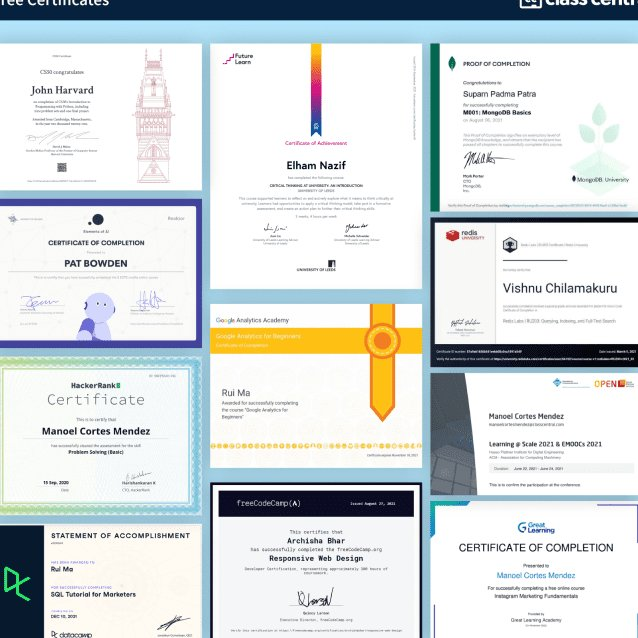
ALL FREE CERTIFICATION RESOURCES
AWS
https://t.co/9i4NWclGiA
CISSP
https://t.co/8h5KPv0S5P
CISA
https://t.co/6r5s3nuVaO
CISM
https://t.co/DNeiAgmO1O
CRISC
https://t.co/6DMTURqs4X
Digital Marketing
https://t.co/6DMTURqs4X
Retweet and specially follow me @RodmanAi to help others
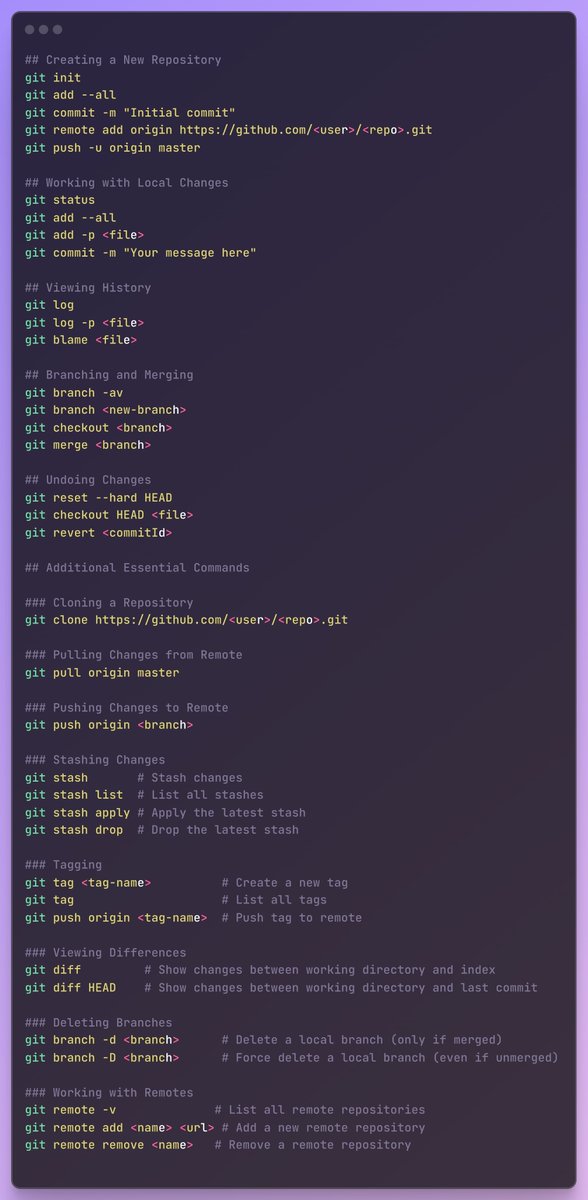
The Only Git Command List You'll Need to Bookmark
→ Daily Lifesavers:
• git status — Your repo’s daily health check
• git add . — “Take everything, I’m ready”
• git commit -m "msg" — The diary entry for your work
• git push — Send it to the world
• git pull --rebase — Fresh updates, minus the merge mess
→ Branch Magicians:
• git branch — Show me all timelines
• git checkout -b feature-x — Start a new adventure
• git switch main — Jump between universes
• git merge feature-x — Combine worlds
• git rebase -i HEAD~5 — Rewrite history like a pro
→ Debugging Detectives:
• git log --oneline --graph --decorate — Visual crime scene
• git diff — What changed? Who changed it? Why??
• git blame {file} — Name and shame (lovingly)
• git bisect — Find that one evil commit
• git fsck — Check repo sanity
→ Oops Fixers:
• git restore . — Undo accidental chaos
• git reset --hard HEAD~1 — Delete the last mistake
• git checkout -- {file} — Bring back a lost file
• git stash — Hide your unfinished sins
• git reflog — The ultimate undo time machine
→ Collaboration Superpowers:
• git fetch --all — Pull updates, no drama
• git remote -v — Show your repo connections
• git pull origin main — Sync with the team
• git push -u origin branch-name — Set an upstream buddy
• git cherry-pick {hash} — Borrow just one commit from another branch
→ Release Masters:
• git tag -a v1.0 -m "first release" — Stamp your moment
• git tag — All milestones at a glance
• git push --tags — Ship your releases
• git describe --tags — Find where you are in release land
• git archive --format=zip HEAD > https://t.co/wtOm5wBOU4 — Pack and ship your code
→ Cleanup Crew:
• git gc — Garbage collector for your repo
• git prune — Get rid of unreachable commits
• git clean -fd — Delete untracked files (danger + power)
• git reset --soft HEAD~1 — Undo commit but keep changes
• git branch -d feature-x — Remove dead branches
→ Power User Tricks:
• git config --global alias.s status — Create your own shortcuts
• git show {hash} — Peek into a commit’s soul
• git shortlog -sn — Who contributed how much?
• git worktree add ../dir branch — Work on multiple branches at once
• git grep -n "text" — Search inside the repo like a detective
What are YOUR go-to Git commands?
I run a 5-node Kubernetes cluster in my pantry.
This single line in your resume will make you stand out from 99% of candidates.
"Hands-on experience emerged as the most valued factor at 95% importance" - LF Talent Report 2025
Companies need skills, not degrees.
They will hire proof:
Repos, pipelines, on-call stories. Not degrees.
Your action plan: Build a homelab.
Start with a laptop. Install Linux on it.
When you're able to install Arch Linux without using the install script, you are ready to move on to containers.
There are plenty of high-quality and free Docker tutorials out there. Use them.
Create a project that involves running multiple containers.
- Postgres database
- FastAPI backend
- Nginx webserver
Build the images with GitHub Actions.
Then build a Kubernetes homelab.
This is the single most effective thing you can do to land DevOps jobs.
Are you going to build something today?
---
Enjoy this? ♻️ Repost it to your network and follow Mischa van den Burg for more.
Ever wondered what the kubelet actually does in your Kubernetes cluster?
Save this cheatsheet to understand:
-What kubelet is & how it works
-Its core responsibilities
-Essential troubleshooting commands
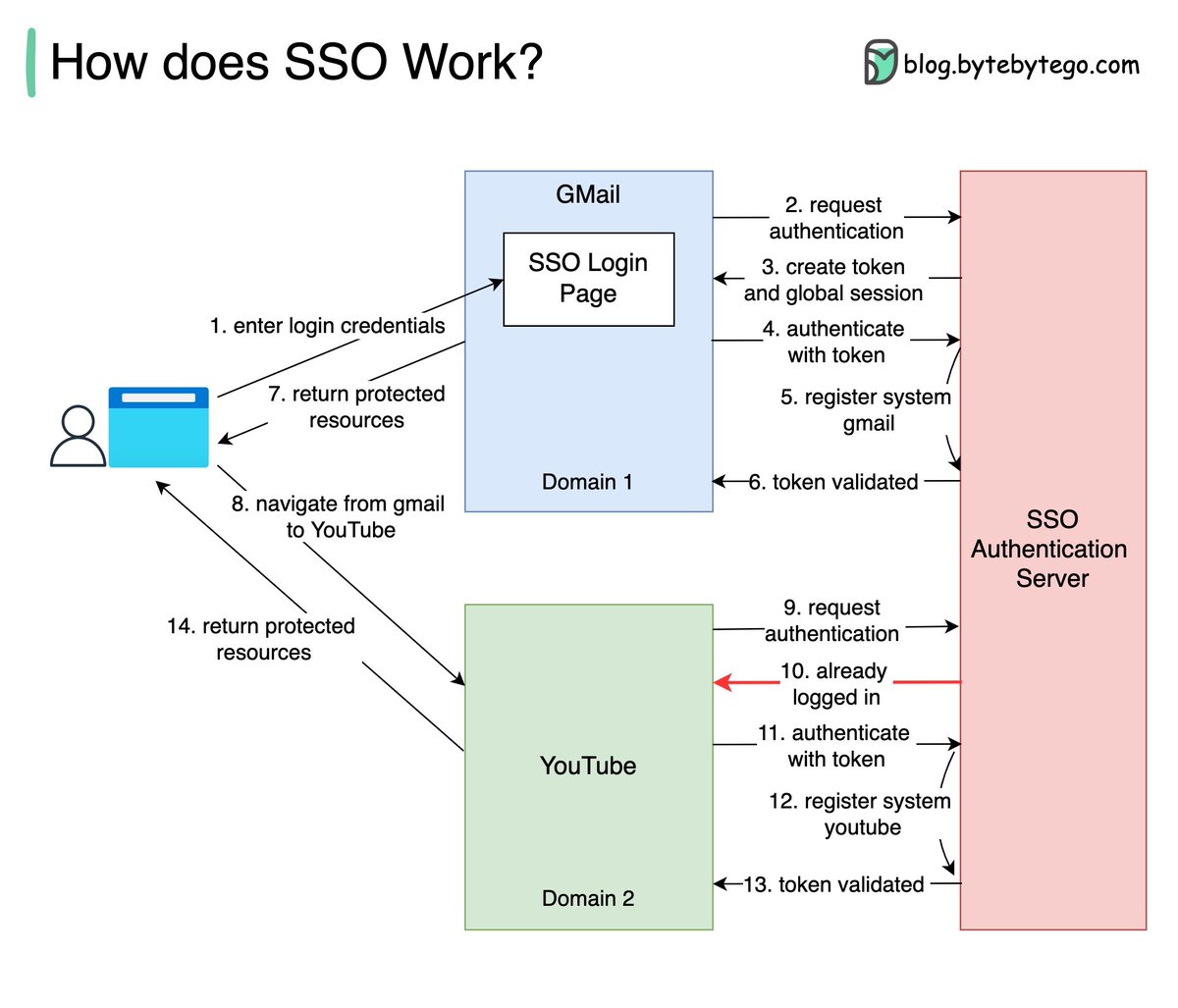
What is SSO (Single Sign-On)?
Basically, Single Sign-On (SSO) is an authentication scheme. It allows a user to log in to different systems using a single ID.
The diagram below illustrates how SSO works.
Step 1: A user visits Gmail, or any email service. Gmail finds the user is not logged in and so redirects them to the SSO authentication server, which also finds the user is not logged in. As a result, the user is redirected to the SSO login page, where they enter their login credentials.
Steps 2-3: The SSO authentication server validates the credentials, creates the global session for the user, and creates a token.
Steps 4-7: Gmail validates the token in the SSO authentication server. The authentication server registers the Gmail system, and returns “valid.” Gmail returns the protected resource to the user.
Step 8: From Gmail, the user navigates to another Google-owned website, for example, YouTube.
Steps 9-10: YouTube finds the user is not logged in, and then requests authentication. The SSO authentication server finds the user is already logged in and returns the token.
Step 11-14: YouTube validates the token in the SSO authentication server. The authentication server registers the YouTube system, and returns “valid.” YouTube returns the protected resource to the user.
The process is complete and the user gets back access to their account.
Over to you:
Question 1: have you implemented SSO in your projects? What is the most difficult part?
Question 2: what’s your favorite sign-in method and why?
–
Subscribe to our weekly newsletter to get a Free System Design PDF (158 pages): https://t.co/RibM5u7UxP