I help developers land top backend roles | Golang • System Design • Scalable Backends | Founder, CodersGyan → building high-value Backend Engineers | Educator
Go’s standard library is the reason it’s eating Node’s lunch on backends.
Not because of benchmarks. Because of how backend projects actually feel to work on.
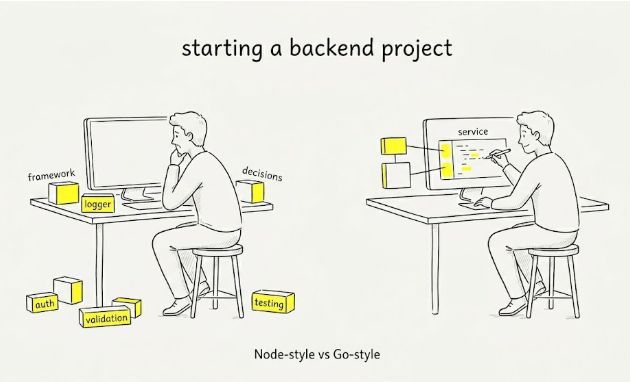
A new Node project usually starts with decisions.
Which framework, which logger, which validation library, which test setup. Before you’ve written a single route, you already have a stack: express, body-parser, helmet, cors, dotenv, winston, jest, ts-node.
That flexibility is powerful. But it also means every project starts from zero.
A Go project feels different. You import net/http, encoding/json, log, testing - and you start building. Most common backend needs are already handled, so the focus shifts from assembling tools to writing the service.
That’s not a benchmark difference. It’s a design choice.
Go pushes more into the standard library. Node pushes more into the ecosystem.
Over time, that difference compounds.
More dependencies → more version conflicts, more upgrade overhead, more time debugging things you didn’t write.
Performance isn’t where this shows up. For most systems, both are fast enough.
The difference shows up later - in maintenance, onboarding, and how predictable the system feels after a few months.
Node optimizes for flexibility. Go optimizes for constraints. Both are valid choices, but they lead to very different day-to-day engineering.
If a team spends more time wiring libraries than shipping features, it’s worth questioning the default.
Not every backend needs to be minimal. But most teams benefit from fewer moving parts
An idempotent payment endpoint makes retries safe.
If the client sends the same payment request twice, the customer shouldn’t be charged twice.
Here’s how to design an idempotent payment endpoint, in 5 lines of pseudocode.
key = request.headers["Idempotency-Key"]
if exists(cache, key):
return cache[key]
response = process_payment(request)
cache[key] = response
return response
That’s it.
But this is the easy part.
The actual work is in the details around it.
1/ Don’t store the key in memory.
Use Redis or Postgres.
2/ Set a TTL (Time to Live)
You don’t need to keep these keys forever, but they should live long enough to cover normal retries.
3/ Store the response, not just “payment done”.
If the same key comes again, return the same response with the same status code.
Not always 200.
4/ Store a hash of the request body.
Same key with the same body is a retry.. Same key with a different body is not a retry.
That is a bad request.
Return 422.
5/ Keep payment processing and saving the idempotency response together :
This is the part people get wrong. If the customer gets charged and your server crashes before saving the response, the next retry can charge them again.
That is the bug idempotency is supposed to prevent.
It is there because networks fail, clients retry, and payments cannot depend on luck.
Stripe uses this pattern.
AWS uses this pattern.
If your payment endpoint does not have it, your retry logic is not safe yet.
♻️ Repost to help other developers in your network.
👉 If you want to build scalable, high-performance backend systems without the guesswork, check out https://t.co/GiIxqkO9dr for deep, practical architecture training.
I post about backend engineering almost every day.
Mostly databases, Go, system design, and mistakes that I keep seeing in real codebases.
If you’re new here, this is the best way to use my work.
1/ CodersGyan Discord
Around 2,000 backend engineers.
Code reviews, system design discussions, job posts, doubts, and people building things in public.
Free to join.. Link in comments.
2/ YouTube
140k+ subscribers now.
I’ve covered networks, HTTP, system design, Go, databases, and backend fundamentals there.
We sit properly with one topic in long video formats, apart from shorts.
3/ The LinkedIn feed
I post one backend lesson here every day.
Usually from code reviews, cohort discussions, or mistakes that I’ve seen/made in actual products.
4/ Substack Newsletter
This is where I write the longer breakdowns.
Architecture decisions, database mistakes, backend tradeoffs, and practical examples
The paid thing is the Backend Foundation Course.
13 weeks.
1,350+ engineers have gone through it so far.
Currently open.
If you’re new, spend some time with the free content first.
Read posts, join discord, watch the videos, go through newsletters..
If the way I explain backend makes sense to you, the course is there.
Discord, newsletter, and course links are in comments.
♻️ Repost to help other developers in your network.
👉 If you want to build scalable, high-performance backend systems without the guesswork, check out https://t.co/GiIxqkO9dr for deep, practical architecture training.
If you work with Postgres but can’t read EXPLAIN ANALYZE, you don’t really know Postgres yet.
A lot of people learn Postgres like this:
write a query → get the data → move forward
And honestly, that works for a while.
Until one query that was taking 50ms in development starts taking 30 seconds in production.
That is when guessing becomes expensive.
The usual first reaction is to add an index, change the ORM query, or blame Postgres.
But EXPLAIN ANALYZE tells you what actually happened when the query ran.
It shows you whether your index was used, whether Postgres picked a sequential scan instead, where the time went, and how many rows Postgres expected compared to how many rows it actually found.
That row estimate part is where a lot of people get surprised.
If Postgres expected 100 rows and actually got 100,000, the planner is working with bad information.
Sometimes the fix is not another index.
Sometimes the fix is just updated statistics.
A simple way to start:
1/ Look at Total Time
That tells you what the query actually cost.
2/ Compare estimated rows vs actual rows
If the difference is huge, Postgres is probably planning with bad assumptions.
3/ Look for Seq Scan on a large table
Especially when you thought the index should be used.
That one line can save you hours because now you’re not guessing anymore.
You can see what Postgres actually decided to do.
Writing SELECT queries is one thing.
Debugging why the same query becomes slow under real traffic is another.
That’s where EXPLAIN ANALYZE becomes non-negotiable.
Most people ignore it until production gives them no choice.
♻️ Repost to help other developers in your network.
👉 If you want to build scalable, high-performance backend systems without the guesswork, check out https://t.co/GiIxqkO9dr for deep, practical architecture training.
I don't know why more people don’t use Ant Design.
It already gives you:
- Beautiful components
- Form validation
- Tables, Drawers
- Great DX
Built an admin dashboard with it and barely needed other UI packages.
Thanks to @codersGyan sir for putting this out at MERN+ ❤️
We all build horizontally scalable systems, but scaling is not as simple as saying "just add more machines" or "I will configure an autoscaling group". The challenge comes when we design systems that continue to behave predictably as traffic and load increase.
Here are some common things you will run into and the pointers that will help you when you are building systems that scale horizontally:
1. Cache everything that can tolerate stale reads
2. Handle noisy neighbors with CPU/memory limits
3. Keep services stateless - scaling becomes easy
4. Databases do not scale easily - know your limits
5. Know your data access patterns before partitioning
6. Queue asynchronous work to absorb traffic spikes
7. Design for failure - retries, timeouts, fallbacks
8. Eliminate single points of failure
9. Make operations idempotent - handle retries safely
10. Understand consistency tradeoffs early
11. Invest in observability - metrics, logs, and tracing
12. Avoid distributed transactions where possible
13. Rate limit critical services and APIs
14. Scale reads and writes differently
15. Capacity planning still matters despite autoscaling
By no means is this exhaustive, but these are some of the most common considerations that tend to surface as systems grow.
Hope this helps.
Once when I was working in a company, I worked on a feature for simple invoice generation and communication.
Everything was working fine.
Clients were buying products.
Application was saving it to DB.
And invoice emails were being sent to them.
These subprocesses were goroutines and we were using channels for communication between them.
But one day server went down because of some hardware issue
After some time server was up and running again perfectly fine.
But after few hours we started receiving complaints:
“we are not receiving invoice emails”
Turns out those pending jobs were just data in the air sitting inside Go channels.
And channels live in memory
So when the process went down, those jobs vanished with it.
That was the mistake here.
Using channels like a real queue system.
And the fix was also simple - PERSISETENCE
Channels are great for communication between goroutines while the service is running.
But if the work actually needs to survive restarts, crashes, or deployments, it shouldn’t be sitting only inside channels.
That’s when queue systems like redis, rabbitMQ, apache kafka come in action
Even today when I review Go codebases, I still see this mistake quite often.
♻️ Repost to help other developers in your network
👉 If you want to build scalable, high-performance backend systems without the guesswork, check out https://t.co/TOHYTDEidX for deep, practical architecture training.
We hit a weird issue some time back while building a release orchestrator in Go.
The services kept getting slower over time.
Memory kept climbing.
Restarting fixed it… temporarily.
A few hours later: same issue.
We were calling external build services like Jenkins from our core service.
Some Jenkins requests never returned.
And we weren’t propagating cancellation/timeouts properly.
So goroutines just sat there waiting forever.
They kept piling up.
Memory growth wasn’t the root problem - goroutine leaks were.
Memory was just the symptom.
The fix was small, but it has two parts:
1/ Propagate
r.Context()
Go net/http gives you r.Context() for free.
If the client disconnects, that context gets cancelled.
But only code that listens to the context can stop.
So pass it downstream.
2/ Add a hard timeout
r.Context() only protects you from caller cancellation.
It does not protect you if Jenkins hangs while your client is still waiting.
So derive a child context:
ctx,cancel := context.WithTimeout(r.Context(), 30∗time.Second)
and use that for outbound calls.
Now both failure modes are covered:
• Client disconnects → cancelled
• Jenkins hangs forever → cancelled after timeout
Small change.
Huge production impact.
In Go, every outbound call should have context ownership.
@amaan_1105 I have stopped the repo, many people started binge pr opens without understanding product vision 😅
In Golang course there will be another project. Will share updates about it.
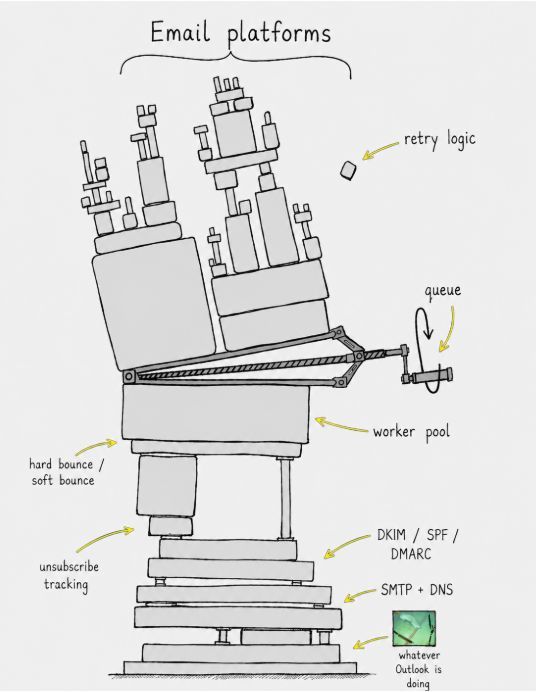
Spent the weekend deep in Camp, the open-source email marketing platform I’m building in Go.
I started this thinking email marketing was basically :
store emails,
write campaigns,
hit send.
Turns out email is a distributed systems problem dressed as a SaaS feature.
What I’ve already had to think through:
- Some emails bounce temporarily. Some permanently. The retry logic changes completely.
- When to retry , when to suppress, Hard bounce vs Soft bounce
- Get DKIM/SPF/DMARC wrong and emails quietly land in spam folders.
- Gmail throttles differently from Outlook. Outlook behaves differently from Exchange.
- If a worker crashes mid-batch, retries can accidentally send duplicate emails.
- Even tracking opens and unsubscribe links become separate HTTP endpoints to maintain.
I thought I was building a CRUD app with a send button.
I’m actually building
a queue,
a worker pool,
a delivery layer,
and a state machine.
Almost every backend problem looks simple until you ship it.
That’s the part tutorials usually skip.
Most “system design” content online is performance theater.
People are learning how to “design Twitter for 1B users” before they understand what a primary key is.
The order is backwards.
1/ Start with Low-Level Design.
Schemas, API contracts, error handling, data relationships, what happens when input is wrong.
That is the boring 90% of real engineering.
2/ Then move to High-Level Design.
Sharding, caching, queues, regions.
But only after you understand what is actually being sharded, cached, or queued.
3/ Then learn trade-offs.
CAP, latency vs cost, consistency vs availability.
These only become useful when you have something concrete to apply them to.
A lot of engineers can draw a Twitter timeline diagram.
Ask them to design the schema for posts, likes, comments, and reactions.
They freeze.
HLD without LLD is fan fiction.
Build the data model.
Earn the architecture diagram.
Go’s standard library is the reason it’s eating Node’s lunch on backends.
Not because of benchmarks. Because of how backend projects actually feel to work on.
A new Node project usually starts with decisions.
Which framework, which logger, which validation library, which test setup. Before you’ve written a single route, you already have a stack: express, body-parser, helmet, cors, dotenv, winston, jest, ts-node.
That flexibility is powerful. But it also means every project starts from zero.
A Go project feels different. You import net/http, encoding/json, log, testing - and you start building. Most common backend needs are already handled, so the focus shifts from assembling tools to writing the service.
That’s not a benchmark difference. It’s a design choice.
Go pushes more into the standard library. Node pushes more into the ecosystem.
Over time, that difference compounds.
More dependencies → more version conflicts, more upgrade overhead, more time debugging things you didn’t write.
Performance isn’t where this shows up. For most systems, both are fast enough.
The difference shows up later - in maintenance, onboarding, and how predictable the system feels after a few months.
Node optimizes for flexibility. Go optimizes for constraints. Both are valid choices, but they lead to very different day-to-day engineering.
If a team spends more time wiring libraries than shipping features, it’s worth questioning the default.
Not every backend needs to be minimal. But most teams benefit from fewer moving parts
The Backend Foundation course at Coder's Gyan.
Here’s who it’s NOT for
1/ You want a quick certificate for LinkedIn next week
2/ You want “10 backend tools to learn in 2026”
3/ You want Express middleware syntax explained from scratch. There’s already a youtube tutorial for that.
4/ You want a backend role in 4 weeks without having built systems before
You’ll probably hate this course.
This pace is slower. The work is harder.
A lot of time goes into understanding systems, not memorizing frameworks.
Who it IS for
1/ Engineers who can already code, but still don’t fully understand TCP, HTTP, or query planning
2/ Frontend developers trying to move beyond just consuming APIs
3/ Mid-level engineers stuck for years because they learned frameworks before systems.
13 weeks.
Networks before frameworks.
SQL before ORMs.
Why before how.
If that sounds like the gap you’re trying to close, the link is in the comments.
𝗧𝗵𝗲 𝗧𝗮𝗻𝗦𝘁𝗮𝗰𝗸 𝗻𝗽𝗺 𝗲𝗰𝗼𝘀𝘆𝘀𝘁𝗲𝗺 𝘄𝗮𝘀 𝗰𝗼𝗺𝗽𝗿𝗼𝗺𝗶𝘀𝗲𝗱 𝗶𝗻 𝗮 𝗰𝗼𝗼𝗿𝗱𝗶𝗻𝗮𝘁𝗲𝗱 𝘀𝘂𝗽𝗽𝗹𝘆 𝗰𝗵𝗮𝗶𝗻 𝗮𝘁𝘁𝗮𝗰𝗸.
84 malicious package versions across 42 @tanstack/* packages were pushed to npm on 11 May 2026, between 19:20 and 19:26 UTC.
This is one of the most serious npm incidents the JavaScript ecosystem has seen this year.
Here is what happened and what it means for developers.
𝗪𝗵𝗮𝘁 𝗵𝗮𝗽𝗽𝗲𝗻𝗲𝗱
An attacker published 84 malicious versions across 42 packages in the @tanstack namespace. @tanstack/react-router alone gets over 12 million weekly downloads.
The tarballs were signed by TanStack's legitimate release pipeline with valid SLSA provenance, which means they were technically indistinguishable from real releases.
𝗛𝗼𝘄 𝘁𝗵𝗲 𝗮𝘁𝘁𝗮𝗰𝗸 𝘄𝗼𝗿𝗸𝗲𝗱
The attacker chained three weaknesses, none of which would have been enough on its own.
1/ A pull_request_target workflow that checked out and ran code from an attacker-controlled fork
2/ GitHub Actions cache poisoning across the fork and base trust boundary, planting a malicious pnpm store that survived into the next legitimate release run
3/ OIDC token extraction from the runner process memory at /proc/<pid>/mem, which gave the attacker a publish-capable npm token without ever stealing a credential
This is the same Mini Shai-Hulud worm family that hit Bitwarden CLI in April and Trivy in March.
𝗪𝗵𝗮𝘁 𝘄𝗮𝘀 𝗶𝗻𝘀𝗶𝗱𝗲 𝘁𝗵𝗲 𝗺𝗮𝗹𝗶𝗰𝗶𝗼𝘂𝘀 𝗽𝗮𝗰𝗸𝗮𝗴𝗲𝘀
The payload was a credential stealer targeting AWS, GCP, Kubernetes, HashiCorp Vault, GitHub tokens, SSH keys, and .npmrc files. It also self-propagated, using stolen OIDC tokens to publish into any other npm scope the compromised CI had access to. On some hosts, it attempted a full disk wipe.
𝗪𝗵𝗮𝘁 𝗶𝘁 𝗺𝗲𝗮𝗻𝘀 𝗳𝗼𝗿 𝗱𝗲𝘃𝗲𝗹𝗼𝗽𝗲𝗿𝘀 𝘄𝗵𝗼 𝗶𝗻𝘀𝘁𝗮𝗹𝗹𝗲𝗱 𝗮𝗻 𝗮𝗳𝗳𝗲𝗰𝘁𝗲𝗱 𝘃𝗲𝗿𝘀𝗶𝗼𝗻 𝗼𝗻 𝟭𝟭 𝗠𝗮𝘆
1/ Treat the install host as compromised
2/ Rotate AWS, GCP, Kubernetes, Vault, GitHub, npm, and SSH credentials reachable from that host
3/ Audit CI runs after 19:20 UTC for unexpected npm publish events
Check for outbound connections to https://t.co/3sAsQN6u3Q and https://t.co/7ClwM1nihv
𝗪𝗵𝗮𝘁 𝗶𝘁 𝗺𝗲𝗮𝗻𝘀 𝗳𝗼𝗿 𝘁𝗵𝗲 𝘄𝗶𝗱𝗲𝗿 𝗲𝗰𝗼𝘀𝘆𝘀𝘁𝗲𝗺
TanStack's postmortem was public within hours. Tanner Linsley named the three vulnerabilities, walked through the full chain, and shipped concrete recommendations. That is the response engineering teams should study.
The deeper problem is structural. OIDC trusted publishing binds an identity, not a specific build step. Once configured, any code path in the workflow can mint a publish-capable token. Provenance signed it. The registry accepted it. Nothing was technically wrong.
𝗧𝗵𝗲 𝗯𝗶𝗴𝗴𝗲𝗿 𝗹𝗲𝘀𝘀𝗼𝗻
Supply chain security is not a checklist. It is a property of how your CI is wired.
The defaults look safe in isolation. pull_request_target runs on PRs. GitHub Actions caches everything to speed up builds. OIDC removes long-lived secrets. Each of those is reasonable on its own. Chained together by an attacker who understands the trust model, they ship malware through your own release pipeline with valid signatures.
The difference between a junior and a senior backend engineer shows up exactly here. One writes code. The other owns the system and asks what the defaults compose into when something goes sideways.
If you ship npm packages, read the TanStack postmortem this week. It is the cheapest tuition you will pay this year.
What is your CI doing on pull_request_target right now?
Distributed systems are not just defined by what we put into them. They are equally defined by what we leave out. Let me give you 4 examples...
Take timeouts - A service with no timeout on an outbound HTTP call will wait indefinitely. Under load, all its worker threads pile up waiting, and the service effectively becomes unavailable. No one 'decided' to make it unavailable. They just forgot to decide how long to wait.
Or retries - If your service does not retry a failed downstream call, the data gap it creates can look like a bug in a completely unrelated service days later. What was omitted from the retry strategy is now an incident.
Take acknowledgements - When you fire a message to a queue and do not wait for an ack, you just chose to tolerate message loss. That choice is not written anywhere in your architecture diagram. It lives silently between the producer and the broker.
The same logic applies to back-pressure. If you do not model what happens when a consumer is too slow, the producer keeps going, memory climbs, and the system falls over. The crash was not caused by what was built. It was caused by what was not built.
Hence, while reviewing a distributed system design, we should ask:
- what happens when this message is lost,
- what happens when this call never returns,
- what happens if this node never comes back?
The answers you do not have are where the failures live.
Hope this helps.
Connection pooling in Postgres.
Postgres uses a process-per-connection model
not thread-per-connection.
That means every connection is expensive :
memory, file descriptors, process overhead.
Now the connection math matters.
A default pool of 100 connections is roughly ~1GB of RAM before queries even run.
4 app servers x 100 connections = 400 connections.
Postgres defaults to max_connections = 100.
Now the database starts refusing connections.
The fix usually isn’t “add more connections.”
It’s a connection pooler.
PgBouncer in transaction mode is the standard answer.
Apps connect to PgBouncer (cheap).
PgBouncer multiplexes them onto a much smaller pool of real Postgres connections (expensive).
1,000 app connections can fan into 20 actual DB connections.
Before reaching for it, read the caveats.
Prepared statements, session-level state, advisory locks.. all behave differently.
If your scaling plan is just increasing max_connections, you probably don’t need a bigger database.
You need PgBouncer.




![codersGyan's tweet photo. An idempotent payment endpoint makes retries safe.
If the client sends the same payment request twice, the customer shouldn’t be charged twice.
Here’s how to design an idempotent payment endpoint, in 5 lines of pseudocode.
key = request.headers["Idempotency-Key"]
if exists(cache, key):
return cache[key]
response = process_payment(request)
cache[key] = response
return response
That’s it.
But this is the easy part.
The actual work is in the details around it.
1/ Don’t store the key in memory.
Use Redis or Postgres.
2/ Set a TTL (Time to Live)
You don’t need to keep these keys forever, but they should live long enough to cover normal retries.
3/ Store the response, not just “payment done”.
If the same key comes again, return the same response with the same status code.
Not always 200.
4/ Store a hash of the request body.
Same key with the same body is a retry.. Same key with a different body is not a retry.
That is a bad request.
Return 422.
5/ Keep payment processing and saving the idempotency response together :
This is the part people get wrong. If the customer gets charged and your server crashes before saving the response, the next retry can charge them again.
That is the bug idempotency is supposed to prevent.
It is there because networks fail, clients retry, and payments cannot depend on luck.
Stripe uses this pattern.
AWS uses this pattern.
If your payment endpoint does not have it, your retry logic is not safe yet.
♻️ Repost to help other developers in your network.
👉 If you want to build scalable, high-performance backend systems without the guesswork, check out https://t.co/GiIxqkO9dr for deep, practical architecture training.](https://pbs.twimg.com/media/HJ8J8JGWIAE3GNd.jpg)