Hello there!!! I am working on an app which addresses the most important issue in the security field i.e The Analog hole. In security world, we majorly focus on digital encryption but what about analog counterpart. #Security#privacy#privacymatters#message#secure#zifrix
looks like a blurry visual noise, so no fear of analog leaks. It also uses identity watermarking to psychologically deter screenshots. I rendered user’s unique identifier hash all over the screen in low opacity. If a user still leaks, he is immediately identifiable.
ZIFRIX is a one stop solution for all your privacy needs. Whether you want to send a confidential image to your friend or an important conversation with your client. ZIFRIX uses optical obfuscation using dynamic Moire Shaders which when viewed from another device or camera,
If a person is standing behind you, a CCTV is focusing on you, or even when you share something confidential to your friend and he just leaks it. That’s scary right. But don’t worry, ZIFRIX got your back.
After months of work, I have finally updated my Bug Bounty course with a massive focus on hands-on labs through @hackinghub_io!
More info here 👉🏼 https://t.co/yhUhrKRYYw
Use code UPDATE50OFF to get 50% off!
I also have some free codes! RT/Reply for a chance to win!
@Sin4Yeganeh Can you please share the writeup. Ofc hide the site identifiers. It will be a great resource for beginners like me.
You just exploited a bug, then again bypassed it with another method🤯
Next time you're testing the checkout functionality on your target...
Check if it's vulnerable to formula injection and if it allows you to order product at discounted or even negative prices! 😎 🤑
4 reasons why you are not finding bugs:
• You're switching from targets too much
• You aren't spending a lot of time on bug bounty hunting
• You only run automated scans without understanding what works and what doesn't
• Your target isn't feature-rich or is a static web app
30 tips for ethical hackers:
Use Reconnaissance Tools: Tools like Nmap, Nikto, or Shodan can help with network and host enumeration.
DNS Enumeration: Use tools like DNSRecon, DNSenum, and Fierce to perform DNS enumeration.
Subdomain Enumeration: Use tools like Amass, Sublist3r, or SubFinder to discover subdomains.
Find Hidden Directories: Use tools like DirBuster, Gobuster, or Dirsearch to find hidden directories or files.
Check the Robots.txt File: This file often contains paths that developers did not want to be indexed by search engines, which could provide useful clues.
Email Enumeration: Tools like theHarvester, Recon-ng, or Hunter can be used for email enumeration.
Check the Website Archive: Use tools like the Wayback Machine to look at older versions of the website.
Check for DNS Transfer Zones: This can reveal useful information about the domain structure.
Port Scanning: Use Nmap or Masscan for port scanning. Don't forget to scan all 65535 ports.
Inspect JavaScript Files: JavaScript files might contain useful API endpoints, comments, or variables.
Monitor GitHub Repositories: Look for sensitive data like passwords, tokens, and API keys left in code or commit histories.
IP Range Scanning: If the company's IP range is known, scan it to discover additional assets.
Google Dorks: Use Google dorks to find indexed information about the target that Google's spiders might have crawled.
Social Media Scanning: You can gather information about a target from their social media accounts.
Check Certificate Transparency Logs: Use tools like https://t.co/qyWccMfUKW to identify all SSL certificates issued for a particular domain.
Check ASN (Autonomous System Number): Identify associated IP ranges.
Use Search Engines: Apart from Google, use search engines like Bing, Baidu, or DuckDuckGo for finding potentially overlooked data.
Check Bug Bounty Platforms: Previous disclosed reports can provide useful information.
Use Public Datasets: Websites like CommonCrawl and Rapid7’s OpenData have a lot of data about websites.
Participate in Bug Bounty Forums: Other bug bounty hunters may share useful insights and techniques.
Fingerprinting: Identify the software and versions used by your target.
Check Error Messages: They can reveal useful information about the underlying technology.
Check RSS/Atom feeds: They might contain interesting URLs or endpoints.
Check Metadata of Files: Documents and images can contain useful metadata.
Code Review: If the source code is available, review it for potential security misconfigurations or vulnerabilities.
Check for Debug Parameters: Some websites might reveal useful information when debug=1 or similar parameters are used.
Check X-Robots-Tag Headers: They might reveal disallowed directories or files.
Use API Enumeration Tools: Tools like Postman and Swagger can help explore APIs.
Test Different User Agents: Some websites might serve different content based on the User Agent.
Check for CORS Misconfigurations: Misconfigured Cross-Origin Resource Sharing (CORS) can sometimes lead to vulnerabilities.
The 30 burp suite extensions every hacker should know about:
SQLiPy SQL Injection Scanner: Injects SQL payloads into all parameters and looks for evidence of an SQL injection.
J2EEScan: Useful for testing J2EE applications. It extends Burp's scanning capabilities to identify J2EE vulnerabilities.
Burp Bounty (Scan Check Builder): It improves the active and passive scanner capabilities by allowing you to customize payloads and scan checks.
Autorize: Automatically detects authorization enforcement by tagging requests and responses.
Logger++: Logs requests and responses for all Burp tools in a sortable table.
JSON Decoder: Beautifies and simplifies complex JSON responses.
Wsdler: Parses WSDL files for web service testing.
EsPReSSO: Enhances handling of client-side stored data like cookies and HTML5 local storage.
Retire.js: Identifies JavaScript libraries with known vulnerabilities.
Backslash Powered Scanner: Actively scans for parameter-based vulnerabilities.
Software Vulnerability Scanner: Integrates with Burp to identify software that is outdated and potentially vulnerable.
BurpHash: Helps to decrypt hash values or make a comparison between two or more hash values quickly.
Paramalyzer: Helps in the identification of hidden, unlinked parameters.
HUNT Methodology Scanner: Allows for easier identification of common parameters vulnerable to certain vulnerability classes (SQLi, XSS, command injection, etc.)
Turbo Intruder: Allows you to perform high speed, reliable HTTP requests.
Upload Scanner: Scans file uploads to find client-side and server-side vulnerabilities.
Brida: Integrates Burp Suite with the Frida Tool, useful for mobile app testing.
J2EEScan: Improves the test coverage of J2EE applications.
Request Timer: Measures the time taken for HTTP responses.
Reflected Parameters: Monitors and logs all reflected parameters within the HTTP response.
CO2: A collection of various tools including Payload encoding/decoding, SQL helpers, and command shortcuts.
Collaborator Everywhere: Injects Burp Collaborator payloads into almost every parameter.
Flow: Provides a sortable and filterable view of all Burp Suite tools' HTTP traffic.
CSRF Scanner: Scans for potential CSRF vulnerabilities.
InQL (Introspection GraphQL): A Burp Suite extension for handling GraphQL.
Content Type Converter: Converts JSON to XML, XML to JSON, etc., for ease of viewing.
Reissue Request Scripter: A tool for scripting the reissue of requests.
HTML5 Auditor: Audits HTML5 web storage data, useful for checking local and session storage.
Same Origin Policy Bypass: Helps find SOP bypasses.
Shellshock Scanner: Actively scans for the shellshock vulnerability.
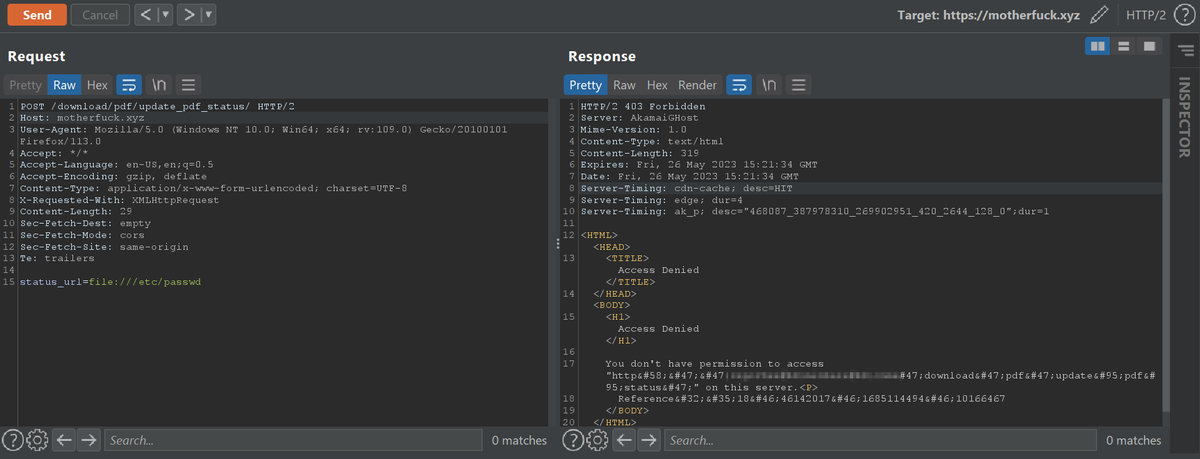
When you are trying to read the files of the server via SSRF and if there is any WAF in place like Akamai, Cloudflare.
If you try to access file:///etc/passwd,
Normally the WAF will automatically blocks your request (So don't give up.)
Example:
#BugBounty#bugbountytips#ssrf
Python Package Index (PyPI) now mandates 2-factor authentication for all project maintainers to prevent account takeover attacks and safeguard the software supply chain.
Learn more: https://t.co/61lX2gTn1c
#infosec#cybersecurity