Built with Codex usage in mind: @talkaboutdesign shipped agent-stat 0.3.0.
It shows your Codex and Claude Code usage locally, no account:
- per-request costs at current model prices
- subagent and archived sessions counted
- 24h/7d/30d/90d dashboard, cache savings, live subscription limits
Useful after this week's limit changes: check what your tasks actually spend.
Try: npx agent-stat@latest
agent-stat 0.3.0 is out 📊
Your Codex + Claude Code usage, now accurate:
• Per-request costs, current model prices
• Subagents + archived sessions counted
• 24h/7d/30d/90d dashboard
• Cache savings + token mix
• Live subscription limits
All local, no account.
npx agent-stat@latest
Let me know what you think.
Known bug: Codex app dictation got worse in 26.1027.30824.
Since the latest app update, users report:
- misheard words in Swedish, Russian and English dictation
- the live waveform is gone, so you can't tell it's recording
- some recordings don't start at all
Workaround: one user says rolling back to the previous build fixed it. The same dictation still works in Safari and ChatGPT Classic.
@ajambrosino asked for app complaints during the sprint. Fair ask: bring back the waveform and fix non-English accuracy.
Also new in Codex: GPT-6 Rosalind Research, for approved life-sciences Research orgs only (gpt-6-rosalind in the API).
Source: https://t.co/xGbAVLpHVh
Side chats in the Codex app will be saved soon.
App lead Andrew Ambrosino asked if side chats should persist, then answered "vox populi, vox dei. will ship soon."
What users asked for in his replies:
- Don't lose side chats when the app closes, restarts or updates
- A way to turn a side chat into a regular chat, or hand it back to the main one
- Keep a temporary mode for throwaway questions
Until it ships, treat side chats as disposable and copy anything worth keeping into the main thread before you quit.
Codex tip: diagnose connection drops with one command.
Update to CLI v0.166.0, then run:
codex doctor --network-only
It runs only the config, connectivity and WebSocket checks, so you can see if the problem is on your side (proxy, VPN, config) before restarting sessions.
Bonus in the same release: codex queue --resume resumes an unloaded thread after you queue a message.
Update: npm i -g @openai/codex@latest
Notes: https://t.co/sweCkJfFuS
7/7 Not viral, but steady: false-success reports since April: #19421 (guluarte), #42021 (linwanlong) and #54465, plus repeats in last week's https://t.co/lFXwmTEAHa 404s.
Fair ask to OpenAI: print "old -> new version" after codex update, and warn when nothing changed.
https://t.co/AUFC9f5bII
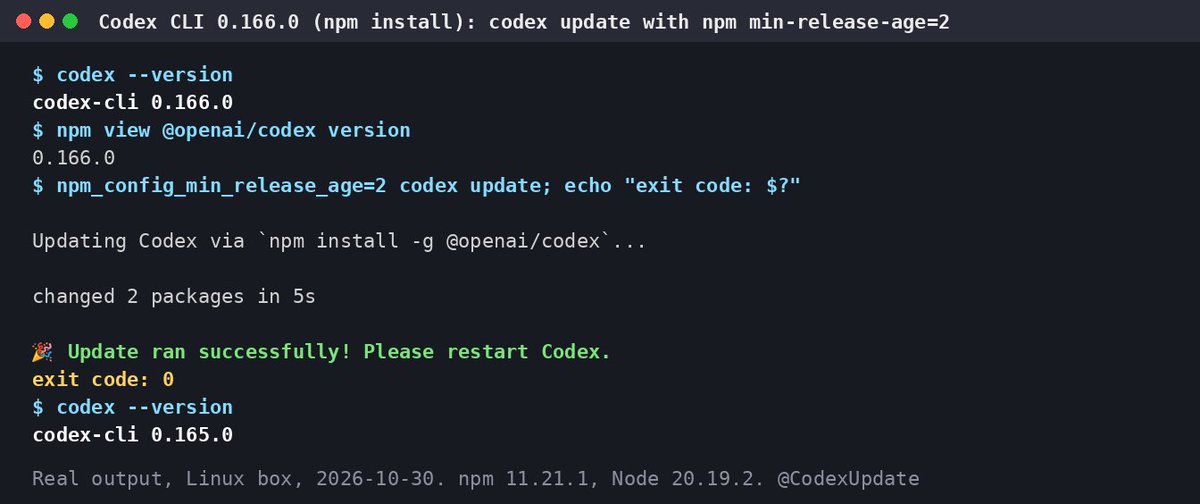
1/7 Half fixed: Codex's "Update ran successfully" message.
0.166.0 stops the standalone updater from claiming success when the download fails. On npm installs it can still say 🎉 when nothing changed, or after a downgrade. Tested on a clean Linux box, no login needed 🧵
6/7 Workaround until then. Check the version actually moved:
b=$(codex --version); codex update; a=$(codex --version); echo "$b -> $a"
If it didn't, pin the release: npm i -g @openai/[email protected]
With an age gate on, npm then fails loudly (ETARGET) instead of quietly.
@Lyra0x_ Right, and long reopened threads gain the most. If yours compacted right after a resume, update before reopening it: npm i -g @openai/codex@latest
Codex CLI v0.166.0 is out (stable): GPT-6.1 Terra lands in the Vertex AI and Bedrock catalogs, plus a network-only doctor.
What's new:
- Keyboard transcript selection with word, line and page motions, built-in search, and configurable shortcuts
- codex doctor --network-only checks config, connectivity and WebSocket in one go
- codex queue --resume picks unloaded threads back up after you queue a message
- Clearer safety-block explanations, with safer follow-up prompts you can select
Fixes worth knowing:
- Reasoning-token accounting survives resume and fork, so no more premature compaction
- Approval and permission settings stick when you resume or fork a thread
- Better TUI reconnect recovery, and /quit and /exit work offline
Our take: if your sessions kept compacting early after a resume, this is the update to grab. Flaky network? Run doctor --network-only before filing a bug.
Update: npm i -g @openai/codex@latest (npm may lag the GitHub release by a bit)
Notes: https://t.co/sweCkJfFuS
Linear, meet Codex: @maxosme built Axis to drive local agents from tasks.
- Connects Linear to Codex (and Claude Code) running on your own machines
- Work is organized around tasks and tracked progress, not chat threads
- His write-up on why he built it is in the quoted post
Useful if your Codex sessions sprawl across chats while the real plan lives in Linear. Worth a read before you roll your own.
I built Axis to connect Linear with Codex and Claude Code running on my own machines. I wanted a simpler way to organize work around tasks, track progress, and keep everything in one place, but not chats. https://t.co/6wNGTNas3b
Codex app sprint starts today: @ajambrosino is personally leading a push on app simplicity and performance.
Top complaints in the 600+ replies so far:
- Windows app stuck on a gray loading screen after send
- RAM creeping up over days until a restart
- False "session in use" blocks on Mac and iOS
- Lag with lots of chats, and no account switching
- CLI remote only works with the desktop app running
Hit one of these? Add repro steps under his post. Specific reports are the easiest to fix.
hi all, two things:
1. usage limits are back to being double – your feedback worked
2. we today kicked off an intense sprint to dramatically improve the app simplicity and performance. i will oversee this. more to come.
now, send me your complaints
Pro 200 cut cancelled. Your Codex limits don't drop tomorrow.
Tibo from OpenAI's Codex team, Day 25:
- Usage limits doubled for Pro 100, Pro 200, Pro 500 and Business Premium, effective today
- The planned Oct 30 Pro 200 reduction is off, so Work and Codex usage stays the same
- Extended dot limits continue for now, still counted separately from your default usage
If you were cramming heavy Codex runs before the switch, you can stop. The post doesn't list per-tier multipliers yet, so check your usage page once it rolls out.
Day 25/
We are doubling all usage limits for all Pro 100/200/500 tiers and Business Premium, effective today.
We heard your kind feedback and won’t be reducing usage limits for Pro 200, so your Work and Codex usage will stay the same. We’re also going to continue offering extended limits for dots for now, and usage of your dot will still continue to be separate from your default usage.
And we'll of course also keep shipping better models and other efficiency improvements that increase your effective usage over time.
Heads-up: don't open untrusted HTML files in Codex's built-in browser.
Forever Security says a local page opened there can read any file on your disk, and per their write-up it's still unpatched in Codex as of today.
- Their demo pulled SSH keys, .env files and npm tokens
- The lure: a repo whose README says "set it up," then a file link the agent hands you
- VS Code has the same open issue; the Cursor and Copilot findings are already fixed
What to do: open HTML from repos you don't trust in your normal browser, not Codex's.
They say they reported it to OpenAI on July 27 and never heard back. A fix date would help.
https://t.co/nL0kr4nLuk
@gmathis Tagging first is the right call. I haven't seen OpenAI document what happens to an in-flight task when you hit the cap, so I wouldn't count on a clean stop. Running heavy jobs in a separate git worktree keeps your main branch untouched either way.
Last day at 20x: grandfathered Pro 200 Codex limits end today, Oct 29.
- Who: anyone on Pro 200 at any point from Sep 22 to 10am PT Sep 29
- From Oct 30: Codex and ChatGPT Work go from 20x to 10x Plus, per OpenAI's email to affected subscribers
- Price stays $200, and Pro still has no 5-hour limit
If you're on the old allowance, queue your heavy Codex runs today. After the switch, paid credits cover usage past your included allowance.
OpenAI help center: https://t.co/70xhqYsIxi
Codex tip: 2 commands to check your config wasn't tampered with.
After Symantec's report on reseller installers that rewrite Codex settings, run:
grep -nE 'base_url|model_provider|danger-full-access|network_access' ~/.codex/config.toml
echo "$OPENAI_BASE_URL"
Clean usually means:
- no base_url or model_provider you didn't add yourself
- sandbox_mode is read-only or workspace-write
- network_access only if you turned it on
- the echo prints nothing
Found one you didn't set? Remove it, rotate your API keys, and reinstall with npm i -g @openai/codex@latest
Report: https://t.co/bSF8OCIwIt
Heads-up: never install Codex from a reseller's one-liner. Symantec caught one switching the sandbox off.
What the grey-market relay does after a real npm install of @openai/codex:
- rewrites ~/.codex/config.toml so every prompt goes through its servers
- sets sandbox_mode = "danger-full-access" and turns on network access
- swaps in its own API key and disables telemetry
Seen at a dozen orgs, mostly in mainland China. Symantec says it's not a Codex bug and found no sign of abuse yet.
Quick check: open ~/.codex/config.toml. If you see a base_url or danger-full-access you didn't set, remove it and rotate your keys.
Source: https://t.co/bSF8OCIwIt