They will say, “Killa won’t hold a $BTC long for 2 years.”
Hold my beer.
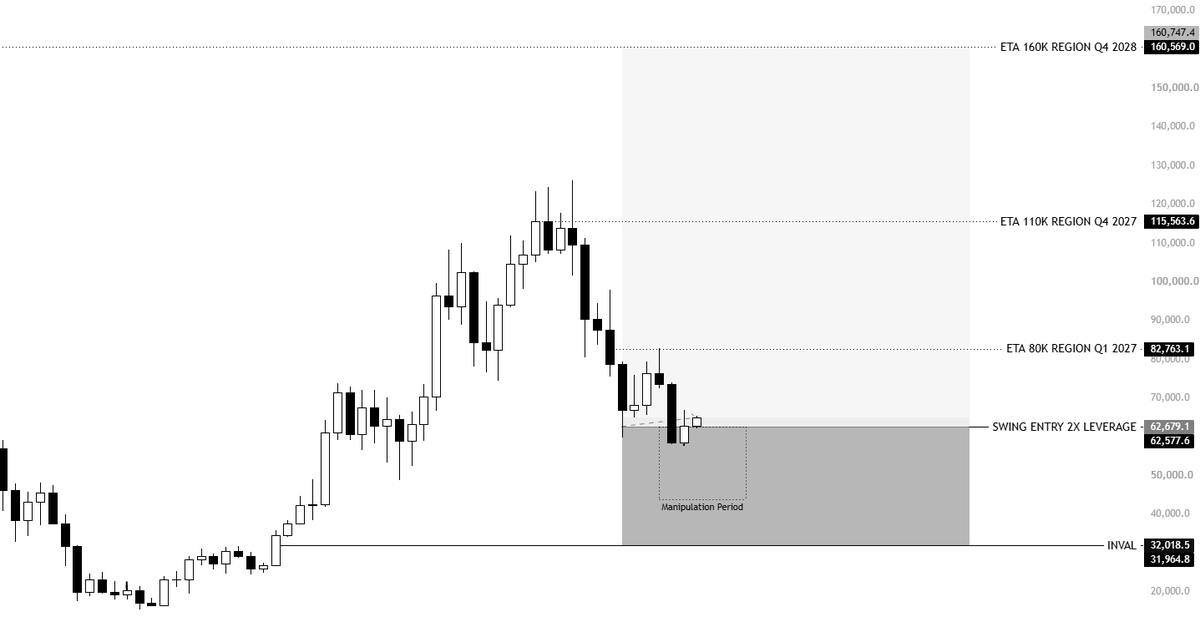
APR on Binance, Bybit & many other exchanges averages around 0.01% every 8H reset, which is 0.03% a day, 0.21% a week, and roughly 0.84% a month. That equates to around 10.08% funding per year, and that’s assuming funding stays at 0.03% every single day.
I remember last cycle, there were plenty of periods where funding was actually negative or sitting around 0.00%. So that metric could end up being significantly lower.
Theoretically speaking, on a 2X long position that I’ll be aiming to get a 100–120% increase on, I’m looking at a 200–240% return on my assets while paying a maximum of roughly 20% in funding over two years.
That’s a small price to pay for the potential return you’re getting.
So sure, you can think this position is irrational, and you can think the stop loss is retarded. But it’s simple mathematics. It’s the same way I positioned myself when BTC was at $123K with a 3X short position.
In the end, I was right then.
Claude Code feels completely different once you install this.
Anthropic quietly released an official plugin called claude-code-setup and it basically turns Claude Code from “pretty good” into an actual AI dev environment.
It scans your project and recommends:
→ hooks
→ skills
→ MCP servers
→ subagents
→ automations
Then sets everything up step-by-step for you.
Most people are using Claude Code completely vanilla…
which is why their experience feels messy.
The real power comes from the ecosystem around it.
Install:
/plugin install claude-code-setup@claude-plugins-official
Bookmark this before you forget it.
Stop telling Claude, "do this."
Stop telling Claude, "write code."
Stop telling Claude, "fix this error."
You're actually treating a senior AI like a junior intern.
Here are 8 prompts you can copy and paste directly:
Stop telling Claude, "do this."
Stop telling Claude, "write code."
Stop telling Claude, "fix this error."
You're actually treating a senior AI like a junior intern.
Here are 8 prompts you can copy and paste directly:👇🏿👇🏿
🚨 Anthropic just showed a 27-minute workshop on how to actually do prompts for Claude.
Taught by the people who built it.
Free. No registration. No paywall.
I've seen $300 courses that don't cover what they teach in the first 8 minutes.
Watch it and bookmark it now.
I gave Claude my birth date and time.
It broke down my entire life with eerie accuracy.
No horoscopes. No tarot. Just pure AI.
Here are 7 prompts you should try ↓
BREAKING: Claude can now build your entire personal wealth operating system better than most financial coaches.
Here are 7 prompts to automate clarity, growth, and calm:
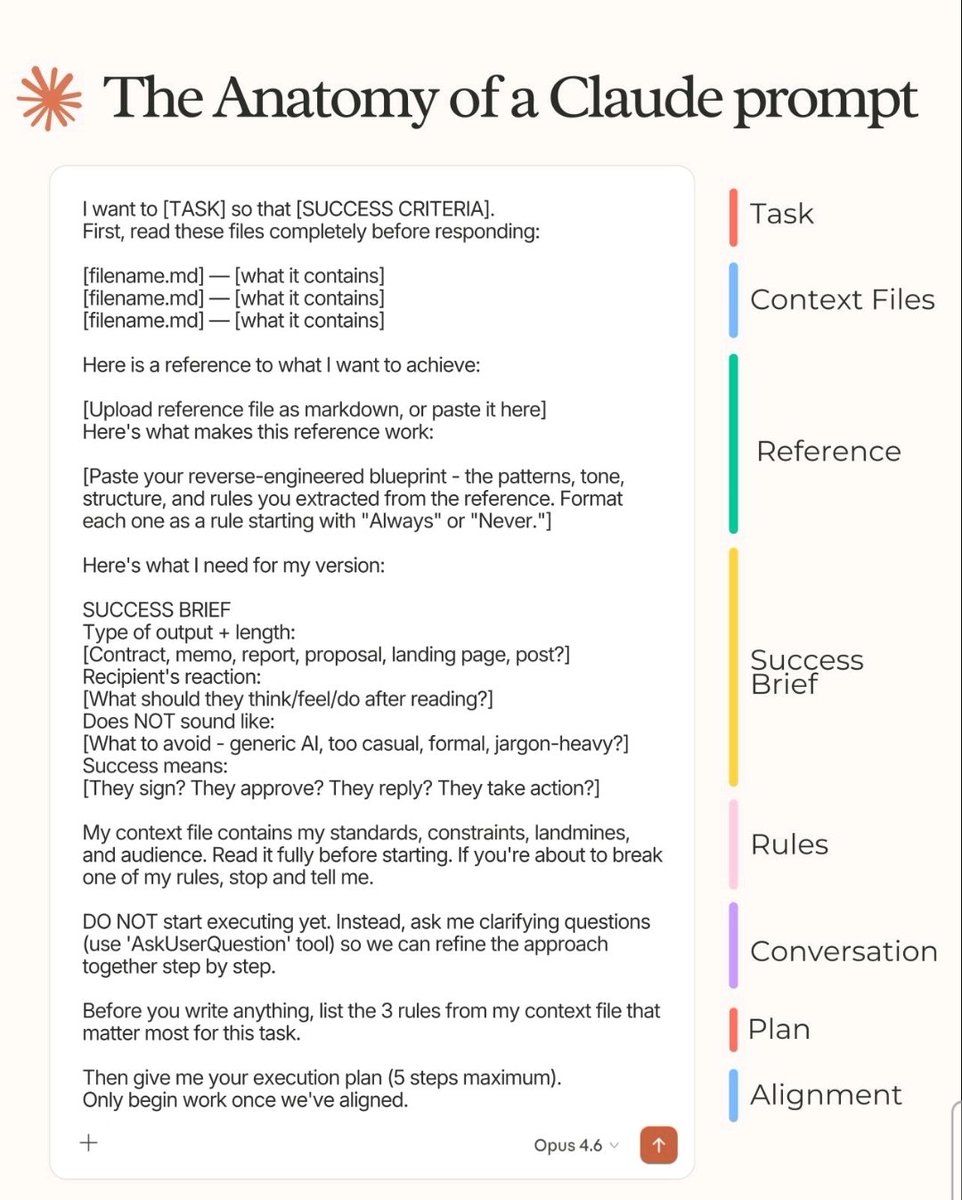
Most people treat Claude like a search engine
The ones getting 10x results use a prompt with 8 layers.
Here's the anatomy of a Claude prompt that actually works:
→ Task — what you want + why it matters
→ Context Files — feed it the right docs first
→ Reference — show it what "good" looks like
→ Success Brief — define the outcome, tone & what to avoid
→ Rules — your constraints, landmines & standards
→ Conversation — ask clarifying Qs before executing
→ Plan — surface the 3 most critical rules first
→ Alignment — get sign-off before a single word is written
The gap between average and elite AI output isn't the model.
It's the prompt structure.
Save this. You'll use it every single time
🚨 Anthropic just shared the exact file their Claude Code team uses internally.
It’s called CLAUDE.md.
Drop it into your project and Claude will:
→ Plan before coding
→ Learn from corrections
→ Verify before shipping
→ Fix bugs end-to-end
This changes how you build with AI.
🚨BREAKING: NotebookLM has a hidden feature that turns any research paper into a full university lecture.
Complete with examples, analogies, and a Q&A section.
Here's how to unlock it in 60 seconds 👇
After 6 months of using NotebookLM, I can say it's the research tool that has revolutionized my workflow the most.
But only because I learned these 10 prompts.
Here's the complete system that turns 200 pages into clear answers in under an hour:
You can import your entire ChatGPT history to Claude.
Here's the exact process:
Step 1. Export your ChatGPT data
→ Go to ChatGPT → Settings → Data Controls
→ Export Data → Confirm.
→ You'll get an email with a download link.
→ Can take up to 24 hours. The link expires in 24, too.
Step 2. Find your chat file
→ Download the zip. Unzip it.
→ Look for the file called chat.html.
→ That's your entire conversation history in one file.
Step 3. Upload to Claude Cowork and run the prompt
→ Open Claude Desktop → Switch to Cowork mode.
→ Upload chat .html and paste this prompt:
"You're an expert at analyzing conversation history. Review this entire chat history and create a detailed profile of me covering: my personality traits, communication style, how I like AI to respond to me, recurring topics and interests, active projects and goals, decision-making patterns, tools I use, and preferences. Write it in second person ("you are...", "you prefer...") so I can paste it directly into an AI memory system."
Step 4. Review your profile
→ Claude reads everything and builds your own profile.
→ Read it. You'll be surprised how accurate it is.
→ Edit anything that feels off.
Step 5. Paste into Claude's Memory
→ Go to Claude → Settings → Capabilities → Memory.
→ Then, click on 'Start import'.
→ Paste the profile. Done.
→ Claude now knows you like an old coworker.
10 minutes. Every conversation after gets better.
BREAKING: Claude can now build your entire startup from idea to launch like a seasoned entrepreneur — without spending a single dollar.
Here are 7 Claude prompts to validate your idea, build your business, and start making money faster than 99% of beginners:
How to set up the Claude completely in just 1 day:
(Save this. Send it to your team. Thank me later.)
Tool 1: Cowork
Download Claude (claude .com/download).
Open the Cowork tab.
Select a folder from your computer.
Now build your brain file. Create "about-me .md."
To download mine, go here: https://t.co/psB7XxAv8w.
Don't pay anything. It's free in the welcome email.
Then, start every chat with this prompt:
"Read the files first. Then ask me questions before doing anything."
Tool 2: Model
Pick Opus 4.6 (it's the best model right now).
Turn on Extended Thinking.
Most skip this & wonder why Claude feels generic.
Then go to Settings > Connectors.
Link Slack, Google Drive, Notion.
Claude now reads your actual workspace.
Tool 3: Excel
Open Excel. Go to Insert > Get Add-ins.
Search "Claude by Anthropic." Install.
Open any spreadsheet. Ask: "Give me a summary of each tab." Claude lives inside the spreadsheet. It knows what D14 actually contains.
Tool 4: Plugins
Go to claude .com/plugins.
Pick the one as per your job.
Marketing. Sales. Legal. Finance. Data.
Click install. Type / in your next chat.
Legal software companies lost $285B in market cap when these dropped. That's a signal.
Tool 5: Artifacts
Nothing to install. Ask Claude to build something.
"Create an interactive HTML calculator for [thing]."
You get a working tool inside the chat. Not text. Not a suggestion. A thing you click and use.
Tool 6: Projects
Go to claude .ai. Click Projects. Create one. Upload your files and add instructions. Every chat inside the project remembers your context.
Honest take: Cowork replaced this for me.
But for teams, it still works.
Where Claude falls short:
No image generation. Use Gemini.
Not the best at real-time search. Use Grok.
Not the best at everything. No tool is.
But for writing, thinking, analyzing, and working with your files? It's the best.
The real difference:
Most people open Claude, type one prompt, get a mid response, and leave.
Because they set up one tool out of six.
Set up all six. It takes 1 day.
Then you'll understand why everyone switched.
Full setup guide + features: https://t.co/jw2qdIbLxJ
Full Claude cowork set up: https://t.co/uWTpOI3oyE
Follow for more @rubenhassid
This is craaazzy.
I uploaded my bank statements to Claude Opus 4.6. It reviewed a full year of transactions, separated income from expenses, and categorized everything.
Twenty minutes later, the bookkeeping was finished.
Roughly $11,000 in accounting work handled in one sitting.
Here’s the exact prompt I used 👇
The most important AI guide you'll read in 2026.
Claude has quickly become the #1 AI tool - and it's not even close anymore.
I just condensed 100+ hours of Claude usage into a <5-minute read.
How to 10x your Claude productivity (as a complete beginner):
🚨Claude can now import your entire memory from ChatGPT and Gemini in 60 seconds.
Anthropic just went #1 on the App Store.
The memory import feature is exactly why.
Here's what just changed:
You've spent months teaching ChatGPT who you are.
Your preferences. Your work. Your context.
Every conversation building on the last.
That context no longer disappears when you switch.
Claude now imports all of it. Instantly.
Here's how it works in 60 seconds:
→ Copy the memory export prompt (prompt 👇)
→ Paste it into ChatGPT or Gemini
→ Copy the response
→ Paste it into Claude's memory settings
→ Done.
Your first conversation with Claude now feels like your hundredth.
The switching cost from ChatGPT to Claude just went to zero.
And Anthropic knew exactly what they were doing.
→ No more reminding Claude who you are.
→ No more starting over.
→ No more loyalty to a tool just because it knows your history.
The #1 spot on the App Store didn't happen by accident.
This is how you win users.
Not by being louder.
By making it easier to arrive.
BREAKING: AI just made the business plan obsolete in 2026.
Here are 12 insane prompts to validate, launch, and monetize any idea before your competition wakes up: (Save for later)
BREAKING: AI can now handle your personal finances for free.
Here are 10 powerful prompts that can replace $3,000 financial advisors and $500/year budgeting apps: (Save this for later)







![rubenhassid's tweet photo. How to set up the Claude completely in just 1 day:
(Save this. Send it to your team. Thank me later.)
Tool 1: Cowork
Download Claude (claude .com/download).
Open the Cowork tab.
Select a folder from your computer.
Now build your brain file. Create "about-me .md."
To download mine, go here: https://t.co/psB7XxAv8w.
Don't pay anything. It's free in the welcome email.
Then, start every chat with this prompt:
"Read the files first. Then ask me questions before doing anything."
Tool 2: Model
Pick Opus 4.6 (it's the best model right now).
Turn on Extended Thinking.
Most skip this & wonder why Claude feels generic.
Then go to Settings > Connectors.
Link Slack, Google Drive, Notion.
Claude now reads your actual workspace.
Tool 3: Excel
Open Excel. Go to Insert > Get Add-ins.
Search "Claude by Anthropic." Install.
Open any spreadsheet. Ask: "Give me a summary of each tab." Claude lives inside the spreadsheet. It knows what D14 actually contains.
Tool 4: Plugins
Go to claude .com/plugins.
Pick the one as per your job.
Marketing. Sales. Legal. Finance. Data.
Click install. Type / in your next chat.
Legal software companies lost $285B in market cap when these dropped. That's a signal.
Tool 5: Artifacts
Nothing to install. Ask Claude to build something.
"Create an interactive HTML calculator for [thing]."
You get a working tool inside the chat. Not text. Not a suggestion. A thing you click and use.
Tool 6: Projects
Go to claude .ai. Click Projects. Create one. Upload your files and add instructions. Every chat inside the project remembers your context.
Honest take: Cowork replaced this for me.
But for teams, it still works.
Where Claude falls short:
No image generation. Use Gemini.
Not the best at real-time search. Use Grok.
Not the best at everything. No tool is.
But for writing, thinking, analyzing, and working with your files? It's the best.
The real difference:
Most people open Claude, type one prompt, get a mid response, and leave.
Because they set up one tool out of six.
Set up all six. It takes 1 day.
Then you'll understand why everyone switched.
Full setup guide + features: https://t.co/jw2qdIbLxJ
Full Claude cowork set up: https://t.co/uWTpOI3oyE
Follow for more @rubenhassid](https://pbs.twimg.com/media/HDHuZ3iWUAEvEMY.jpg)