I've been testing @contextmode Insight with our team, and it's been surprisingly useful. (98% token save+)
Instead of guessing what AI agents are doing, we can actually see project progress, token usage, security insights, and developer/agent activity in one place.
Made planning a lot easier.
Shoutout to @mksglu and the team for building it. If you're building with AI, it's worth checking out 👀
5,500 AI coding sessions in Claude Code over 114 days. Here is what @contextmode saved me.
→ 16.5 MB of raw tool output kept out of my context window. About 148 KB every single day.
→ 24,064 events indexed across 221 projects. Searchable across every session.
→ 56 preferences auto-learned. I said "use TS strict" once, it remembered.
→ 5,500 conversations resumed from memory. The agent never reopened with "what were we doing?"
→ ~$110 of Opus tokens my team never burned. Real money, Opus rates for context.
Without context-mode |████████████████████████████████████████| 16.8 MB
With context-mode |█░░░░░░░░░░░░░░░░░░░░░░░░░░░░░░░░░░░░░░░| 340 KB
98% of raw data never entered the conversation.
Scale across a 10-dev team and that is about $3,500/year, plus a pile of context you stop paying to rebuild after every compaction.
New in v1.0.167: it now measures the real per-model token cost of every turn, not an estimate. You can finally answer what your agents actually cost.
We launched @contextmode Insight on @ProductHunt today.
Built on @contextmode, the open source MCP plugin 400,000+ developers run. The org layer turns your team's AI coding into engineering signal a CTO can read.
If it is useful to you, a vote helps.
I asked @contextmode Insight who was blocked on my team. It pointed at me. 𝚜𝚛𝚌/𝚖𝚌𝚙/𝚊𝚐𝚎𝚗𝚝.𝚝𝚜 16 edits in a day, 37 errors a session. It was reading my own coding sessions, and it was right.
Live tomorrow on @ProductHunt
This is one of the products I am very impressed with, teams or companies that use AI should use this product 100%.
In one word, “Google analytics for AI developer team (AI and Developer mixed)”
Featured most used areas
- How many tokens did your team spend on which project?
- How is the communication of the team with AI
- At what stage is the project (with AI interpretation)
Tomorrow we launch @contextmode Insight on @ProductHunt.
@contextmode grew to 400,000+ developers this year, all organic, none of it without you. Insight is the org layer on the same plugin.
An upvote tomorrow would mean a lot. Link goes up when we go live.
B2B is still new territory for us, but honestly, it’s already moving faster and becoming more profitable than open source.
A huge thank you to everyone supporting us and the team behind it. Teams are loving @contextmode Insight.
I wasn’t planning to share this yet, but over the next few months, I’ll also be working on a multi-layer enterprise memory system built on a graph database.
Very excited for what’s next.
This one was carried by the community — 14 contributors this cycle, with a special thank-you to ken-jo (GitHub) @x_ken_jo, who shipped nine PRs including both new adapters.
context-mode v1.0.163 is out — now supporting 17 AI coding agents.
This release adds two new adapters:
• GitHub Copilot CLI
• Antigravity CLI (agy) …taking us from 15 to 17 supported platforms, each verified against the upstream agent's own contract.
Also in 1.0.163:
• A broad round of Windows hardening — PowerShell UTF-8, Maven/MinGW paths, Git Bash path conversion, sandbox cleanup
• Session-resume context savings and ctx_search fixes
• Security hardening, plus resilience for mise/asdf/nvm and Homebrew Node upgrades
If you work across multiple AI coding agents and feel the context bloat, give it a try:
→ https://t.co/cW2osnCQ0n
Release notes: https://t.co/kExMStSkXH
Today I had the chance to present @contextmode at the Claude Ankara Meetup.
Thanks to everyone who made the event happen. It was great meeting the Ankara AI community 🙌
You shipped Claude Code to your team six months ago.
Your CFO asks what it's returning. You say "feels faster."
Your CISO asks what the agent touched. You say "we have logs."
Your EM asks who's stuck. You say "Slack me if you need help."
You can do better with @contextmode
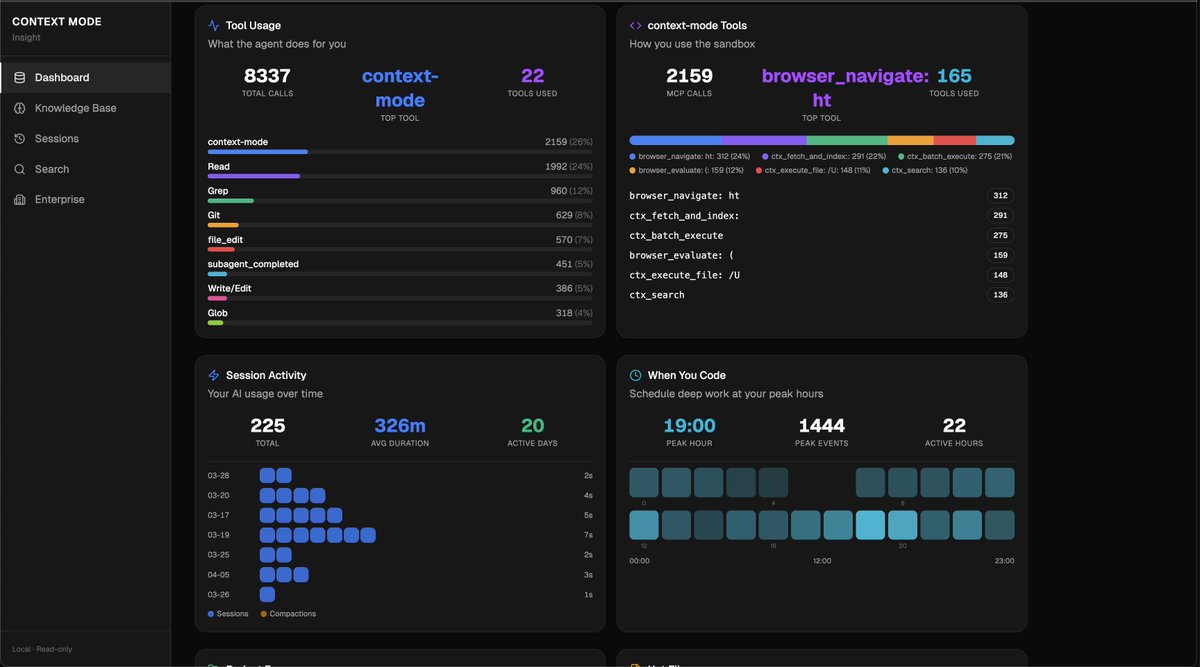
225 sessions, 8,337 tool calls. I ran /ctx-insight on my own data and the numbers surprised me.
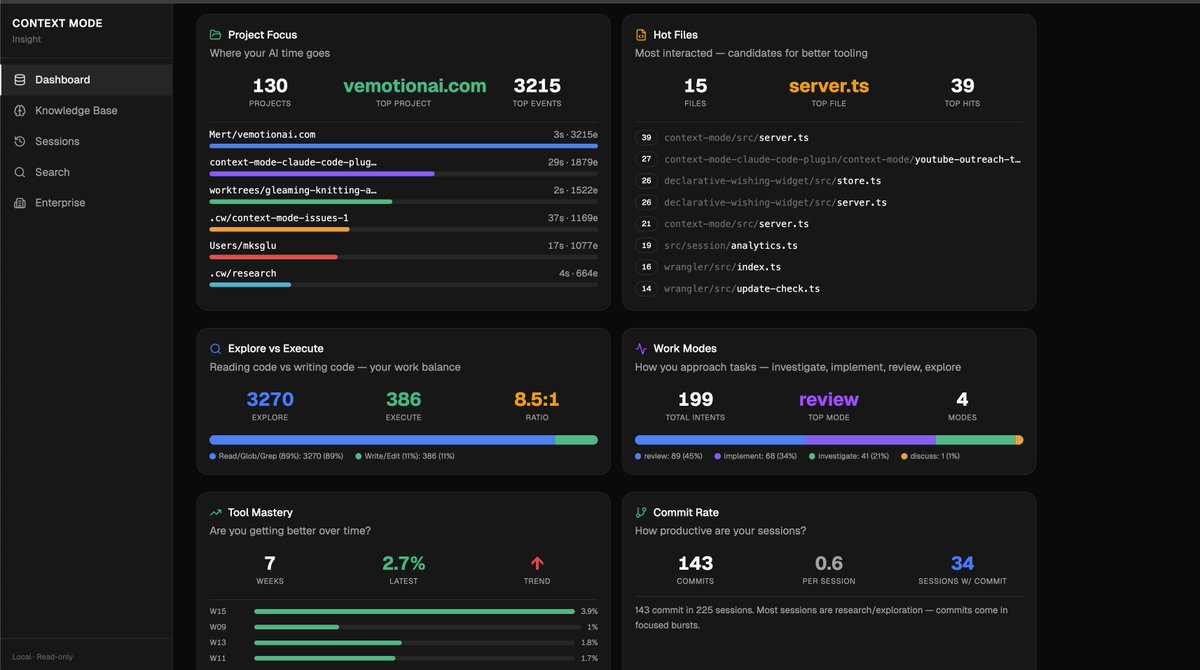
I read 5.2x more than I write. 1,992 files read, 386 written. I thought I was mostly writing code. Turns out I spend most of my AI time understanding code. Review mode 45% of the time, implementation only 34%. My context window overflows in just 4% of sessions, which apparently puts me well below the 60%+ most developers hit.
The part I didn't expect: 19 tasks running in parallel across 6 bursts saved me roughly 26 minutes. And my error rate is 2.7%, meaning almost everything lands on the first try. 143 commits in 225 sessions, but most sessions are pure research.
The commits come in focused bursts.
All of this was already sitting in a local SQLite database on my machine. Every session writes tool calls, errors, file edits, context overflows. I just never had a way to see it until now.
/ctx-insight to see yours. Nothing leaves your machine.
https://t.co/6qDtMec1UO
This quarter, AI is the first line your CFO will cut. Unless you can prove what it's returning.
Context Mode Insight measures it — productive session rate per engineer, retry waste by team, cost per shipped commit.
30 seconds ↓
https://t.co/cuxUUawAjV
You're saving 90%+ tokens with context-mode.
Now see who on your team AI is actually helping with those saved tokens.
You're paying for 50 Claude Code seats.
Do you know which of your engineers AI is actually making faster? And which it's slowing down?
If "I think so" — that's not measurement.
Context Mode Insight tells you which is which.