50 Web Sites Google Doesn't Want You to Know About
1.) 'https://t.co/wrIBl1oRbK' — Bypass any paywall
2.) 'https://t.co/UVC7zUsTwO' — Millions of free textbooks
3.) 'https://t.co/RgKnS6D1KN' — Free academic articles
4.) 'https://t.co/Gv7RVNvS2w' — Find free app alternatives
5.) 'https://t.co/77DeRlW5RY' — Find where any content is published
6.) 'https://t.co/tPrADrkFu0' — Access any old web page
7.) 'https://t.co/xPRUz6fXZK' — 70,000 free classic books
8.) 'https://t.co/VaeGfrRVDa' — Free PDF downloads
9.) 'https://t.co/fpSMmbABYs' — Free courses from top universities
10.) 'https://t.co/fhAarLfiHo' — Solve any math problem instantly
11.) 'https://t.co/Mm1kjeBIiY' — Free Photoshop in your browser
12.) 'https://t.co/2ACSCRXuiV' — Compress any image for free
13.) 'https://t.co/bPEOCh1KWs' — Remove image backgrounds for free
14.) 'https://t.co/1L7IVBoXLv' — Remove objects from photos
15.) 'https://t.co/sfQWxY1sAp' — Remove video backgrounds
16.) 'https://t.co/KmZZc7Vdzx' — Turn code into art
17.) 'https://t.co/lcYIImsCkP' — Stylish code screenshots
18.) 'https://t.co/iuZEvCUBcR' — Free product mockups
19.) 'https://t.co/sjKo2T0vZM' — Create mockups without Photoshop
20.) 'https://t.co/gyC3p0k1Rc' — Check if you've been hacked
21.) 'https://t.co/IzsPfZBNu5' — Scan any file for malware
22.) 'https://t.co/Suz3ABOaRe' — Send self-destructing messages
23.) 'https://t.co/JJXZNwkBMw' — Instant disposable email
24.) 'https://t.co/Dfhnm3qXv2' — Auto-deleting file sharing
25.) 'https://t.co/S7nFGBir9J' — Permanently save any web page
26.) 'https://t.co/Kmldgu7dEH' — Find alternatives to any site
27.) 'https://t.co/CUZrr82f6N' — Listen to any radio station worldwide
28.) 'https://t.co/eGPgvwQFJ5' — Discover every music genre
29.) 'https://t.co/548umxbqcz' — Find songs from any TV show
30.) 'https://t.co/mLkJpAXKLX' — Focus music
31.) 'https://t.co/reD9s41y7q' — Custom focus soundscapes
32.) 'https://t.co/PtYDT0fZhK' — Cafe sounds that boost productivity
33.) 'https://t.co/j2jDUZ2Epd' — AI academic paper assistant
34.) 'https://t.co/b3UqkCqjka' — Search scientific consensus
35.) 'https://t.co/WQhycofzh6' — Visualize academic paper maps
36.) 'https://t.co/lyMO20EsSI' — Free academic search
37.) 'https://t.co/NSKQOn69tV' — Understand any academic paper
38.) 'https://t.co/TB5VFMQTp4' — Summarize any YouTube video
39.) 'https://t.co/frT8hDQIW5' — AI search engine for developers
40.) 'https://t.co/x7iK61lZdl' — Test any regex instantly
41.) 'https://t.co/H4xGp0QXM0' — Format code cleanly
42.) 'https://t.co/I6Imp5g5Xl' — Read JSON like a human
43.) 'https://t.co/J0bGNDRode' — Understand terminal commands
44.) 'https://t.co/kpDlLGNw4o' — Effective bookmark manager
45.) 'https://t.co/HahxW8xshV' — Check if any site is down
46.) 'https://t.co/Zb9YbVRy6L' — Reverse image search
47.) 'https://t.co/X8PzbLjneq' — Check internet speed
48.) 'https://t.co/psqZ9G6xff' — Free PDF editing
49.) 'https://t.co/fYYmhcoolp' — Merge and split PDFs
50.) 'https://t.co/RhbEhUKfOz' — Second-long temporary email
The internet is much bigger than what Google shows you.
CLAUDE OPUS 5.5 DREW A 92 M² APARTMENT FROM A SINGLE GRID LINE, THEN BUILT IT IN 3D.
No AutoCAD here. The CAD screen, every command and the 3D model are one HTML file it wrote.
What makes it worth watching is the order, the one a real drafter follows. Grid first, with bays of 4.2, 3.6 and 4.2 m, because everything hangs off these lines. Then one 400 × 400 mm concrete column, copied to every crossing. Outer walls next: 300 mm block with 150 mm of insulation outside.
After that come doors and windows, then furniture at real sizes, so you can see if a door swings into the bed. Dimensions, room areas, a 1:50 sheet. Then one selection window, and the walls rise to 2.8 m.
Useful tool or just a nice demo?
Claude Code x TradingView is the best AI trading quant of all time.
Gone are the days of AI slop market analysis - AI is now better at technical analysis than you.
Here's how you can turn Claude Code into your expert trading quant (in <5 minutes):
Step 1. Ensure you have these requirements:
• Claude Code - installed on your computer (this is what talks to TradingView)
• Node.js 18+ - installed on your computer (the MCP server runs on this)
• TradingView Desktop app - downloaded from https://t.co/1YkJpaCU8L
• A valid TradingView subscription (paid plan for real-time data)
Step 2. Open Claude Code and run the following prompt to connect the TradingView MCP:
"Install the TradingView MCP server. Clone and explore https://t.co/k1Ql1o0CYi, run npm install, add to my MCP config at ~/.claude/.mcp.json, and launch TradingView with the debug port."
Step 3. Health check
Restart Claude Code, and paste this prompt:
"Use tv_health_check to confirm TradingView is connected."
If correctly connected, Claude Code should respond with a confirmation.
Step 4. Start prompting
Claude Code now has access to your ENTIRE TradingView environment
Your charts, your technical analysis, alerts - everything.
Use this prompt to turn Claude Code into your personal market analyst:
"Act as an elite quantitative trader and technical analyst with full access to my TradingView environment.
Analyze the current market structure for [ASSET] on the following timeframes: 5m, 15m, 1H, 4H, 1D.
Use my existing indicators, drawings, and chart context to:
Identify the current trend and market regime (trending, ranging, accumulation, distribution)
Mark key support and resistance levels based on price action and liquidity
Identify liquidity pools, stop clusters, and likely areas of manipulation
Analyze momentum using RSI, MACD, and volume where available
Detect any chart patterns (breakouts, consolidations, deviations, etc.)
Evaluate confluence across timeframes
Then provide:
A clear directional bias (bullish, bearish, neutral)
The highest probability trade setup right now
Exact entry, stop loss, and take profit levels
Risk-to-reward ratio
Invalidation point (what would prove this analysis wrong)
Finally:
Explain your reasoning step-by-step in plain English.
Avoid generic statements. Be decisive.
If no high-quality setup exists, explicitly say “no trade” and explain why."
This is an EXTREMELY powerful setup - make sure to save this post so you don't forget it.
10 free GitHub repos that anyone with $100 and a laptop can use to trade like a hedge fund in 2026.
These are the same tools 300+ hedge funds quietly run on. Bookmark this. The list will save you years.
1. OpenBB
A free Bloomberg Terminal. Stocks, options, futures, crypto, forex, all in one platform. The Bloomberg Terminal costs $25,000 a year. This costs $0.
Repo → https://t.co/0B6lYfDr2b
2. Lean (QuantConnect)
The algorithmic trading engine 300+ real hedge funds use right now. Backtest on 25 years of data, deploy live to Interactive Brokers or Alpaca.
Repo → https://t.co/59tBnLMMn2
3. qlib (Microsoft)
Microsoft's full quant investment platform. The most serious open-source quant infrastructure ever shipped.
Repo → https://t.co/aw74Z8aVTq
4. Backtrader
The Python backtesting framework every quant learns first. Used in graduate finance programs around the world.
Repo → https://t.co/W2HrFoXpNH
5. TradingAgents
A multi-agent LLM trading framework from UCLA and MIT. Autonomous AI agents acting as analyst, technician, and risk manager.
Repo → https://t.co/dOjFPbgv8R
6. Riskfolio-Lib
The portfolio optimization library quants use to allocate capital. Mean-variance, Black-Litterman, CVaR, all in one place.
Repo → https://t.co/OHXrAkbm4H
7. yfinance
The free market data API every Python finance course starts with. Real-time and historical data on 100,000+ tickers.
Repo → https://t.co/BQyJmfw2bf
8. FinanceToolkit
150+ financial ratios, indicators, and valuation models in one library.
Repo → https://t.co/L3CE8q2jbP
9. vectorbt
The fastest backtesting engine in Python. Test thousands of strategies in seconds.
Repo → https://t.co/eDjeKf96jr
10. TradingView Lightweight Charts
The charting library powering real fintech apps in production. The reason your trading dashboard looks professional.
Repo → https://t.co/XPkVUbPE0A
Here's the wildest part:
A Bloomberg Terminal costs $25,000 a year. A junior hedge fund analyst costs $250,000. Goldman Sachs research costs millions.
These 10 repos give a kid with $100 and a laptop access to most of what Wall Street pays for.
A trading desk in 2010 cost $50,000 to set up. In 2026, the entire stack is free.
The barrier between retail and Wall Street has never been lower.
Save this before you forget.
100% free. 100% open source.
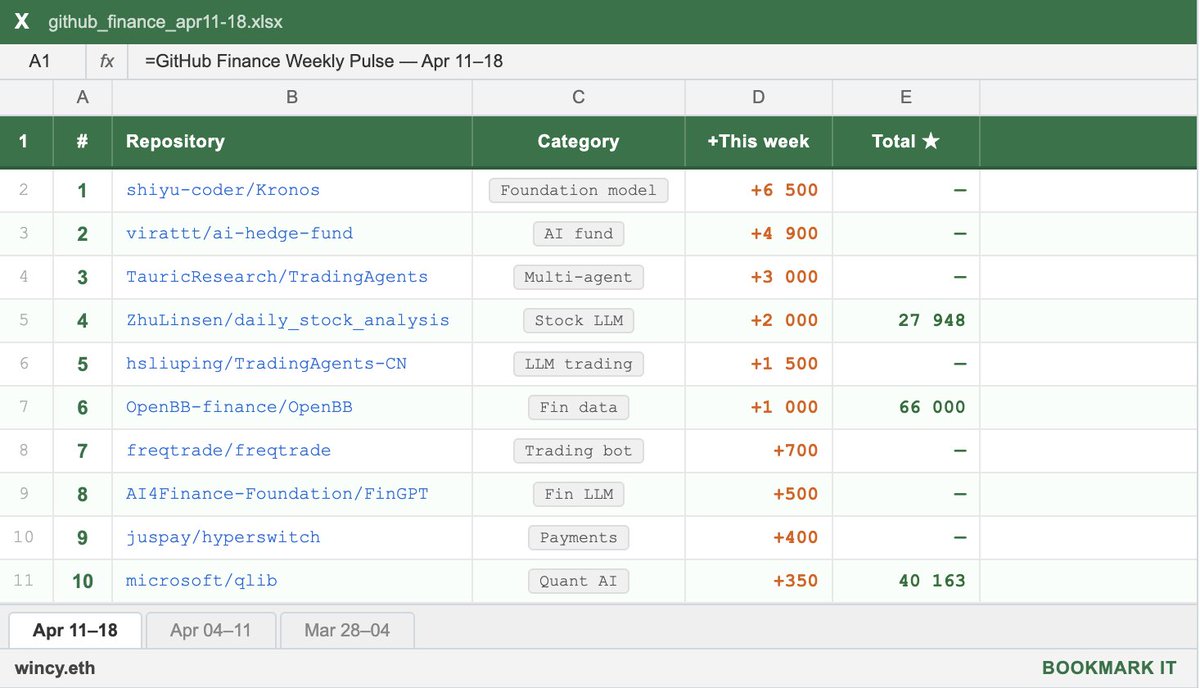
the fastest growing GitHub repos in finance this week:
1. shiyu-coder/Kronos (+6.5K ★)
first open-source foundation model for financial candlesticks. trained on 45+ global exchanges. predicts OHLCV candles as tokens — literally GPT for price charts. accepted at AAAI 2026.
2. virattt/ai-hedge-fund (+4.9K ★)
a team of AI agents simulating Buffett, Munger, Ackman, Cathie Wood and others. each agent runs its own strategy, a Portfolio Manager makes the final call. one of the most viral finance repos right now.
3. TauricResearch/TradingAgents (+~3K ★)
multi-agent LLM trading framework. fundamental analyst, sentiment analyst, technicals, risk manager — all working together. supports GPT-5.x, Gemini 3.x, Claude 4.x, Grok. built by UCLA/MIT researchers.
4. ZhuLinsen/daily_stock_analysis (+~2K ★)
LLM stock analyzer for US, A-share and H-share markets. auto-builds a daily decision dashboard with exact entry/exit levels. pushes to WeChat/Telegram/Discord/Email via GitHub Actions. zero cost, zero server.
5. hsliuping/TradingAgents-CN (+~1.5K ★)
Chinese fork of TradingAgents. fully localized for A-share markets (Shanghai/Shenzhen), Chinese data sources, and domestic LLMs. 5.1K forks — very active community.
6. OpenBB-finance/OpenBB (+~1K ★)
open-source Bloomberg alternative. stocks, crypto, options, derivatives, fixed income — one platform. integrates with AI agents via MCP. 66K total stars and still climbing.
7. freqtrade/freqtrade (+~700 ★)
free, open-source crypto trading bot in Python. supports all major exchanges, full backtesting, strategy optimization, Telegram control. release 2026.3 just dropped.
8. AI4Finance-Foundation/FinGPT (+~500 ★)
open-source financial LLMs trained on real market data — news, filings, earnings. built for sentiment analysis and robo-advisors. models on HuggingFace, ready to deploy.
9. juspay/hyperswitch (+~400 ★)
open-source payments router in Rust. one API to connect Stripe, Adyen, PayPal and 50+ providers. smart routing, high performance, built for fintech scale.
10. microsoft/qlib (+~350 ★)
Microsoft's AI quant investment platform. covers the full pipeline: alpha seeking, backtesting, model training, live trading. supports ML/DL, RL, and auto-quant.
bookmark this and start today.