Oil went from $120 a barrel during the war to $79 today.
this is the reason why bitcoin is back near $67K
if the link isn't obvious, let me walk the chain, because it's the whole game right now.
it starts with the deal. America and iran sign on the 19th in switzerland.
the strait of hormuz reopens and the US pulls its naval blockade.
oil flows like it did before the war, the supply that got choked comes back, and the price keeps falling.
cheaper oil is the first domino. the whole global economy runs on it, so when oil drops, inflation drops with it, US inflation especially.
that's the number the FED actually watches.
with oil at $120 the market was leaning toward another rate hike this year.
with oil and inflation cooling, that leaning flips. rate cut odds start climbing.
and a rate cut is the signal every risk asset waits on, because it means cheaper money and more liquidity coming into the system.
more liquidity just means more cash in wallets looking for a home.
M2 money supply goes up, people spend more, and that money flows into assets.
stocks catch a bid, gold and silver catch a bid, bitcoin catches the strongest bid of all because it's the highest-beta thing in the room.
oil falls while all of it rises. that's the exact tape in front of you this week.
so the pump makes sense once you see the chain.
oil → inflation → rate cuts → liquidity → risk on, with crypto sitting at the far end as the biggest bet on the whole thing.
now the part i'm not relaxed about.. this is a 60-day MOU, nothing is locked.
and israel is the problem.
netanyahu wants iran finished, not handed a deal that rebuilds it, and he won't sit quiet.
the US and israel are already bumping heads over lebanon. anything blows up in those 60 days and the chain runs in reverse
- oil rips, inflation fear comes back, liquidity dries up, and crypto retraces the move back.
so enjoy the pump, but know what it's standing on. watch oil and watch israel. that's the entire trade
$HYPE looks stupid bullish here ngl.
- Swept below previous highs
- Flipped it and reclaimed with strength.
Kind of setup that has led to violent.. expansions time and time again
Hyperliquid
Do you remember these “next gen” L2s ? 😭
Crazy how every single one of them was sitting at 500M+ TVL with 100K+ weekly active users at their peak
Now all 4 combined can’t even scrape past 100M TVL
entire ecos disappeared faster than memecoins 😭
And if you add up the funding across all 4… it’s well over $1B
so seriously…
where tf did all the money go?
Did Saylor crash the market on purpose just to buy the dip?
let me break the whole thing down properly.
a few days ago michael saylor sold bitcoin for the first time since 2022.
just 32 coins, at around $75K each.
then today he turns around and buys 1,550 bitcoin for $101M, which works out to about $65K a coin..
so he sold a little high and bought a lot back around 15 percent cheaper..
once you understand how his machine works, you'll stop panicking whenever this headline shows up again..
first you have to understand what saylor's company actually is.
strategy is not just some rich guy buying bitcoin and trading it.
it's a machine built for one single job, which is to own more and more bitcoin over time.
and like any machine, it runs on a process.
here's how that process works, step by step..
▫️Step 1, strategy raises money from investors. it does this by selling its own stock, and by selling 4 special products called STRK, STRF, STRF and STRC.
each one lets an investor hand over cash and get paid a regular dividend in return, but they all work a little differently, and that part is worth knowing.
STRK pays 8 percent, but it can later convert into strategy's stock, so investors take a smaller dividend in exchange for that upside..
STRF pays 10 percent and sits at the top as the safest one. if saylor ever skips its payment, it piles up and he still owes every cent..
STRD also pays around 10 percent but it's the riskiest of the bunch.
its dividend isn't even guaranteed, so if things get rough, he can simply stop paying it without breaking anything..
STRC is the flexible one, paying around 11.5 percent every month, and he adjusts that rate to keep it trading near 100 dollars.
this is the main tap he raises cash from.
and here's the most important part about all 4. they're perpetual, which means saylor never has to pay the original money back.
there's no loan to repay, no margin call, no price where anyone can force him to sell.
the only thing he ever owes is the dividend.
Step 2, he takes all that raised money and buys bitcoin with it.
Step 3, those investors need to get paid their dividend, and that payment has to go out in actual dollars, not in bitcoin.
and that right there is the only reason he ever sells.
when the dividend bill comes due and he needs cash, he sells a tiny bit of bitcoin to cover it.
that's the entire story behind the 32 coins.
sold just to pay investors what they were owed.
it was never him giving up on bitcoin.
so why did he buy 1,550 today? because buying is the actual job. the buying is the plan, the selling is just maintenance.
And yes the flywheel:
he raises cheap money, buys bitcoin, the pile grows, his company gets more valuable, a more valuable company can raise even more money, and he buys even more bitcoin.
round and round, bigger every time.
and since he's paying 8 to 12 percent on money he never has to repay, the whole thing keeps printing as long as bitcoin grows faster than that.
there's only one thing that can break this loop, and it's worth knowing.
the machine works as long as his company is worth more than the bitcoin it holds.
the day it's worth less than its own bitcoin, raising money starts hurting him instead of helping, and the flywheel slows down.
that's the real thing to keep an eye on, not whether he sold a few coins...
so here's what you actually need to burn into your head.
this exact pattern, sell a little and buy a lot, is going to repeat over and over for years.
the headlines will scream "saylor is selling" every single time, and people will panic every single time. don't be one of them.
zoom out, ignore the scary number, and look at the net. for every coin he lets go, far more come back in.
it only moves one way..
There are thousands of claude skills on github now.. and that's the problem..
because installing one is easy but finding the right one is the hard part..
you keep opening readme after readme, not even sure it fits what you're doing..
find-skills fixes that.
it's basically a skill that finds suitable and important skills for you.
its #1 on https://t.co/SY2YmUu1Co, 1.9M installs, made by the vercel team..
once it's in, you don't search anything.
you just tell claude what you need:
like
> is there a skill for better react? > find me one for pr reviews > i need to make a changelog
it looks through everything, finds the best match, and gives you the command to install it. one prompt, done..
best thing about it is that it only shows you the good ones. no random skill with 5 installs…
it checks how many people use it and who made it first. so you're not adding junk to your setup..
Setup takes about 1 min:
one command:
npx skills add vercel-labs/skills
that's it. now claude can find and install any skill for you while you work..
how i use it is:
1) starting something new "claude, is there already a skill for this?" it checks before you build from scratch.
2) want to search yourself
npx skills find <thing>
like npx skills find playwright.. it lists the best matches, you pick.
3) found one you like
"install it" claude adds it for you, done.
and yeah it works in all claude code, codex, cursor and 70+ agents.
Any trading strategy you've seen on youtube by your favourite Youtuber
can be turned into a backtestable pine script in under 30mins..
claude does the conversion, tradingview runs the test, and you find out fast whether the strategy actually holds up.
i ran this with @MarciSilfrain measured move trend approach (320% return at the world trading championship).
the whole loop took about 40 minutes.
▫️ the workflow is simple:
find a trading strategy explained clearly on youtube. transcribe the rules..
you can either paste the youtube link to claude if you've got notebooklm-py wired in, or just type the rules out from the video
feed the entry, stop, and exit rules into claude
claude writes the pine script
paste it into tradingview's pine editor and run a backtest on whatever ticker and timeframe you want
read the results, tell claude what to improve, regenerate
▫️ the prompt that actually works:
i want to convert a trading strategy into Pine Script v5 for TradingView.
here are the rules:
entry: [paste rules]
stop loss: [paste rules]
exit / take profit: [paste rules]
position sizing: [paste rules]
timeframe: [intraday / daily / weekly]
write a complete, backtestable Pine Script v5 strategy. include strategy.entry, strategy.exit, alert conditions, and plot the key levels on the chart so i can verify the logic visually.
after the code, list the assumptions you made and flag anything ambiguous from the rules so i can correct it.
the "flag ambiguous" line is what saves you. most youtube strategies leave out edge cases.. gap opens, what counts as a "valid setup," etc. and claude asks instead of guessing wrong.
▫️ the verify loop
once the script compiles, don't just trust the green PnL number. load the strategy on 3-5 different tickers and timeframes and look at:
- the equity curve shape (smooth uptrend or wild swings) - max drawdown vs. peak return - trade count (too few = no statistical significance) - what the trades look like on the chart (does each entry match the original rules visually?)
if any of those look off, tell claude what's wrong and have it fix the logic.
2-3 iterations usually gets you to a strategy you can actually evaluate.
▫️ direct tradingview connection (skip the copy-paste entirely)
if you've got the tradingview MCP wired into claude code, the whole loop runs in one prompt.
claude writes the pine script, injects it into your tradingview editor, compiles it, reads the errors, fixes them, and pulls the backtest results back into the conversation.
setup: paste this into claude code:
Install the TradingView MCP server. Clone https://t.co/4NApHd4Lyx, run npm install, add to my MCP config at ~/.claude/.mcp.json, and launch TradingView with the debug port.
then verify with:
Use tv_health_check to confirm TradingView is connected.
now you can just say "convert this strategy into pine script, test it on $BTC 4h, and show me the equity curve"
and watch the whole thing run end to end.
@Google Hi Team,
My Google Account appeal was fully approved and I received the official “Account restored” email.
But I’m still completely stuck on “Too many failed attempts” error for 72+ hours. Recovery options don’t work on any device or browser.
Please help
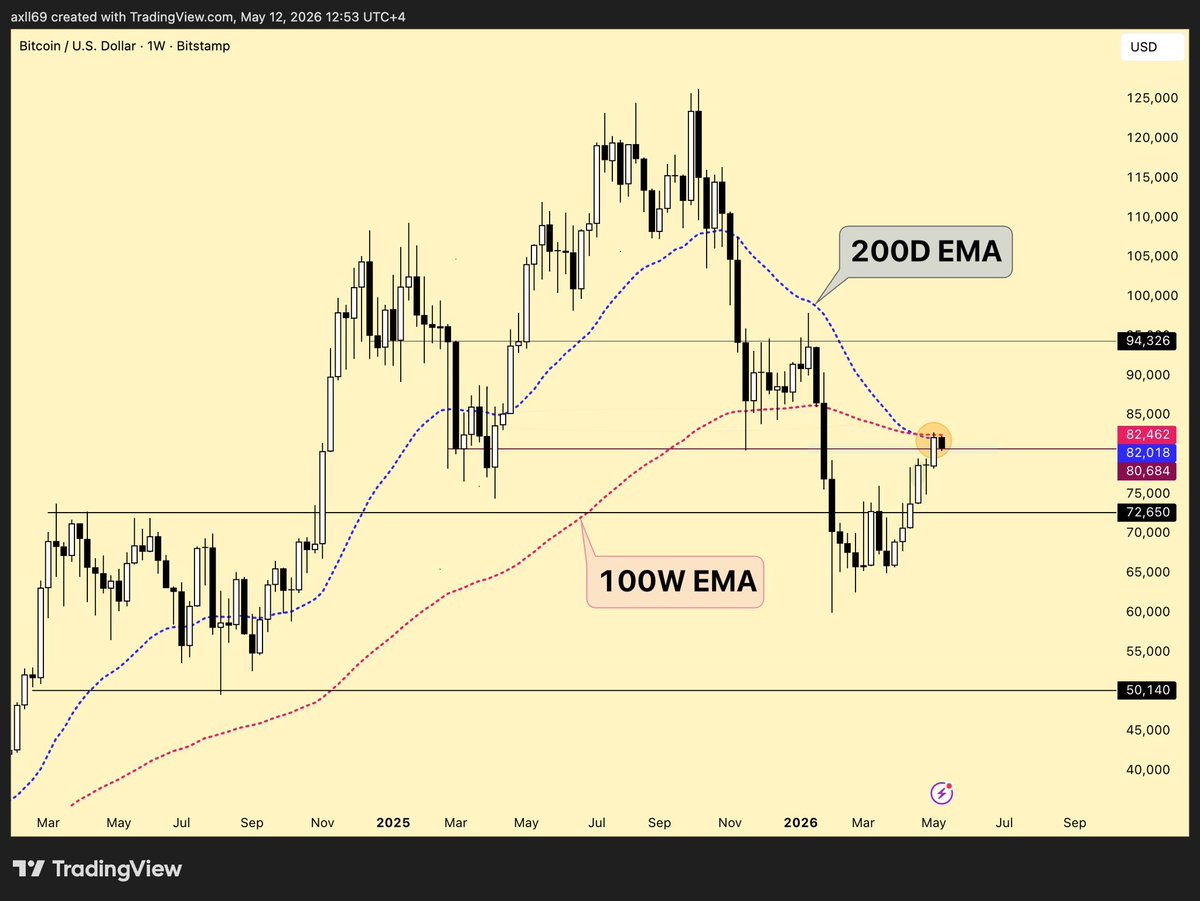
Gonna be an important week for $BTC
- Testing the 100W EMA
- Testing the 200D EMA
At the same time the entire week is packed with events:
• US CPI (May 13)
• US PPI (May 14)
• Retail Sales (May 15)
• Trump-Xi / China headlines (May 15-16)
imo one soft inflation print or positive China headlines and we rip through those levels..
Claude has a 10-20 message limit per session before context degrades..
Anthropic literally recommends restarting after that..
but the problem is, every restart loses the branch, the commits you shipped, the files you touched, every dead end you already hit.
you spend 20 mins re introducing the project before you can do any actual work.
now there's one claude code plugin that solves this entirely. call once, paste, done.
▫️ Setup (1 minute)
inside claude code, run:
/plugin marketplace add willseltzer/claude-handoff
/plugin install handoff
that's it. plugin's installed.
▫️ The 3 commands
/handoff:create — full handoff with everything
/handoff:quick — minimal handoff for simple tasks
/handoff:resume — pick up from an existing handoff in a new session
end of session you call /handoff:create. it generates a HANDOFF.md with your full state.
fresh window the next morning you call
/handoff:resume.. claude reads the doc,
checks if the repo drifted, summarizes, and keeps building.
▫️ what the handoff actually captures
the goal.. what you were trying to do
what's done, what's not
failed approaches + WHY they failed (so the next session doesn't loop on them)
key decisions with their rationale
current state of what works, what's broken with file:line refs
resume instructions with expected outcomes
warnings (env vars, sandbox limits, anything weird)
the failed approaches section is the most underrated part. "tried X, didn't work because Y" saves hours of next-session debugging.
▫️ the bonus part
HANDOFF.md is plain markdown. agent-agnostic. you can hand it to codex, gemini, cursor, anything.. just say "read HANDOFF.md and continue the work" and they pick up where claude left off.
imo this kills 90% of the memory MCPs people install.
zero infra, zero cost, zero context preloaded into every fresh session.. just a clean handoff doc when you actually need one.
repo: https://t.co/dU5n3dJaxg





![Axel_bitblaze69's tweet photo. Any trading strategy you've seen on youtube by your favourite Youtuber
can be turned into a backtestable pine script in under 30mins..
claude does the conversion, tradingview runs the test, and you find out fast whether the strategy actually holds up.
i ran this with @MarciSilfrain measured move trend approach (320% return at the world trading championship).
the whole loop took about 40 minutes.
▫️ the workflow is simple:
find a trading strategy explained clearly on youtube. transcribe the rules..
you can either paste the youtube link to claude if you've got notebooklm-py wired in, or just type the rules out from the video
feed the entry, stop, and exit rules into claude
claude writes the pine script
paste it into tradingview's pine editor and run a backtest on whatever ticker and timeframe you want
read the results, tell claude what to improve, regenerate
▫️ the prompt that actually works:
i want to convert a trading strategy into Pine Script v5 for TradingView.
here are the rules:
entry: [paste rules]
stop loss: [paste rules]
exit / take profit: [paste rules]
position sizing: [paste rules]
timeframe: [intraday / daily / weekly]
write a complete, backtestable Pine Script v5 strategy. include strategy.entry, strategy.exit, alert conditions, and plot the key levels on the chart so i can verify the logic visually.
after the code, list the assumptions you made and flag anything ambiguous from the rules so i can correct it.
the "flag ambiguous" line is what saves you. most youtube strategies leave out edge cases.. gap opens, what counts as a "valid setup," etc. and claude asks instead of guessing wrong.
▫️ the verify loop
once the script compiles, don't just trust the green PnL number. load the strategy on 3-5 different tickers and timeframes and look at:
- the equity curve shape (smooth uptrend or wild swings)
- max drawdown vs. peak return
- trade count (too few = no statistical significance)
- what the trades look like on the chart (does each entry match the original rules visually?)
if any of those look off, tell claude what's wrong and have it fix the logic.
2-3 iterations usually gets you to a strategy you can actually evaluate.
▫️ direct tradingview connection (skip the copy-paste entirely)
if you've got the tradingview MCP wired into claude code, the whole loop runs in one prompt.
claude writes the pine script, injects it into your tradingview editor, compiles it, reads the errors, fixes them, and pulls the backtest results back into the conversation.
setup: paste this into claude code:
Install the TradingView MCP server. Clone https://t.co/4NApHd4Lyx, run npm install, add to my MCP config at ~/.claude/.mcp.json, and launch TradingView with the debug port.
then verify with:
Use tv_health_check to confirm TradingView is connected.
now you can just say "convert this strategy into pine script, test it on $BTC 4h, and show me the equity curve"
and watch the whole thing run end to end.](https://pbs.twimg.com/media/HKGO9z1akAEHD2g.jpg)